Claude Code has been live for just six months, yet its annualized revenue has already surpassed $1 billion. In a developer survey, 46% of users even ranked it as their favorite coding tool—beating established players like GitHub Copilot and Cursor.
However, such a powerful tool comes with a relatively high subscription cost: $20/month for Pro and up to $200/month for Max, which can add up over time. To address this, I’ve compiled several legitimate ways to access Claude Code for free—or at least at a much lower cost.
Access Claude Code via GamsGo — Safe & Affordable!
What Is Claude Code?
Claude Code is an AI coding tool developed by Anthropic that runs directly in your terminal—no IDE plugins required. You can describe tasks in natural language, and it will autonomously read your codebase, modify files, and execute commands, acting like a real working collaborator.
Unlike Cursor or GitHub Copilot, Claude Code doesn’t just autocomplete code—it’s an agent. It can plan across multiple files, execute full tasks end-to-end, and works with any editor or workflow without being tied to a specific development environment.
Claude Code supports multiple usage environments:
- Terminal CLI — The core way to use it. Install with
npm install -g @anthropic-ai/claude-codeand start using it right away - VS Code / Cursor extensions — Supports inline diffs, @-mentioning files, and conversation history
- JetBrains plugins — Compatible with IntelliJ, PyCharm, WebStorm, and more
- Desktop app — Features visual diffs, parallel sessions, and scheduled tasks
- Web browser — Use it directly at
claude.ai/codewith no local installation required
How to Get Started with Claude Code
💡 If you’re already familiar with Claude Code, you can skip ahead to How to Use Claude Code for Free.
Claude Code is offered as part of the paid subscription on Claude.ai. To use it interactively in the terminal, you’ll need to buy Claude Pro or Max account. Alternatively, you can access the underlying models via the Anthropic API with pay-as-you-go pricing.
Once you’ve subscribed to Pro/Max or obtained API access, you can install the CLI in just three steps:
- Make sure you have Node.js 18+ installed
- Run
npm install -g @anthropic-ai/claude-code - In your project directory, run
claude
When logging in, subscription users authenticate via their Claude.ai account, with usage counted toward their plan limits; API users enter their API key and are billed based on token usage.
How to Use Claude Code for Free: 5 Official Methods
In general, using Claude Code requires a subscription or API access. However, as mentioned earlier, the long-term cost can be quite high. Fortunately, Anthropic understands the different needs of its users and has provided several legitimate ways to access it for free.
The following 8 methods cover a range of scenarios—from students to open-source developers—so no matter your background, you can find an option that works for you.
50% Off Claude Code via GamsGo
The free methods mentioned below all come with certain limitations, such as being restricted to new users, requiring student status, or needing an invitation from Max users. Therefore, getting access to Claude Code at less than half the price can also be a great alternative.
GamsGo is a reliable account marketplace where hundreds of real sellers offer Claude accounts. Most of these come from users who have prepaid credits they don’t fully use and choose to resell at a lower price. Both individual and shared accounts are available, but either way, they are significantly cheaper than subscribing directly.
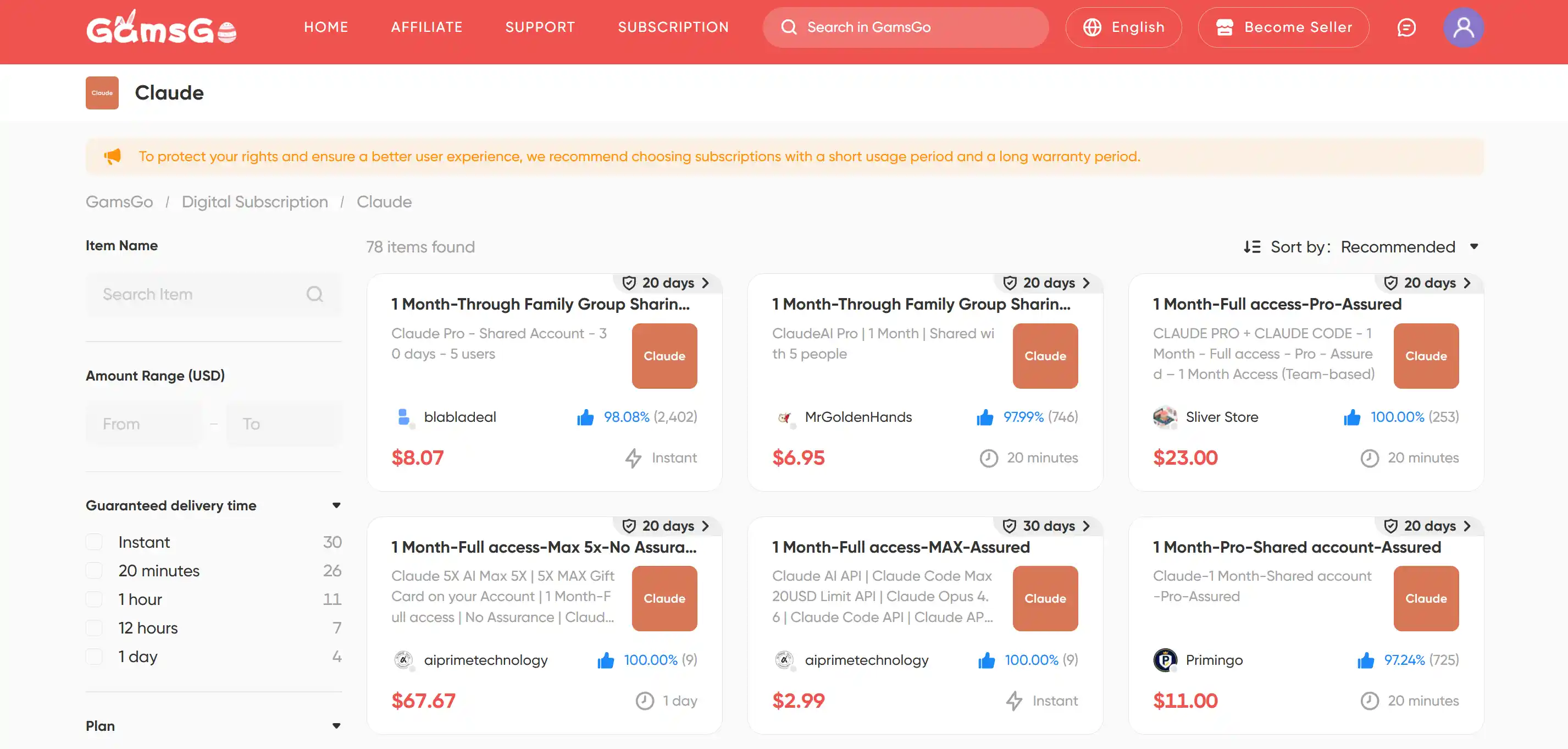
This method comes with no restrictions and is suitable for most users, which is why it’s introduced first. If you’d still prefer to explore official free options, feel free to keep reading below.
Free plan + $5 API credits for new users
This is the easiest way to get started. Anthropic provides new users with about $5 in free API credits upon account registration. This is an official trial offering—no credit card required, and you’ll receive the credits automatically after signing up.
Go to platform.anthropic.com to create an account. After obtaining your API key, follow the CLI installation steps mentioned above to complete authentication and start using Claude Code.
With the $5 credit (calculated using the Sonnet model), you can typically run around 3–5 medium-sized Claude Code tasks. This is more than enough to test workflows and evaluate whether it’s worth paying for a subscription.
If you find that it fits your workflow, upgrading to a paid plan or purchasing additional credits is a more reasonable next step. If you want to understand the limits of the free tier before adding funds, you can refer to this guide on what the Claude free plan can do.
7-day Guest Pass (from Claude Max users)
Guest Pass is an invitation feature introduced by Anthropic in late 2025. Each Claude Max user receives 3 invite codes that can be shared with others, granting 7 days of full Pro access for free, including complete access to Claude Code.
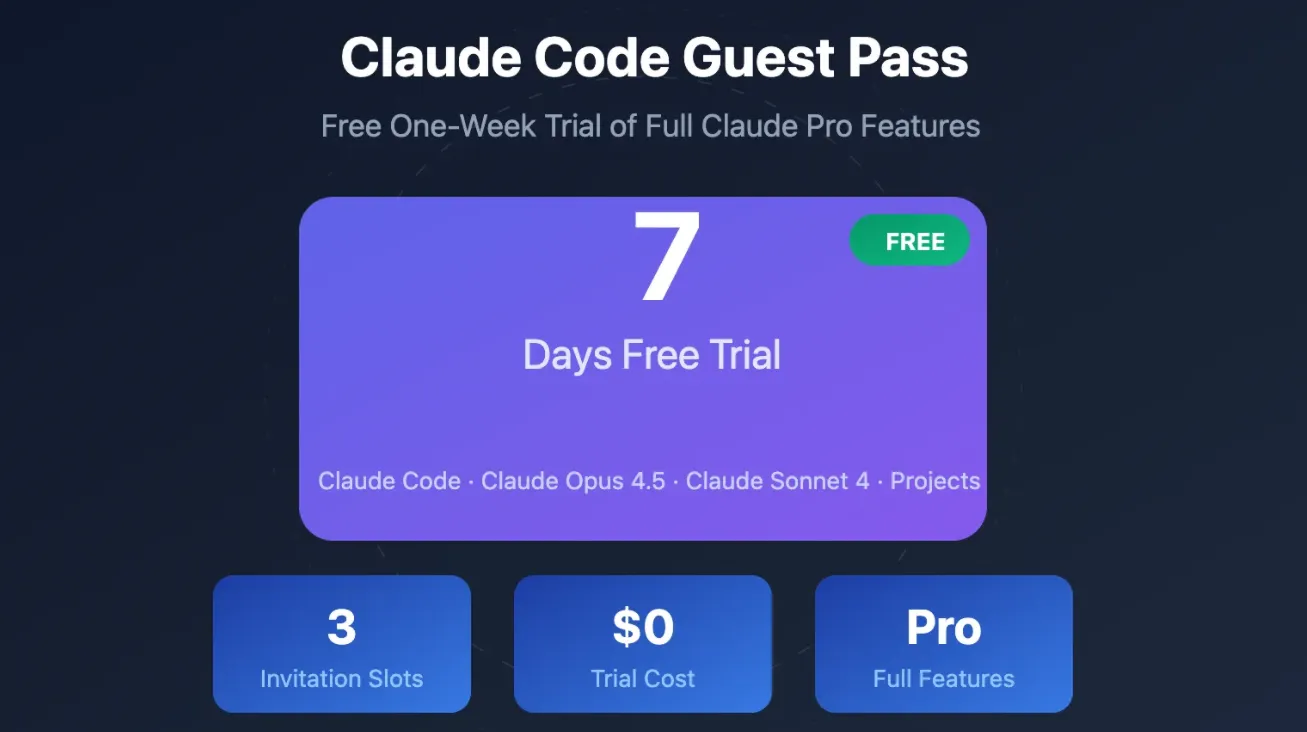
These invite codes are not distributed through official channels, so you’ll need to find one yourself. The most straightforward way is to ask friends who use Claude Max. If that’s not an option, you can search on Reddit (r/ClaudeAI), X (Twitter), or developer Discord communities—people occasionally share unused invite codes there.
One important thing to note: redeeming a Guest Pass requires linking a credit card, and after the 7-day trial ends, it will automatically renew at $20/month. If you’re only looking for a free trial, make sure to cancel the subscription before it expires to avoid being charged.
If you’re interested in other ways to get Claude Pro for free beyond the Guest Pass, you can check out this guide on additional methods to access Claude Pro for free.
GitHub Student Developer Pack
The GitHub Student Developer Pack is a free benefit program offered by GitHub for students, bundling free or discounted access to dozens of developer tools—Claude Pro included. For students, this is one of the lowest-cost official ways to access Claude Code.
The requirements are simple: you need a school email address (such as .edu or other academic domains) or valid student verification. Go to education.github.com/pack to apply. Once approved, you’ll gain access to the full set of benefits, including Claude Pro. The review process typically takes 1–7 business days.
The exact Claude discount or free credits may vary over time, so it’s best to check the latest details after activation. If you’re a student, you can also refer to this guide on Claude Student Discount for more ways to save.
Claude for the Open Source Program
This is an open-source support program launched by Anthropic in February 2026. Eligible open-source maintainers can receive 6 months of Claude Max (20x usage), valued at up to $1,200. Among all the free methods, this is by far the most valuable one.
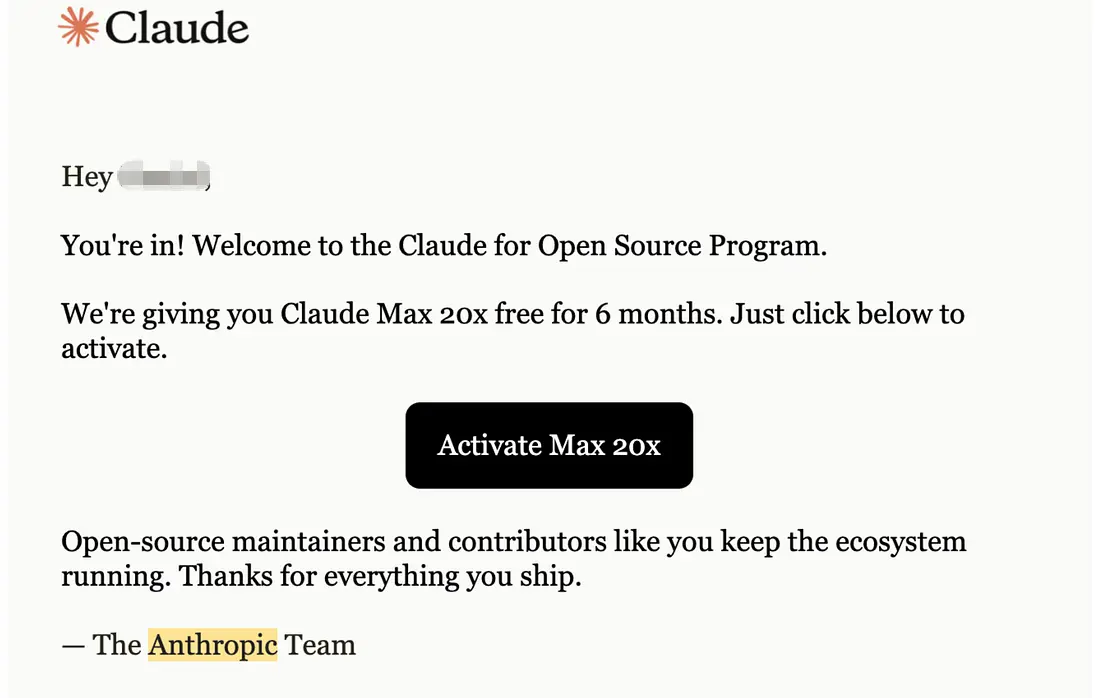
The eligibility criteria are clearly defined: you must be a core maintainer or major contributor of a public repository, and the project should have either 5,000+ GitHub stars or over 1 million monthly NPM downloads, along with active commits in the past 3 months.
You can apply via claude.com/contact-sales/claude-for-oss. The program is capped at 10,000 slots, with a deadline of June 30, 2026.
If your project falls slightly below the thresholds, it’s still worth applying. There is a “critical infrastructure exception” policy—projects with significant downstream impact but fewer stars may still be accepted. When applying, focus on demonstrating your project’s ecosystem impact rather than just listing metrics.
Of course, if your project doesn’t meet the requirements for the Claude for the Open Source Program, you can still try the following three methods.
Other Ways to Try Claude Code for Free (Unofficial)
⚠️ Disclaimer: The following methods are not officially supported by Anthropic and may violate the terms of service. Stability and security are not guaranteed—please evaluate the risks before deciding whether to use them.
Claude Code is essentially a “client” that sends requests to Anthropic’s servers each time it receives instructions. By modifying local environment variables, you can intercept and redirect these requests to other free API services, thereby bypassing subscription restrictions.
Path 1: Google AI Studio (Gemini approach)
Currently the most stable bridging method. Google provides free API credits with low latency and fast response times.
- Log in to Google AI Studio and create a free API key
Set environment variable:
ANTHROPIC_BASE_URL=https://generativelanguage.googleapis.com/v1beta/openai/Set model:
ANTHROPIC_MODEL=gemini-2.5-flashAdd your key:
ANTHROPIC_API_KEY=your Google API key
Note: Google enforces a requests-per-minute (RPM) limit. Under heavy usage, you may experience temporary disconnections.
Path 2: Third-party routing (OpenRouter / Puter approach)
Use aggregator platforms to route requests, supporting free models like Grok, Llama, and DeepSeek.
- Register on OpenRouter or Puter.js and obtain an API key
Set environment variable:
ANTHROPIC_BASE_URL=https://openrouter.ai/api/v1Set model:
ANTHROPIC_MODEL=x-ai/grok-4-fast:free(Make sure the model name includes
:free)Add your key:
ANTHROPIC_API_KEY=your platform API key
Note: Since requests go through an additional layer, responses may be 1–2 seconds slower. Make sure the model name includes :free, otherwise it may consume your account balance.
Avoid pitfalls: How to bypass the forced login prompt
After configuration, launching Claude Code may still open a browser window asking you to log in to an Anthropic account. To bypass this, set a dummy token in your terminal beforehand:
export ANTHROPIC_AUTH_TOKEN=anything_you_wantOnce Claude Code detects this token, it will skip the login step and connect directly to your configured custom endpoint.
Path 3: Local Deployment (Ollama + LiteLLM)
If you have higher requirements for data privacy or are dealing with an unstable network environment, this approach is worth serious consideration.
The core idea is: run an open-source coding model locally, then use LiteLLM to wrap it into an API format that Claude Code can recognize—completely bypassing external servers. All code processing happens on your own machine, and it even works offline.
Step 1: Install a local model (Ollama)
- Download and install Ollama
Run the following in your terminal:
ollama pull qwen2.5-coder:14b(Currently one of the best-performing local coding models overall)
Step 2: Set up local bridging (LiteLLM)
Install Python, then run:
pip install litellmStart the proxy service:
litellm --model ollama/qwen2.5-coder:14b --port 4000- Keep this terminal window open—it acts as your local API server
Step 3: Connect Claude Code
Open a new terminal window, set the environment variables, and launch:
ANTHROPIC_BASE_URL=http://localhost:4000
ANTHROPIC_API_KEY=local-secret
claude
Notes:
- Hardware requirements: The 14B model requires at least 16GB of RAM. Macs with M-series chips perform best; with 8GB RAM, consider using
qwen2.5-coder:7binstead - Slow first load: The first launch requires loading the model into memory, which may take 10–20 seconds. Performance will normalize afterward
- Privacy advantage: Works offline, with all data processed locally and no external servers involved
This approach has very clear trade-offs: if your hardware is sufficient and you’re willing to spend time setting it up, it’s the only unofficial method that truly achieves “zero cost and zero data leakage.” However, if you just want to try Claude Code quickly, the first two methods have a much lower barrier to entry and are better starting points.
What Can You Do with Claude Code?
After exploring the free ways to try Claude Code, you might be wondering what makes it so popular. Claude Code isn’t just a Q&A tool—it’s an agent that can actually take over real development tasks.
Claude Code operates at the project level: it reads your entire codebase, plans across multiple files, executes changes, runs tests, and iteratively fixes failing tests. As a developer, you only need to define the goal and review the results—you don’t have to guide every step.
What can it do specifically:
- New feature development —— Describe the feature in natural language, and it will implement it across multiple files and verify it
- Bug fixing —— Paste an error message, and it will trace the root cause and apply a fix
- Automated testing —— Write tests, run them, and automatically fix failures until everything passes
- Git workflows —— Automatically commit, generate commit messages, create branches, and open Pull Requests
- Handle time-consuming tasks —— Write tests for untested code, fix lint issues, resolve merge conflicts, update dependencies, and generate release notes
It’s also worth noting that Claude Code requires explicit permission before modifying files or executing commands. It runs in your local environment using your own tools, rather than operating in a black-box backend—so you don’t need to worry about security.
Which Method Is Right for You?
Among the methods mentioned above, some are official free options—ideal for users who want to try Claude Code at zero cost. Others are lower-cost alternatives, better suited for those looking for long-term, stable usage.
To help you decide quickly, here’s a comparison based on duration, limitations, and suitability:
| Method | Duration | Limitations | Recommendation |
| GamsGo marketplace | Permanent | Requires payment | ⭐⭐⭐⭐⭐ |
| Free plan + $5 API credits | Until used up | ~3–5 medium tasks | ⭐⭐ |
| 7-day Guest Pass | 7 days | Requires credit card, auto-renews | ⭐⭐ |
| GitHub Student Developer Pack | While enrolled | Students only | ⭐⭐⭐ |
| Claude for Open Source Program | 6 months | Requires 5,000+ Stars or 1M+ NPM downloads | ⭐⭐⭐ |
| Other Ways (Unofficial) | Unlimited | Unofficial, unstable, technical setup required | ⭐⭐ |
After reviewing the table, you can choose based on your situation:
- For everyone → Use marketplaces like GamsGo to purchase unused Claude subscriptions from other users at a lower cost
- Students → Apply for the GitHub Student Pack first—low barrier, long duration, fully official
- Open-source maintainers → Apply directly for the Open Source Program—6 months of Max access is the most valuable option
- Developers who want a quick trial → Use the $5 API credits to test workflows before deciding on a subscription
- Users who want full access immediately → Look for a Guest Pass to explore everything within 7 days (remember to cancel before renewal)
- Privacy-focused or zero-cost users → Try unofficial methods and decide after evaluating the risks
If you don’t qualify as a student or open-source maintainer and prefer to avoid the risks of unofficial methods, GamsGo offers a practical middle-ground—giving you stable access to Claude’s premium plans at a lower price than official subscriptions, without the hassle of repeated applications or worrying about expiration.
We've prepared an exclusive promo code for all blog readers:
Enjoy an additional 3% off on your next purchase!
Valid across all categories — streaming accounts, AI tools, game top-ups, software subscriptions, and more.
FAQ
Is Claude Code completely free?
Not exactly. Claude Code is free to install, but requires a Pro subscription ($20/month) or API credits to run. The free plan doesn't include access — though the methods in this article can help you get started without paying full price.
Can I use Claude Code without a subscription?
Yes — via API credits. Instead of subscribing, you can purchase API credits directly at platform.anthropic.com and use them to run Claude Code on a pay-per-use basis. New users also get approximately $5 in free credits upon sign-up, which is enough for a few sessions to evaluate whether it fits your workflow.
Is Claude Code available on Windows?
Yes. Claude Code supports Windows, macOS, and Linux. On Windows, it runs via WSL (Windows Subsystem for Linux) — you'll need to enable WSL first before installing Claude Code. Mac and Linux users can install it directly in the terminal without any additional setup.
How is Claude Code different from Cursor or GitHub Copilot?
Cursor and GitHub Copilot work inside your editor, mainly offering autocomplete and inline suggestions. Claude Code runs in the terminal as a true agent — it reads your entire codebase, plans across files, and completes tasks end-to-end without you guiding every step.
Can I use Claude Code for non-coding tasks?
Yes. Beyond coding, Claude Code can handle tasks like drafting documentation, managing files, writing commit messages, and automating repetitive terminal workflows. Anthropic's Cowork — built with Claude Code in 10 days — is proof that its capabilities extend well beyond pure development.
Related Articles