Claude is one of the fastest-growing AI assistants in the world, with millions of users relying on it daily for writing, coding, research, and more. Developed by Anthropic, Claude has rapidly expanded its user base across individuals, developers, and enterprises alike — and for good reason.
But here's the thing: Claude Pro costs $20/month, and Claude Max goes up to $100/month. For heavy users or small teams, that adds up fast. Many users are paying full price without knowing there are smarter, cheaper ways to access the same powerful models.
That's exactly what this guide covers. Whether you're looking for a Claude discount on Pro or Max subscriptions, exploring API cost-cutting strategies, or comparing third-party platforms, we've laid out every effective way to buy Claude AI for Cheap in 2026 — so you only pay for what you actually need.
Quick Guide: 7 Methods Covered
- Annual Billing Discount
- Claude Education Plan
- GitHub Student Pack
- Claude Max Guest Pass
- GamsGo Marketplace
- Anthropic Promotions
- Extra Usage Bundles
Claude AI Pricing Overview
Before hunting for discounts, it's worth knowing exactly what you're paying for — and whether the default price already fits your budget.
Currently, Claude’s pricing is structured along two main paths: one is fixed monthly subscription plans (Free / Pro / Max / Team / Enterprise), and the other is usage-based API pricing designed for developers.
Claude AI Subscription Pricing
Claude offers five fixed subscription tiers, covering everything from a free trial experience to full enterprise deployment. The overall structure is straightforward: the more frequently you use it and the more complex your needs, the higher the plan price—but you also get higher usage limits and more advanced features.
| Category | Free | Pro | Max 5x | Max 20x | Team | Enterprise |
| Monthly Price | Free | $20/month | $100/month | $200/month | $30/seat/month | Custom |
| Annual Price | — | $17/month | — | — | $25/seat/month | — |
| Usage Limits | Basic | 5× Free | 5× Pro | 20× Pro | Higher than Pro | Custom |
| Reset Cycle | Every 5–8 hours | Every 5–8 hours | Every 7 days | Every 7 days | — | — |
| Available Models | Sonnet 4.6 | Sonnet + Opus 4.6 | All models | All models | All models | All models |
| Claude Code | ✕ | ✓ | ✓ | ✓ | Premium seats only | ✓ |
| Best For | Casual users | Everyday professional use | Heavy users | Full-time developers | Small teams | Large enterprises |
Claude API Cost
If you’re a developer—or your usage mainly involves programmatic access—a subscription plan may not be the most cost-effective option. Claude’s API uses a pay-as-you-go model, meaning you only pay for the tokens you actually use, with no fixed monthly fee.
Here are the current core Claude models and their API pricing:
| Model | Input Price (/1M tokens) | Output Price (/1M tokens) | Best For |
| Claude Haiku 4.5 | Lowest | Lowest | High concurrency, simple tasks |
| Claude Sonnet 4.6 | $3 | $15 | Everyday development, balanced performance |
| Claude Opus 4.6 | $5 | $25 | Complex reasoning, high-quality output |
In addition, the API offers two cost-saving mechanisms:
- Prompt Caching: Caches repeated long contexts (such as fixed system prompts), significantly reducing repeated charges. Ideal for applications with stable or recurring context.
- Batch API: For non-real-time tasks, you can process requests in batches and get around a 50% discount. For example, Sonnet 4.6 batch pricing can be as low as $1.5 for input and $7.5 for output per million tokens—well-suited for large-scale asynchronous workflows.
Now that we’ve covered the basics of both subscription and API pricing, let’s take a closer look at how to further reduce costs on top of these options.
How to Get Claude Pro and Max for Less
From annual billing discounts to student programs and limited-time promotions, here are all the verified ways to get Claude Pro and Max for less in 2026.
Annual Billing Discount: Save 15% on Claude Pro
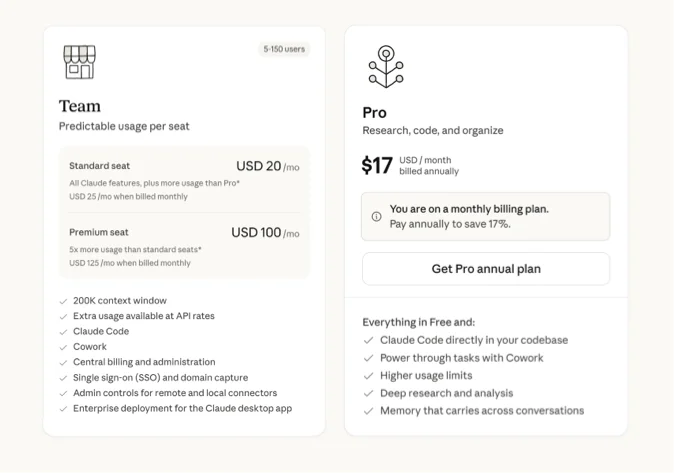
Annual billing is the simplest and most reliable way to save money, but it’s best suited for users who are confident they’ll be using Claude long-term. Currently, annual plans are available for Claude Pro and Claude Team Standard.
- Claude Pro: $20/month ($240/year) → $17/month billed annually ($200/year), saving $40 per year (about 17%).
- Claude Team Standard: $30/seat/month ($360/year) → $25/seat/month billed annually ($300/year), saving $60 per seat per year (about 17%). For a team of 5, that’s $300 in annual savings—and the more seats you have, the more you save.
The main trade-off is that annual billing requires paying the full year upfront. If you’re new to Claude, it’s a good idea to start with a monthly plan for a month or two. Once your usage stabilizes, you can switch to annual billing for better savings while still maintaining flexibility.
Still unsure whether upgrading makes sense? Read our full analysis on whether Claude Pro is worth it.
Claude Education Plan: Cheaper Access for Students and Institutions
In April 2025, Anthropic launched Claude for Education, an official program for higher education institutions. It provides free Claude’s premium features for students, faculty, and administrative staff at participating schools.
Unlike limited-time trials, this access is ongoing—as long as you’re enrolled in or employed by a partner institution, you can continue using it. Confirmed partner schools currently include:
- Northeastern University (Anthropic’s first university design partner, with 50,000 students and staff across 13 campuses worldwide)
- London School of Economics (LSE)
- Champlain College
- University of San Francisco School of Law (law school only)
- Northumbria University (UK)
- Syracuse University
- University of Pittsburgh
- Columbia University (coming soon)
If your school is part of the program, simply sign in to claude.ai using your school email. Your account will be automatically recognized and upgraded—no separate application or payment required.
If your institution isn’t yet partnered with Anthropic, you can reach out to your school’s student services or IT department to encourage them to apply. At the moment, Anthropic does not offer individual student discount codes or a standalone application process.
For a complete breakdown of every available option, check out our dedicated guide on how students can save on Claude.
GitHub Student Pack: Access Claude Models for Free as a Student
If your school isn’t part of Anthropic’s education program, there’s another option worth trying: the GitHub Student Pack.
This is a free bundle of developer tools offered by GitHub to students, including free or discounted access to dozens of tools—among them, GitHub Copilot. Through Copilot, students can use certain Claude models for coding assistance in editors like VS Code.
Getting access is straightforward: sign up with your school email and complete student verification through GitHub Education. Once approved, you can activate the Student Pack benefits—typically within a few hours.
However, there’s an important update: as of March 12, 2026, this pathway has changed significantly. Claude Opus and Sonnet models have been removed from the free student offering. Students can now only access lighter models like Haiku through Auto mode, without the ability to manually select higher-end models.
For students with basic, day-to-day coding needs, this option still has some value. But if you need full access to Claude’s capabilities—or plan to use it beyond programming—this route is now fairly limited in practice.
Claude Max Guest Pass: Try Advanced Features for Free
A Guest Pass is a trial invite that Max subscribers can share with others. If you receive one, you’ll get 7 days of full Pro-level access for free, including all models and Claude Code.
One important detail: you’ll need to add a credit card when claiming the pass. You won’t be charged during the 7-day trial, but if you don’t cancel before it ends, it will automatically convert into a $20/month Pro subscription.
The easiest way to get a Guest Pass is to ask someone you know who uses the Max plan. If that’s not an option, you can try searching for “Claude Guest Pass” on platforms like Reddit (r/ClaudeAI), Discord AI communities, or X (Twitter), where users occasionally share invites. Since each Max user has a limited number of passes, it’s best to claim one quickly when you find an available link.
Claude Discounts for Everyone: GamsGo Marketplace
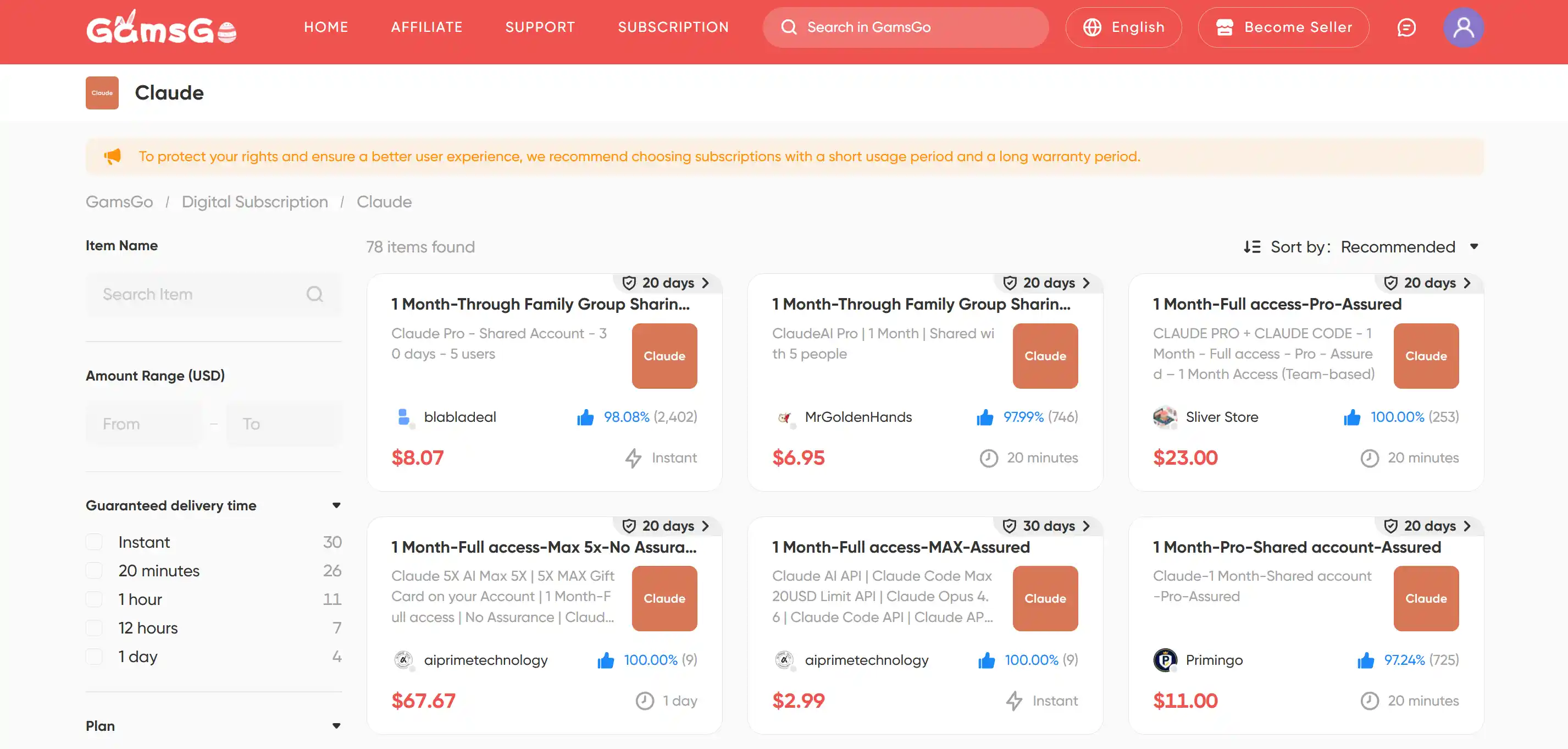
If you can’t access official discounts (such as student offers or limited-time promotions), another option worth considering is the GamsGo marketplace.
It’s a well-established subscription-sharing platform with a mature process and solid verification system. The platform brings together a large number of vetted sellers offering various AI subscriptions—including Claude—with plans ranging from Pro to Max, covering most usage needs.
Getting started is simple: sign up for an account, choose the Claude subscription that fits your needs, and complete your purchase. There’s no complicated setup involved, and access is typically delivered within minutes—allowing you to use full Pro-level features at a lower cost.
Anthropic Promotions: How to Catch a Claude Discount
Beyond third-party platforms, Anthropic itself occasionally offers promotions and usage credits. While these aren’t as openly advertised as standard subscriptions, there are still clear patterns you can follow.
Anthropic doesn’t provide permanent public discount codes, and customer support can’t issue one-off discounts to individual users. However, promotions do exist—they’re just not distributed through coupon sites. Instead, they’re delivered directly via official channels.
Based on past activity, Anthropic’s promotions typically fall into these categories:
- Usage Credits: Credits are sometimes granted when new models launch. For example, Opus 4.6 came with a $50 credit, and in November 2025, Pro users received $250 while Max users received $1000 in Claude Code–specific credits.
- Limited-Time Subscription Discounts: Occasionally, there are short-term deals—such as Pro at 50% off for 3 months, bringing the price down to $10/month.
- Double Usage Events: During holidays or special periods, usage limits may be doubled. Similar campaigns were seen during Christmas 2025 and again in March 2026.
To stay updated, it’s best to follow Anthropic’s official channels: subscribe to their newsletter, check banner notifications inside your claude.ai account (credits often need to be manually claimed under Settings → Usage), and monitor their official X (Twitter) account.
As a rule of thumb, most discount codes circulating online aren’t reliable—official channels are the only trustworthy source.
Extra Usage Bundles: Save Up to 30% When You Need More
The methods above mainly help you save on subscription costs. But if you already have a plan and occasionally exceed your usage limits, Anthropic offers another flexible option: prepaid extra usage bundles.
If you only go over your quota from time to time, upgrading to a higher-tier plan often isn’t cost-effective. Instead, usage bundles let you top up on demand without changing your subscription. The more you purchase, the bigger the discount—up to 30% off.
These bundles are available for Pro, Max, and Team plans, with the following key features:
- Shared Usage Pool: Credits can be used across different scenarios, including Claude, Claude Code, Cowork, and connected third-party tools
- Tiered Discounts: Larger purchases unlock higher discounts, with savings of up to 30%
- Purchase Limits: Pro and Max users can buy up to $2,000 worth of discounted usage per month, while Team users can go up to $3,000
- Smart Triggering: Bundle credits are only used after you exceed your plan’s included quota, so your regular subscription usage remains unaffected
You can purchase these bundles in the Claude interface by going to Settings → Usage (bottom-left corner). Once you select a bundle size, the discount is applied automatically.
Which Claude Discount Option Is Best for You?
With so many ways to save, which one should you choose? The comparison below gives you a quick overview of how each option stacks up:
| Discount Option | Savings | Applicable Plans | Limitations | Recommendation |
| Annual Billing | ~17% | Pro, Team | Requires full upfront payment | ⭐⭐⭐ |
| Education Plan | Free | Individual account upgrade | Requires school partnership with Anthropic | ⭐⭐ |
| GitHub Student Pack | Partial | Via Copilot | Requires student verification | ⭐⭐ |
| Guest Pass | 7 days free | Pro-level access | Requires invite from a Max user | ⭐⭐ |
| GamsGo Marketplace | Up to 60% | Pro, Max | None | ⭐⭐⭐⭐⭐ |
| Anthropic Promotions | Varies (up to 50%) | Pro, Max | Irregular availability | ⭐⭐ |
| Extra Usage Bundles | Up to 30% | Pro, Max, Team | Requires existing subscription | ⭐⭐ |
Based on your usage, here’s the best approach:
- Light users: The Free plan is usually enough. Try it for a while, and only upgrade once you’re sure you need more. For your first upgrade, you can consider shared subscriptions via GamsGo—often around 50% of the official price. For a full breakdown of what the free tier includes, see our detailed guide on what Claude's free tier includes.
- Everyday professional users: Go with Pro annual billing. It has the lowest barrier, consistent savings, and is the most cost-effective long-term option.
- Students: First check if your school is part of the Education Plan—just log in to claude.ai with your school email to confirm. If not, use the GitHub Student Pack as a fallback.
- Heavy users / developers: If you’re using Claude daily and constantly hitting limits, the Max plan is more cost-effective than repeatedly buying extra usage. If your usage is less predictable, combining Pro + usage bundles gives you more flexibility. You can also explore lower-cost access options like GamsGo—for example, shared Max accounts can be around $30.
Conclusion
Claude doesn’t offer public discount codes, and customer support can’t provide one-off deals to individual users—that’s the reality. But as this guide shows, there are far more ways to save than most people realize.
That said, most of these options come with certain limitations. For example, annual billing requires upfront payment, while the Education Plan and GitHub Student Pack are only available to specific groups and won’t apply to everyone.
That’s why, for most everyday users, platforms like GamsGo remain one of the most cost-effective options available today.
We've prepared an exclusive promo code for all blog readers:
Enjoy an additional 3% off on your next purchase!
Valid across all categories — streaming accounts, AI tools, game top-ups, software subscriptions, and more.
FAQ
Does Claude AI offer a student discount?
Claude has no individual student discount codes. However, students can access Claude free through the official Education Plan if their university partners with Anthropic, or partially through the GitHub Student Developer Pack via Copilot. If neither applies, Claude Pro annual billing at $17/month is the most affordable official option.
Is Claude API cheaper than the subscription?
It depends on your usage. The API charges per token — Claude Sonnet 4.6 costs $3/1M input tokens and $15/1M output tokens. For light or irregular use, the API is cheaper. For heavy daily use, a Pro subscription at $20/month is typically more cost-effective. Developers can also use Batch API for 50% off on non-urgent tasks.
Does Claude offer a free plan?
Yes. Claude's free plan gives you access to Sonnet 4.6 via web, iOS, Android, and desktop. It includes web search, document analysis, image understanding, and basic projects. Usage limits reset every 5–8 hours. Claude Code and Opus 4.6 are not available on the free tier.
Is there a Claude discount for teams or businesses?
Yes. The Team plan offers annual billing at $25/seat/month, down from $30/month-to-month — a 17% saving. For larger organizations, Enterprise pricing is custom and may include volume-based discounts. Contact Anthropic's sales team at claude.com/contact-sales for a tailored quote.
Related Articles