Spotify is one of the most popular music streaming platforms in the world, with over 600 million active users. It lets us enjoy music anytime—whether we’re commuting or working out at the gym.
However, streaming heavily depends on a stable internet connection. In places like subways or tunnels where the signal is weak, music can lag or even stop playing. That’s why offline downloads have become essential for many users.
But aside from subscribing to Spotify Premium, are there other ways to download music? The answer is yes. In this article, we’ll walk you through several practical methods to help you enjoy your favorite tracks offline with ease.
Click the image below to learn how to save 80% on your Spotify Premium subscription!
Can You Still Download Spotify Playlists in 2026?
Spotify allows Premium subscribers to download music for offline listening, but free users can’t download songs directly from the platform. Using third-party downloaders violates Spotify’s terms of service, so the safest and most reliable way to download music is still by buying Spotify Premium.
As of 2026, Spotify Premium costs $12.99/month. Duo and Family plans are priced at $18.99/month and $21.99/month respectively. Students can get a 50% discount.
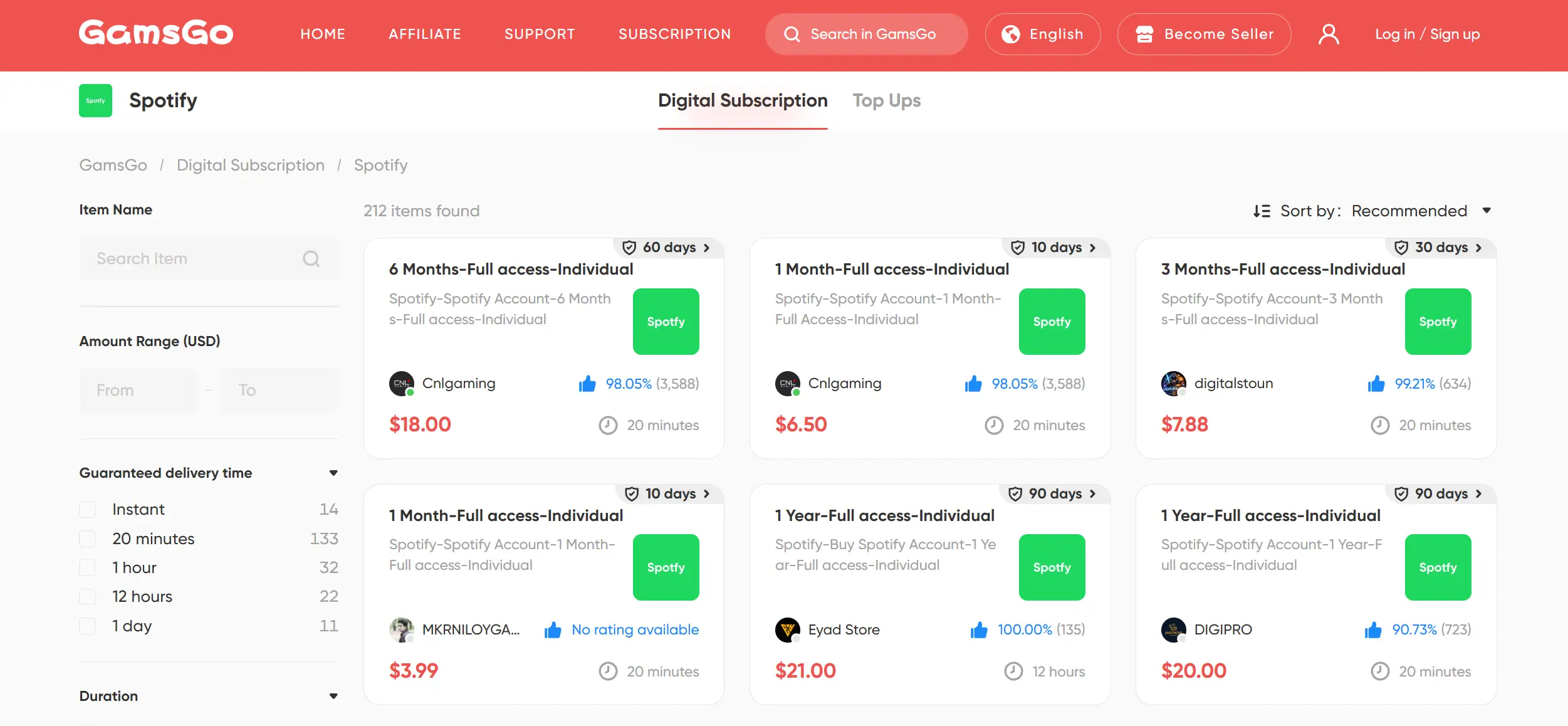
If you’re like me and feel that Spotify Premium has become too expensive, you might want to consider buying a cheap Spotify premium through GamsGo. They reduce the cost per person by offering shared spotify Premium plans—helping you save money without the hassle of finding people to split a subscription with.
How to Download Music from Spotify
Using Spotify Premium is the easiest and most reliable way to download music. The process is simple on both desktop and mobile. However, there’s one small catch: the official Spotify app doesn’t support downloading individual songs—you’ll need to download an entire playlist or album instead.
If you only want a few specific tracks, the smartest workaround is to add them to a new playlist first. Here’s how:
- Find the song you want to download and tap the “three dots” icon next to it.
- Select “Add to Playlist” (you can create a new playlist in advance) or simply add it to your “Liked Songs.”
- Go to “Your Library” in the bottom menu and locate the playlist containing your selected songs.
- Tap the “Download” button below the playlist cover.
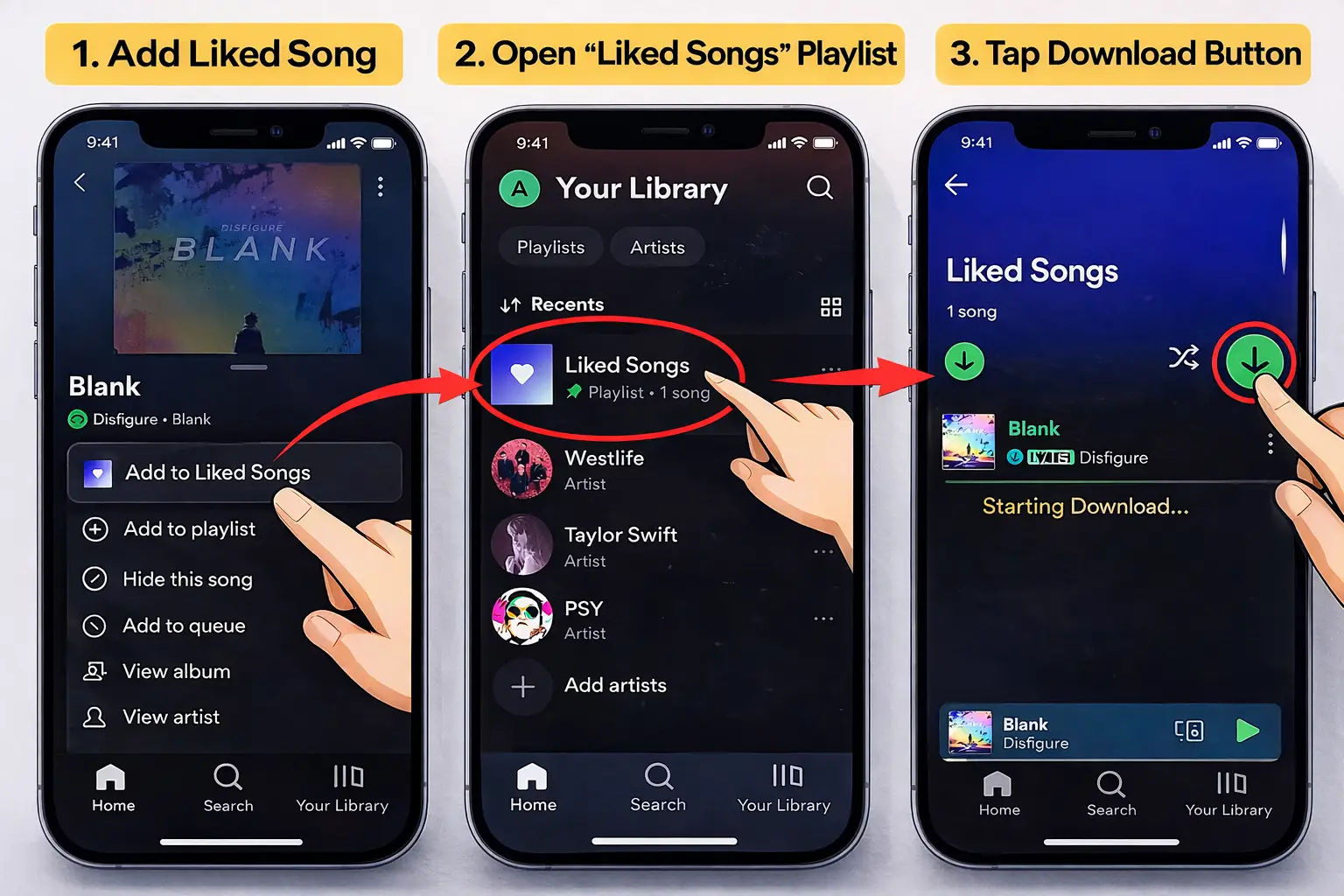
The biggest advantage of using Spotify Premium is its stability and ease of use. With just a few taps, you can download playlists or albums directly within the app.
That said, there are some limitations. Downloads are stored in an encrypted format and can only be played within the Spotify app. Once your subscription ends, you’ll lose access to those downloaded tracks.
So next, I’ll walk you through a few alternative methods that let you save music permanently and listen to it freely outside of Spotify.
Download Music with a Spotify Downloader
If you don’t plan to subscribe to Spotify Premium, there are alternative ways to download music from the platform. Some tools can convert songs into MP3 files and save them permanently on your device—no subscription required.
However, it’s important to note that these methods are not officially supported. We don’t recommend violating Spotify’s terms of service, and the options below are provided for reference only.
Among the many Spotify downloaders available, I’ve selected three worth recommending. They’re generally easy to use, stable, and capable of meeting most users’ downloading needs.
NoteBurner Spotify Music Converter
NoteBurner Spotify Music Converter is a tool designed specifically for Spotify users who want to download and convert music. It lets you transform songs, albums, or playlists into common formats such as MP3, AAC, FLAC, WAV, AIFF, or ALAC, while keeping all metadata intact (title, artist, album art, etc.).
How to use it:
- Download and install NoteBurner (compatible with Windows and Mac).
- Log in with your Spotify account.
- Choose the playlist or album you want to download.
- Click the green music note icon, go to the subscription page, and select the right plan.
- Once subscribed, follow the instructions to start downloading.
Keep in mind that NoteBurner is not free — in 2026 it costs $14.99/month, $39.99/year, or $79.99 for a lifetime license.
NoteBurner is one of the most complete options on the market because it offers a wide variety of formats and preserves audio quality along with metadata, which is very useful for keeping your library organized.
Although its price is somewhat high, it's still a tool that works well for most users who want to download music in a stable way and with good quality.
Sidify Music Converter
Sidify Music Converter doesn't just work with Spotify — it's also compatible with Apple Music, Amazon Music, Tidal, and Line Music, offering a versatility that sets it apart from NoteBurner. Like NoteBurner, it lets you convert songs to common formats like MP3, AAC, FLAC, or WAV.
How to use it:
- Download and install Sidify (available for Windows and Mac).
- Choose the music platform you want to use (e.g., Spotify or Apple Music).
- Log in and add your songs or playlists.
- Select the output format and quality in the settings.
- Click "Convert" and save the files to your computer.
In terms of pricing, in 2026 it costs $49.95 for three months, $69.95/year, or $139.95 for a lifetime license.
Sidify stands out as an "all-in-one" solution that covers almost every streaming platform. It's ideal if you use more than one service and want all your files in the same format.
That said, the price is quite steep, especially the lifetime license, so I'd consider it best suited for users who regularly download music from multiple streaming services.
Tunelf Spotify Music Converter
Tunelf Spotify Music Converter sets itself apart with its simplicity: the whole process comes down to three steps, making it perfect for those who want something quick and straightforward.
How to use it:
- Download and install Tunelf (compatible with Windows and Mac).
- Open the program and copy your Spotify songs or playlists into the Tunelf interface.
- Adjust the output format and quality (for example, MP3 at 320 kbps).
- Click "Convert" and wait for the download to finish.
Tunelf is priced at $19.95 USD/month, and its official pricing page is only available in USD.
Tunelf is the most accessible option for beginners or users who don't want to spend time on configurations. Its simplicity makes up for the monthly pricing if what you're looking for is something fast with no learning curve.
With any of these three tools (NoteBurner, Sidify, and Tunelf), once the conversion is complete, you'll be able to save the audio files to your computer and transfer them freely to your phone, MP3 player, or other devices, enjoying your music permanently and without depending on Spotify.
Download Spotify Music with Free Online Tools
In addition to downloader programs, there's another method that I personally find even more convenient: online download sites for Spotify. They're completely free, require no installation, and work directly from your browser, making them very easy to use.
While some users say these sites can be unstable, in my experience I haven't had any issues. Download speeds are fast and they allow you to download entire playlists at once. Here are two options I tried and found genuinely useful:
Spotify Downloader
Using Spotify Downloader is very simple:
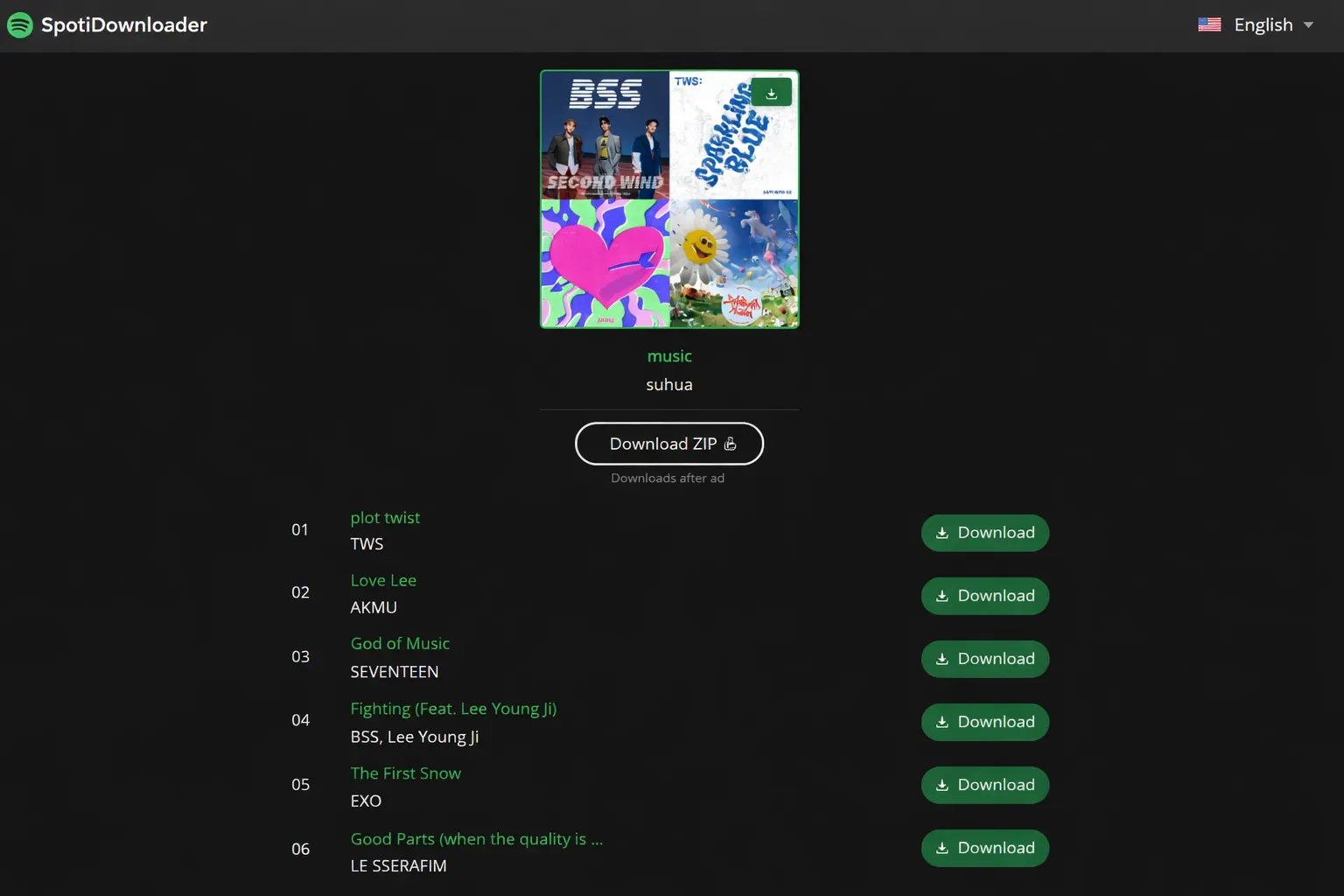
- Open the Spotify app and find your song or playlist. Click the three dots → "Share" → "Copy Link".
- Paste the link into SpotiDownloader and click "Submit".
- Wait for the analysis to finish and you're ready to download.
I personally tested it with a full playlist and the process took less than 10 seconds to analyze. I was then able to select all songs at once. Download speed was very fast, with almost no delays.
Soundloaders
Soundloaders works in a very similar way to Spotify Downloader. Just copy the song link from Spotify, paste it into the site, and you can download it right away. In my experience it's also been a very quick and reliable tool.
📷 Here's a screenshot from when I downloaded my playlist using Spotify Downloader:
Download Spotify Music with Recording Software
Beyond the methods mentioned above, there's another relatively traditional but still viable approach: using recording software.
The concept is simple: while Spotify plays music, the recording program captures the audio output from your computer in real time and saves it as an audio file. This method doesn't depend on Spotify Premium or require bypassing DRM, so it's fairly stable.
Common Tools
- Audacity: a free, open-source software for audio recording and editing, compatible with Windows, macOS, and Linux. You just need to set your system audio as the recording source to capture Spotify songs and save them in formats like MP3 or WAV.
- Built-in system recorders: both the "Voice Recorder" app on Windows and QuickTime Player on macOS can handle basic recording functions. However, their features are limited and they're better suited for occasional use.
Pros and Cons
This method is completely free, making it ideal for users who don't want to spend money. It's not limited by Spotify Premium and lets you record any content that's playing. It can also be used to save podcasts, live streams, or meetings.
On the downside, the process is more involved since you need to play and record at the same time. Sound quality can be affected by your system environment or volume levels, and there's no automatic song recognition or track splitting, which makes organizing your library more difficult afterward.
💡 Tip: if you just want to save a few songs occasionally and don't want to install more complex conversion tools, recording software can be a viable option. But if you're looking for efficiency, bulk downloads, and better sound quality, the other methods in this article are still the way to go.
Download Spotify Music with GamsGo
As mentioned earlier, if you don’t want to deal with different Spotify downloaders—or find them too complicated—a much easier option is to get a lower-cost subscription through an account-sharing platform.
GamsGo is a reliable platform worth considering. It has been focused on digital subscription services for years, helping millions of users save on entertainment costs. By splitting Premium plans into shared slots and distributing them across multiple users, it significantly lowers the cost per person—while also saving you the hassle of finding people to share a plan with.
On top of that, GamsGo offers solid service guarantees, including instant delivery and 24/7 customer support. All accounts come from carefully vetted real sellers, ensuring reliable sources and stable usage, so you can use them with confidence over the long term.
Comparison of 5 Methods to Download Spotify Music
We've covered 5 different ways to download music from Spotify, and each has its own pros and cons. To help you choose the option that works best for you, here's a comparison table:
Method | Key Features | Rating |
Spotify Premium | Stable and legal, but expensive and expires when subscription ends. | ⭐⭐⭐⭐ |
Spotify Downloader | Bulk downloads and high quality, but requires payment and installation. | ⭐⭐⭐ |
Online Tools | Free and easy to use, but less stable. | ⭐⭐⭐⭐ |
Recording Software | Free and DRM-free, but slow and impractical. | ⭐⭐ |
Premium via GamsGo | Same as official, at less than half the price. | ⭐⭐⭐⭐⭐ |
As you can see, while online tools can save you money, they tend to be unreliable; Spotify Premium offers stability but at a high price; and methods like downloaders or recording software are more complex, time-consuming, and carry certain risks.
Overall, I think opting for a sharing platform like GamsGo is the best value-for-money alternative, since it delivers the official experience in a stable, much more affordable way.
Conclusion
There are many ways to download music from Spotify: the official download with Premium is the most stable but also the most expensive; third-party programs like NoteBurner or Sidify are powerful and let you save files permanently, though they require an extra payment; online tools are free and easy to use but not always reliable; and recording software is completely free, though a bit cumbersome to manage.
Looking at it from a long-term, value-for-money perspective, my recommendation is to go with a shared account platform to subscribe to Spotify Premium at a lower cost. That way, you not only enjoy all the official features at a much lower price, but also get offline downloads, ad-free music, and high-quality audio.
FAQ
How do I convert Spotify songs to MP3?
To convert Spotify songs to MP3, you can use programs like NoteBurner or Sidify. Just install the software, import your Spotify playlists, choose MP3 as the output format, and export. You'll have your songs ready to listen to offline on any device.
How do I download music from Spotify without Premium?
You can use online downloaders, third-party apps, or audio recording software to download music without Premium, though quality may be limited. The most stable option remains Spotify Premium with offline downloads.
How can I set a song as a ringtone on my iPhone?
On iPhone, use iTunes or the Music app: import the song, trim it to 30 seconds, and convert it to a ringtone file (.m4r). Then sync it with your iPhone and activate it in Settings > Sounds & Haptics > Ringtone. You can also use GarageBand to easily create and assign ringtones.
Related Articles