Roblox Top Up | Buy Robux & Premium Membership
Roblox is a global online platform where players can explore user-created experiences, customize avatars, interact with friends, and enjoy different types of virtual worlds. Robux is the main virtual currency used for avatar items, accessories, selected in-experience purchases, passes, and other eligible virtual content. GamsGo provides Roblox top-up products such as Robux, Premium Membership, and redeem code options.
Roblox Top-up Instructions
Please select the correct Roblox product and top-up method before placing your order. Product availability, denominations, regions, membership benefits, and redemption rules are subject to the product page and official Roblox display.
Available Products
Robux Premium Membership Redeem Code
Available Platforms
PC iOS Android Xbox PlayStation VR Other Supported Platforms
Top-Up Methods & Requirements
| Method | Required Information | Important Notes |
| Login Top Up | Roblox username, password, security code / two-step verification code if required | Provide account information in the order chat as instructed. Stay online and cooperate with verification requests in time. |
| Redeem Code | Correct Roblox account and product / code region compatibility | Redeem the code on the official Roblox redemption page and make sure you are logged in to the correct account. |
Required Information
Roblox Username Roblox Password Security Code / 2FA Code Order Verification Details Correct Redemption Account Product / Region Compatibility
Region & Account Notice
Roblox is a global platform. Product availability may vary depending on account region, product type, redemption rules, and official restrictions. Please confirm that the selected product matches your Roblox account before placing an order.
Delivery Result
• After the order is completed, you can check the result in your Roblox account balance, Robux balance, Premium Membership status, redemption history, or related Roblox account pages.
• If the top-up does not appear immediately, please log out and log back in, refresh the page, and confirm that you are checking the correct Roblox account.
• If the issue remains, please contact customer support with your order information, Roblox username, product details, and relevant screenshots.
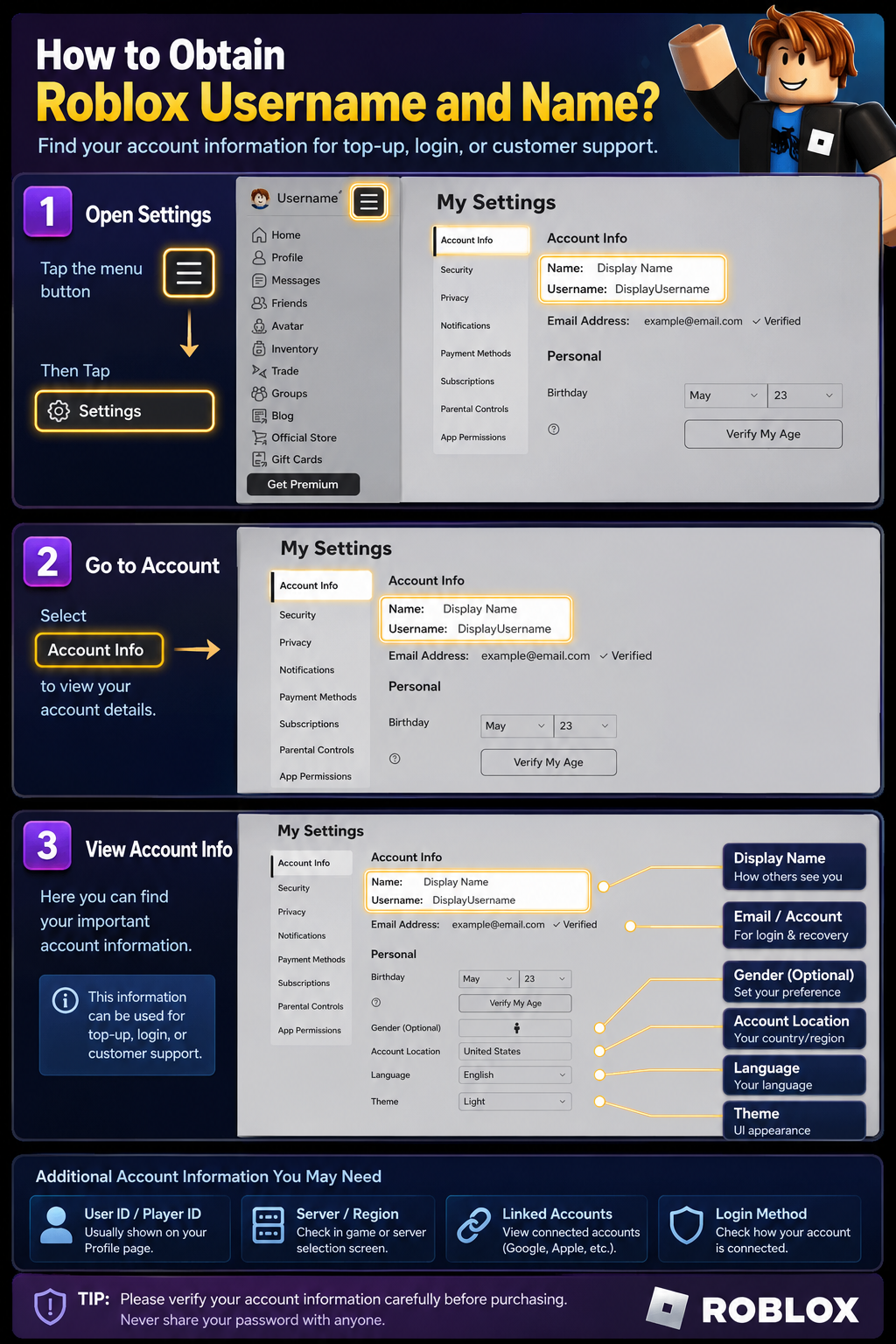
How to Find Your Roblox Account Information
1. Open the Roblox app or visit the Roblox website.
2. Log in to your Roblox account.
3. Go to your profile page or account menu.
4. Check your Roblox username, User ID, or account information.
5. Before placing an order, confirm that the account and selected product are correct.
Terms & Conditions
By clicking "Buy Now", you acknowledge and agree that this purchase is non-refundable once completed. Please make sure the selected Roblox product, account information, redemption account, and region compatibility are correct before placing the order.
Completed top-ups or redeemed codes usually cannot be reversed, transferred, or moved to another account. Membership benefits, renewal rules, account restrictions, product availability, denominations, and redemption rules are subject to the product page and official Roblox rules.
You confirm that you meet the legal age requirement and accept our Terms of Use available at Terms and conditions of use.
Risk Notice
- For Login Top Up, delayed or expired security verification may cause order processing delays.
- For Redeem Code orders, please redeem the code on the correct Roblox account. Redeemed codes usually cannot be reversed or transferred.
- Product or code availability may vary by account region, product type, redemption rules, and official restrictions.
- Balance display, purchase restrictions, membership benefits, redemption entry, and cross-platform usage may vary by platform, account region, and official Roblox rules.
- Do not share unnecessary sensitive information. Only provide information required by the product page or order chat for fulfillment.