Ever catch yourself wishing you could fly massive sky giants like the Airbus A380—which seats a whopping 470 passengers—or unlock iconic, high-profile jets like the Concorde and the 787 Dreamliner? Grinding- flying one flight at a time takes forever to save up the Skybux you need for your next big fleet upgrade.
Luckily, Cabin Crew Simulator regularly releases redeem codes that instantly score you free Skybux. GamsGo has gathered every active redeem code valid as of September 22, 2026. Claiming all these codes will net you over 56,000 Skybux in one go—saving you countless hours of grinding flights. Bookmark this page, as we update it daily!
If you prefer to skip both code redeeming and grind-saving altogether, GamsGo also offers plenty of roblox account with robux. Many of these accounts already come packed with loaded Skybux balances and pre-unlocked popular planes like the A380 and Concorde, letting you jump straight into the cockpit of your dream aircraft.
On top of that, GamsGo provides roblox robux top up options at prices up to 25% cheaper than official rates 😊.

All Active Cabin Crew Simulator Codes
Cabin Crew Simulator promo codes can only be redeemed directly in-game. Once entered, they instantly award Skybux (the game's main currency), which you can use to buy new aircraft, airports, service upgrades, and character cosmetics.
⚠️ Warning: Entering the code seniac will actually deduct 20,000 Skybux! It is not a hidden reward, so avoid typing this code at all costs.
🎁 Playing other Roblox games too? Check out our latest redeem code collections:
How to Redeem Cabin Crew Simulator Codes
Cabin Crew Simulator doesn't have a standalone official redemption website; all codes must be redeemed directly within the game. The process is identical across mobile and PC devices, with no level or progression requirements needed.
Redeeming In-Game
- Launch Cabin Crew Simulator.
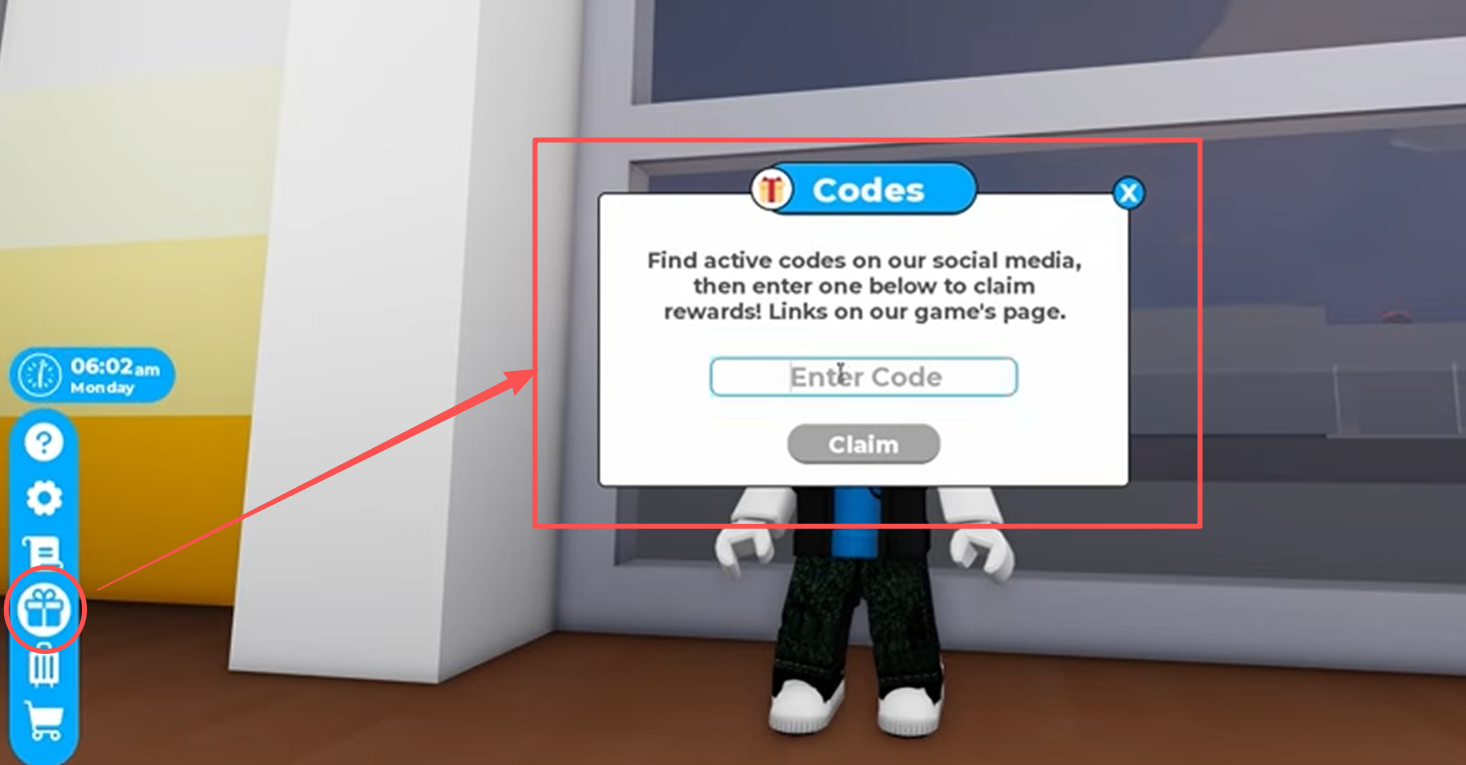
- Click the Gift Icon on the left side of the screen.
- Paste your code into the Enter Code box that pops up.
- Click Claim to receive your Skybux instantly.
Don't see the Enter Code box? Make sure you are logged into your Roblox account and that your game client is updated to the latest version.
Expired Codes Cabin Crew Simulator Codes
The following codes have been confirmed expired and no longer give rewards. However, since a few codes have occasionally been reactivated during past special events, we keep them archived here for reference:
migrate jetway Triplee7 clouds turbulence paris airport snow evacuate trees 100m airliner badge boba captain cruising customize decoration easter2025 flying galley landing pilot service star triple7 wheelsup mission airstairs takeoff
Why Isn't My Cabin Crew Simulator Code Working
If you're having trouble redeeming codes in Cabin Crew Simulator, it's usually due to one of the following common issues:
- Already Claimed: Most codes can only be used once per account. Entering the same code twice won't grant rewards again.
- Code Has Expired: Developers don't publish a fixed expiration schedule, so codes can expire without prior notice.
- Typos or Capitalization Errors: Codes are case-sensitive. It's best to copy and paste them directly instead of typing manually.
- Server Sync Delays: Newly released codes might experience slight server lag. Try rejoining the game or switching to a different server.
- Using Global Roblox Codes In-Game: Account-level global codes (like SPIDERCOLA) cannot be redeemed in the in-game text box.
If you believe a code should still be valid but continues to fail after trying all the steps above, you can seek help and check the latest code status on the official Cabin Crew Simulator Discord server community.
All Active Roblox Promo Codes
Official global Roblox promo codes differ from Cabin Crew Simulator in-game codes. Global promo codes unlock avatar items for your overall Roblox account—such as hats or shoulder accessories—which carry over into any game that displays custom avatar gear. However, they will not convert into Skybux or planes inside Cabin Crew Simulator.
Official Web Redemption Status: The official Roblox redemption system (roblox.com/redeem) has cleared out many legacy codes. Currently, long-term active items are limited, with the most notable one being:
| Redeem Code | Redemption Channel | Item Name | Equipment Slot |
|---|---|---|---|
| SPIDERCOLA | Official Roblox Promo Code Page | Spider Cola | Shoulder Accessory |
In-Game Promo Codes from Official Showcase Experiences: To promote Roblox Studio capabilities, Roblox created permanent hub experiences like Island of Move and Mansion of Wonder, which distribute account-wide avatar items via in-game redemption booths:
| Experience Name | Redeem Code | Reward Item | Item Slot |
|---|---|---|---|
| Island of Move | DIY | Kinetic Staff | Back Accessory |
| Island of Move | GetMoving | Speedy Shades | Face Accessory |
| Island of Move | SettingTheStage | Build It Backpack | Back Accessory |
| Island of Move | StrikeAPose | Hustle Hat | Hat Accessory |
| Island of Move | VictoryLap | Cardio Cans | Hat Accessory |
| Island of Move | WorldAlive | Crystalline Companion | Shoulder Accessory |
| Mansion of Wonder | Boardwalk | Ring of Flames | Waist Accessory |
| Mansion of Wonder | FXArtist | Artist Backpack | Back Accessory |
| Mansion of Wonder | Glimmer | Head Slime | Hat Accessory |
| Mansion of Wonder | ParticleWizard | Tomes of the Magus | Shoulder Accessory |
| Mansion of Wonder | ThingsGoBoom | Ghastly Aura | Waist Accessory |
If you want your flight attendant or pilot look to stand out, you can mix and match these account-wide cosmetics along with the uniforms bought using Skybux inside Cabin Crew Simulator. And if you'd rather spend a little cash to grab Robux for cross-game cosmetics or gamepasses, GamsGo also provides cheap robux top up deals.
How to Redeem Roblox Promo Codes
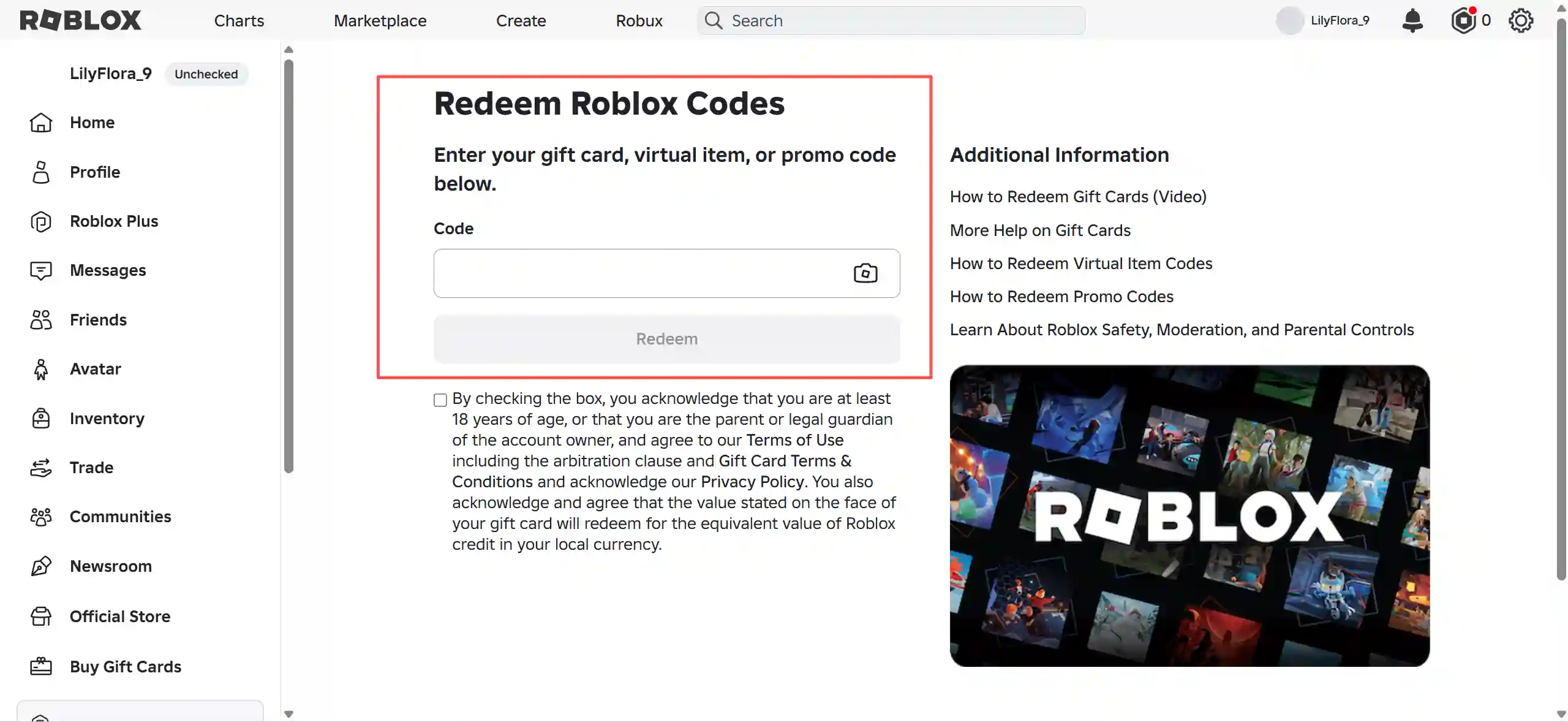
Global Roblox codes are redeemed on the official Roblox website:
- Go to the Official Roblox Redemption Page.
- Log in to your target Roblox account.
- Type or paste your code into the text field.
- Click Redeem.
- Once confirmed, the Robux, account balance, or virtual item will automatically be added to your account.
Claimed items will go straight into your Avatar Inventory and can be equipped platform-wide across all supported games.
What Can You Do with Cabin Crew Simulator Skybux
Skybux is the primary currency used to purchase planes, airports, flight service items, and upgrades. Aside from promo codes, you can earn Skybux by completing flights, daily tasks, challenges, and daily login rewards, or buy them directly with Robux.
1. Unlock New Aircraft
Search for codes → Claim free Skybux → Check prices and unlock order for your dream planes → Calculate the remaining cost → Grind flights/tasks to cover the gap → Unlock → Customize cabin layouts and service settings. The goal is simple: own and operate the exact planes you want.
2. Maximize Earnings Efficiency
Codes provide a nice one-time boost, but long-term success requires understanding how Economy, Business, and First Class seating tiers impact income, how Service/Safety/Quality scores boost earnings, and how the cost-benefit ratio of hiring crew members works out. One key tip: the cabin configuration with the highest single-flight payout isn't always the fastest earnings generator overall—you have to factor in flight duration too.
3. Save Resources Without Spending Robux
Redeem every available code → Master the mechanics of daily rewards, daily challenges, and flight income → Build a quick daily routine matching your gaming schedule → Check back for new codes whenever updates go live.
4. Upgrade Flight Attendant Cosmetics
Redeem codes to stack up Skybux → Browse the in-game catalog for uniforms, suitcases, hats, and accessories → Earn missing funds through flights → Buy your favorite gear and match it with aircraft liveries and airline logos to create your own signature style.
5. Unlock Big Aircraft Faster & Decide on Robux Upgrades
Claim codes to boost your balance → Calculate remaining costs for your target plane → Estimate the flight grind time needed → Compare the cost-efficiency of buying Skybux via Robux → Choose whether to keep grinding for free or top up.
How to Get the Latest Cabin Crew Simulator Codes First
To make sure you get the newest Cabin Crew Simulator codes as soon as they drop, keep an eye on these sources:
- Official X Account: Developer Cruising Studios posts announcements and update codes on X and Discord via @CabinCrewRBLX.
- Roblox Community Page: The Cruising Studios Community page also regularly updates game notices.
- Bookmark This Page: GamsGo tracks and verifies new working codes daily.
Additionally, if you want to top up Robux to unlock high-tier Cabin Crew Simulator planes faster, you can use GamsGo's Roblox Top Up service, offering a safer and much more cost-effective way to elevate your gaming experience.
Summary
While Cabin Crew Simulator doesn't drop an overwhelming number of codes, updates remain steady. Redeeming all the working codes listed here will save you a substantial amount of grind time.
Recent updates have focused heavily on new aircraft and flight routes: the A340-600 and L1011-1 have joined the fleet, alongside the addition of the new Cape Town Airport. The game currently features 12 flyable destinations; outside of Robloxia and New York (which are unlocked by default), all other airports must be purchased with in-game currency.
If you're looking to speed up your progress even further, besides claiming codes, check out GamsGo's discounted Robux top ups or pre-loaded Roblox accounts equipped with unlocked planes and Skybux. Both let you skip the tedious early-game grind and take the captain's seat right away.
Cabin Crew Simulator Codes FAQ
How Often Are New Codes Released?
There is no fixed schedule. Unlike developers who drop codes weekly or monthly, developer Cruising Studios releases codes alongside game update cycles. For example, with the release of the new A340-600 and L1011-1 planes, new codes dropped on X and Discord. Since releases are unpredictable, the safest approach is to bookmark this page—we verify and update new codes as soon as they appear.
Can I Redeem Codes on a Web Browser?
No. Unlike games from developers like Supercell (Brawl Stars, Clash of Clans) which feature web store redemption support, Cabin Crew Simulator is created by third-party studio Cruising Studios on Roblox. They do not maintain a web redemption portal, so all codes must be redeemed via the in-game "Enter Code" box under the left Gift icon.
Are Promo Codes Region-Locked?
No region lock has been observed. Cabin Crew Simulator targets a global Roblox audience, and its codes are not tied to country-specific social media events or offline tournaments (unlike certain QR codes in games like Brawl Stars). Therefore, regardless of where your account was registered, any valid code can be successfully redeemed.
How Else Can I Earn Free Skybux Besides Codes?
Codes are great for a quick boost, but steady progress depends on the regular in-game economy loop. Completing flights, daily quests, daily challenges, and claiming daily login rewards all produce a steady supply of Skybux. Building consistent gameplay habits around these features provides a far more reliable income stream than waiting for new code drops.
Related Articles: