Quick answer
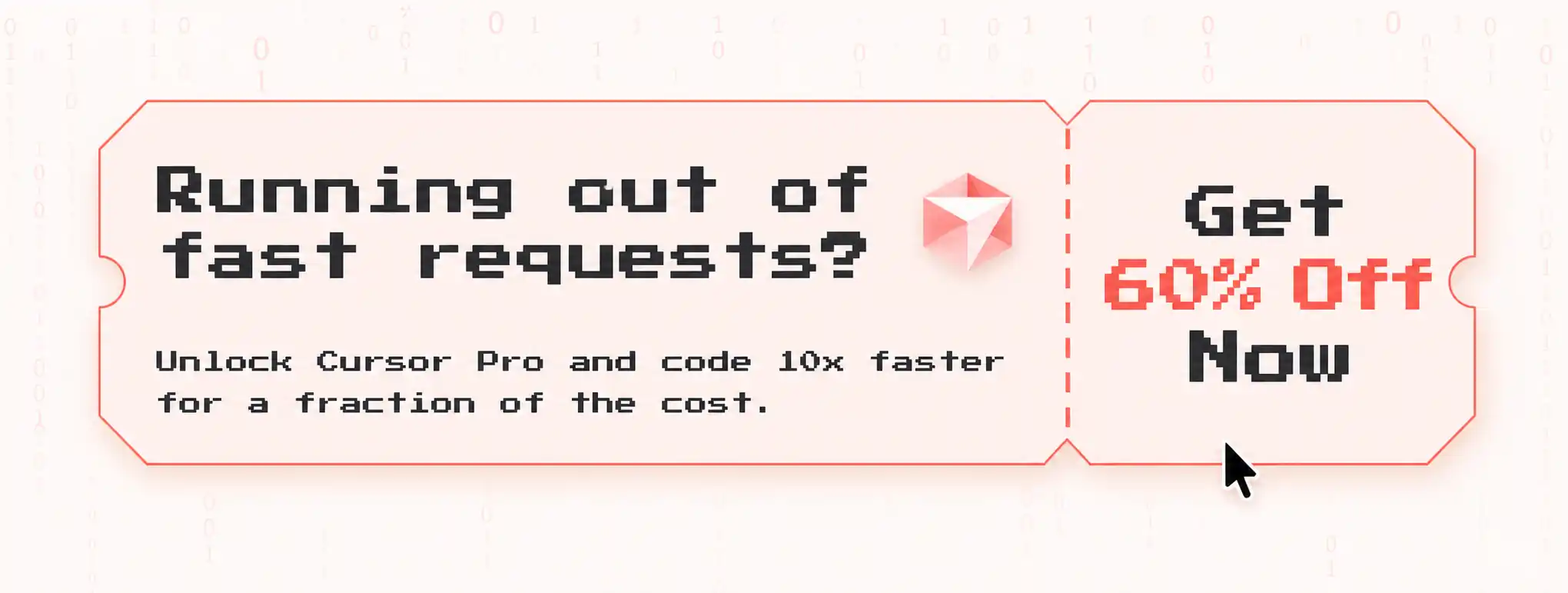
Cursor Pro has not offered a standard free trial since January 14, 2026. As a result, new users should not expect a 14-day Pro trial when signing up today. The only guaranteed free option is Cursor's Hobby plan. If you need the full Pro features, the methods below can help you access Cursor Pro at a lower cost.
If you use Cursor Hobby for coding, you may have run into this problem: Cursor AI suddenly stops generating code because your usage limit has been reached. To keep using its AI features, you then have to upgrade to Cursor Pro for $20 per month.
But before upgrading, many users only know that Cursor Pro offers higher AI usage limits and are unsure what else it includes.
In this guide, we’ll explain what Cursor Pro includes, help you decide whether it is worth upgrading from Hobby, and compare ways to pay less for your subscription, including official yearly billing, GamsGo, and other available discounts.
Is Cursor Pro Free in 2026?
Does Cursor Pro Still Offer a Free Trial?
No, Cursor Pro is not free for everyone in 2026. Some users may still see a 7-day or 14-day Pro trial as an account-specific promotion when they sign up.
This is a real change from 2025, when every new account received a trial by default.
If you do get a trial, spend it on these four things:
- Run Tab completions on a real project, not a toy file. This is where the difference from the free tier becomes obvious.
- Open Composer with Ctrl+I (Cmd+I on Mac) and try implementing a multi-file feature.
- Test Agent mode on a debugging task to see how it handles multi-step reasoning.
- Compare Auto mode with manually selecting a frontier model, so you can understand how credits are consumed.
If no trial appears in your account, skip ahead to the section on how to get Cursor Pro cheaper. The paid options below start well under the $20 list price.
Is the Cursor Hobby Plan Free?
Yes. The Hobby plan is free with no time limit and no credit card required, and it is a permanent tier rather than a trial.
The plan includes Cursor’s full VS Code-based editor, along with a limited monthly allowance of Agent requests and Tab completions. This makes Hobby suitable for learning, occasional coding, and trying Cursor’s AI features before deciding whether to upgrade to Pro.
Is Cursor Pro Still Free for Students?
No. Cursor stopped accepting new sign-ups for its free one-year student plan on June 25, 2026.
If you redeemed the student offer before that date, you can continue using it until your current student plan expires. After that, the free student benefit ends, and the regular Cursor Pro plan costs $20/month.
Cursor now supports students and academic users mainly through credits, campus events, and academic programs. We explain these options and how to apply in Get Free Cursor Credits Through Student and Academic Programs.
Cursor Free vs Pro: What’s the Difference?
Before spending anything, it is worth checking whether you actually need Pro. Plenty of developers pay for it out of habit when the free tier would cover their week.
What Do You Get With Cursor Free?
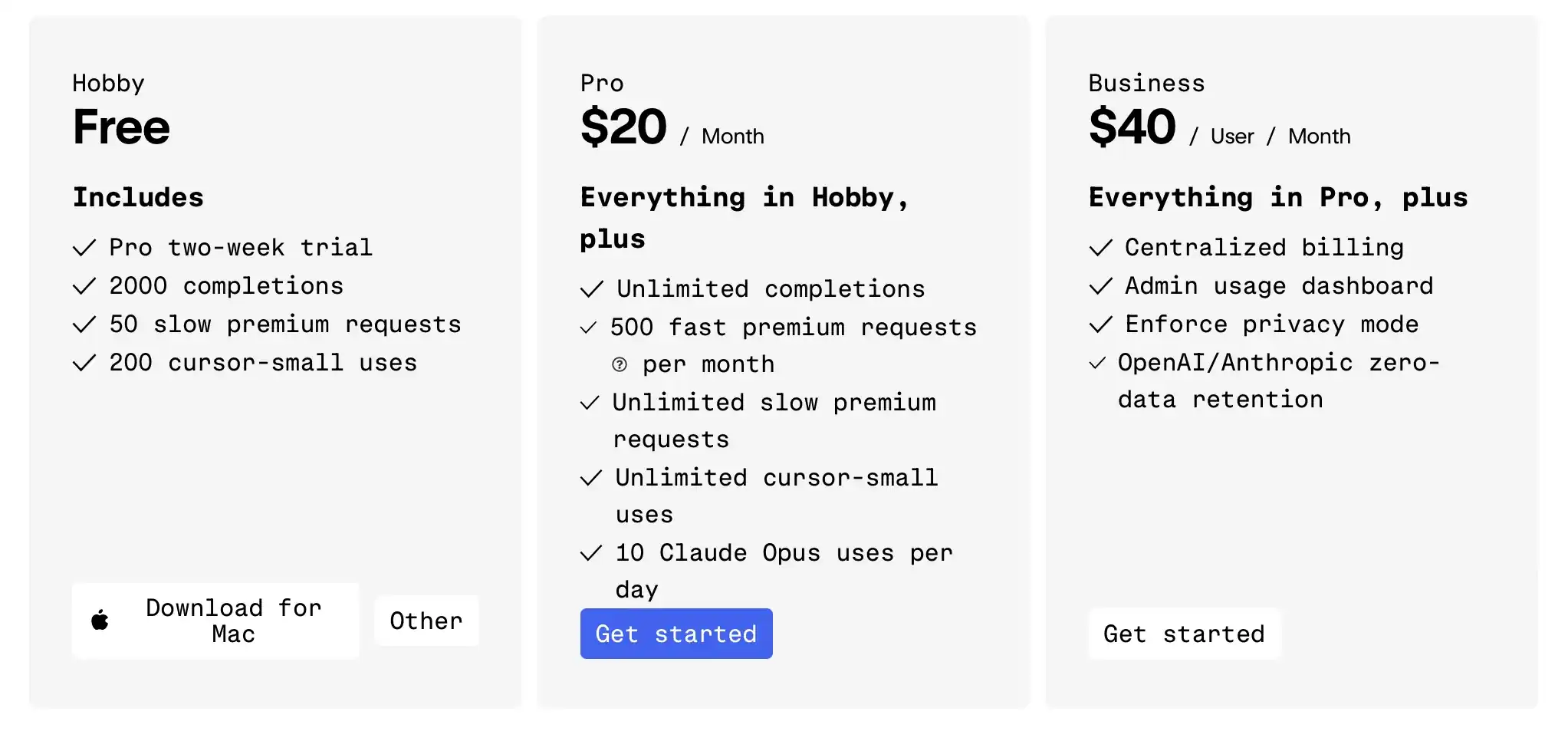
The Hobby plan is a genuinely functional free tier, not a time-limited trial. You get access to the full VS Code-based editor with all standard IDE features — extensions, themes, Git, and terminal — at no cost, no credit card required.
On the AI side, free users receive 2,000 code completions and 50 slow premium model requests per month. For light experimentation or learning, this is sufficient. But most active developers hit these limits within a single focused coding session. Tab completions, in particular, become unavailable partway through a productive day — and that's where the frustration begins.
The free tier is best used for: evaluating whether Cursor fits your workflow, small personal projects, or occasional AI assistance.
What Do You Get With Cursor Pro?
Upgrading to Cursor Pro gives you higher AI usage limits and additional AI coding tools for $20/month or $192/year with annual billing. Here’s how Pro compares with the Hobby plan:
| Item | Free (Hobby) | Pro ($20/month) |
|---|---|---|
| Price | $0, permanent | $20 / month · $192 / year |
| Tab completions | Limited monthly allowance | Unlimited |
| Agent requests | Limited monthly allowance | Extended, multi-step |
| Monthly credit pool | ✕ | ✓ For frontier models |
| Auto mode | ✕ | ✓ Does not draw credits |
| Model access | Smaller model set | Grok 4.5, Composer, GPT-5.5, GPT-5.6 Sol, Claude Opus 5, Claude Fable 5, Gemini Pro |
| Composer (multi-file editing) | ✕ | ✓ Full access |
| Bugbot & Automations | ✕ | ✓ |
| Cursor SDK | ✕ | ✓ |
| Credit card required | No | Yes |
As the comparison shows, the biggest practical upgrades are unlimited Tab completions and higher Agent limits. If you use Cursor throughout the day, this means fewer interruptions from hitting the free plan’s usage caps.
With broader access to frontier AI models and tools such as Cloud Agents, Pro also gives you more room to handle complex tasks and make Agent part of your daily coding workflow.
Cursor Free vs Pro: Should You Upgrade?
Whether Pro is worth paying for mainly depends on how often Cursor’s free limits interrupt your work.
| Choose Hobby If You… | Choose Pro If You… |
|---|---|
| Are learning programming or exploring Cursor’s AI features. | Code regularly and frequently hit the free usage limits. |
| Only edit code occasionally or use AI assistance for small tasks. | Rely on Tab completions and Agent throughout your workday. |
| Can complete your usual tasks within the free limits. | Need higher Agent limits and unlimited Tab completions to reduce interruptions. |
| Are still deciding whether Cursor fits your workflow. | Use Cursor enough to justify the subscription cost. |
In short, do not upgrade just because Pro has more features. Start with Hobby and upgrade when its limits regularly slow you down. If you’ve decided to upgrade to Cursor Pro, here are a few ways to save on your subscription.
How to Get Cursor Pro Cheaper: Best Ways to Save on Cursor
With the trial no longer guaranteed and the student year closed, the practical question for most people is not "how do I get Pro free" but "how do I pay less than $20 a month for it". Here are the seven routes that still work, starting with the one everybody searches for first.
Buy Cursor Pro Accounts for Less on the GamsGo Marketplace
If you have already reached the point where Hobby is no longer enough, the next question is how much you actually need to spend on Pro.
Cursor officially charges $20/month for Pro. For developers who only need Pro for a project, internship, or a few months of heavier coding, committing to the full official price may not always be the most economical option.
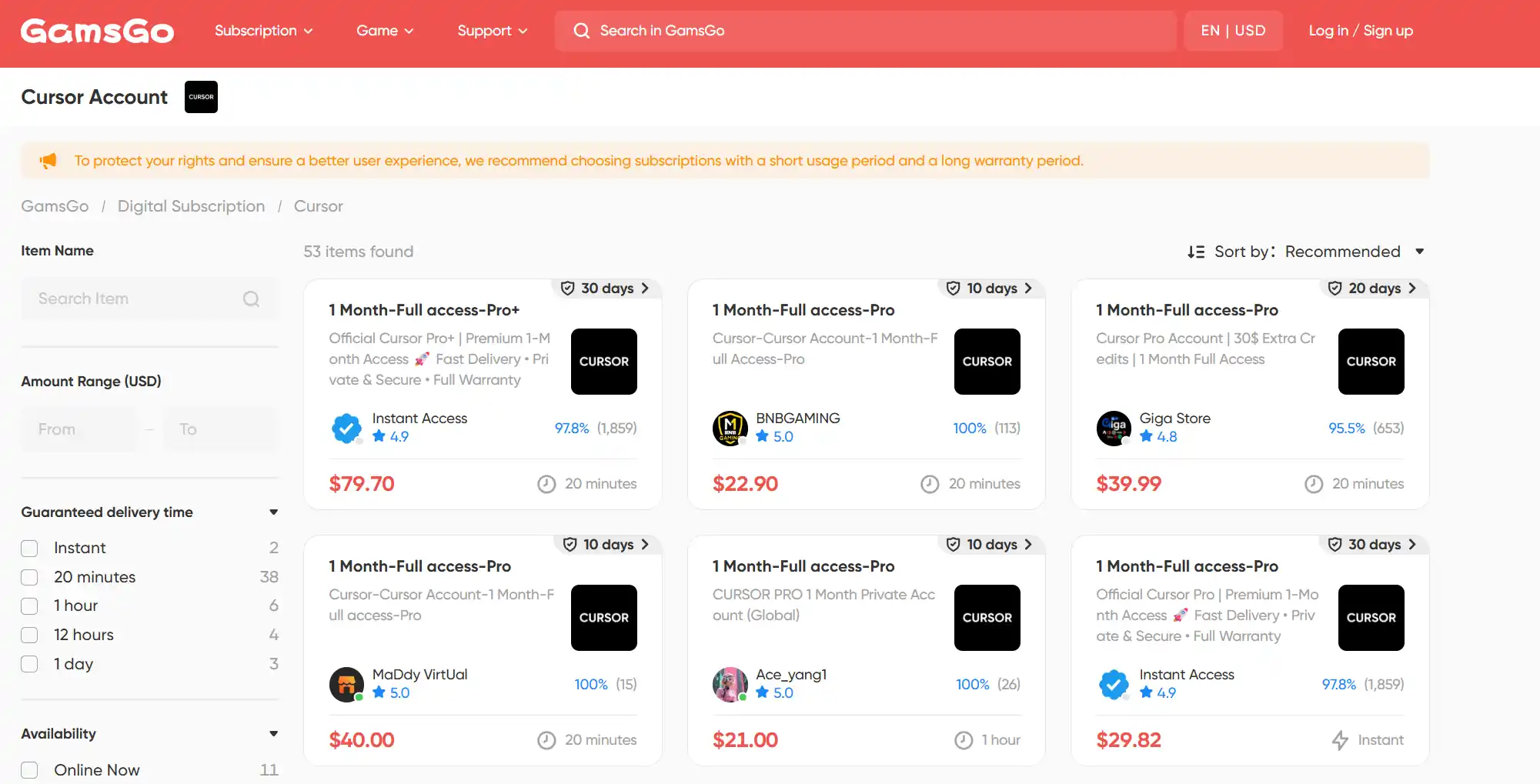
GamsGo Marketplace provides another way to compare lower-priced Cursor offers. Depending on the available listing, you may find Cursor Pro with shorter subscription periods such as 1, 3, or 6 months, allowing you to choose based on how long you actually expect to use the higher limits.
You can compare the current Cursor Pro account listings on GamsGo against Cursor's own pricing before deciding.
Get Free Cursor Credits Through Student and Academic Programs
Students, researchers, and educators can still receive free Cursor usage credits through eligible academic programs, campus events, and other Cursor-supported initiatives.
These credits are not the same as a free Cursor Pro subscription. Instead, they are applied to eligible Cursor usage and may be limited to specific features or services. The amount, eligibility requirements, and expiration date depend on the program or promotion through which you receive them.
| Who can apply? | How to get Cursor credits |
|---|---|
| Undergraduate students | Join the Cursor campus newsletter, check the Community event calendar, and attend eligible campus events, online workshops or MLH programs. |
| Master’s students | Submit the academic-work form with details about the project and how Cursor will be used. |
| PhD candidates and researchers | Request research credits through the academic-work form. Approval and credit amounts depend on the project. |
| Professors and educators | Apply for teaching or classroom credits through the academic-work form. Event organizers can also request support for workshops or hackathons. |
After receiving credits, follow the email or event instructions to add them to your Cursor account. You can then check the balance in the Usage or Spending section of the Cursor dashboard. Eligible Agent and Chat usage is deducted automatically—there is normally no need to select the credits manually.
Use Your Own API Key to Reduce Cursor Costs
Cursor supports API keys from OpenAI, Anthropic, Google, Azure OpenAI and AWS Bedrock. To add one, open Cursor Settings → Models, choose the provider, paste the key and save it. When you manually select a supported model, the model provider charges your account according to its API pricing.
This method works best for developers who mainly need standard Chat model access and already understand token-based API billing. Light usage may cost less than a $20 Pro subscription, but heavy or long-context Agent work can cost more.
The main limitations are:
- Custom API keys work only with supported chat models.
- Cursor’s proprietary Composer models cannot be billed to an external API key.
- Tab completion continues using Cursor’s built-in models and the limits of your Cursor plan.
- Auto mode does not use your API key.
- Cloud Agents, Bugbot, Automations and other paid features remain plan-dependent.
- Cursor’s Zero Data Retention policy does not apply to BYOK requests; data handling follows the selected model provider’s policy.
In short, BYOK replaces the billing source for certain model calls—not the Cursor subscription or its complete feature set.
Get Cursor Pro Through Lenny's Product Pass
Lenny’s Product Pass can provide one year of standard Cursor Pro, but it only makes financial sense if you also want several other products in the bundle.
The Cursor offer is currently listed as an Insider-exclusive benefit. An Insider subscription costs $400 per year and includes access to the full Product Pass collection. The Cursor benefit is one year of Pro, not Pro+ or Ultra, and it is usually limited to new Cursor customers.
To claim it:
- Subscribe to Lenny’s Newsletter at the $400-per-year Insider tier.
- Sign in to Product Pass using the same email.
- Claim the Cursor offer while codes are still available.
- Redeem it on an eligible new Cursor account before the code expires.
Codes are limited, and Product Pass states that access depends on maintaining the qualifying newsletter subscription. If the subscription is cancelled, active benefits may be revoked.
For Cursor alone, this is not a saving: official Cursor Pro annual billing costs $192, while the Insider subscription costs $400. It becomes worthwhile only when the other included products would save you more than the additional $208.

Save More with a Cursor Pro Annual Plan
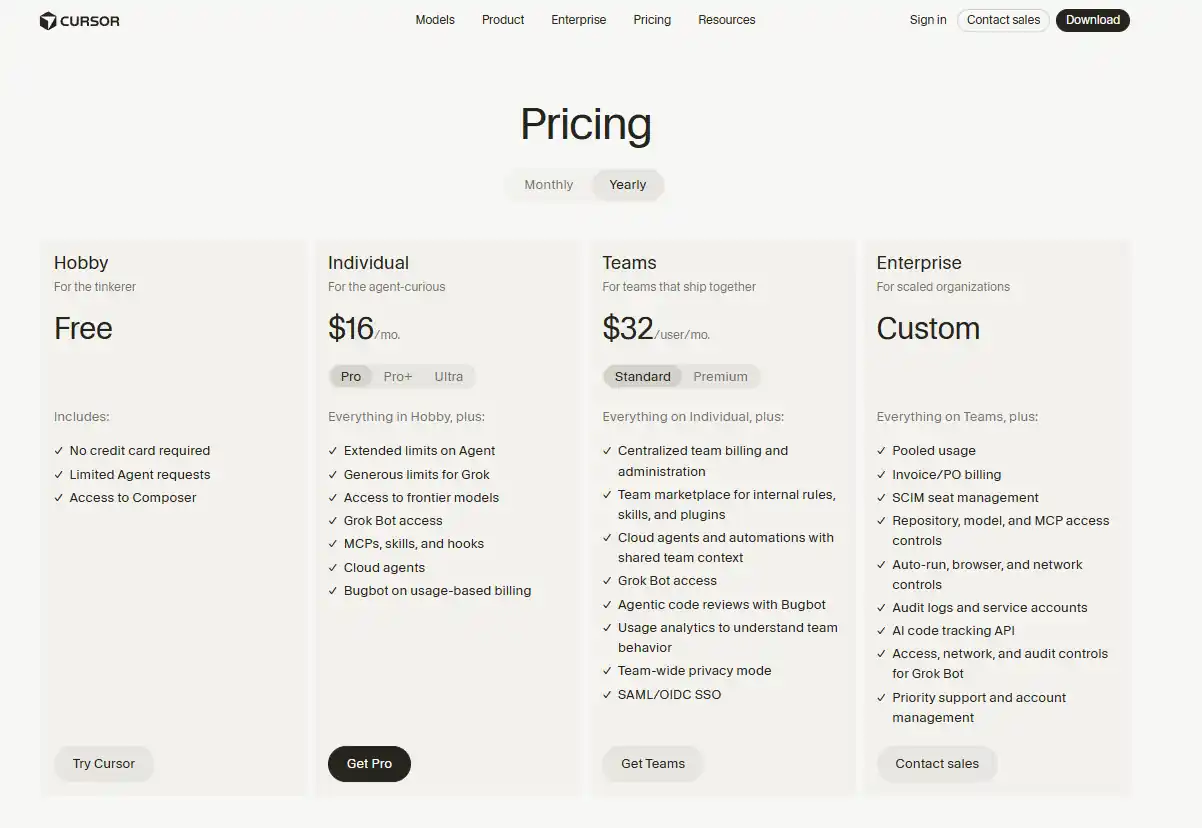
Cursor Pro costs $20 per month, but annual billing reduces the effective price to $16 per month. You pay $192 upfront instead of $240 over twelve monthly payments, saving $48—or 20%—per year.
The annual plan includes the same Cursor Pro features and monthly usage allowance as the monthly plan. The only difference is that you pay for the full year in advance.
For even greater savings, one-year Cursor Pro listings on GamsGo were priced at approximately $114–$159, compared with Cursor’s official annual price of $192. That means you can save approximately 17%–41%, depending on the seller and offer.
These listings provide 12 months of Cursor Pro access with the same Pro-tier features, including extended Agent usage, access to frontier models, Cloud Agents, MCPs, skills and hooks.
Does Cursor Offer Discount Codes or Promo Codes?
No. Cursor does not issue public promo or coupon codes, and any "Cursor discount code" listed on a coupon site will not apply at checkout. The only official price reduction Cursor offers is annual billing. Everything cheaper than that comes from how the subscription is bought, not from a code you paste at the till.
This matters because the coupon sites ranking for these terms are almost all recycling expired or invented codes. Referral links promising "50% off your first month" are individual affiliate links, not an official Cursor programme.
Do Cursor Trial Reset Tools, Cracks, and Free VIP Scripts Work?
Several tools circulating online claim to repeatedly reset Cursor’s former Pro trial or unlock Pro features without paying. Examples include go-cursor-help, cursor-free-vip, and the cursor-fake-machine plugin.
Although some may have worked with older versions of Cursor, they are now unreliable and carry significant risks. Here’s why we don’t recommend using them in 2026:
- Cursor has actively updated its detection algorithms. Multiple users in the Cursor community have reported that these methods are increasingly unreliable and flagged.
- They violate Cursor's Terms of Service. Account bans are a real risk, and any Cursor Pro work you've set up — custom rules, configurations, project history — could be lost.
- The maintenance burden is real. These tools require ongoing updates as Cursor patches each bypass, meaning you're constantly chasing a moving target.
Our recommendation: start with Cursor’s free Hobby plan to see how it fits your workflow, then choose the option that best suits your needs from the methods above.
Which Cursor Free or Discount Method Should You Choose?
Eight routes, honestly rated. Only one of them is genuinely free and permanent — which is the single most useful thing to know before you start.
| Method | Cost | Who it fits | The catch |
|---|---|---|---|
| Hobby plan | Free, permanent | Learning, light use, evaluation | Monthly allowance runs out fast for daily coders |
| Pro trial | Free if offered | New accounts that receive one | No longer guaranteed; depends on account promotion |
| GamsGo marketplace account | ~$114–$159 / year | Anyone committing to a full year | Saving is in annual plans only; monthly is near list price |
| Academic credits | Free credits | Grad students, researchers, educators | Credits, not a full year; application required |
| Bring your own API key | Pay per token | Light or irregular usage | Heavy use costs more than Pro; no Tab or Auto mode |
| Lenny's Product Pass | $400 / year | People who want the whole bundle | Costs more than Cursor Pro if Cursor is all you want |
| Annual billing | $192 / year | Anyone already paying monthly | Still full price, just less of it |
| Cracks & trial resets | — | Nobody | ✕ Largely defunct, violates ToS, account ban risk |
Overall, each way to get Cursor Pro comes with its own advantages and limitations. No matter which option you eventually choose, it’s a good idea to start with the free Hobby plan first. After using it for about a week, you should have a much clearer idea of whether Cursor Pro’s unlimited Tab autocomplete and Agent mode are actually right for you.
Conclusion
Free Cursor Pro options are far more limited in 2026 than they were in 2025. The Hobby plan is still genuinely free and useful, but most other ways to save come with restrictions.
Student programs, academic credits, and regional pricing can lower the cost, but they may depend on eligibility, location, payment method, or usage limits. If you want full access to Cursor Pro at a lower price with fewer restrictions, GamsGo offers a more flexible alternative.
We’ll continue updating this page as Cursor’s plans and pricing change. If you’re looking to save on your next purchase, here’s an extra bonus for readers: 👇
We've prepared an exclusive promo code for all blog readers:
Enjoy an additional 3% off on your next purchase!
Valid across all categories — streaming accounts, AI tools, game top-ups, software subscriptions, and more.
Cursor Pro Free Trial and Discount FAQ
Does Cursor Have a Discount Code?
No. Cursor does not issue public promo or coupon codes, and codes listed on coupon sites will not work at checkout. Its only official discount is annual billing, at $192/year against $240 paid monthly. Cheaper prices than that come from where you buy the subscription, not from a code.
Is the Cursor Student Plan Still Available?
No. Cursor closed the free student year to new applications on 25 June 2026. Existing verified students keep the remainder of their term, and re-verification is not offered. Graduate students, researchers and educators can instead apply for credits through Cursor's academic programme, which is open now.
Does the GitHub Student Developer Pack Include Cursor?
No. Cursor is not among the Pack's partner offers, and linking a verified GitHub account to Cursor will not activate student pricing. The Pack is still worth claiming for its cloud credits, domain registration and other developer tools — just not as a route to Cursor Pro.
Where Can I Buy a Cheaper Cursor Pro Account?
Subscription marketplaces such as GamsGo list private full-access Cursor Pro accounts at around $115–$120 per year against Cursor's $192. The saving sits almost entirely in annual plans — monthly listings are close to list price. Check the warranty period and delivery method on each listing before buying.
Is It Safe to Use Cursor Trial Reset Tools?
No. Cursor rebuilt its device fingerprinting during 2026, so these tools are largely defunct, and using them violates the Terms of Service and risks an account ban that takes your rules, project context and history with it. They also reset you toward a trial that new accounts may not receive at all.
Is There Any Way to Get Cursor Pro Free Without a Student Email?
Rarely, and none of them are guaranteed. The realistic options are an account-specific Pro trial if your sign-up is offered one, Lenny's Product Pass at the $400 Insider tier, or academic credits if you are a researcher or educator. For everyone else the practical answer is paying less, not paying nothing.
Related Articles