Have you ever used CapCut? With hundreds of millions of active users, it's an essential tool for creators. While the free version covers basics, paying for CapCut has gotten pricier.
It reworked its plans a while back, keeping the old $9.99 option as "Standard" and adding a new Pro tier at $19.99/month, leaving a lot of people wondering if it's still worth it.
To help you decide, I’ve personally tested and compared the features, pricing, and target users of each plan. If you want to upgrade for less right now, you can check out GamsGo's cheap CapCut Pro shared accounts (up to 70% off) first.
Of course, we also break down all the official details and alternatives below so you can choose what works best for you.
What is CapCut?
CapCut is a free video editing tool launched in 2020 by ByteDance, the parent company of TikTok. While it started as a simple app for short-form creators, it has since evolved into a full-featured editor available across multiple platforms.
Its rapid global popularity stems largely from how well it works with short video platforms. CapCut comes packed with templates and effects specifically designed for TikTok, Instagram Reels, and YouTube Shorts. Even without editing experience, you can quickly create polished videos using auto-beat sync, smart transitions, and one-tap templates.
Beyond the basics, CapCut Pro offers advanced tools for more experienced creators. Features such as background removal, motion tracking, and noise reduction simplify tasks that previously required professional software. With an expanded library of premium effects, music, and fonts, CapCut makes professional editing both efficient and accessible.
💡 If you’re just getting started and aren't sure how to use CapCut to edit your first video, check out our CapCut Beginner’s Guide for a step-by-step walkthrough.
CapCut Pricing Plans in 2026
CapCut offers three subscription plans in 2026: Free, Standard, and Pro. Each plan differs significantly in price, features, and usage limits:
| Plan | Monthly | Annual | Platform Support | Export Quality | AI Features | Cloud Storage |
| Free | $0 | $0 | Mobile + Desktop | Up to 1080p | Basic or none | Minimal |
| Standard | $9.99/month | No annual plan | Mobile only | Up to 1080p | Select AI tools | 10-20GB |
| Pro | $19.99/month | $179.99/year | All platforms | Up to 4K+HDR | Full AI toolkit | 1024GB (1TB) |
CapCut Free: $0/month
The free version requires no payment and provides complete basic editing tools, including cut and split, multi-track timeline editing, keyframe animation, chroma key, and basic stabilization.
It comes with plenty of free music, sound effects, filters, and basic effects, plus an AI voiceover feature with text-to-speech. This is enough to handle the complete workflow for everyday short-form video creation.
CapCut Standard: $9.99/month
Standard costs $9.99 per month and currently offers only a monthly payment option, with no annual plan available. This tier is designed specifically for mobile users, with its core benefit being watermark-free exports. It also unlocks additional short-form video templates, transitions, filters, and text styles previously marked as "Pro."
Compared to the free version, the extra $9.99 per month gets you:
- Removal of the CapCut watermark from all videos
- A richer library of templates and effects
- More transition and text style options
CapCut Pro: $19.99/month or $179.99/year
Pro offers both monthly and annual payment options. The monthly plan costs $19.99, while the annual plan totals $179.99.
Monthly vs Annual Comparison:
- Monthly: $19.99 × 12 = $239.88/year
- Annual: $179.99/year
- Annual savings: $59.89 (equivalent to 3 months free)
If you plan to use CapCut long-term, the annual plan is clearly more cost-effective, averaging just $15 per month.
Compared to Standard, Pro costs about $10 more per month (or roughly $5 more with annual billing), and you get:
- 4K watermark-free export (vs Standard's 1080p)
- Complete AI toolkit
- Approximately 1024GB of cloud storage
- All premium templates, effects, transitions, filters, fonts, and music library
- Team collaboration features
What these AI tools have in common is this: they simplify tasks that would normally require professional skills or significant time into one-click operations. This makes Pro ideal for users who create content regularly and edit across multiple devices.
CapCut Free vs Standard vs Pro
To help you better understand the differences between the three versions, I've compiled a detailed feature comparison table:
| Feature Category | Free | Standard | Pro |
| Price | $0 | $9.99/month | $19.99/month or $179.99/year |
| Platform Support | Mobile + Desktop | Mobile only | Mobile + Desktop |
| Export Resolution | Up to 1080p | Up to 1080p | Up to 4K |
| Watermark | Yes | ❌️No | ❌️No |
| Auto Captions | ❌️No | ❌️No | ✅️Multi-language recognition + style customization |
| Background Removal | Basic (limited accuracy) | Basic (limited accuracy) | ✅️High-precision removal |
| Motion Tracking | ❌️No | ❌️No | ✅️Auto-follow for text/stickers/effects |
| Noise Reduction | ❌️No | ❌️No | ✅️Audio noise reduction + ambient sound removal |
| AI Video/Music/Image Generation | ❌️No | ❌️No | ✅️Yes |
| Video Enhancement Tools | Basic color grading | Basic color grading | ✅️Quality optimization + color correction |
| Templates & Music Library | Free music + templates | More template options | ✅️Complete content library (includes commercial templates) |
| Team Collaboration | ❌️No | No❌️ | ✅️Project sharing + collaborative editing |
| Best For | Casual personal creators | Mobile-focused frequent short-form creators | Professional creators / cross-device workflows / commercial use |
From this table, you can see that the core differences between the free and Pro versions concentrate on four areas: premium template resources, AI tool functionality, export specifications (1080p vs 4K), and cloud storage capacity.
If you mainly create vertical short-form videos, edit 1 to 2 videos per week, don't mind manually adding captions, and don't frequently need background removal or motion tracking, the free version should be sufficient.
However, if you create more frequently (3+ videos per week), have started making horizontal videos or longer YouTube content, or need to deliver finished videos to clients, the Pro version's value becomes clear. Auto captions save 20 to 30 minutes per video, 4K export maintains quality on large screens, and watermark-free output ensures professionalism.
In other words, the free version suits casual personal creation, while Pro suits sustained output and professional needs. What you need to assess is whether the time Pro saves and the quality it delivers are worth the $19.99 monthly cost.
What Hidden Costs Does CapCut Pro Include?
While $19.99/month appears to be the full cost of CapCut Pro, there are some potential additional expenses you should know about before subscribing. These costs are often overlooked but can significantly increase your actual monthly spending.
AI Credit Costs
Something a lot of people don't notice until later: CapCut Pro's heavier AI tools run on a monthly credit pool, not unlimited use. Everyday editing like trimming, captions, and transitions doesn't touch credits, but generative features such as AI video generation, voice cloning, and AI image generation draw from that pool.
Once you run out, you top up separately. Extra credits start at around $4.99 for 100 credits and stay valid for two years. For light AI use this barely registers, but if your workflow leans heavily on AI generation, those top-ups can add to your monthly bill on top of the $19.99 subscription.
Cloud Storage Expansion Costs
Pro subscription includes around 1024GB (1TB) of cloud storage, though it's worth confirming the exact amount at checkout since it can vary by region and plan. That's enough for most creators. However, if you're a heavy 4K video creator managing numerous projects and assets, this capacity may still fall short. One hour of 4K raw footage takes up roughly 20 to 30GB.
A single project containing 3 hours of footage, plus editing cache and multiple export versions, could easily consume 60 to 80GB.
When you run out of space, you'll need to pay extra for cloud storage:
- 10GB: $0.99/month
- 1TB: $14.99/month
Music Library Licensing Restrictions
Although CapCut Pro provides a commercial music library, you need to be aware that not all music can be used for commercial purposes. CapCut's music is divided into "personal use" and "commercial use" categories, and even Pro users need to pay attention to this distinction.
Additionally, the built-in music library has a relatively limited selection. If you need professional music not available in the built-in library (such as for corporate videos or high-end advertising), you may need to subscribe to third-party music platforms, such as:
- Envato Elements full library subscription: approximately $16.5/month
- AudioJungle per-track licensing: charged per track, typically starting from $1
- PremiumBeat subscription: starting at $9.99/month
Price Differences Across Subscription Channels
The platform through which you subscribe to CapCut Pro also affects what you actually pay. Subscribing through app stores typically costs more than through the official website or desktop app, because app stores charge platform service fees.
- iOS App Store: Monthly fees are typically around $21.99 to $22.99, with proportionally higher annual fees.
- Android Google Play: Subscription prices are generally $0.50 to $2 higher than the official website.
Therefore, if you're more concerned about long-term costs, it's recommended to subscribe through the CapCut website or desktop app first.
Does CapCut Pro Have Different Prices in Different Regions?
The answer is yes. CapCut's pricing varies significantly across countries and regions, with Pro subscriptions potentially differing by 40 to 50% between markets:
- Lower-priced regions: Brazil at around $10 to 11/month, Turkey at around $5 to 6/month, Philippines and India at $6 to 8/month.
- Higher-priced regions: UK at around $25 to 26/month (£19.99), Germany at around $22 to 23/month (€19.99).
This means that if you're in a country or region with higher subscription prices, the regional pricing difference itself is an additional cost you'll need to bear.
There are three main reasons behind this pricing strategy:
- Purchasing power parity: ByteDance adjusts pricing based on market economics. In emerging markets like Southeast Asia and Latin America, they lower prices to acquire users quickly, while in high purchasing power regions like the UK and Germany, higher pricing covers increased server and copyright costs.
- Tax differences: The UK and EU impose higher value-added tax (VAT) on digital services, and these taxes are typically passed directly to consumers, resulting in higher final prices.
- Market competition pressure: In markets like Brazil or India, there are many extremely cheap or even free video editing alternatives, so CapCut must maintain competitiveness through more aggressive low-price strategies.
How to Get CapCut Pro for Less?
After reviewing the pricing and hidden costs above, you might feel that $19.99/month (or $179.99 annually) is still a significant expense. While testing CapCut Pro, I was constantly looking for more economical subscription options. After all, as a content creator, every dollar saved matters.
The solution I found was subscribing to the CapCut Team plan through GamsGo. GamsGo splits the cost of this plan among multiple users, allowing each person to get full Pro features for just around $8/month.
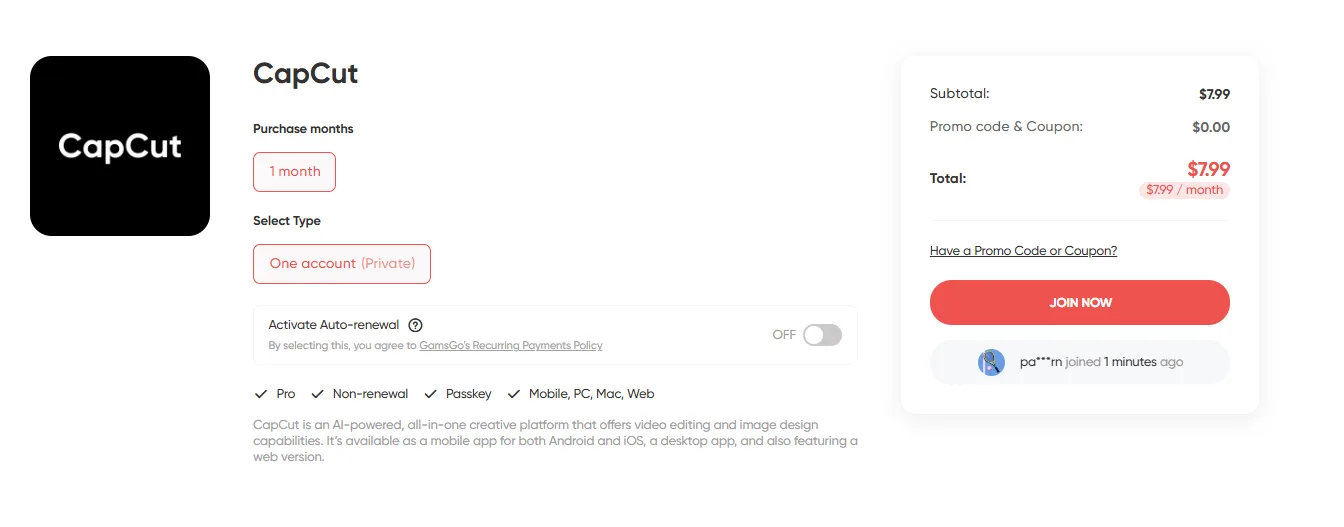
From my actual experience, the CapCut Pro accounts subscribed through GamsGo are functionally identical to the official Pro version: 4K export, complete AI toolkit, 1024GB cloud storage, all premium templates and effects. Every feature is included.
Price Comparison:
- CapCut Pro official monthly: $19.99/month
- CapCut Pro official annual: $179.99/year (approximately $15/month)
- Subscribe through GamsGo: approximately $8/month
Subscribing through GamsGo saves 60 to 65% in costs, which adds up to over $150 in savings per year.
Additionally, I was impressed with GamsGo's service experience. When I first purchased, I had quite a few questions, and customer service responded promptly and patiently. They also explained their service guarantee mechanism in detail, which gave me confidence in using their service.
CapCut vs Other Editing Platforms: Price Comparison
While testing various editing tools, I've done extensive comparisons across platforms. If you find that CapCut doesn't quite fit your workflow, there are several CapCut alternatives worth considering. I've compiled the pricing and key differences of these common editing software to help you better assess CapCut's value for money.
| Software | Pricing Model | Price | Platform Support | Key Features |
| CapCut Pro | Subscription | $19.99/month or $179.99/year | Windows, Mac, iOS, Android, Web | Short-form video optimized, rich AI tools, cloud collaboration |
| Adobe Premiere Pro | Subscription | $22.99/month (annual) or $34.49/month | Windows, Mac, iOS (basic version) | Industry standard, deep integration with Adobe ecosystem |
| Final Cut Pro | One-time purchase | $299 (one-time) | Mac, iPad | Mac ecosystem optimized, magnetic timeline, smooth rendering |
| DaVinci Resolve | Free + Paid | Free version feature-rich, Studio version $295 (one-time) | Windows, Mac, Linux | Professional color grading tools, free version meets most needs |
Price-wise, CapCut Pro's monthly fee ($19.99) is cheaper than Premiere Pro's ($22.99), and its annual fee ($179.99) works out to about $15 per month, which is also more affordable than Premiere Pro's annual plan. If you subscribe through GamsGo, the cost can drop to around $7/month, which is nearly one-third the price of other professional editing software.
However, CapCut's appeal isn't just about being "cheap." It's that the price matches a very specific use case. Its features and workflow are almost entirely designed around short-form video creation, eliminating numerous unnecessary steps in templates, captions, aspect ratio adaptation, and cross-device usage.
This means that for content production on TikTok, Reels, and Shorts, CapCut can often complete the same work in less time.
Of course, this doesn't mean CapCut suits everyone. If your primary needs are long-form videos, multi-camera editing, or cinema-grade post-production, Premiere Pro or DaVinci Resolve remain more appropriate choices.
But for creators focused on short-form videos who need to produce content at high frequency, CapCut Pro offers a more acceptable balance between price, efficiency, and flexibility.
Is CapCut Pro Worth Buying?
Ultimately, this depends on your creation frequency, quality requirements for finished videos, and how much you're willing to spend on a subscription. Based on the analysis of pricing, features, and hidden costs above, here are some simple criteria to quickly determine if CapCut Pro is right for you.
CapCut Pro is a reasonable choice in these situations:
- You need watermark-free exports for public release, client deliverables, or brand account management
- You publish videos frequently (for example, 3+ per week) and want to reduce production time per video through auto captions, templates, and AI tools
- You have clear quality requirements and need 4K export for YouTube, horizontal content, or commercial use
- Your main creation focus is short-form video platforms (TikTok, Reels, Shorts, etc.) rather than cinema-grade long-form post-production
- You want to control upfront costs and avoid purchasing expensive professional software outright or being locked into long-term, high-priced subscriptions
Under these conditions, the features CapCut Pro provides match its price. If you can further reduce the monthly cost through GamsGo, its value for money becomes even more compelling.
Not upgrading to Pro is perfectly reasonable in these situations:
- You edit infrequently, mainly for personal use or non-commercial content
- You can accept watermarks and 1080p export, with no high demands on output specifications
- You don't rely on auto captions, background removal, or template-based workflows
- You mainly produce long-form videos, complex multi-camera content, or cinema-grade projects, which are better suited to other professional editing software
If you're still unsure whether CapCut Pro is worth paying for, my advice is to first use the CapCut Pro free trial for 7 days to experience the full features and confirm the value these tools bring to your actual workflow.
If you find it necessary for long-term use after the trial, you can subscribe through GamsGo to keep monthly costs around $8, which both reduces trial-and-error costs and is more suitable for long-term use.
Conclusion
Overall, while CapCut Pro's subscription fee has increased after the recent price adjustment, the accompanying AI feature upgrades, expanded premium template library, and smoother workflow experience have genuinely enhanced its paid value. For short-form video creators, it remains a solid value-for-money option.
If you decide to subscribe to the Pro version, I recommend purchasing through the GamsGo platform, which typically saves about 70% compared to official channels with identical functionality. The platform's customer support is also excellent, so even if you encounter issues, they can be resolved quickly.
We've also prepared a special little gift for you:
We’ve prepared an exclusive promo code for all blog readers:
Enjoy an additional 3% off on your next purchase!
Valid across all categories — streaming accounts, AI tools, game top-ups, software subscriptions, and more.
FAQ
Is CapCut Still Free?
Yes, CapCut's free version includes core editing tools, basic transitions, effects, and plenty of templates for everyday video creation. Advanced features like 4K export, AI auto captions, and the premium asset library require upgrading to Pro at $19.99/month or $179.99/year.
What Is the Difference Between Capcut Pro and Basic?
CapCut offers three plans: free (basic editing), Standard ($9.99/month, removes watermarks and unlocks some assets), and Pro ($19.99/month, with 4K export, full premium library, AI tools like auto captions and background removal, plus professional features).
Is Capcut Worth It Without Pro?
Absolutely. The free version provides comprehensive editing tools, including multi-track editing, transitions, effects, filters, and templates, which are enough for high-quality short-form videos. It's more than sufficient for casual creators, beginners, or occasional users.
Are There Discounts for Students or Educational Institutions Subscribing to Capcut?
CapCut has a few education offers, like its Creative Campus program that gives free Pro to students at partner universities in select countries, but there's no student price open to everyone. If you're not covered, GamsGo gets you the same Pro features for less, saving up to 70% compared to official channels.
Does Capcut Have a Lifetime Purchase Option?
Currently, no. CapCut uses a pure subscription model and does not offer a one-time purchase license. Once you stop paying, you'll lose access to Pro features, but videos you previously created with Pro features won't be affected. If you plan to use it long-term, the annual subscription is recommended for a better monthly rate.
Related Articles: