
On November 18, 2025, Google officially launched Gemini 3.
While the tech world was flooded with benchmarks and specifications, as an everyday user, you might still struggle to grasp what these numbers actually mean for you.
After two weeks of intensive testing and reading through tens of thousands of real user reviews on Reddit and X, here's what I discovered: Gemini 3 isn't a chatbot waiting for commands anymore. It understands what you want, plans ahead, carries out tasks on its own, and creates custom interfaces on the fly. It's more like an operating system than a conversation tool.
In this article, I'll walk you through everything new in Gemini 3 and break down exactly how these changes affect the way we work and live.

What is Google Gemini 3?
Simply put, Google Gemini 3 is Google's third-generation universal AI system, marking the first truly comprehensive upgrade since Gemini 1.5 and 2.5. Its goal has evolved beyond just answering questions to becoming an "intelligent agent" that understands intent, plans steps, and executes tasks independently.
You'll see these changes across the Gemini App, Workspace, Android, Chrome, as well as Google AI Studio, Vertex AI, Cursor, JetBrains, and other tools. This wide reach makes the upgrade particularly noticeable.
Within this generation, Gemini 3 Pro is the core version for everyday users and developers, serving as the foundation for all new capabilities. Google calls it “the most intelligent model to date.”
It leads in tough benchmarks like Humanity's Last Exam, GPQA Diamond, and MathArena Apex, while delivering practical improvements in key areas: generating code that runs right out of the box, understanding text, images, screenshots, and documents simultaneously, and maintaining stable reasoning chains across multi-step tasks.
It's not just smarter. It's more reliable and capable of handling complex, extended real-world workflows.
What Are the Core Features in Gemini 3?
Compared to the previous generation, Gemini 3's improvements go far beyond specs and benchmark scores. On its developer page, Google explains that Gemini 3 offers "extended context, multimodal input, and action capabilities that let users work more efficiently across new types of tasks."
To understand this, let's look at the key abilities it has strengthened in this update:
PhD-Level Reasoning Ability
The leap in Gemini 3's thinking capability comes from its most fundamental structural upgrade: Deep Think mode.
It works like the "slow thinking" humans do when facing complex problems. Instead of jumping to a quick answer, it breaks down the problem, builds logical chains, and tests assumptions. The result is reasoning that approaches PhD-level quality.
This shift shows up clearly across multiple challenging benchmarks:
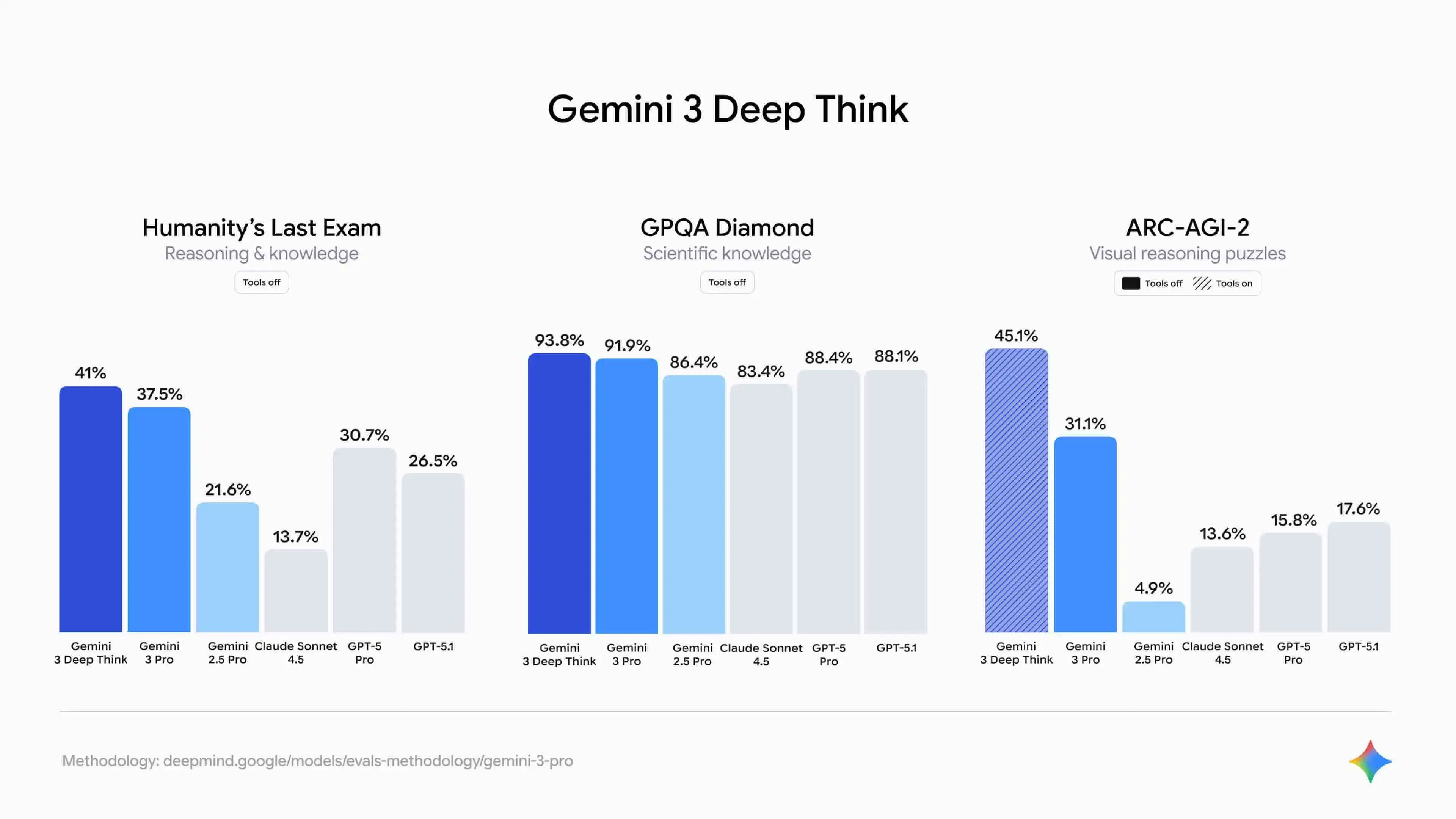
On the challenging Humanity's Last Exam, Gemini 3 Deep Think scored 41.0%, beating GPT-5.1 by over 11 percentage points. Add its 93.8% on GPQA Diamond and record-breaking 40%+ on ARC-AGI-2, and the pattern is clear: Gemini 3 isn't memorizing answers. It's thinking through problems.
Because this reasoning ability is real and verifiable, it's far more valuable in practice. When researchers tackle highly complex physics challenges like tokamak plasma flow or need to derive new mathematical formulas, they no longer have to worry about the model making wild guesses. Gemini 3 provides clear reasoning steps, analyzing problems like a true expert would.
Even more important, Gemini 3 has overcome the "people-pleasing tendency" of traditional models. It won't agree with flawed logic just to satisfy the user. This "refusal to blindly follow" trait makes it effective as a "red team" for business leaders.
When reviewing corporate strategies, it can spot weaknesses based on logic and offer genuinely insightful second opinions.
Automated Coding and Building Capability
Gemini 3's leap in programming agent ability marks a shift from "generating code" to "building products independently." The biggest change comes from introducing Vibe Coding and integrating with Google's Antigravity platform, fundamentally redefining AI's role throughout the software development process.
The core of Vibe Coding is letting AI understand both functional structure and interface aesthetics. Previous models handled algorithms and backend logic well, but often lacked judgment on frontend, layout, and visual aspects. Developers still spent considerable time fixing UI and interactions.
Gemini 3 now understands visual aesthetics and interface semantics, generating clickable frontend prototypes directly from requirements. Whether it's a "retro-style 3D spaceship game" or a "clean wireframe layout," it produces interfaces with complete visual effects and complex components. As Replit's president put it, it's like a “skilled UI designer.”
This change isn't just about experience. It shows up in the data too:
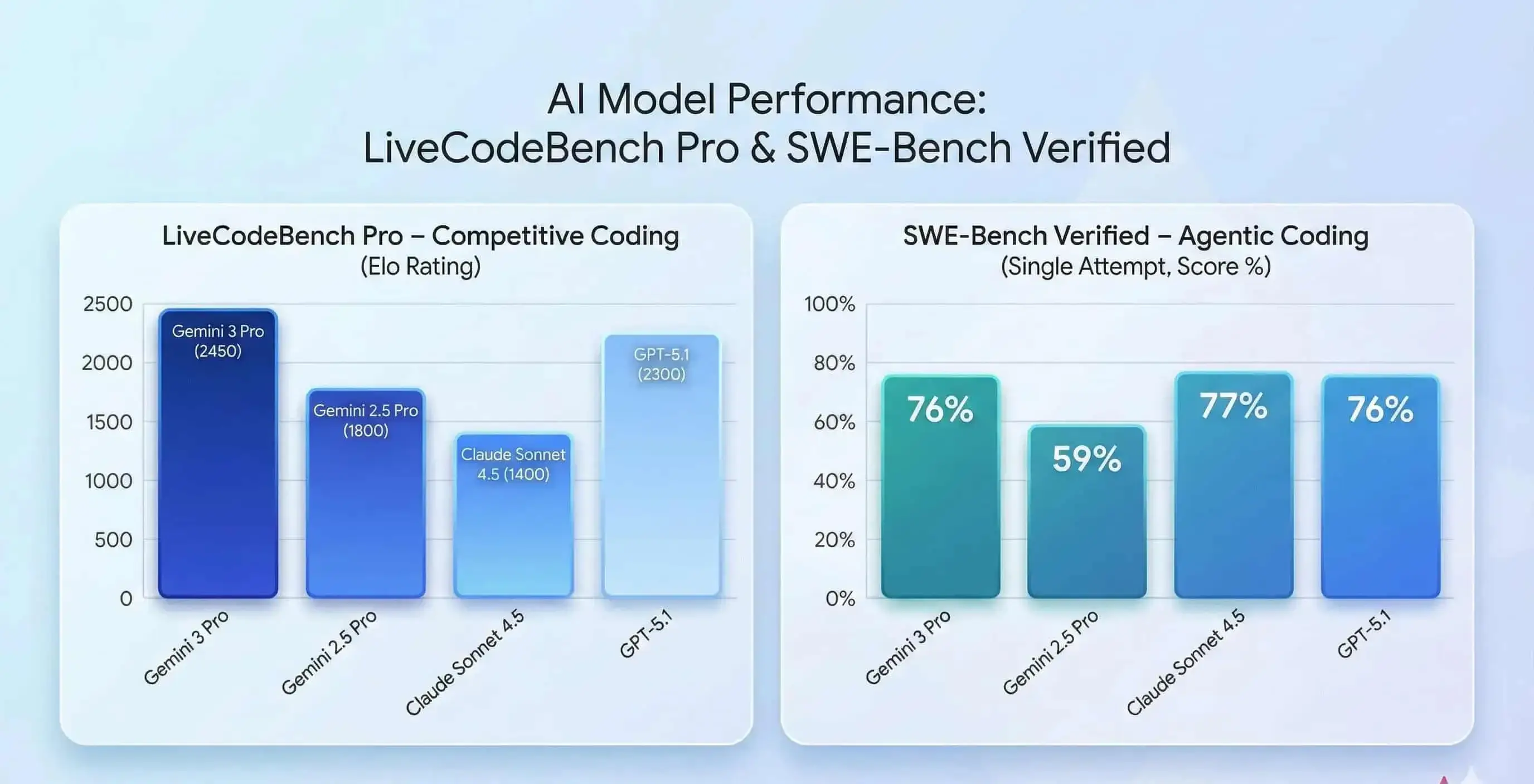
Gemini 3 scored 2,439 Elo on LiveCodeBench Pro, surpassing GPT-5.1 and up 37% from the prior generation. On SWE-bench Verified, it achieved 76.2%, far above Gemini 2.5 Pro's 59.6%, showing major gains in code quality and problem-solving.
More importantly, Google Antigravity provides a complete working environment—not just a chat window. Gemini 3 autonomously accesses the editor, terminal, and browser to write, run, diagnose, and fix code, creating a full loop from generation to verification.
What once required manual copying of errors and back-and-forth now happens automatically. As one Cline user noted:
Gemini 3 has changed the game. We use it for complex, long-term coding tasks that require a deep understanding of the entire codebase.
Native Multimodal Unified Understanding
Many models claim to be multimodal but are actually "stitched together" (using one model to recognize images, converting them to text, then passing that to a large model for analysis). Gemini 3 is different. Built from the ground up, it's a truly unified multimodal analysis model.
It can simultaneously understand text, images, video, audio, and code within a single task, building coherent logical connections across these data types.
For example, it can combine device operational data with factory surveillance footage: when logs show anomalies, it can determine whether the issue stems from a blocked robotic arm, loose parts, or other visual factors, achieving genuine cross-modal understanding.
This capability directly solves the longstanding enterprise challenge of "unusable unstructured data," effectively handling complex information like PDF documents, meeting transcripts, email content, and video materials.
In Box's internal testing, Gemini 3 Pro's performance on complex multi-step reasoning tasks jumped from 64% with Gemini 2.5 Pro to 83%, a 19 percentage point improvement. In specialized domains, the results were even more dramatic:
- Healthcare and life sciences: accuracy soared from 45% to 94%
- Media and entertainment: accuracy rose from 47% to 92%
- Financial services: accuracy climbed from 51% to 60%
This means enterprises can now complete previously difficult tasks with high confidence, such as reviewing hundreds of vendor contracts at once, extracting key fields from thousands of invoices, or consolidating multiple research and marketing materials in a single query. This brings major efficiency gains to legal, finance, and R&D teams.
Stability in Long-Task Execution
Google specifically highlighted Gemini 3's leap in planning ability, essentially addressing how traditional models tend to "lose focus," drift off topic, or peter out during long tasks.
In real use, our interactions with AI are rarely one-off exchanges. They're extended tasks lasting dozens of minutes or longer, like writing an annual performance review or repeatedly refining a project proposal.
Traditional models often perform well early on, but as the conversation continues, they forget earlier constraints, produce inconsistent logic, duplicate work, or drift completely off target.
Gemini 3 introduces a more stable "internal chain of thought" and a 1M token context planning mechanism. Deep Think mode reserves more internal computing resources to complete multi-step reasoning and task breakdown internally before providing an external response.
This maintains the same planning thread throughout longer interactions, reducing the randomness of “going wherever the thought takes it.”
Vending-Bench 2 testing shows that Gemini 3 maintained decision consistency throughout simulating "a full year" of vending machine operations. It didn't forget early constraints just because the task chain grew too long.
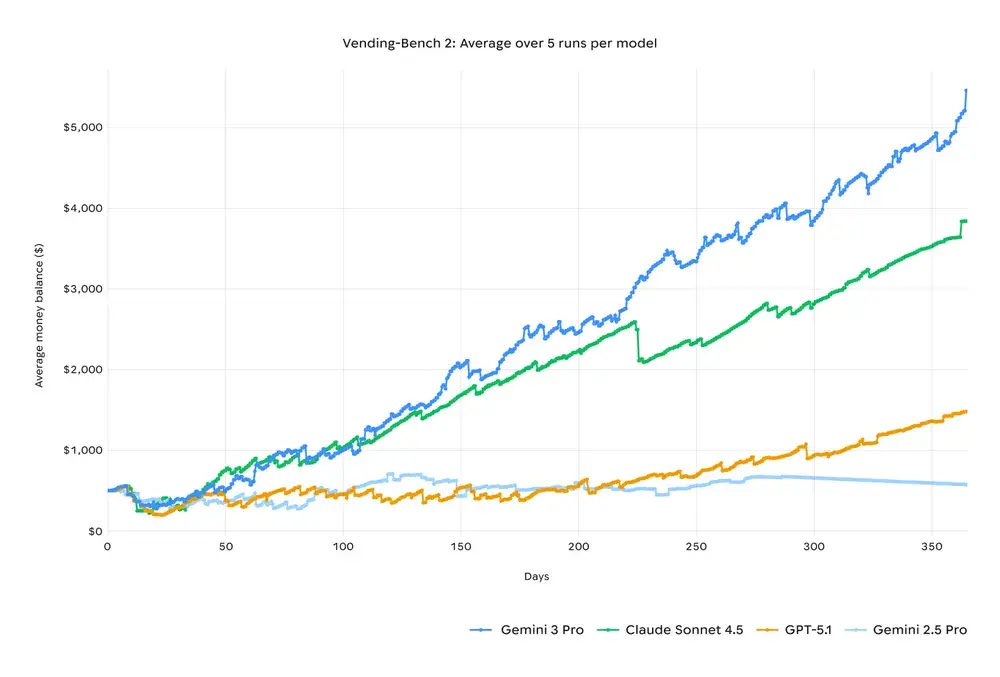
This combination of long-task execution and stable reasoning chains gives Gemini stronger practical potential in complex project management, long-term simulation, and automated operational decision-making scenarios.
Gemini 3 Pro Application Examples
Since Gemini 2.5 Pro introduced its 1 million token context window, it's become essential to my daily work. So when Gemini 3 launched, I immediately wondered: with that same powerful context capability as the foundation, how much of a difference would Deep Think mode and multimodal understanding actually make?
Over the past two weeks, I've put it through various real-world tasks. Here are some of the most impressive tests:
Turning Your Prompts Into Interactive Apps
The traditional AI conversation pattern is simple: you ask a question, it gives you text. But Gemini 3 changes this completely.
During testing, I asked a common question:
"Explain how a volcano erupts and what's happening inside the volcano during each stage"
I expected a few paragraphs of explanation, maybe with some bullet points.
What it actually did: generated a complete interface with a volcano cross-section diagram and interactive stage-by-stage steps. I could tap different areas and get corresponding explanations. It completely transformed the traditional LLM Q&A format.
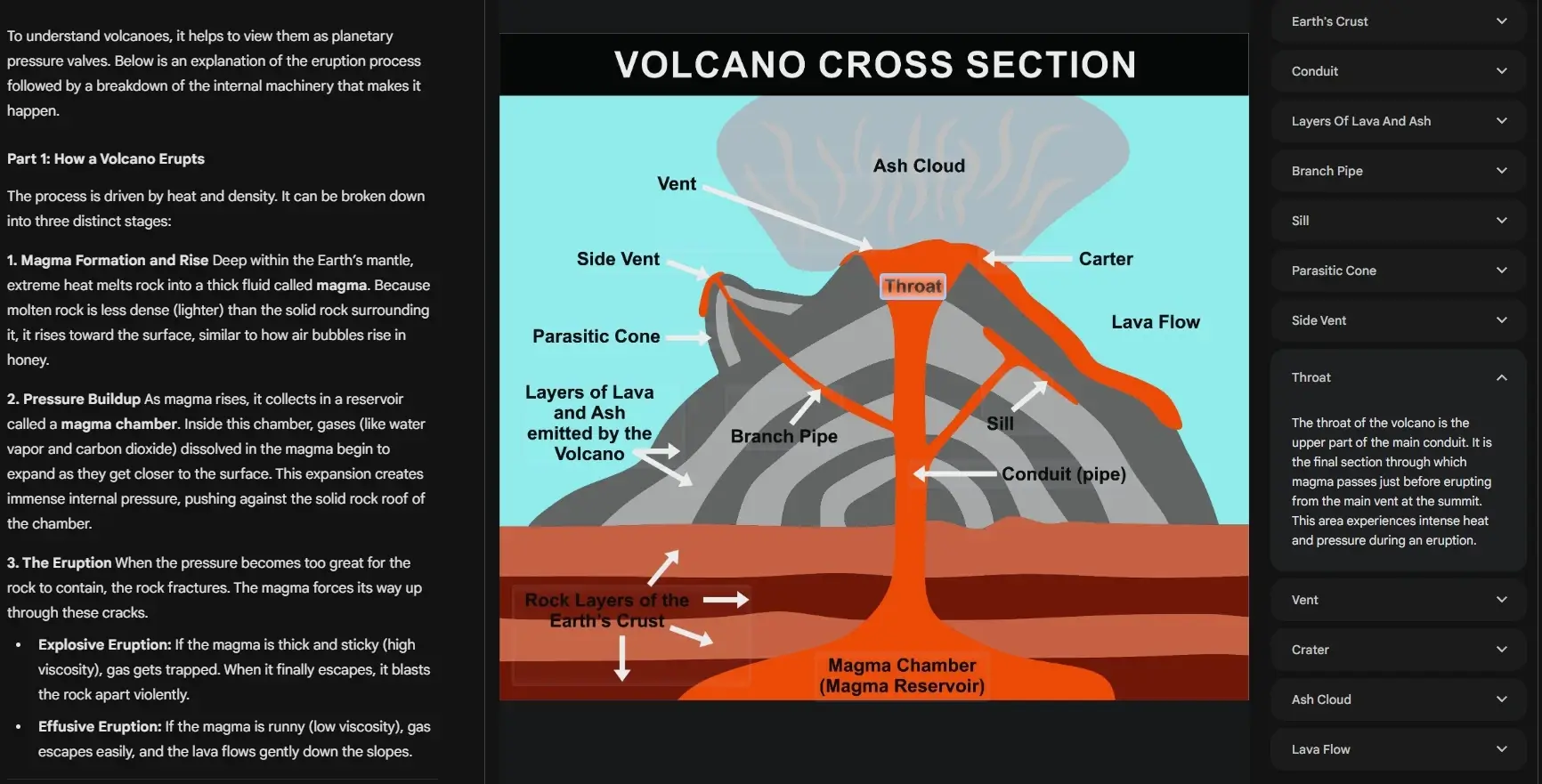
This is Gemini 3's Generative UI capability. It doesn't pick from a set of premade templates. It generates dynamically at runtime. For the first time, an LLM truly "writes the interface and builds the tool on the spot." You ask a question, and it not only gives you an answer but creates a custom mini-app tailored to that specific question.
💡 What you can use it for: This capability transforms many scenarios that used to require "reading to understand" into "direct hands-on experience."
For instance, when explaining the solar system to a child, it generates an interactive model of the galaxy. When a student uploads a biology diagram or a physics process, Gemini 3 turns it into an interactive visualization they can explore step by step.
It can become one of the best AI tools for students who prefer learning through visuals rather than long explanations.
Stronger Agentic Capability
After understanding the theoretical improvements in automated coding, I wanted to actually test it: can it really turn an idea into a working program?
I gave it a very simple prompt:
"Make a 2D mini-game where the player controls a paddle to catch a falling ball."
That's it. One sentence. I didn't specify what tech stack to use or what visual style I wanted.
A few minutes later, I had a fully playable game:
- ✅ Paddle moves left and right
- ✅ Ball accelerates as it falls
- ✅ Scoring system included
- ✅ Game over notification added
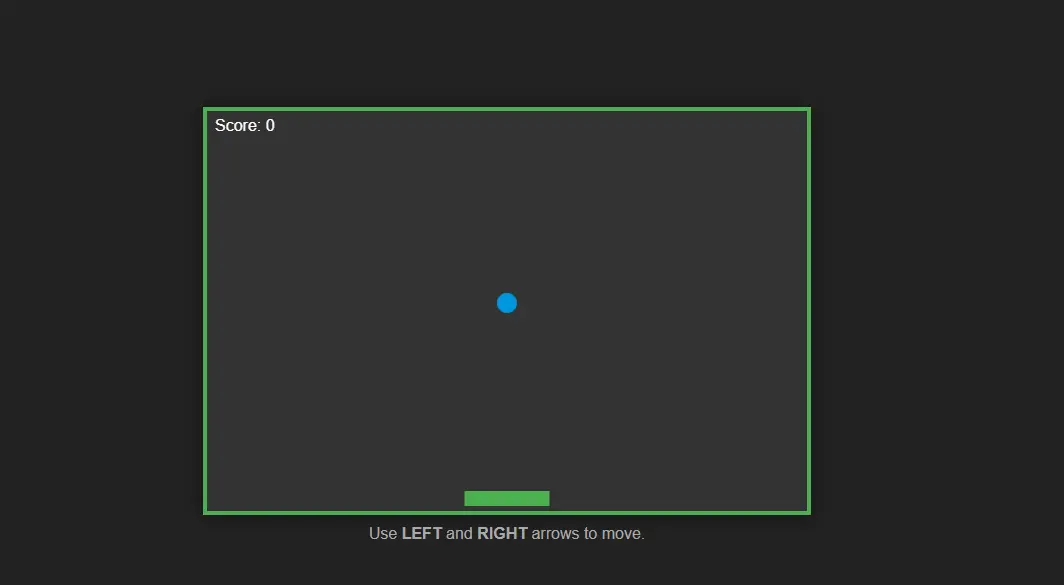
This is Gemini 3's agentic capability. It doesn't wait for me to give step-by-step instructions. Instead, it understands my intent and automatically breaks down the task (write code → create project structure → run tests → fix errors), completing each step until it determines the task is done.
💡 What you can use it for: This capability shrinks the distance from "idea to finished product" to just minutes.
A coding newbie who wants a budget calculator can simply describe the function and get a working tool. When developers need to add features to existing projects, it reads the codebase and generates code that matches the team's style. When you want to test a product idea, you can have a demonstrable prototype the same day.
Multimodal Understanding: From Recognition to Creation
Gemini has emphasized multimodal capability since its first generation, but in Gemini 3, this ability becomes truly practical for the first time. It doesn't just recognize content; it makes clear judgments, plans, and creates based on different types of information.
I uploaded a floor plan image and gave this prompt:
"Based on the rooms, door positions, and spatial layout in the image, create a mini-game for me."
What it did:
- Identified the floor plan structure (location of bedroom, living room, kitchen)
- Understood spatial relationships (which rooms connect to each other)
- Converted these elements into a game scene
- Generated a playable "indoor chase" mini-project
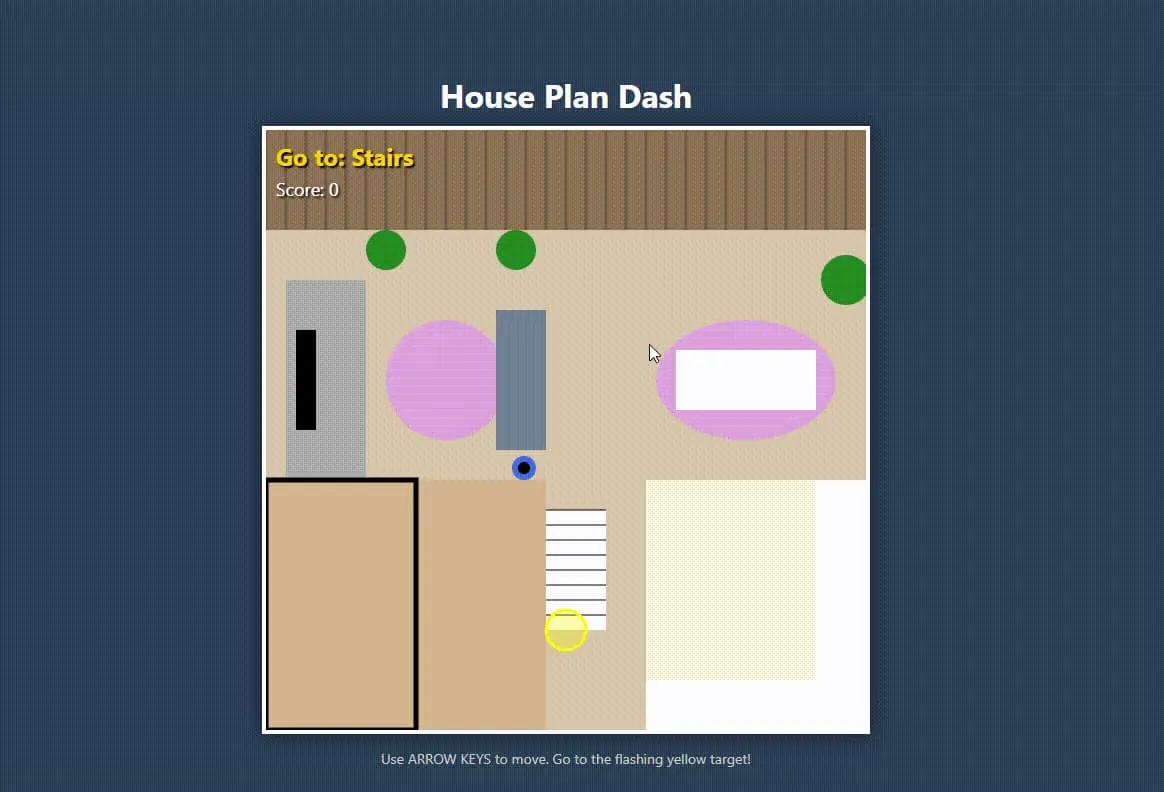
This shows that Gemini 3's multimodal capability no longer stops at "telling you what's in an image or video." It treats visual and audio as directly usable materials for creating content, designing logic, and generating code, truly participating in task completion.
💡 What you can use it for: This capability turns visual information into directly usable creative material.
Designers can upload floor plans and get 3D visualizations or furniture placement suggestions. Upload a sports video, and it will pinpoint exactly which second has a problematic movement. Even upload security footage and ask "where's the anomaly," and it will locate it precisely and explain why.
These tests represent just part of what Gemini 3 Pro can do. From my two weeks of hands-on experience, its greatest value isn't how strong any single feature is, but that it truly starts acting like an "assistant that can complete tasks independently." You describe what you need, and it plans, executes, and delivers results.
Whether you're quickly validating a product idea, analyzing complex business decisions, or handling problems across multiple data sources, Gemini 3 can genuinely save time and boost efficiency in real work. This shift from "conversational tool" to "work partner" is what makes it worth paying attention to.
Gemini 3 Pro vs. ChatGPT-5.1 vs. Claude Sonnet 4.5
With several major releases arriving at once, users are understandably comparing the best AI chatbots across their core capabilities. The table below summarizes the most talked-about dimensions to clarify each model’s technical strengths:
| Dimension | 🟦 Gemini 3 Pro | 🟥 ChatGPT-5.1 | 🟩 Claude Sonnet 4.5 |
| Reasoning depth | Deep Think strong reasoning; most stable on math/science problems. | Reasoning solid, but struggles with extremely long chains compared to Gemini. | Strong structured logic, general reasoning slightly weaker. |
| Multimodal | End-to-end pixel/audio processing; strongest at long videos (1h+) with millisecond precision. | Long video precision insufficient. | Limited video capability. |
| Creative writing | Accurate but stiff tone. | Most flexible and natural style. | Steady tone, suitable for business/emails. |
| Context memory | 1M–2M | 128k–256k | 200k; stable but less capacity than Gemini. |
| Code/Agent | End-to-end automated execution, deeply integrated with Antigravity. | High code quality, but more instruction-driven. | Clear debugging, average at large project modifications. |
| Ecosystem integration | Deeply integrated with Google Workspace + Antigravity + Vertex. | Relies on plugins. | Almost no ecosystem integration. |
Overall, Gemini 3 Pro has strong advantages in multimodal, long context, and automated execution. ChatGPT-5.1 continues to lead in creative generation. Claude Sonnet 4.5 excels at structured logic.
But it's important to emphasize that differences in model capabilities don't equal "absolute superiority." Different tasks, use cases, and workflows demand very different things from models.
This update is more about each model improving in its own direction rather than competing on the same dimension. The right choice usually depends on specific user needs, not a single metric.
How to Access Gemini 3 and How Much It Costs?
Gemini 3 Pro is now available through multiple channels, covering individual users, developers, and enterprises. Different user types can choose the appropriate access method and subscription plan based on their needs:
Individual Users
Individual users can access Gemini 3 directly through the Gemini app. After enabling Gemini mode, you can use text, multimodal processing, and search-enhanced capabilities powered by Gemini 3. Gemini 3 is also integrated into Google Search's AI mode, with some explanation interfaces already supported by it.
For the full Gemini 3 Pro experience, you can subscribe to one of two tiers:
- Google AI Pro ($19.99/month): Provides complete access to Gemini 3 Pro, including Deep Think mode, roughly 1 million token context, multimodal processing, and deep integration with Gmail, Docs, Drive, and Sheets, creating a unified personal AI work environment.
- Google AI Ultra ($249.99/month): Builds on Pro with increased model limits and unlocks Project Mariner browser agent, Veo 3 1080p video generation, 30TB cloud storage, and YouTube Premium, suited for heavy creative workloads and multi-task development.
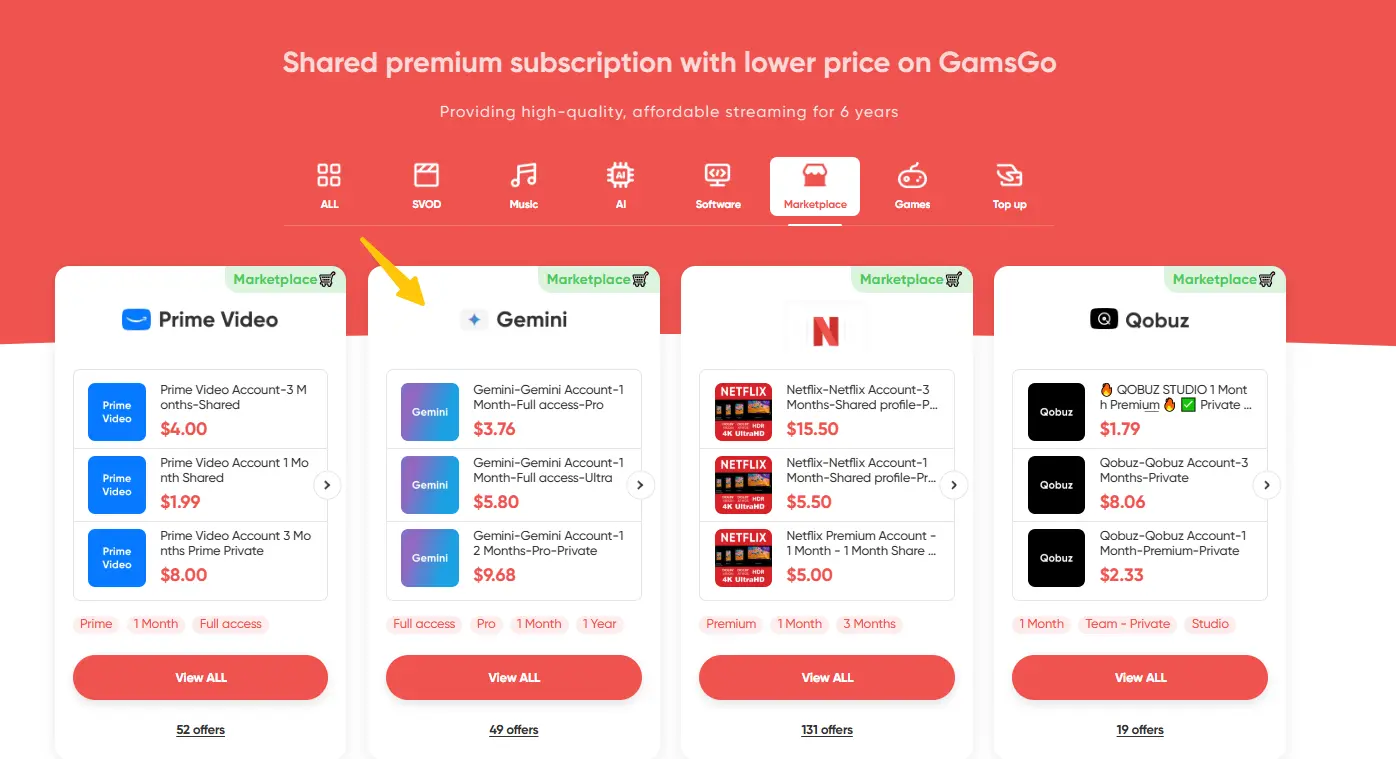
Both subscriptions are also available at a lower cost through GamsGo. GamsGo offers Gemini Pro accounts at roughly 30% of the standard price, supports flexible subscription periods, and provides verified accounts with around-the-clock support, ideal for users wanting to experience full Gemini 3 Pro more affordably.
Developers
Developers can use Gemini 3 Pro to build applications, agents, or multimodal systems through these platforms:
- Google AI Studio
- Vertex AI
- Gemini CLI
Additionally, Google's Antigravity platform provides an executable environment where the model can directly operate the editor, terminal, and browser for end-to-end task execution. Gemini 3 Pro is also integrated into Cursor, JetBrains, VS Code extensions, Replit, and other development tools, fitting directly into existing workflows.
API pricing (Gemini 3 Pro):
- Standard context (≤ 200K tokens): Input $2 per million tokens; Output $12 per million tokens
- Long context (> 200K tokens): Input $4 per million tokens; Output $18 per million tokens
- Multimodal billing: Image input and generation use separate pricing (for example, typical costs for a 1024×1024 image are roughly $0.0011 for input and $0.134 for generation)
- Free testing: The Preview phase offers a free quota in AI Studio, with official billing expected between December 2025 and Q1 2026
Enterprise Users
Enterprises can deploy Gemini 3 through Vertex AI and subscribe to Gemini for Workspace as needed to enable team-level AI functionality in Docs, Sheets, Drive, Gmail, and other collaboration apps. Enterprise plans provide unified management, permission controls, audit features, and stricter compliance configurations.
Enterprise pricing:
- Vertex AI enterprise plan: Offers volume discounts, dedicated support, SLA guarantees, and private deployment options. Specific pricing requires contacting the Google Cloud sales team for custom quotes.
- Workspace integration: Gemini for Workspace add-on, with some plan prices having increased roughly 17%, depending on enterprise scale and requirements.
Conclusion
Gemini 3 shows clear improvements in reasoning, multimodal understanding, and long-task execution. Its coding capabilities are also more mature, handling more complete workflows. These upgrades make the model more practical and reliable across creative, analytical, and development scenarios.
If you plan to use Gemini 3 Pro long term, pricing doesn't have to be a concern. Through GamsGo, you can access the same premium features at roughly 30% of the standard cost, making it easier to integrate this model into your daily work or study without compromising quality.
We've also prepared a little bonus for you 👇
We’ve prepared an exclusive promo code for all blog readers:
Enjoy an additional 3% off on your next purchase!
Valid across all categories — streaming accounts, AI tools, game top-ups, software subscriptions, and more.
FAQ About Gemini 3
Is Gemini 3 Free?
Gemini 3 offers limited free access. Individual users can use basic features through the Gemini app, but the full experience requires subscribing to Google AI Pro ($19.99/month) or Ultra ($249.99/month). Developers can get free quota during the AI Studio Preview phase, with official billing expected to start between late 2025 and early 2026.
Is Gemini Better Than ChatGPT?
Each model has its strengths. In the Gemini vs ChatGPT comparison, Gemini 3 excels in multimodal tasks, long-context work, and automated execution, making it ideal for long videos, complex code, and enterprise documents. GPT-5.1 still leads in creative writing and tone flexibility. The best choice depends on your needs.
Is a Gemini AI Subscription Worth It?
Use Gemini Pro if you regularly process large documents or videos, automate coding, or rely on deep Workspace integration—its Deep Think, 1M-token context, and agent features speed up real work. For occasional simple questions, the free tier is enough.
Related Articles:


%20vs%20ChatGPT%401x-5d2bedb1-6884-4049-b3c3-7ce664d834f4.webp)