Keep the Door Locked is a Roblox survival horror game set in a hotel after midnight. Just three months after launch, it had already attracted nearly 49 million visits and more than 10,000 concurrent players.
Redeem codes can provide Cash, skins, Revive Tokens, and Jumpscare Tokens, helping you spend less time collecting resources early on. This guide lists every working and expired code, explains how to redeem them, and covers the most common reasons a code may fail.
If free rewards are not enough for the items and features you want, you can get cheap Robux on GamsGo and add more resources to your account at a lower cost.
All Working Keep the Door Locked Codes
The Keep the Door Locked codes below are the latest Roblox codes worth trying for October 2026. Codes are case-sensitive, and some rewards may only work on updated or fresh servers, so copy each code exactly and rejoin a new server if a code fails.
| Code | Rewards | Status |
|---|---|---|
Cash | 10,000 Cash | Try First |
HideCloset | 10,000 Cash | New |
TheMaze | 10,000 Cash | New |
NewVA! | Cash reward | Recent |
Wawa | 10,000 Cash | Recent |
Moth | Cash or furniture skin reward | Recent |
FREESKIN | Furniture skin reward | Worth Trying |
ROOMCUSTOM | Cash reward | Worth Trying |
ENDING5 | 10,000 Cash | Worth Trying |
NEWUISOON | 10,000 Cash + 1 Jumpscare Token | Worth Trying |
Redeem Cash, HideCloset, and TheMaze first, then try the remaining update and room-customization codes. If a code does not work, check the spelling and punctuation, join a new server, and try again.
Expired Keep the Door Locked Codes
The following 10 Keep the Door Locked codes have expired and no longer provide rewards. Expand the list below if you need to check an older code.
How to Redeem Codes in Keep the Door Locked
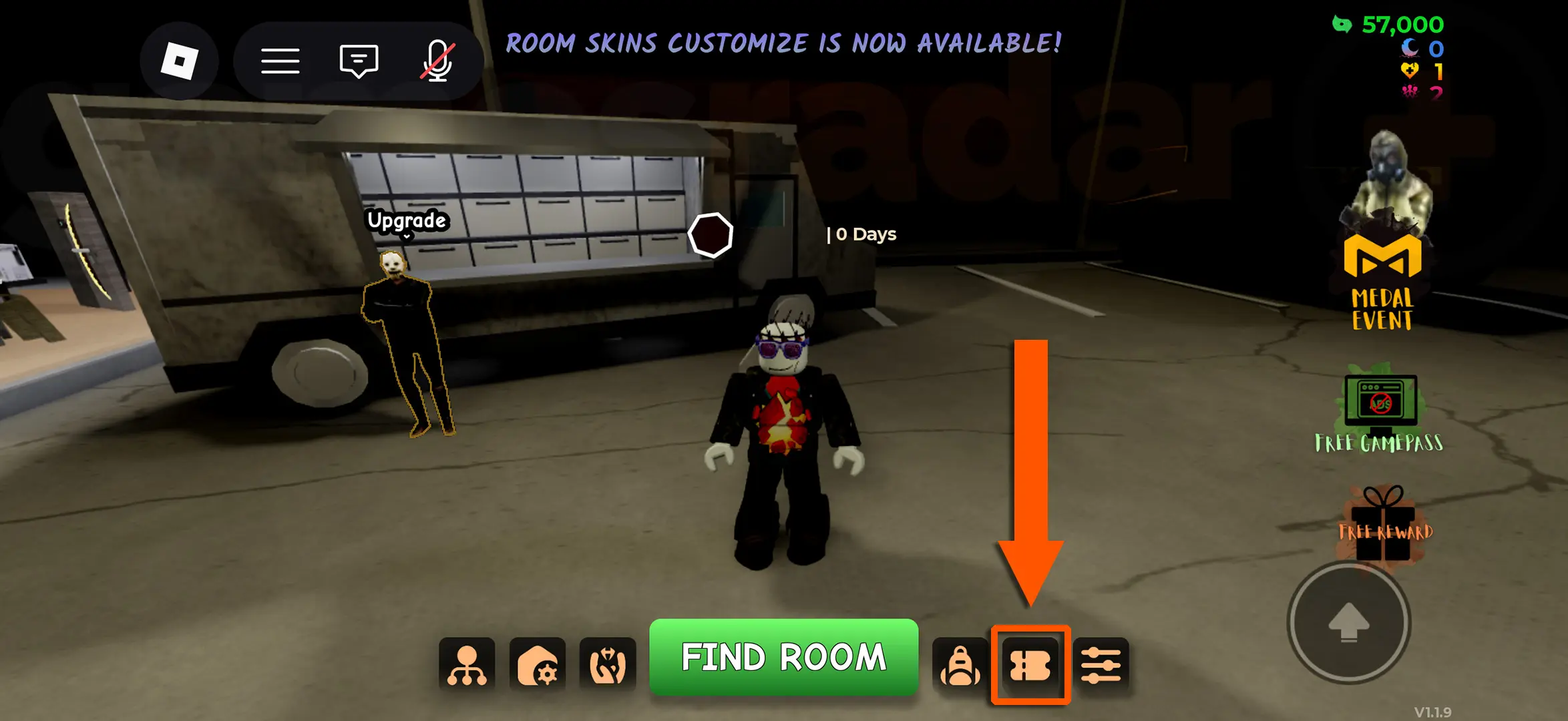
Keep the Door Locked has no level requirement for code redemption. Once your hotel room loads, open the code menu on the left side of the screen and follow these steps to claim your rewards:
- Launch Keep the Door Locked on Roblox and wait for your hotel room to finish loading.
- Click the CODE button on the left side of the screen to open the redemption window.
- Paste a working code into the ENTER CODE field.
- Click REDEEM CODE and confirm that the reward has been added to your account.
Codes are case-sensitive, so keep all punctuation, including exclamation marks. Some new codes only work on new servers; if redemption fails, switch servers and try again.
Why Are My Keep the Door Locked Codes Not Working?
Redemption failures are usually related to a code's status, its input format, or the server version. Check the following common causes in order:
- The code has expired: Limited-time codes may be disabled after an update. A code can still appear in an older guide even though it no longer works.
- The code was entered incorrectly: Codes may be case-sensitive, and an extra space or missing exclamation mark can cause validation to fail.
- The code has already been used: Each code can usually be redeemed only once per Roblox account, so entering it again will not provide another reward.
- The server has not updated: A new code may only work on updated servers, while an older server may show it as invalid or fail to recognize it.
Copy codes directly from the table and remove any extra spaces before or after them. If a code still does not work, leave the game, join a new server, and try again.
How to Get More Keep the Door Locked Codes
New Keep the Door Locked codes are usually released with game updates, visit milestones, bug compensation, or community events. Use the following sources to avoid missing them:
- Bookmark this guide: The code list will be updated when new rewards are found, giving you one place to check all working codes.
- Join the official Roblox group: The developers may announce updates and rewards through group posts.
- Follow the official Discord server: Check the announcements, update logs, and code channels first.
- Check the Roblox game page: Its description and update notes may include limited-time codes and event announcements.
New codes may remain active for only a short time. Redeem them as soon as you find them, making sure every letter, number, and special character is correct.
Want to upgrade your favorite games for less? GamsGo offers game top-ups with savings of up to 30% across popular RPGs, shooters, strategy games, and mobile titles. You can also find lower-priced premium game accounts, including high-level accounts, rare skins, powerful characters, and ready-to-play setups.
Whether you need currency for your next pull, a battle pass, a skin bundle, or a stronger account for a faster start, GamsGo provides lower prices, secure payment, and after-sales support when you need it.
What Is Keep the Door Locked?
Keep the Door Locked is a Roblox survival horror game developed by Hotel Room Services and released on May 28, 2026. As of September 3, it had approximately 51.9 million visits and a 91% approval rating.
The game takes place in a hotel after midnight. Players must monitor security cameras, check visitors for signs of anomalies, and decide whether to open the door. One wrong judgment can trigger danger or change the ending.
Get Robux Cheap on GamsGo
The Cash, Tokens, and skins available from redeem codes are limited, and they cannot replace Robux when purchasing game passes or paid content. If you need more resources, you can top up Robux through GamsGo.
Compared with buying directly at the standard official price, GamsGo offers more competitive Robux prices and multiple top-up options, making it easier to choose a package that fits your budget and reduce your gaming costs.
FAQ
When Will New Keep the Door Locked Codes Be Released?
New codes do not follow a fixed release schedule. They usually arrive with game updates, visit milestones, or special events, and are generally announced first on the official Hotel Room Services Discord server.
Can You Redeem a Keep the Door Locked Code More Than Once?
No. Each code can usually be redeemed only once per Roblox account. After a successful redemption, rejoining the game will not allow the same account to claim the reward again.
What Are Cash, Revive Tokens and Jumpscare Tokens Used For?
Cash is used to purchase upgrades and survival tools such as the Pocket Camera and Remote Breaker. A Revive Token lets you continue after a failed run. Jumpscare Tokens are special rewards from certain codes, but the developers have not published a complete explanation of their purpose.
Does Keep the Door Locked Have a Trello or Wiki?
As of September 2026, no official Trello board or wiki has been confirmed by Hotel Room Services. Existing wikis are community-made resources that may be useful for reference, but their content is not official.
Related Articles