If you cannot install or open Brawl Stars normally at school, work, or on a restricted device, Brawl Stars Unblocked offers another way to play.
It is not a separate version of the game. Instead, it usually means running Brawl Stars through a browser, Cloud Gaming service, or another supported method.This can give players another way to access Brawl Stars on devices where direct installation is unavailable.
If you are already in the game and need Gems or a Brawl Pass, you can compare available packages and prices on GamsGo brawl stars top up.
How To Use Brawl Stars Unblocked
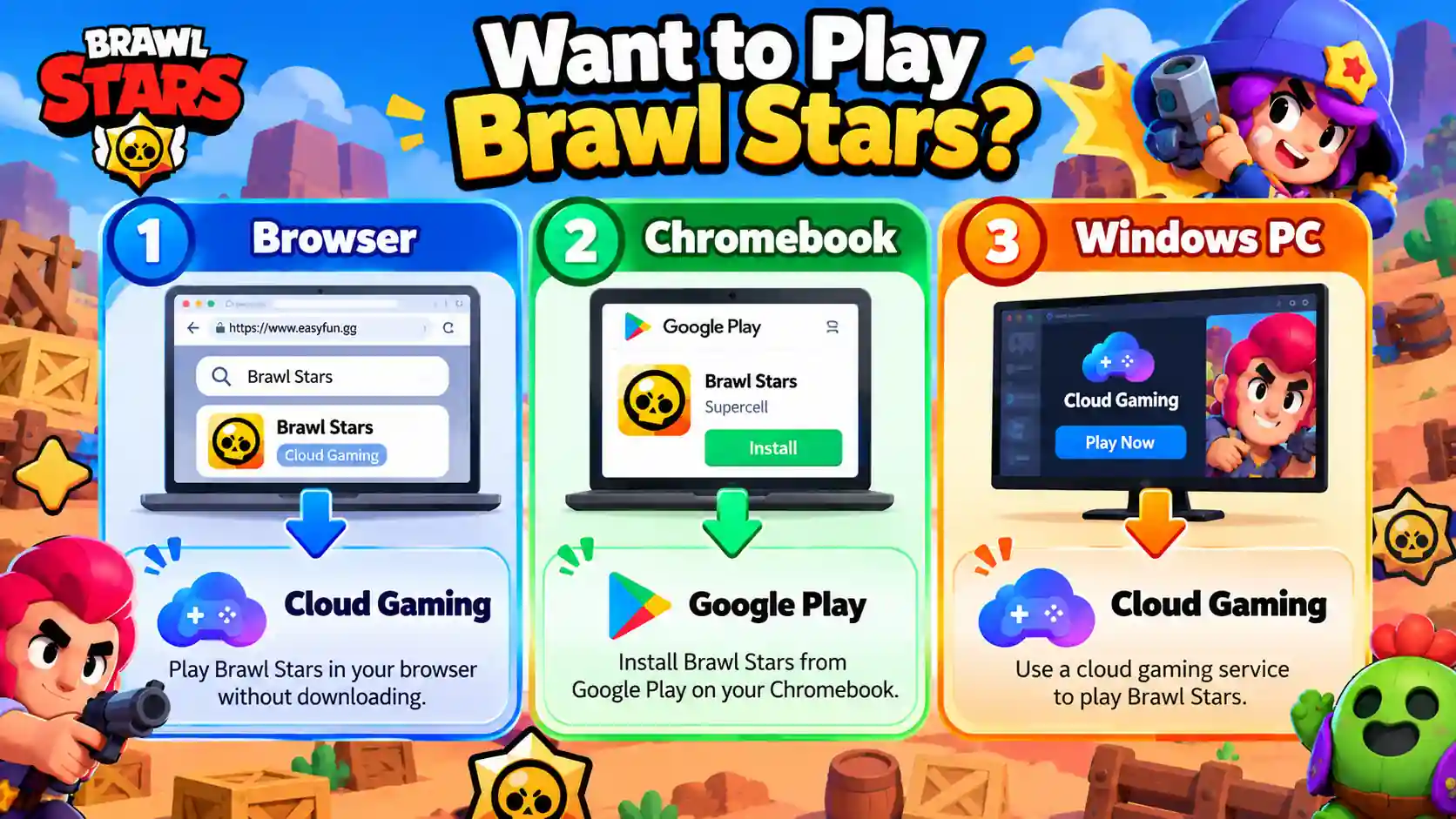
There are three practical options: browser-based Cloud Gaming, official installation on a Chromebook, and other supported methods for regular computers.
| Device Situation | Recommended Method | Download Brawl Stars? | Difficulty |
|---|---|---|---|
| Browser only | Cloud Gaming | No | Easy |
| Chromebook | Google Play | Yes | Easy |
| Low-spec PC | Cloud Gaming | No | Easy |
| Regular Windows PC | Check Cloud Gaming first | Depends on method | Medium |
If your main goal is brawl stars no download, browser-based Cloud Gaming is the best place to start.
Play Brawl Stars Online Directly Through a Browser
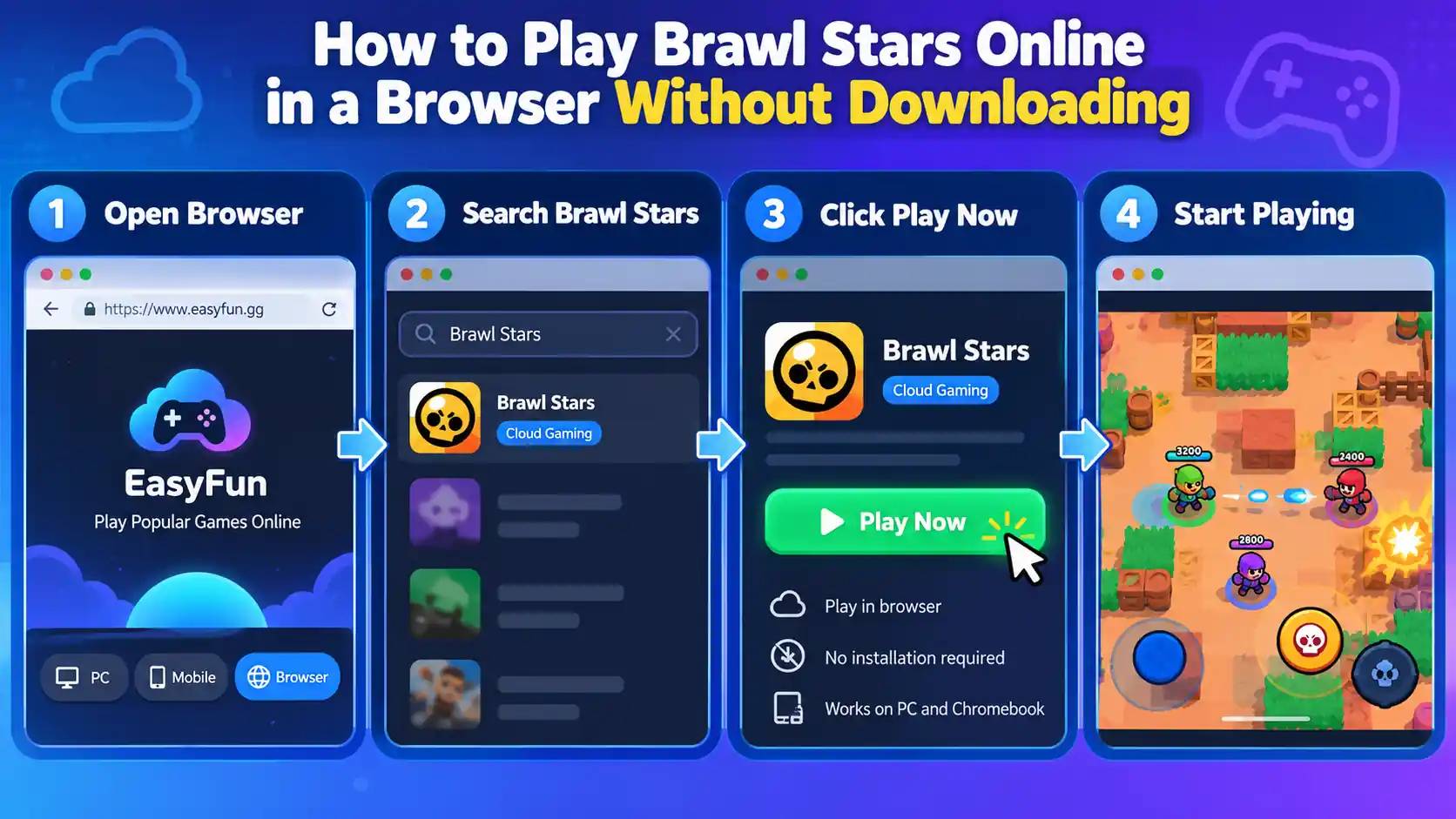
Some third-party Cloud Gaming platforms currently let you launch Brawl Stars directly from a browser.
For example, EasyFun has a dedicated Brawl Stars page and offers browser-based Cloud Gaming.
You can follow these steps:
- Open Chrome, Edge, or another modern browser
Use an up-to-date browser and keep your internet connection stable.
Cloud Gaming streams gameplay in real time, so connection drops or high latency can directly affect your controls.
- Open a Cloud Gaming platform that offers Brawl Stars
Once you enter the platform, do not immediately download an APK.
Search its game library for Brawl Stars first and confirm that the platform still offers the game.
- Open the Brawl Stars game page
EasyFun, for example, currently provides a direct browser launch option for Brawl Stars.
If a page only shows “Download APK” with no Cloud Play or similar option, it is not a true no-download method.
- Click Play to launch the cloud game
Brawl Stars is not installed on your computer. Instead, it runs on a remote device.
Your browser displays the game stream and sends your keyboard and mouse inputs back to the remote device.
- Wait for Brawl Stars to load
The first launch may take some time while the cloud device starts.
If you see a queue, limited free playtime, or busy servers, follow the instructions provided by the platform.
- Make sure the game works properly first
Once you reach the main screen, test a few basic controls before doing anything else.
Do not enter your Supercell ID information immediately after opening a cloud session.
- Log in to your account if needed
After confirming that the session is running the normal Brawl Stars game, use the in-game Supercell ID login option.
Supercell ID lets you access your saved game progress across supported devices.
- Start playing
Once your account has loaded, you can access your Brawlers, Skins, Trophies, and other saved account content.
Play Brawl Stars Through Cloud Gaming
Cloud Gaming is one of the most practical options if you are searching for brawl stars no download.
It does not turn Brawl Stars into a native browser game. Instead, the game runs on a remote device while your computer receives the video stream and sends back your controls.
EasyFun and CloudMoon currently have accessible Brawl Stars Cloud Gaming pages.
The basic process is:
- Open the Cloud Gaming website.
- Search for Brawl Stars.
- Check whether a Play option is still available.
- Register or sign in to the platform.
- Launch the cloud device.
- Wait for Brawl Stars to load.
- Adjust the keyboard controls.
- Sign in with Supercell ID if needed.
- Enter the game and start a match.
Free playtime, queues, server availability, and regional support can change between platforms.
For that reason, do not assume that a Cloud Gaming service will always be free or available in every region.
EasyFun currently provides dedicated PC keyboard controls for Brawl Stars:
| Action | Default Key |
|---|---|
| Move | W / A / S / D |
| Attack | Space |
| Super | Q |
| Gadget | R |
| Hypercharge | Left Shift |
| Auto Aim | Press Space twice |
These controls are based on EasyFun's current Brawl Stars setup. The platform also allows players to adjust some key bindings.
If you are new to keyboard controls, try them in training or another low-pressure mode first.
Brawl Stars uses dual-stick controls on mobile, so switching to a keyboard can take some time to get used to.
CloudMoon works in a similar way. It runs the game on remote cloud servers and streams the gameplay back to your browser.
This means even a low-spec computer does not need to run a full Android gaming environment locally.
However, network latency can still affect aiming, movement, and the timing of your Super.
Play Brawl Stars on Chromebook and PC
If you use a Chromebook, you may not need to search for an unblocked brawl stars website at all.
Google Play currently lists Chromebook as a supported device type for Brawl Stars.
On a Chromebook, you can:
- Turn on your Chromebook.
- Open Google Play.
- Search for Brawl Stars.
- Check that the developer is Supercell.
- Click Install.
- Wait for the installation to finish.
- Open Brawl Stars.
- Go to the game settings.
- Sign in with your Supercell ID.
- Restore your existing game progress.
This method requires installing the game, so technically it does not qualify as brawl stars no download.
However, if your Chromebook allows app installation, this is usually more straightforward than searching for unfamiliar Brawl Stars Unblocked websites.
The same method does not automatically apply to Windows PCs.
Google Play Games on PC only supports games included in its available catalog. You should not assume that every Android game can be installed directly on Windows.
First, check whether Brawl Stars is currently available in the supported PC game catalog for your region.
If it is not available, browser-based Cloud Gaming is the more practical option.
What Content Can Brawl Stars Unblocked Keep?
For many players, the main concern is not simply whether Brawl Stars opens in a browser.
The bigger question is whether their original account and saved content will still be available.
If Cloud Gaming is running the normal Brawl Stars game and you sign in to your own account, your saved content comes from your Supercell ID.
Can You Log In to Your Existing Brawl Stars Account?
Yes, as long as the environment is running the normal Brawl Stars game and supports the Supercell ID login process.
Supercell ID is designed to save your account and let you access your game progress across supported devices.
You can usually log in by following these steps:
- Open Brawl Stars.
- Go to Settings.
- Find Supercell ID.
- Select the login option.
- Enter the email linked to your account.
- Check your email for the verification code.
- Enter the code inside the game.
- Wait for your account to load.
Only enter your verification code through the normal Supercell ID login process.
Never enter it on an unfamiliar website that claims to offer “free Gems” or asks you to “verify” your Brawl Stars account.
Supercell also provides Account Protection, which can use a phone number and Recovery Codes to add another layer of account security.
Are Brawlers, Skins, and Game Modes Still Available?
If the service is running the current official version of Brawl Stars, Cloud Gaming will not automatically remove your Brawlers, Skins, or other account content.
The official game on Google Play includes Brawlers, Skins, Star Powers, Gadgets, and multiple PvP game modes.
If a website only opens a small game that looks similar to Brawl Stars, however, you should not expect it to load your official account content.
You can check these key differences:
| What to Check | Normal Brawl Stars | Imitation Browser Game |
|---|---|---|
| Supercell ID | Supported | Usually unavailable |
| Existing Brawlers | Can be loaded | Cannot be loaded |
| Existing Skins | Can be loaded | Usually unavailable |
| Official Matchmaking | Supported | May not be supported |
| Official Updates | Follows official updates | Usually different |
Do not assume a website is running the official game simply because it uses Brawl Stars artwork, characters, or branding.
Can Your Online Game Progress Be Saved?
If you sign in with your own Supercell ID, your progress is linked to your account rather than only to the browser you are currently using.
This means you can access the same account again when switching devices.
For example, you could play on a Chromebook in the morning and return to your phone later using the same Supercell ID.
If you use Cloud Gaming, sign out properly and close the cloud session when you finish.
This is especially important on a school, office, library, or other shared computer where someone else may use the same browser later.
What Should You Know Before Using Brawl Stars Unblocked?
The biggest problem with searching for brawl stars unblocked is not a lack of results.
It is that the pages appearing in search results may offer completely different things.
Before starting a game, check what the website is actually providing.
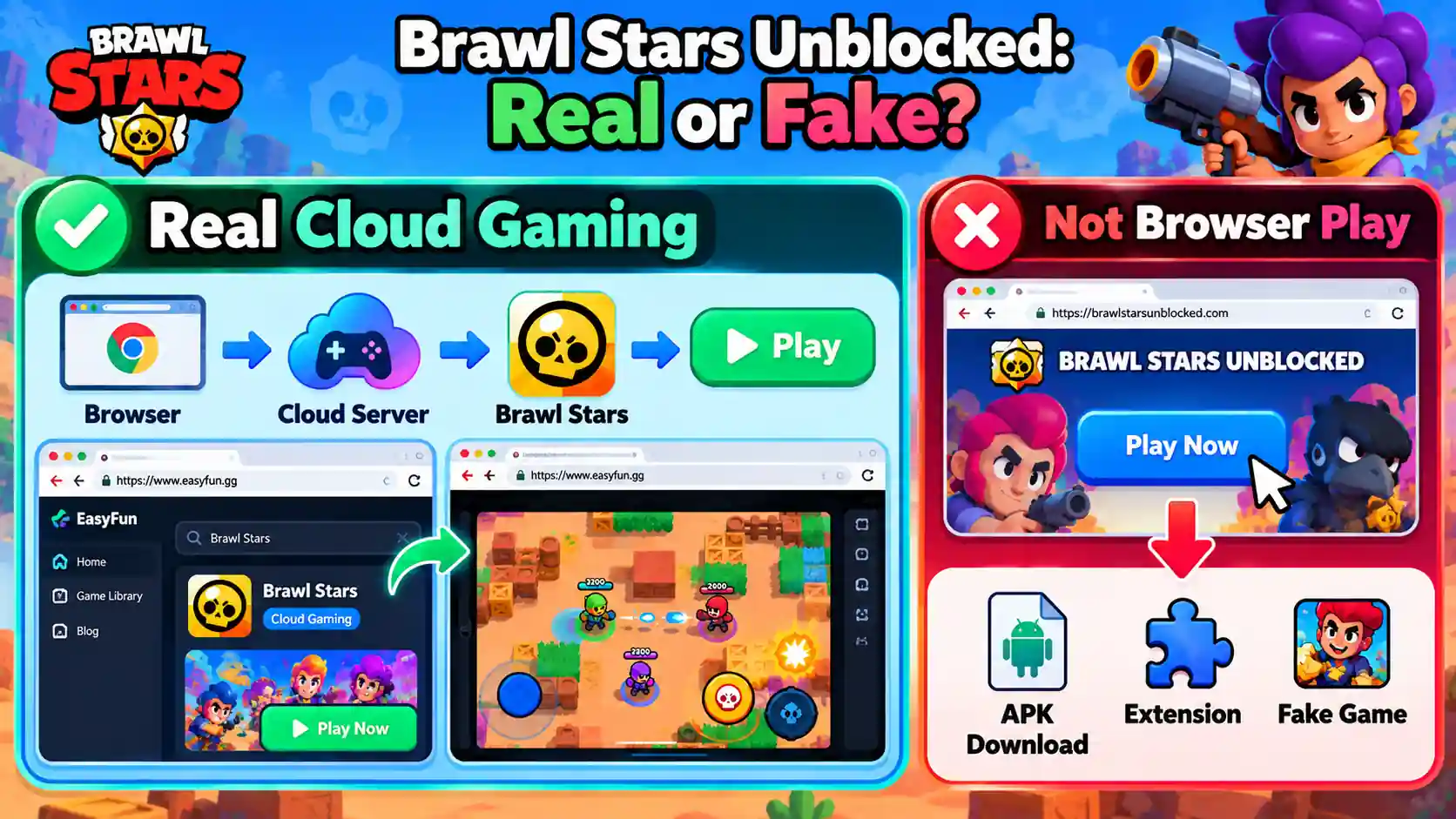
Which Websites Do Not Really Let You Play Online?
There is a simple way to check: click Play and see what actually launches.
A real Cloud Gaming service should start a remote gaming environment inside your browser.
If you see any of the following instead, check the page carefully before continuing:
| Page Behavior | What It Actually Means |
|---|---|
| Launches a cloud game in the browser | Matches no-download gameplay |
| Redirects to Google Play | Official download, not browser play |
| Asks you to download an APK | Not a no-download method |
| Opens another mini-game | May only be an imitation game |
| Requires a browser extension | Use caution |
| Promises unlimited Gems | Not part of normal Unblocked play |
| Asks for your account password | Do not continue |
The key is to determine whether the page really offers no-download gameplay or simply redirects you to a download.
What Should You Do If a Website Asks You to Download a File?
If your goal is brawl stars no download and the website suddenly asks you to download an APK, it no longer matches what you were looking for.
Do not download the file immediately.
Check whether the website has disguised a download link as a “Play Online” button.
If you still have to install Brawl Stars locally, then it is not really a browser-based no-download solution.
If you do need to install the game, use an official app store supported by your device whenever possible.
Avoid installing unknown modified files simply because they are advertised as an “Unblocked” version.
Supercell's Safe and Fair Play Policy restricts unauthorized third-party software that interferes with or modifies game functionality.
What If Your School or Office Network Still Blocks the Game?
“Unblocked” does not mean a game can bypass every school or workplace network restriction.
If the network blocks both gaming websites and Cloud Gaming, switching between different websites may not solve the problem.
You can troubleshoot it in this order:
- Check whether normal websites load
If every website is unusually slow or unavailable, the problem may simply be your current internet connection.
- Test the Cloud Gaming homepage
If even the platform's homepage cannot load, the service may be restricted on the current network.
- Check whether only the game stream fails
Some networks allow access to a website while blocking the traffic needed for Cloud Gaming.
- Test it on your own permitted network
For example, open the same Cloud Gaming page again when you are connected to your home or another personal network.
- Check whether the device has installation restrictions
A school-managed Chromebook may support Brawl Stars through Google Play while still preventing students from installing it.
- Do not change school or workplace security settings
If the device or network explicitly blocks gaming, use Brawl Stars later on a personal device and network where gaming is permitted.
This also avoids changing security settings simply to get a game running.
Conclusion
Brawl Stars Unblocked is not a special version of Brawl Stars. It refers to ways of playing when normal installation or access is unavailable, including browser-based Cloud Gaming.
If your goal is brawl stars no download, a Cloud Gaming service that currently supports Brawl Stars is one of the most practical options to check first.Whichever method you choose, use your own Supercell ID if you want to keep access to your Brawlers, Skins, and saved game progress.
This makes it easier to return to your original account when switching from Cloud Gaming back to your phone or another device.Once you are in the game, you can also check GamsGo Brawl Stars Top Up if you need cheap Brawl Stars Gems, Brawl Pass, or Brawl Pass Plus.
FAQ
Can You Play Brawl Stars Without Downloading It?
Yes. Some Cloud Gaming services currently let you run Brawl Stars through a browser without installing the full game on your current device.
Can You Play Brawl Stars on a Browser?
Yes, through Cloud Gaming. However, this does not mean Supercell has released a native browser version of Brawl Stars.
Is Brawl Stars Unblocked an Official Version?
No. “Brawl Stars Unblocked” is a search term commonly used for ways to play in restricted environments. It is not a separate version released by Supercell.
Can I Use My Brawl Stars Account When Playing Online?
Yes. If the cloud service runs the normal Brawl Stars game and supports Supercell ID login, you can access the game progress saved to your account.
Related Articles: