The EA FC 27 Web App went live on September 16, 2026, with the Companion App following one day later on September 17. Since the Standard Edition of EA SPORTS FC 27 launches on September 25, eligible Ultimate Team players get a nine-day head start to manage their clubs, complete SBCs, check the Transfer Market, and begin building their first squads.
That early access can be useful, but starting from scratch still takes time. New players usually have limited Coins, basic starter cards, and only a few ways to improve their squads at first. You may also run into common issues such as Web App login problems, a locked Transfer Market, rapidly changing player prices, or SBCs that cost more resources than expected.
This EA FC 27 Web App Guide explains how to get started step by step, from logging in and unlocking key features to trading, completing SBCs, and managing your Ultimate Team more efficiently. If you prefer to skip some of the early grind, you can also browse EA FC 27 accounts on GamsGo and compare available options by platform, price, seller rating, and estimated delivery time.
What Is the EA FC 27 Web App?
The EA FC 27 Web App is a browser-based tool designed to help Football Ultimate Team players manage their squads without launching the full game on PC or console. Simply sign in with the EA Account linked to FC 27, and you can handle many everyday Ultimate Team tasks directly from your browser.
This is especially useful around the start of a new season, when squad building and market activity can take up a lot of time. Even when you are away from your console, you can check players, complete SBCs, manage transfer targets, and organize your squad. Players comparing FC 27 accounts or looking for FC 27 deals can also use the Web App to manage their Ultimate Team more conveniently once they have access to the correct EA Account.
In simple terms, the FC 27 Web App works like a browser-based management hub for Ultimate Team. You cannot use it to play matches, but it gives you access to many important squad and transfer market features. Whether you are building your own club or managing FC 27 Ultimate Team accounts, it can save time and leave more of your in-game sessions for actually playing matches.
What Can You Do on the FC 27 Web App?
The FC 27 Web App gives you access to many everyday Ultimate Team features, including:
- View and adjust your squad
- Manage players and items in your Club
- Complete Squad Building Challenges
- Claim eligible rewards
- Check your Coins balance
- Search the Transfer Market
- Buy and sell tradeable players
- Manage your Transfer List and Transfer Targets
- Adjust selected squad and tactical settings
For most players, the three most frequently used features are the Transfer Market, SBCs, and squad management. These tools make it easier to keep your Ultimate Team organized even when you are away from the full game.
This is especially useful during the early stages of FC 27, when the prices of popular players and SBC fodder can change quickly. The Web App lets you monitor transfers and manage your club resources without launching the full game, making it easier to stay on top of your Ultimate Team.
FC 27 Web App vs Companion App
The FC 27 Web App and Companion App offer very similar core features. The main difference is how and where you use them.
| Feature | FC 27 Web App | Companion App |
|---|---|---|
| Access | Open directly in a browser | iOS / Android app |
| Best for | PC and Mac | Phones and tablets |
| Transfer Market | Supported | Supported |
| SBCs | Supported | Supported |
| Squad management | Supported | Supported |
| Best suited for | Longer sessions, price checking, and completing SBCs | Quickly checking transfers and squads on the go |
How to Log In to the EA FC 27 Web App
You do not need to create a separate account for the FC 27 Web App. Simply sign in with the EA Account linked to the PlayStation, Xbox, or PC account you use for FC 27.
Make sure you use the correct EA Account. If you sign in with a different account, you may still be able to access the Web App, but your existing Ultimate Team Club may not appear.
FC 27 Web App Login Steps
You can log in to the FC 27 Web App in just a few steps:
- Open the official EA SPORTS FC Web App.
- Select Log In.
- Enter your EA Account email address and password.
- Complete any account verification steps if prompted.
- Select the correct gaming platform.
- Wait for your Ultimate Team Club to load.
If your EA Account has been linked to more than one platform, such as PlayStation and PC, make sure you are opening the correct Ultimate Team Club.
Once you are logged in, it is a good idea to check your Club, Squad, and Transfer Market access first instead of immediately buying players.
Who Can Access the FC 27 Web App?
To access the FC 27 Web App before the full game officially launches, you generally need to have created an Ultimate Team Club in FC 26, FC 25, or FC 24. The relevant Club must also have existed before August 1, 2026, and your EA Account needs to remain in good standing.
This means returning players may be able to start managing their club before fully entering FC 27, while completely new players with no previous Ultimate Team history will usually need to meet the required access conditions first.
Keep in mind that Web App access and Transfer Market access are not exactly the same thing. You may be able to open your Ultimate Team Club while the Transfer Market still shows as Locked.
Why Can't I Log In to the FC 27 Web App?
If you cannot log in to the FC 27 Web App, the first thing to check is your account.
Make sure the EA Account you are using is actually linked to the PlayStation, Xbox, or PC account you use for EA SPORTS FC.
Next, check that your email address and password are correct, complete any required EA Account verification, and confirm that you have selected the right gaming platform. Browser cookies or cached data can also sometimes cause login issues.
If everything looks correct, the problem may be related to a temporary EA service issue, an account restriction, or your account not meeting the current Web App access requirements.
If the Web App opens but your correct Ultimate Team Club does not appear, check your EA Account and linked platform first. This is especially important when managing multiple FC 27 accounts, as signing in with the wrong linked account can make it look like your Club is missing. Avoid creating a new EA Account until you have confirmed that you are signing in with the correct one.
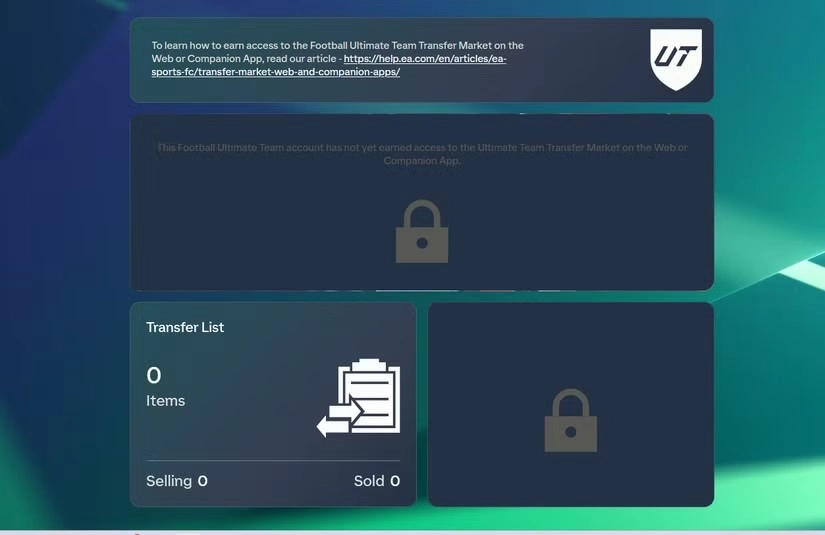
How Does the FC 27 Transfer Market Work on the Web App?
The Transfer Market is one of the most important features of the FC 27 Web App.
Once you have access, you can use your browser to search for player cards listed by other users and sell eligible tradeable players from your own Club.
This means you do not need to keep FC 27 running all the time to manage your Ultimate Team assets. You can check listings, monitor the market, and handle transfers directly through the Web App.
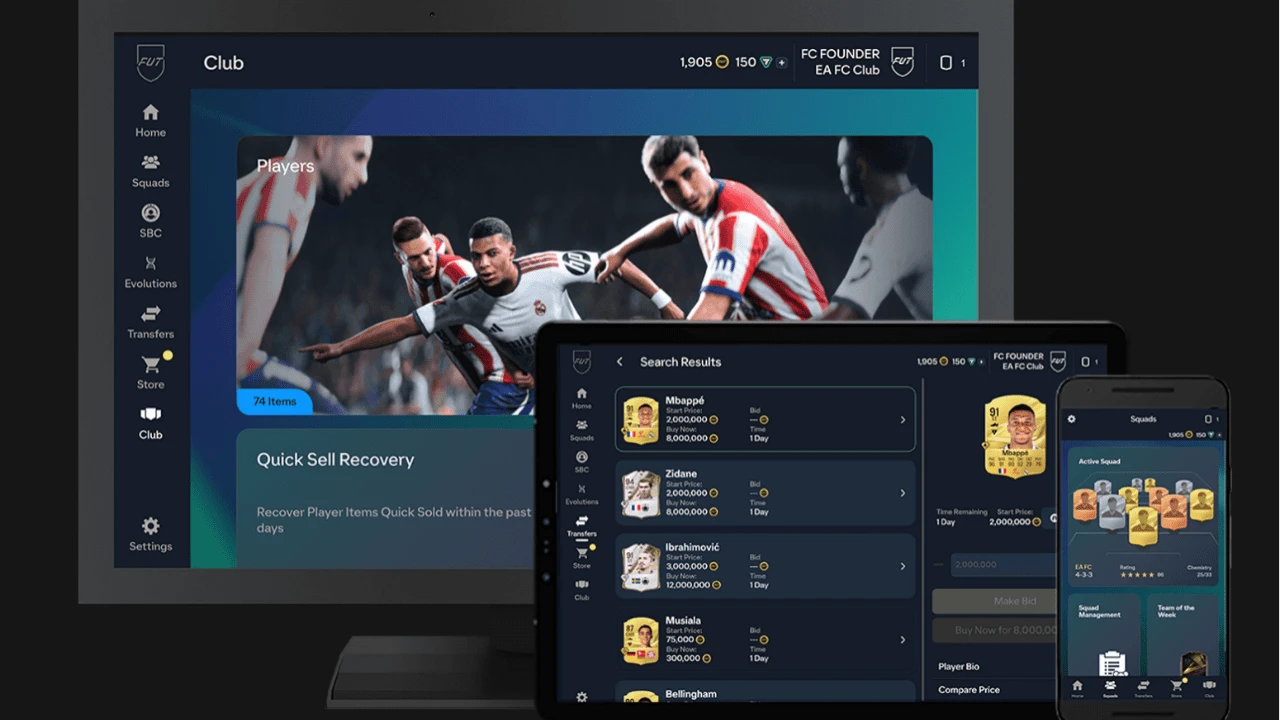
How to Access the Transfer Market
After opening the FC 27 Web App, go to the Transfer Market section.
Accounts with market access can use features such as:
- Player Search
- Buy Now
- Bid
- Transfer Targets
- Transfer List
- Player Listing
When searching for players, you can filter results by player name, Quality, Position, League, Club, and price.
For new players, price filters are especially useful.
Instead of buying the first card that appears in the search results, narrow the Buy Now Price range first. This gives you a better idea of the current market value of the card before you spend your Coins.
How to Unlock the Transfer Market for New Players
New players may not receive full Transfer Market access as soon as they enter Ultimate Team.
FC 27 uses a gradual access system, which means new accounts need to build a normal gameplay history by completing specific Objective Groups in Ultimate Team.
According to EA's current process, these include:
- The Journey Begins
- First Team Dreams
- Rising Through the Ranks
Even after completing the required objectives, Transfer Market access may not unlock immediately.
So if you create a new FC 27 Ultimate Team and see that the Transfer Market is locked, it does not necessarily mean there is a problem with your account.
In most cases, continuing to complete beginner objectives and play Ultimate Team normally is more useful than repeatedly logging out or creating a new EA Account.
How to Buy and Sell Players on the Web App
When buying a player, the first thing you should do is check the current price.
For example, if most listings for the same card are between 13,250 and 14,000 Coins, that is a reasonable indication of its current market range. Do not assume a 15,000-Coin listing is a fair price just because it appears first in the search results.
The same rule applies when selling players. Search for the current lowest Buy Now price first, then choose your listing price based on how quickly you want the card to sell.
Prices can move quickly, especially around the launch period. Avoid relying on prices you saw yesterday or even a few hours earlier, because they may no longer reflect the current market.
Why Is My Transfer Market Locked?
If you have already completed the required Objectives for new players but the FC 27 Web App still shows Transfer Market Locked, it does not necessarily mean the Objectives failed to register or that your account has been banned.
Gradual Access to the in-game Transfer Market and market access on the Web App or Companion App are not exactly the same system. This means you may already be able to use some Transfer Market features in the full game while the Web App market is still temporarily unavailable.
EA may consider several factors when deciding whether to grant Transfer Market access on the Web App and Companion App. These can include whether your EA Account is in good standing, whether there is any previous history of breaking FC Rules, how many Ultimate Team accounts have been used on the same device, and your recent Ultimate Team activity.
EA may also consider Active Days. In simple terms, an Active Day generally means completing at least three full matches on the same Ultimate Team Account and logging in to the Web App or Companion App on that day. Simply opening the game, logging in to the Web App, or playing only one or two matches may not count as a full day of activity.
If your Transfer Market is still locked, the best approach is to keep using the same account normally, play Ultimate Team matches, and maintain regular account activity. Avoid Coin transfers, suspicious trades, or other actions that violate EA Rules in an attempt to unlock the market faster, as these can negatively affect your account status and future market access.
What Should You Do First on the FC 27 Web App?
One of the most common mistakes new users make on the FC 27 Web App is immediately buying players.
A better first step is to check what you already have.
Your Club may already contain usable players, untradeable rewards, and cards that can be used in SBCs. If you do not review these resources first, you may end up spending Coins on players you did not actually need.
Check Your Club and Starter Squad
Start by opening your Club and Squad.
A simple way to organize your players is to divide them into four groups:
- Current starters
- Substitutes and rotation players
- Tradeable players
- SBC fodder
Just because a player does not fit into your starting XI right now does not mean you should immediately Quick Sell the card.
Players from popular leagues or nations, as well as cards with useful ratings, can become valuable for SBCs later. Keeping them in your Club can often be more useful than selling them too quickly.
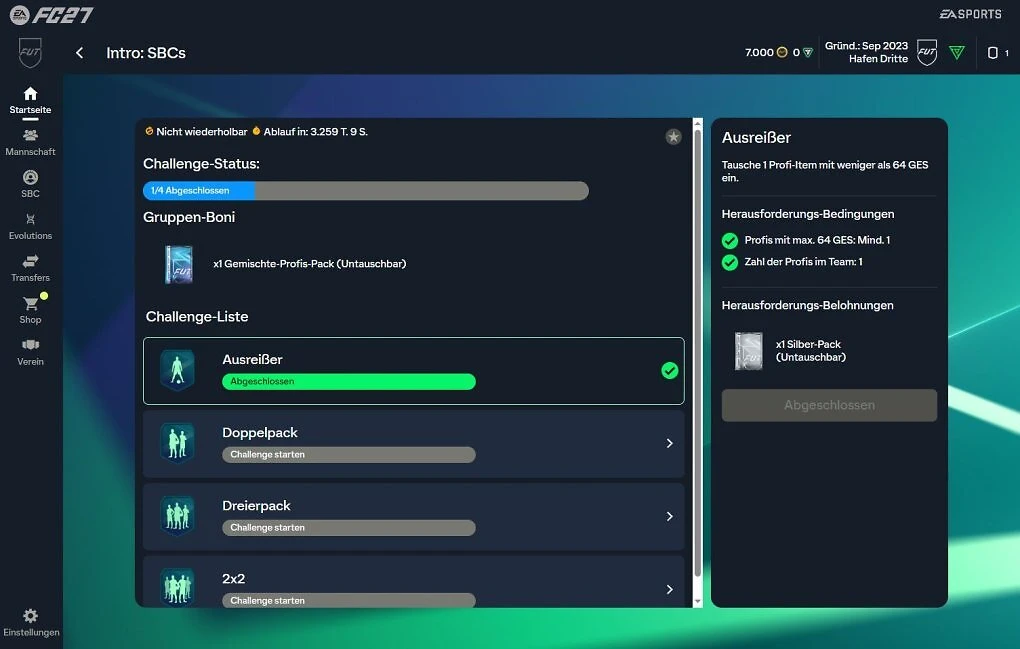
Claim Available Rewards
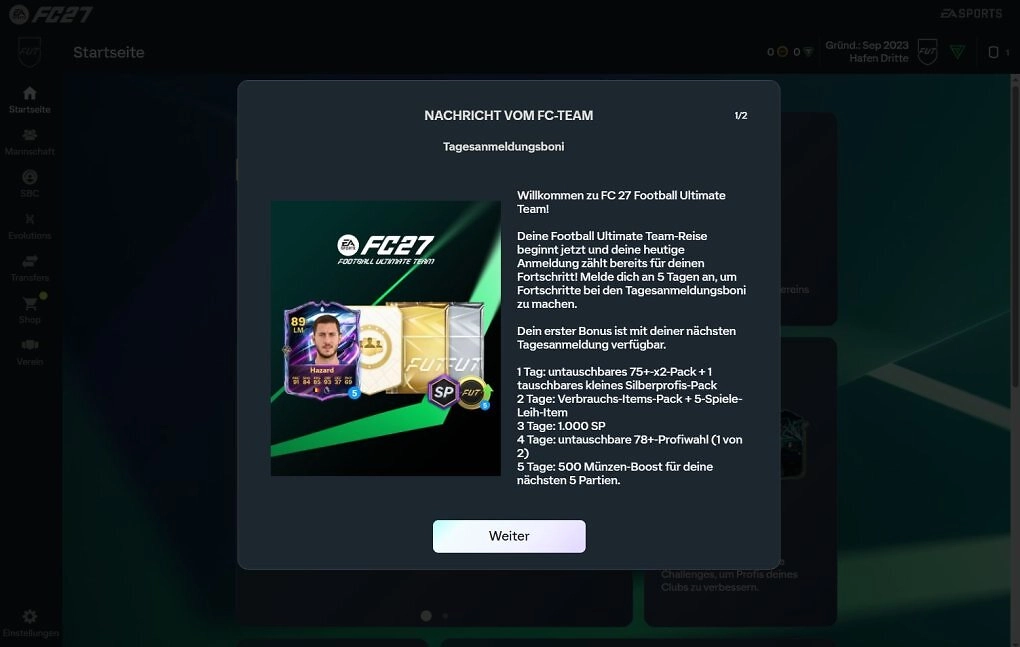
Do not forget to check all rewards currently available to claim, including Objectives, Season Progress, login events, returning player rewards, and rewards tied to the current release or campaign.
Not every reward will be tradeable, but free players, packs, and SBC fodder can still reduce the number of Coins you need to spend early on. This is especially useful if you are comparing different FC 27 accounts and want to understand what resources are already available before spending more.
Claim as many free resources as possible first, then decide how to spend your Coins based on your current squad and Club.
Complete Starter SBCs
Next, check which Starter SBCs are currently available.
SBCs allow you to turn players you are not using into packs, players, or other rewards, making them a useful way to manage your Club during the early stages of Ultimate Team.
Always check the total cost before completing an SBC.
If a basic challenge requires you to buy several expensive players from the Transfer Market, it may not be worth completing immediately.
Whenever possible, use untradeable players already in your Club to save Coins.
Organize Your First Ultimate Team Squad
Your first Ultimate Team squad does not need to be filled with high-rated players.
What matters more is whether the team actually works well in matches.
For example, check whether your forwards have enough pace and finishing, your midfield has a reasonable balance of passing and defending, your center-backs are quick enough, and your overall Chemistry makes sense.
Early in the game, spending 20,000 Coins on a balanced starting squad can often give you more room to progress than spending 18,000 Coins on a single star player. The same idea applies when checking FC 27 deals: overall squad value usually matters more than spending most of your budget on one card.
FC 27 Web App Transfer Market Tips for Beginners
The Web App makes buying and selling players much more convenient, but simply having access to it will not automatically earn you more Coins.
What matters is how you manage the Coins you already have.
Player prices can move quickly during the early stages of FC 27. Instead of constantly chasing popular cards, focus on building consistent buying and selling habits.
Compare Prices Before Buying Players
Check the current market price every time you are about to buy a player.
This is especially important for popular cards and SBC fodder.
New events, SBCs, and reward updates can cause the price of the same card to change significantly in a short period of time.
If a player suddenly appears to be rising in price, avoid buying immediately just because you think the price will keep going up.
Check the lowest current listings and compare several prices first to get a better idea of the card's actual market range.
Avoid Spending All Your Coins Early
One of the biggest advantages of keeping Coins early on is flexibility.
For example, if you have 50,000 Coins and spend 48,000 on one striker, you may not have enough left if a useful SBC suddenly becomes available.
A better approach is to keep part of your balance available. This gives you more freedom to upgrade your squad, buy SBC fodder, or take advantage of a good-value player when one appears on the market. This is also worth considering when evaluating FC 27 Ultimate Team accounts, since available Coins and existing squad resources can affect how much room you have to improve the team.
Keep Useful Players for SBCs
Do not clear out every low-rated player in your Club.
Players from popular Leagues, Nations, or Clubs can still become useful when new SBC requirements appear, even if their current market value is low.
This is especially true for untradeable players. Since you cannot turn them directly into Coins, it often makes more sense to keep them as future SBC resources instead of discarding them too early.
This is also worth checking when reviewing FC 27 accounts, since a well-stocked Club can sometimes be more useful than simply having a higher-rated starting squad.
How to Build Your Ultimate Team Faster
If you want to progress faster in the early stages of Ultimate Team, manage your resources based on three practical uses: players you can use, players you can sell, and players you can put into SBCs.
Rating alone does not tell you how valuable a card is to your Club.
Manage Coins, Players and SBC Resources Together
A simple way to organize your Club is to divide your resources into three groups.
Squad Resources
Players who are part of your starting XI or regularly used as substitutes and rotation options.
Tradeable Resources
Tradeable players you are not currently using but that still have market value.
SBC Resources
Players who do not fit your current Squad but have useful Ratings, Leagues, or Nations for future challenges.
For example, a high-rated untradeable player may not fit your starting XI, but could significantly reduce the cost of completing a future SBC.
On the other hand, if you have a valuable tradeable player who does not fit your team at all, you can consider selling the card based on its current market price. This can free up Coins for squad upgrades or better FC 27 deals later.
Starting With an Established EA FC Account
If the main thing holding you back is not how to use the Web App, but not having the right FC 27 edition yet, switching platforms, or simply not wanting to start from a basic Starter Squad and limited resources, then the question becomes less about Web App access and more about how to get into EA FC 27 faster.
In that case, you can consider starting with an account that already has the version and platform setup you need. GamsGo's EA FC 27 accounts page lets you compare account options by platform, game version, seller rating, price, and estimated delivery time, so you can choose one that better matches your setup and requirements. GamsGo is a digital marketplace where users can compare and purchase game accounts, top-ups, gift cards, and other digital products from different sellers.
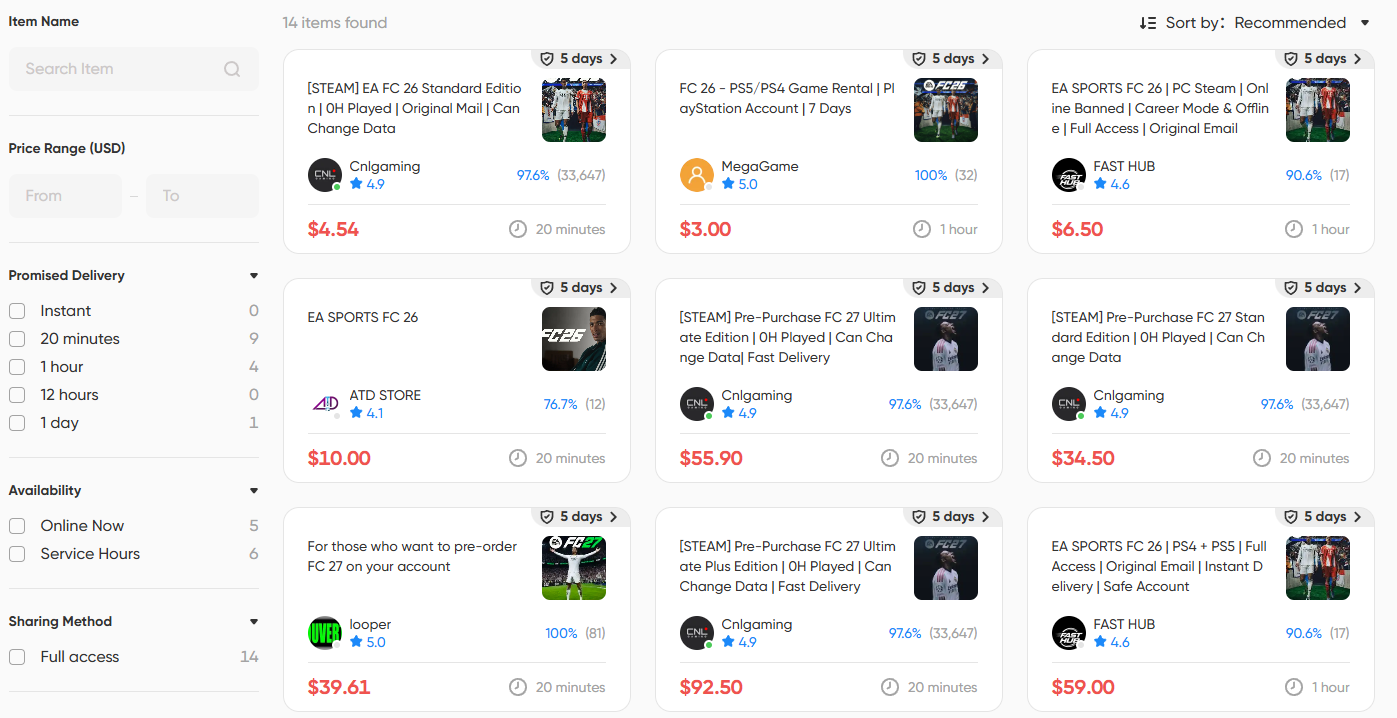
This option is better suited to players who do not yet have FC 27, plan to switch platforms, or simply do not want to go through the process of buying the game version and setting up a basic account from scratch. Instead of starting with everything at zero, you can first solve the question of getting into FC 27, then focus your time on managing your Squad, completing SBCs, and using the Transfer Market.
However, buying an EA FC 27 account does not automatically mean that Web App or Transfer Market access is already available. If Web App market access is one of your main requirements, read the product description carefully before placing an order and confirm the platform, game version, account type, and current market access status. Do not choose an account based on price alone.
EA FC 27 Web App Common Problems and Fixes
Most FC 27 Web App issues are related to your EA Account, linked platform, or Transfer Market access.
- Cannot log in to the Web App: Check your EA Account email and password, and make sure the gaming platform you use is linked to the same EA Account.
- The correct FC 27 Club does not appear after login: If your EA Account has been used on multiple platforms, confirm that you have selected the correct platform and Ultimate Team Club.
- Transfer Market Locked: New accounts should complete the required Objectives and continue playing Ultimate Team normally. Web App market access may not unlock at the same time as in-game Transfer Market access.
- Cannot buy a player: Check whether your account has full Transfer Market access, make sure you have enough Coins, and confirm that the listing is still active.
- The page keeps loading: Try signing out and back in, clearing your browser cache and cookies, or switching to another browser. If EA services are experiencing an outage, you may need to try again after the service is restored.
- Account Restriction: If the issue is related to an EA Account penalty, do not create new accounts to bypass the restriction. Check the reason through EA's official account and sanction appeal channels instead.
Conclusion
The main value of the EA FC 27 Web App is not that it lets you build the strongest possible team without playing matches. Its real advantage is moving many of Ultimate Team's repetitive management tasks from the game itself to your browser.
After your first login, a practical order is: check your Club → claim rewards → complete Starter SBCs → build your Starter Squad → check the Transfer Market → then decide how to spend your Coins. Following this order can help reduce unnecessary spending during the early stages of Ultimate Team.
If you do not yet have the right FC 27 version for your setup, or you want a faster way to get into the game, you can also browse EA FC 27 accounts. The page lets you compare options from different sellers by price, version, platform, seller rating, and estimated delivery time, while DealShield provides order protection during the transaction.
Whether you start with your existing EA Account or purchase a new FC 27 account, make sure you confirm the platform, game version, and exact product details first. Once you are in Ultimate Team, using the Web App to manage your squad, SBCs, and Transfer Market is usually more efficient than spending all your Coins right away.
FAQ
Can New Players Use the FC 27 Transfer Market Immediately?
No. New players usually need to complete specific Objectives in FC 27 Ultimate Team and go through the Gradual Access process first. Even after meeting the requirements, Transfer Market access may not unlock immediately.
Can I Unlock the FC 27 Transfer Market by Playing Matches?
Yes, but playing matches alone is usually not enough. New players need to complete the Objective Groups required by EA while also building a normal Ultimate Team activity history. Even after meeting these conditions, market access may still take some time to unlock.
Can I Access the FC 27 Web App With a New EA Account?
Not always. A newly created EA Account may not have the same early-access eligibility as a returning account, and Transfer Market access may need to be unlocked again.
Does Buying an EA FC 27 Account Automatically Unlock the Transfer Market?
No. Owning an FC 27 account and having Web App Transfer Market access are two separate things. If market access is important to you, check the product description carefully before buying FC 27 accounts and confirm whether the listing clearly states the current account status and market permissions.
Can I Use the FC 27 Web App Without Opening the Full Game?
Yes. Once you have Web App access, you can manage your Squad, Club, SBCs, and Transfer Market directly from your browser without launching the full game on PC or console every time.