Netflix usually renews automatically based on your billing cycle. As long as your payment method is valid and your account is in good standing, you generally do not need to take any manual action. However, if you have canceled your membership, experienced a payment failure, or purchased a subscription through a third-party platform such as GamsGo, the renewal process may be different.
Most renewal issues are not complicated. You only need to confirm your subscription channel and account status first, then choose the corresponding recovery method to renew successfully. After renewal, your original profiles, viewing history, and watchlist are usually retained. In some cases, the system may ask you to confirm your plan or payment information again.
This article will explain how to renew both official Netflix subscriptions and GamsGo Netflix subscriptions, helping you restore your membership smoothly and continue watching the content you enjoy.
Does Netflix Renew Automatically
Normally, Netflix renews automatically. As long as your account remains active and your payment method can be charged successfully, the system will bill you for the next cycle on your billing date. You do not need to subscribe again every month. You can check your exact billing date and payment information on your Netflix account page.
However, if you have already canceled your subscription, your membership will usually continue until the end of the current billing cycle, and billing will stop afterward. If you want to keep using Netflix, you can undo the cancellation before it expires or restart your membership after it ends. If your bank card has expired, your balance is insufficient, or the payment is declined, your subscription may also be interrupted. In that case, you will need to update your payment method first.
The renewal process also depends on where you originally purchased the subscription. If you subscribed directly through Netflix, you should manage it in your Netflix account. If you purchased it through a carrier, GamsGo, or another third-party platform, you should renew it on that platform instead. Once you confirm who is charging the fee, the next steps are usually much clearer.
How to Renew Your Netflix Subscription
When renewing Netflix, it is easier to first confirm where your subscription comes from. Renewal options vary depending on the channel: users who subscribed directly through Netflix should manage their renewal in their official Netflix account, while users who purchased through GamsGo need to return to GamsGo to renew. Once the subscription channel is confirmed, you can follow the steps based on your account status and usually restore access more quickly.
Renew Through Netflix
If your Netflix membership was set up directly through Netflix, you can first sign in to your Netflix account using your original email address. This makes it easier for the system to match your membership records and can also help keep your profiles, viewing history, and watchlist.
After signing in, choose the appropriate option based on your account status. If your membership is still within the current billing cycle but you have already canceled it, check whether the page offers an option to restart your membership or undo the cancellation. If your membership has already ended, simply follow the on-screen instructions to restart it, then confirm your plan and payment method.
If the renewal fails, the most common reason is an invalid payment method, such as an expired bank card, insufficient balance, or bank restrictions on online payments. In this case, you can update your payment information first and then try renewing again.
Renew Through GamsGo
If your Netflix subscription was purchased through GamsGo, you should renew it through GamsGo first. This keeps your order, remaining subscription time, and payment records on the same platform, making it easier to check details or handle any issues later.
It is recommended that you renew your subscription before it expires. This can reduce the chance of service interruption and help you clearly confirm whether your current subscription period has been extended.
Step 1: Sign In to Your GamsGo Account
Open the GamsGo official website and sign in with the email address you used to purchase your Netflix subscription. It is best to use your original registered email address. If you log in with a new email address, you may not be able to see your previous orders and subscription records.
After signing in, you can first check whether your account information is correct. If you have purchased multiple services, you can also identify the correct Netflix subscription in the next steps by checking the subscription name and remaining time.
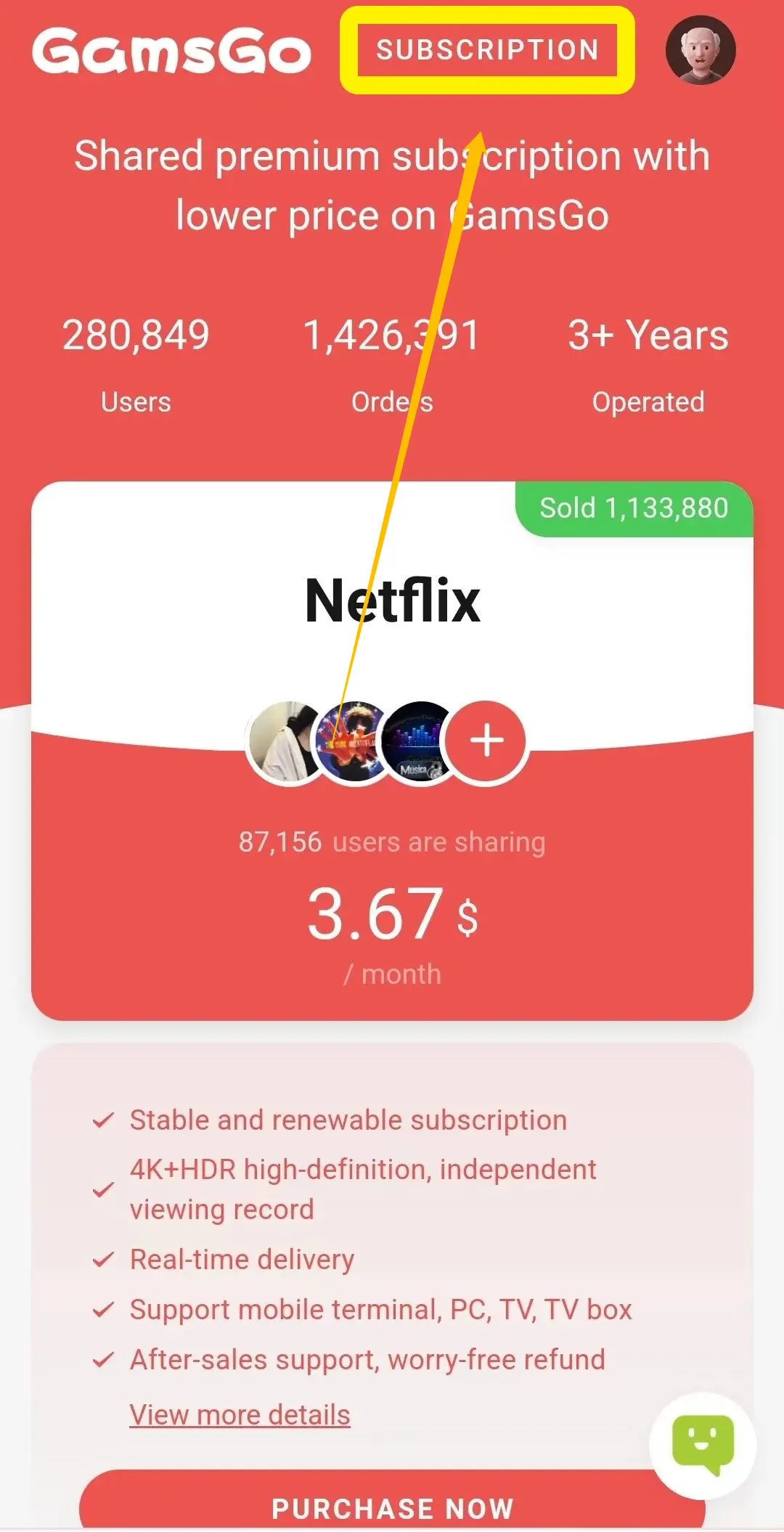
Step 2: Open Your Subscription Page
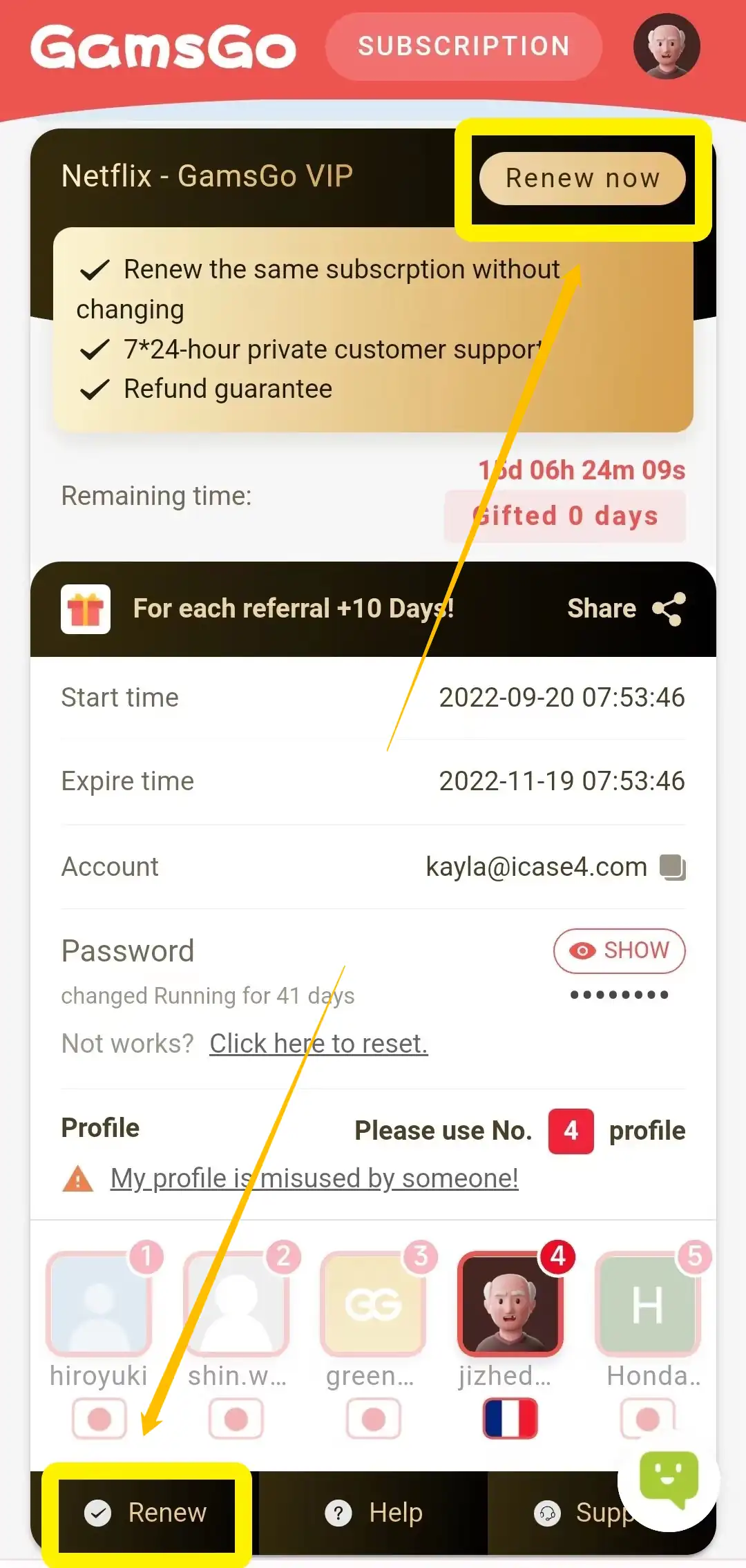
After signing in successfully, go to the subscription page in your account. You can find the “Subscription” option in the upper-right corner of the page. Click it to view your current subscription status and remaining time.
Before renewing, it is recommended that you first confirm whether you need to renew immediately or choose a longer renewal period.
Step 3: Click “Renew Now”
After you find the corresponding Netflix subscription, click “Renew Now” or the “Renew” button below the subscription card.
If you do not see the renewal button, first check whether you are logged in to the correct account or whether the subscription is still eligible for renewal. Once everything is confirmed, you can continue with the renewal process.
Step 4: Choose a Renewal Period
After entering the renewal page, choose a renewal period based on your viewing needs.
Before selecting a period, it is recommended that you check the price, service details, and validity period after renewal. This way, after payment, you will clearly know which subscription cycle this renewal applies to, and it will also be easier to review your order later.
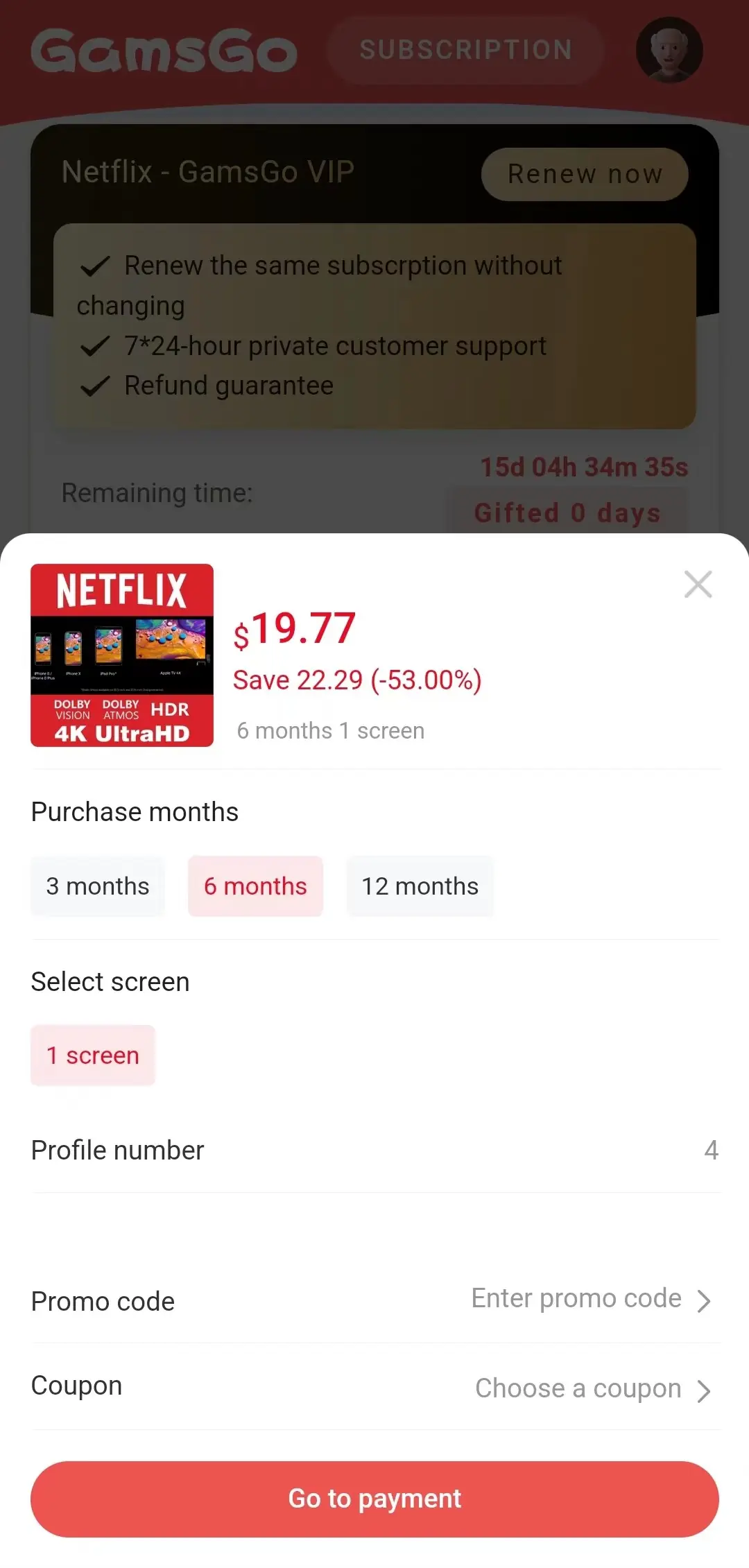
Step 5: Complete Your Payment
After confirming that the renewal information is correct, follow the on-page instructions to complete your payment. Once the payment is successful, you can return to the GamsGo subscription page to check whether the remaining time for your Netflix subscription has been updated.
After completing the steps above, your Netflix subscription will show the new validity period in your GamsGo account. After payment, it is recommended that you return to the subscription page to confirm that the renewal time has been updated. If the time does not change immediately, you can refresh the page and check again later. If it still has not taken effect, please contact GamsGo customer service for assistance. Once the renewal is confirmed, you can continue watching Netflix content.
How to Restart Netflix at a Lower Cost
If your Netflix membership has expired, you can compare the costs of different options before renewing it. Managing your subscription directly through Netflix is simple and gives you the full account experience, but the overall price is relatively high. This becomes more noticeable over time, especially if you choose a plan with higher video quality or support for more devices.
If you care more about value for money, GamsGo can be a more budget-friendly choice. It focuses on shared subscriptions, allowing you to regain access to Netflix at a lower individual cost. This makes it more suitable for users who want to control their subscription expenses. After confirming that the price, duration, and service details on the page meet your needs, you can follow the steps below to renew your Netflix account with GamsGo.
Step 1: Open the Netflix Subscription Page on GamsGo
After entering GamsGo, find the Netflix subscription page and check the available service types, subscription durations, and page details. Before making a choice, it is recommended that you confirm whether the price fits your budget and whether the service content matches your viewing needs.
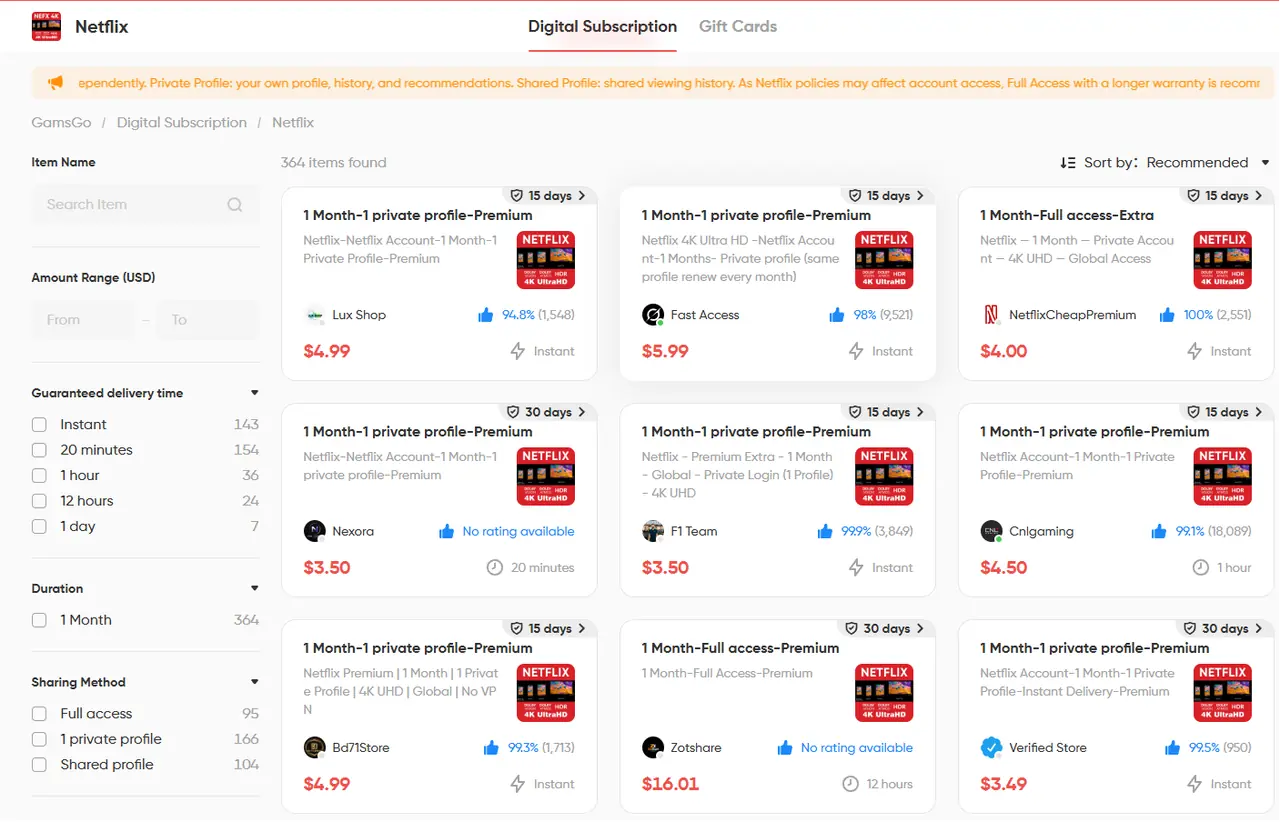
Step 2: Choose a Plan and Complete Your Order
Choose the subscription length that best fits your viewing plan. Once you have confirmed that all the information is correct, follow the on-page instructions to complete your order and payment.
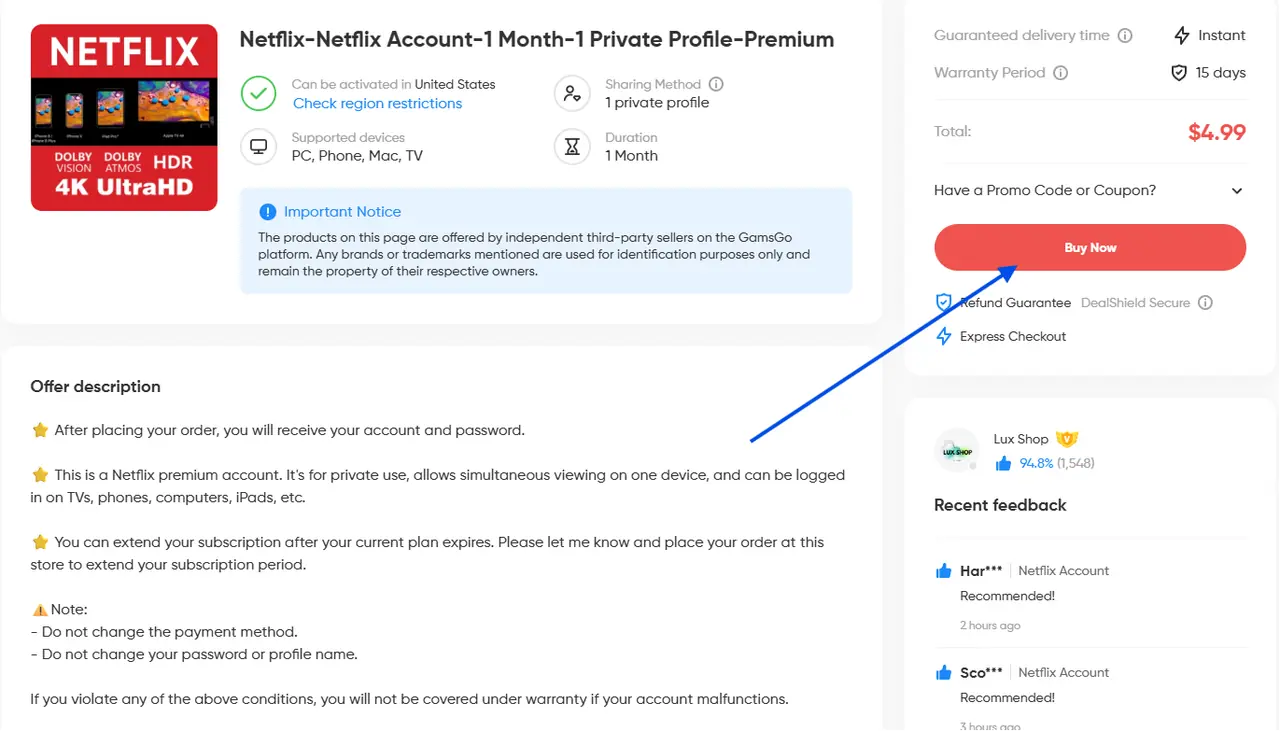
Step 3: Check Your Subscription Information
After a successful purchase, GamsGo will provide the account information needed for later use. You can first return to the subscription page to check whether the Netflix service status and remaining time have been updated.
Overall, renewing Netflix through GamsGo is not complicated. As long as you review the service details before purchasing and check the subscription status after purchase, you can restore your viewing access more securely. If there is an issue with the order or the service has not taken effect, contact GamsGo customer support in time for assistance.
Conclusion
Whether you want to reactivate a canceled membership or extend a subscription that is about to expire, choosing the right renewal method can make the process much easier. Before taking action, check the renewal entry carefully, and after completion, confirm the subscription status. This can help you avoid the most common problems.
If you renew through GamsGo, remember to log in with the original purchase account and check whether the subscription time has been updated after payment. This makes it easier to manage future orders and helps you return to your usual viewing routine more quickly.
Once these steps are complete, the rest is simple: open Netflix and continue watching the next episode.
We’ve prepared an exclusive promo code for all blog readers:
Enjoy an additional 3% off on your next purchase!
Valid across all categories — streaming accounts, AI tools, game top-ups, software subscriptions, and more.
FAQ
Can I Renew My Netflix Subscription After Canceling It for a Few Months?
Usually, yes. Log in to Netflix with your original email address and follow the on-screen instructions to restart your membership. Whether your previous profiles and data can be restored depends on your account status and how long Netflix keeps the information.
How Long Does It Take for the Renewal to Take Effect Through GamsGo?
In most cases, the subscription period is updated after payment is completed. If it does not appear immediately, refresh the page later. If it still has not changed, contact GamsGo customer support.
Can I Keep My Profile After Renewing?
Usually, yes. If you use the same account, your profiles, watch history, and list are often kept, depending on your account status.
Why Can’t I Find the Renew Button?
You may be logged into the wrong account, using a third-party subscription, or your plan may not support direct renewal.
Can I Change My Netflix Plan When Renewing?
Yes. Direct Netflix users can usually change plans in their account settings. Third-party users may need to make changes through their provider.
Related Articles
How to Share Spotify Premium in 2025 (For Under $3/Month)
Cursor AI Pricing 2025: How to Avoid Hidden Costs & Save More