Netflix offers different movies and TV shows in different countries and regions, largely due to local licensing agreements. A VPN lets you connect through a server in another country to access additional regional libraries or keep watching content from home while traveling.
However, Netflix continually detects and blocks VPN IP addresses, so only a handful of VPNs provide consistent access to its libraries. Netflix also states that VPNs are not supported on ad-supported plans or when watching live events.
This guide compares 6 paid VPNs and 2 free options based on Netflix unblocking performance, connection speeds, device compatibility, and pricing, with recommendations for different needs. Toward the end, we also share a way to save on your Netflix subscription.

Best VPNs for Netflix at a Glance
The table below summarizes the eight VPN options featured in this guide, including their Netflix performance, simultaneous connection limits, and starting prices. Read on for a detailed review of each.
| VPN | Netflix Highlights | Simultaneous Connections | Starting Price |
|---|---|---|---|
| NordVPN | Unblocked all 28 libraries in third-party testing; SmartPlay automatically optimizes streaming connections | 10 devices | From $2.99/month |
| Surfshark | Unblocked 28 of 30 libraries tested | Unlimited | From $2.49/month |
| ExpressVPN | Reliably unblocks 18 libraries, including the US and UK | 10–14 devices, depending on the plan | From $2.99/month |
| Proton VPN Plus | Officially lists support for 26 Netflix regions | 10 devices | From $2.99/month |
| Windscribe Pro | Unblocked 32 libraries in third-party testing, the most among the services compared | Unlimited | $5.75/month, billed annually |
| IPVanish | Native Fire TV app; most US servers unblock the US library | Unlimited | From $2.19/month |
| PrivadoVPN Free | One of the few free VPNs that can access US Netflix | 1 device | Free, with 10GB/month |
| Windscribe Free | Accesses libraries including the UK, France, and Germany, but not the US | Unlimited | Free, with 10GB/month |
NordVPN, Surfshark, ExpressVPN, and Proton VPN Plus offer 30-day money-back guarantees. IPVanish’s 30-day guarantee applies only to long-term plans. Windscribe Pro allows refund requests within 7 business days, provided you have used no more than 10GB of data.
Note: Prices reflect promotional monthly equivalents for long-term plans in November 2026. Offers may change, so check each provider’s website for current pricing.
Save on both Netflix and your VPN. Visit GamsGo’s subscription-sharing platform for deals on Netflix Premium and a range of VPN accounts. Spend less on subscriptions and get ready for your next binge-watch.
GamsGo is also currently running a promotion with an instant 6% discount, making it a great time to pick up your next subscription.
How We Compared VPNs for Netflix
Netflix continually detects and blocks VPN servers, so general performance alone is not enough to judge a Netflix VPN. Consistent access to regional libraries matters most. We compared the services across five areas:
- Netflix unblocking: The number of regional libraries accessible and the consistency of access to popular libraries, including the US, UK, and Japan.
- Connection speeds: Whether download speeds over the VPN are sufficient for smooth HD and 4K streaming. If playback still looks blurry, our guide explains how to improve Netflix streaming quality.
- Device and platform support: Native apps for streaming devices such as smart TVs, Fire TV, and Android TV, along with the number of simultaneous connections allowed per account.
- Pricing and refunds: Monthly equivalents for long-term plans, renewal prices, and refund policies to assess overall value.
- Privacy and security: Independently audited no-logs policies and security measures such as RAM-only servers.
The information in this guide comes from providers’ official websites and tests published by independent reviewers in 2026. We cross-checked the information before including it. As Netflix continues to adjust its blocking methods, each VPN’s performance may change over time.
Best VPNs for Netflix
Below, we review six paid VPNs for Netflix, covering their unblocking performance, key features, pricing, and drawbacks to help you choose based on your devices and budget.
NordVPN: A Well-Rounded Option for Netflix
NordVPN is a well-rounded service with strong Netflix unblocking, connection speeds, and security. Based in Panama, it has had its no-logs policy independently audited by firms including Deloitte and supports up to 10 simultaneous connections per account.
In third-party testing, NordVPN unblocked all 28 Netflix libraries tested, with reliable access to popular regions including the US, UK, and Japan. Its SmartPlay feature automatically handles streaming connection adjustments, so users do not need to search manually for a working server.
NordVPN uses NordLynx, a protocol built on WireGuard, and reached download speeds of 892 Mbps in third-party testing—more than enough for 4K streaming. Its apps cover computers, phones, smart TVs, and Fire TV devices, with router setup also supported.
| Pros | Cons |
|---|---|
| • Unblocks many regional libraries, with reliable access to popular regions • Fast NordLynx protocol suitable for 4K streaming • Apps for major platforms and support for router setup | • Significantly higher renewal pricing; the 2-year Basic plan renews at approximately $139/year • Limited to 10 simultaneous connections, while some competitors offer unlimited connections |
Get a NordVPN account on GamsGo—the Premium Plan is just $3.
Surfshark: Unlimited Connections for Multiple Devices
Surfshark’s standout feature is unlimited simultaneous connections, making it a practical choice for households with many devices. Based in the Netherlands, it operates more than 4,500 servers across 100 countries. Its no-logs policy passed Deloitte audits in both 2023 and 2025.
Surfshark unblocked 28 of 30 Netflix libraries in third-party testing, including popular regions such as the US and UK. However, Surfshark discontinued SmartDNS in 2026, so devices that cannot run a VPN app need to connect through a VPN-configured router.
Third-party speed tests recorded download speeds of approximately 372 Mbps on US servers and 430 Mbps on UK servers, sufficient for HD and 4K streaming. Surfshark offers apps for computers, phones, Fire TV, and Android TV, and introduced an Apple TV app in 2024.
| Pros | Cons |
|---|---|
| • Unlimited connections let one account cover the household’s devices • Reliable unblocking of popular Netflix libraries • Affordable long-term plans | • SmartDNS has been discontinued, making setup more involved on devices such as game consoles • Significant renewal price increase; Starter renews at $79/year after the initial term |
ExpressVPN: An Easy-to-Use Netflix VPN
ExpressVPN is known for its straightforward apps and one-click connections, making it a good fit for VPN beginners. Based in the British Virgin Islands, it uses RAM-only servers and has had its no-logs policy audited by KPMG.
In long-term third-party testing, ExpressVPN reliably unblocked 18 Netflix libraries, including the US and UK. The reviewer also noted that, over the past five years, ExpressVPN was the only VPN to consistently unblock more than half of eight popular regional libraries.
ExpressVPN offers MediaStreamer for devices that cannot run VPN apps. It also supports computers, phones, Fire TV, Apple TV, and routers. Its Basic, Advanced, and Pro plans allow 10, 12, and 14 simultaneous connections, respectively.
| Pros | Cons |
|---|---|
| • Simple, beginner-friendly apps • Reliable access to popular Netflix libraries • MediaStreamer supports devices that cannot run VPN apps | • Lacks advanced features such as multi-hop connections and port forwarding • High renewal pricing; Basic renews at $99.95/year after the initial term |
Proton VPN Plus: A Privacy-Focused Paid Option
Proton VPN is operated by Switzerland-based Proton AG and offers open-source apps, making it an appealing option for privacy-conscious users. Its no-logs policy has passed independent Securitum audits for five consecutive years. The paid Proton VPN Plus plan offers servers in more than 140 countries and supports 10 simultaneous connections.
Netflix streaming requires Plus servers because Netflix frequently blocks the IP addresses of free servers. Proton VPN’s official streaming guide lists support for 26 Netflix regions, and third-party reviewers also recommend it for accessing multiple regional libraries.
Proton VPN offers dedicated 10 Gbps streaming servers and VPN Accelerator technology, which the company says can boost speeds by up to 400%. Its apps support computers, phones, Android TV, Fire TV, and Chromebooks.
| Pros | Cons |
|---|---|
| • Open-source apps and a no-logs policy independently audited over multiple years • Servers in more than 140 countries • Access to multiple Netflix libraries | • The free version is unreliable for Netflix, so a Plus subscription is needed • Relatively expensive monthly plan at $9.99/month |
Windscribe Pro: Broader Netflix Library Access
Windscribe is a Canada-based VPN provider. Its Pro plan offers servers in more than 69 countries and unlimited simultaneous connections. In February 2026, Dutch police seized one of its servers but found no user data.
Windscribe Pro stands out for the number of Netflix libraries it can access. It unblocked 32 regional libraries in third-party testing, including the US, UK, Australia, Canada, India, and Japan. It was also the only VPN tested by that reviewer to access the New Zealand and Portugal libraries.
Windscribe Pro costs $9/month or $69/year, equivalent to $5.75/month. Windscribe also offers Build-A-Plan, which costs $1 per location per month and suits users interested in only a few regional libraries.
| Pros | Cons |
|---|---|
| • Unblocks a wide range of Netflix libraries • Unlimited simultaneous connections • Flexible Build-A-Plan pricing | • Refunds are limited to 7 business days, with no more than 10GB of data used • Its no-logs policy has not yet been independently audited |
IPVanish: A Netflix VPN for Fire TV and Android TV
IPVanish is a US-based VPN provider offering unlimited simultaneous connections on all plans. The company says its no-logs policy passed a Schellman audit in 2025. Its 2-year Essential plan starts at $2.19/month.
IPVanish offers a native Fire TV app with an interface designed for remote controls and an option to connect automatically when the device starts. Top10VPN named it the best VPN for Fire TV Stick. IPVanish also offers an Android TV app.
Most IPVanish US servers can unblock the US Netflix library, making it an option for viewers mainly interested in American content. However, third-party testing reported an overall Netflix unblocking success rate of around 70%, with less consistent access to libraries outside the US.
| Pros | Cons |
|---|---|
| • Native Fire TV app designed for remote-control navigation • Unlimited simultaneous connections • Affordable long-term plans | • Inconsistent access to Netflix libraries outside the US • Based in the US, a Five Eyes member country • Renewal pricing rises to approximately $7.50/month |
Save on an IPVanish account with GamsGo and add a VPN to your Fire TV or Android TV setup for less.
What Is the Best Free VPN for Netflix?
Free VPNs typically come with data caps and fewer server locations. Netflix is also more likely to detect and block their server IP addresses, so they are better suited to occasional viewing or short trips. The following two free services perform relatively well with Netflix and are worth considering as starting points.
PrivadoVPN Free: A Starting Point for Free Netflix Streaming
PrivadoVPN Free is a beginner-friendly free VPN. It offers 10GB of data per month, a choice of 12 server locations, and one simultaneous connection. The free plan does not expire, and no credit card is required to sign up.
PrivadoVPN’s free plan can access US Netflix, which is unusual among free VPNs, and has recently added support for the Canadian library. You may occasionally need to switch servers, however, so it is better suited to occasional viewing than extended binge-watching.
Once you use your monthly 10GB allowance, the free plan switches to Lite mode. Speeds are significantly reduced, and you can no longer select a location; the app automatically connects you to the nearest available location. For more data and connections, you can upgrade to the paid plan, which supports up to 10 simultaneous connections.
PrivadoVPN Free’s main advantages are access to US Netflix, a relatively generous free data allowance, and no credit card requirement. Its drawbacks are the limited viewing time 10GB provides, the single-device connection limit, and the loss of location selection once the allowance runs out.
Windscribe Free: More Location Choices With a Monthly Data Cap
Windscribe Free offers a relatively broad choice of locations for a free VPN, with 17 server locations across 10 countries. It provides 10GB of data per month if you supply an email address, or 2GB without one. Both the free and paid plans allow unlimited simultaneous connections.
Windscribe Free cannot access US Netflix, but it unblocked five regional libraries in the latest third-party testing, including the UK, France, and Germany. However, Netflix actively blocks VPN IP ranges, and Windscribe’s free servers tend to be identified early, so access can be inconsistent.
The free and paid plans follow the same no-logs policy. When Dutch police seized one of Windscribe’s servers in February 2026, they found no user data. For unlimited data or access to US Netflix, you can upgrade to Pro, which offers servers in more than 69 countries without a data cap.
Windscribe Free’s strengths are its choice of locations and unlimited simultaneous connections, making it useful for viewers interested in European Netflix libraries. Its limitations include no access to US Netflix, a modest 10GB monthly allowance, and inconsistent unblocking on free servers.
Which VPN Should You Choose for Netflix?
Your budget, preferred Netflix regions, and TV devices can help determine which VPN to choose. The table below compares the eight options in this guide across these factors, followed by recommendations for different needs.
| VPN | Cost | Supported Netflix Regions | TV Support | Rating |
|---|---|---|---|---|
| NordVPN | From $2.99/month | Unblocked all 28 libraries in third-party testing, including the US, UK, and Japan | Android TV and Fire TV apps; router setup supported | ★★★★★ |
| Surfshark | From $2.49/month | Unblocked 28 of 30 libraries tested, including the US and UK | Android TV, Fire TV, and Apple TV apps | ★★★★☆ |
| ExpressVPN | From $2.99/month | Reliably unblocks 18 libraries, including the US and UK | Android TV, Fire TV, and Apple TV apps; MediaStreamer for other devices | ★★★★☆ |
| Proton VPN Plus | From $2.99/month | Officially lists support for 26 regions | Android TV and Fire TV apps | ★★★★☆ |
| Windscribe Pro | $5.75/month, billed annually | Unblocked 32 libraries in third-party testing, including the US, UK, and Japan | Native Fire TV, Android TV, and Apple TV apps | ★★★★☆ |
| IPVanish | From $2.19/month | Mainly the US; less consistent access to other libraries | Native Fire TV and Android TV apps | ★★★☆☆ |
| PrivadoVPN Free | Free, with 10GB/month | Regions including the US and Canada | Fire TV and Android TV apps | ★★★☆☆ |
| Windscribe Free | Free, with 10GB/month | Five regions, including the UK, France, and Germany; excludes the US | Uses the same Fire TV, Android TV, and Apple TV apps as Pro | ★★★☆☆ |
Note: Ratings consider Netflix unblocking performance, connection speeds, device support, and pricing, and are intended as a general guide.
- For strong all-around performance: Choose NordVPN for its balance of Netflix unblocking, speeds, and device compatibility.
- For households with many devices: Choose Surfshark. One account covers the household’s devices, and its long-term plans are affordable.
- For VPN beginners or devices that cannot run VPN apps: Choose ExpressVPN for its straightforward apps and MediaStreamer feature.
- For privacy-conscious users: Choose Proton VPN Plus for its open-source apps and no-logs policy, independently audited over multiple years.
- For access to more regional libraries: Choose Windscribe Pro, which unblocked the most libraries in third-party testing.
- For viewing mainly on Fire TV or Android TV: Choose IPVanish, whose Fire TV app is designed for remote-control navigation.
- For occasional US Netflix viewing at no extra cost: Choose PrivadoVPN Free, one of the few free VPNs that can access the US library.
- For free access to European libraries: Choose Windscribe Free for its range of locations and unlimited simultaneous connections.
Get a Cheap Netflix Subscription Through GamsGo
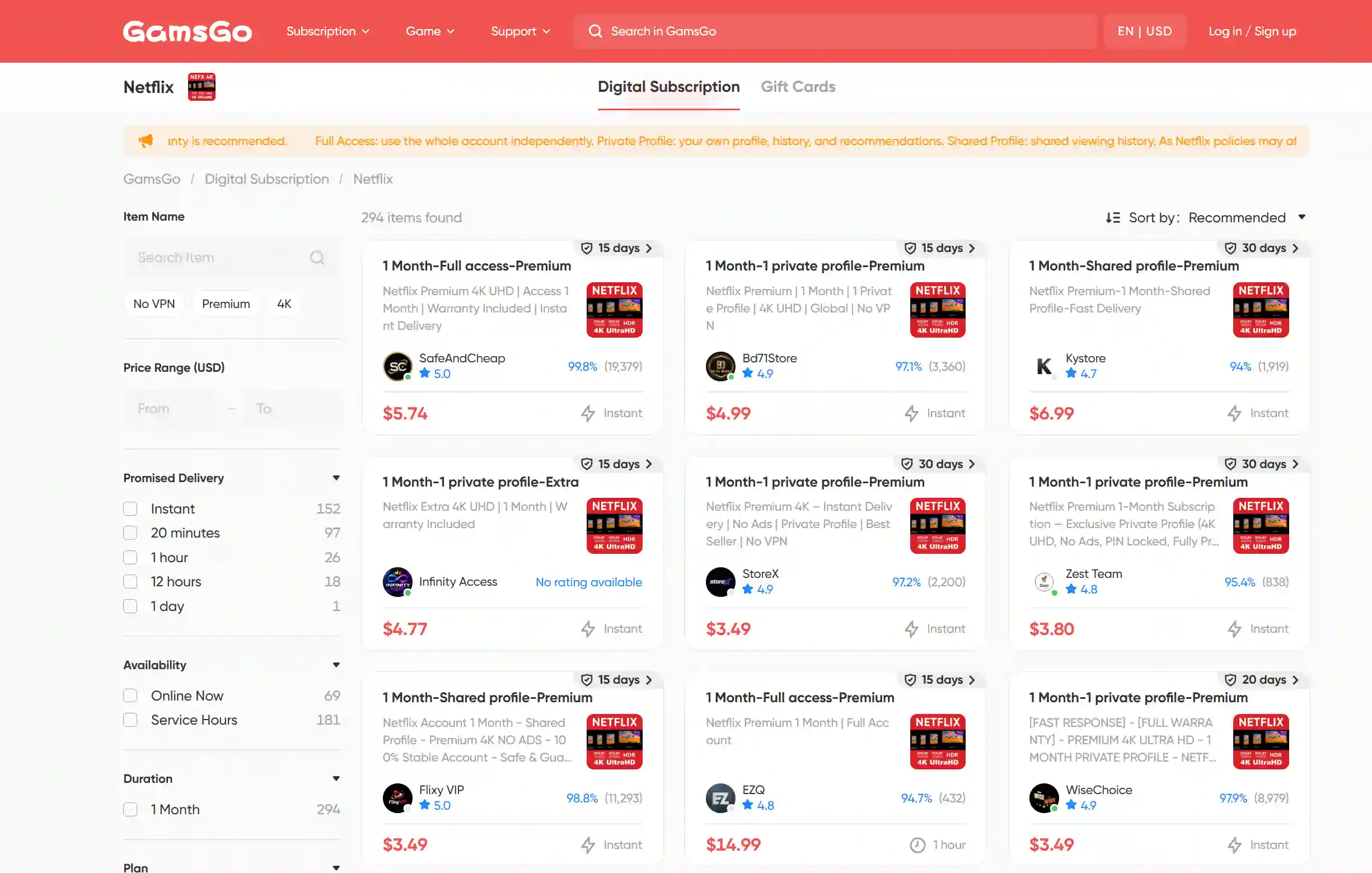
Once you have chosen a VPN, your Netflix subscription is another part of your ongoing viewing costs. If you want to keep high-quality, ad-free streaming while managing your budget, consider the Netflix Premium plans available through GamsGo, a reliable platform for digital streaming subscriptions.
After purchasing through GamsGo, you receive login details and a dedicated profile within the Netflix account, saving 75% compared with subscribing directly while keeping your own viewing history and recommendations. The plans support phones, computers, and TVs, with 4K UHD playback on compatible devices and connections—ideal for watching movies and shows on a larger screen.
GamsGo’s Netflix products also include an order warranty period and round-the-clock customer support. Visit GamsGo to buy a Netflix account and check current prices, subscription lengths, and plan details to find an option that suits your devices and budget.
For more ways to reduce your subscription costs, explore our guide on how to get Netflix for less.
How to Use a VPN With Netflix
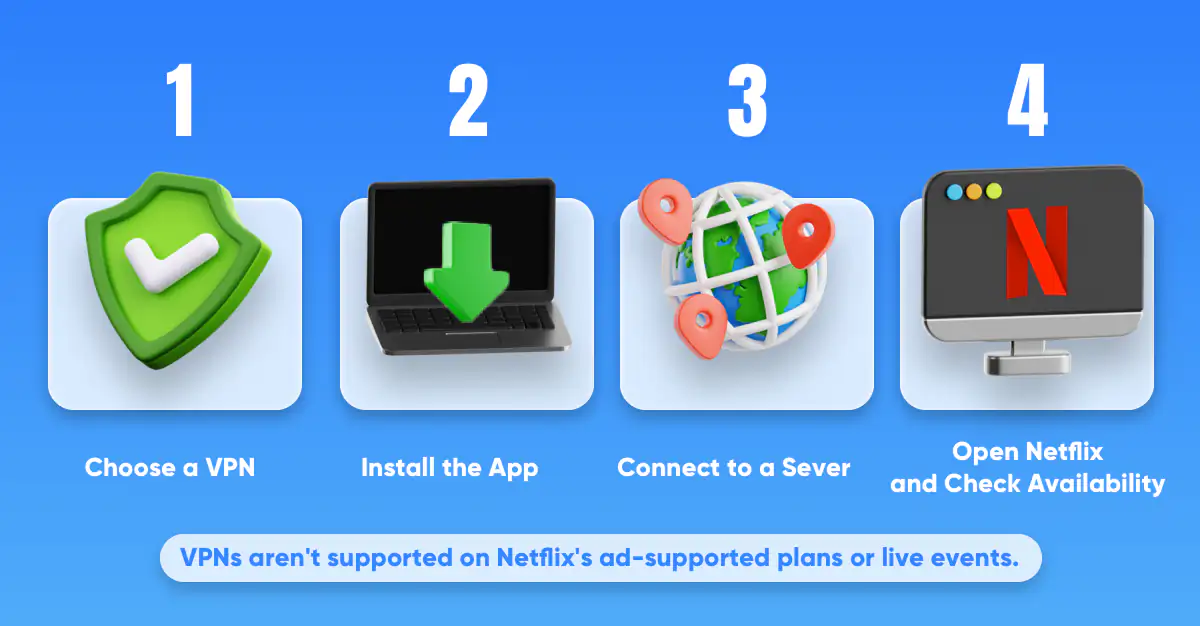
Using a VPN with Netflix is straightforward: subscribe to a VPN, download its app, and connect to a server in your chosen region. Then open the Netflix app or website to browse that region’s library. If the library does not change, try clearing your browser’s cache or restarting the Netflix app.
Remember that Netflix does not support VPN use on ad-supported plans or when watching live events. If you see a message saying, "You seem to be using a VPN or proxy," try another server in the same country or contact your VPN provider for help finding a working server.
If problems continue after you disconnect the VPN, our guide to common Netflix problems and fixes covers login, playback, and account issues.
Conclusion
Only a handful of VPNs provide consistent Netflix access. Considering unblocking performance, connection speeds, and device support, NordVPN is a good fit for most users. Surfshark suits households with many devices, while Windscribe Pro is worth considering if you want access to more regional libraries.
As Netflix’s blocking methods continue to change, consider a paid VPN with a money-back guarantee and test your preferred libraries during the refund period. Free VPNs are better suited to occasional viewing because of their data and location limits. Before connecting, also make sure your Netflix account is not on an ad-supported plan.
GamsGo DISCOUNT CODE
Get 1% OFF
Enter the code at checkout to claim your discount.
PROMO CODE
SAVE60
FAQ
Which Country Is Best for Netflix With a VPN?
There is no single best country—it depends on the movies and shows you want to watch. Choose a region where your preferred titles are available and check whether your VPN can access that library. Netflix’s catalog varies by location and changes over time.
Will Netflix Ban Me for Using a VPN?
Netflix does not state that VPN use automatically results in an account ban. You may encounter playback restrictions or see only globally licensed titles. However, Netflix reserves the right to restrict or terminate access for violations of its terms, so an unconditional “no risk” guarantee would be misleading.
Do VPNs Really Work for Netflix?
Yes, some VPNs can access regional Netflix libraries, as independent testing shows. However, results vary by provider, server, and country. Simply opening Netflix is not proof of successful unblocking—the VPN must also let you play content exclusive to the target region.
Does the Netflix VPN Trick Still Work?
Yes, switching regions with a VPN can still work, but it is not guaranteed. Netflix blocks VPN IP addresses, so a working server may stop providing access later. VPNs are also unsupported on Netflix’s ad-supported plans and when watching live events.
Related Articles