Crunchyroll is one of the most popular anime streaming platforms in the U.S., offering a huge library of licensed Japanese anime, simulcasts of new episodes, and an ad-free viewing experience. It now has over 17 million subscribers worldwide.
In 2026, U.S. users typically need to pay $9.99–$17.99 per month to watch anime with Crunchyroll Mega Fan. However, in regions like Turkey and Argentina, the monthly price is only $2–3. The content and service are exactly the same, but the price can be several times cheaper.
Because of this clear regional price gap, many users have started trying to subscribe at a lower price using a VPN. That said, some VPNs come with unstable connections, limited speeds, and potential account security risks, which can seriously affect the overall experience.
That’s why this guide brings together all practical ways to save money on Crunchyroll in 2026 — including VPN subscription methods that still work and are relatively stable, as well as legal alternatives that don’t require a VPN and are safer and more reliable. The goal is to help you subscribe to Crunchyroll long-term at a much lower cost, so you can enjoy anime with peace of mind.
If you're looking to save on subscriptions — not just for Crunchyroll, but also for games, software, and other streaming services — check out the deals below. Click the image to discover more offers!
Crunchyroll Premium Pricing and Benefits
What is Crunchyroll Premium
Crunchyroll Premium is the paid subscription service for Crunchyroll that gives you a better anime-watching experience. Premium plans include tiered options like Fan, Mega Fan, and Ultimate Fan, each offering different levels of simultaneous screens and perks.
Crunchyroll Premium Pricing
Before we talk about ways to save, let’s first take a look at what Crunchyroll actually costs in the United States right now.
Subscription Plan | Fan | Mega Fan | Ultimate Fan | GamsGo (Mega Fan) |
Price | $9,99/month
$99,99/year | $13,99/month $139,99/year | $17,99/month
$179,99/year | $3,30/month
$29,99/year |
Ads | No | No | No | No |
New Anime Update | Simultaneous | Simultaneous | Simultaneous | Simultaneous |
Offline Download | Supported | Supported | Supported | Supported |
Multi-device | 1 | 4 | 6 | 1 |
💡 It is worth noting that on February 2, 2026, Crunchyroll suddenly announced a price increase for memberships. New users would be eligible immediately, while existing subscribers would be eligible in the next billing cycle after March 4. The Mega Fan plan went up from $11.99/month to $13.99/month, and all three subscription tiers increased by $2.
The differences between the plans are quite significant. As our breakdown of the [Mega Fan vs Ultimate Fan plans] shows, Ultimate Fan supports more simultaneous devices (6 vs. 4), making it a better choice for families or shared use.
Crunchyroll Mega Fan Benefits
Even after the price increase, Mega Fan remains the most popular Crunchyroll plan — and for good reason. Here’s why so many users still choose it:
Ad-free access to the entire anime library
Mega Fan lets you watch all anime without ads, so you can fully immerse yourself without interruptions.
Simulcast episodes shortly after Japan
New episodes are usually available within 30–60 minutes after airing in Japan on Crunchyroll (including the U.S. version), so you won’t fall behind.
Up to 4 devices streaming at the same time
Supports up to 4 simultaneous devices, making it ideal for families or account sharing.
Better Crunchyroll Store perks
Mega Fan members get 10% off selected merchandise, plus member-only deals and early access to special promotions.
Compared to Ultimate Fan, Mega Fan is cheaper while offering nearly the same benefits, which is why most users consider it the best overall Crunchyroll experience. That said, $139.99 per year is still a significant expense for most people’s entertainment budget.
This is exactly why so many users look for cheaper alternatives. Online, you’ll find plenty of “shortcuts” — free trial tricks, promo codes, and other hacks. Some may work briefly, others are questionable, and some can even put your account at risk.
All the methods below have been tested and verified. You can genuinely save money without worrying about scams or account issues.
Buy Crunchyroll Premium Cheaper with GamsGo
We spent 6 months testing 5 different ways on the market to reduce the cost of a Crunchyroll subscription. Our criteria were clear: it had to be genuinely cheaper, stable long-term, and safe for your account.
After multiple rounds of comparison and real-world testing, GamsGo clearly stood out. In fact, our entire team is now using it — some of us for over a year — with consistently stable and reliable results.
Next, let’s break down how GamsGo helps you lower the cost of Crunchyroll safely and reliably, without using a VPN.
What Is GamsGo
GamsGo is a trusted subscription-sharing platform. As of 2026, it has attracted over 2 million subscribers and has maintained long-term, stable operations.
GamsGo’s core mission is simple: help users significantly reduce the cost of subscription services. Its offerings now cover multiple categories, including streaming platforms, AI tools, and gaming subscriptions, designed for long-term use rather than short-term hacks.
More recently, GamsGo launched the GamsGo Marketplace, further expanding its service model. Through the marketplace, users can purchase Crunchyroll Premium accounts at prices far below the official rate, directly from GamsGo-verified sellers, adding an extra layer of reliability and trust.
How to Get Crunchyroll at a Lower Price with GamsGo
By subscribing to Crunchyroll Mega Fan through GamsGo, you can save up to 70%. Follow this step-by-step guide to enjoy ad-free anime streaming while significantly cutting your costs.
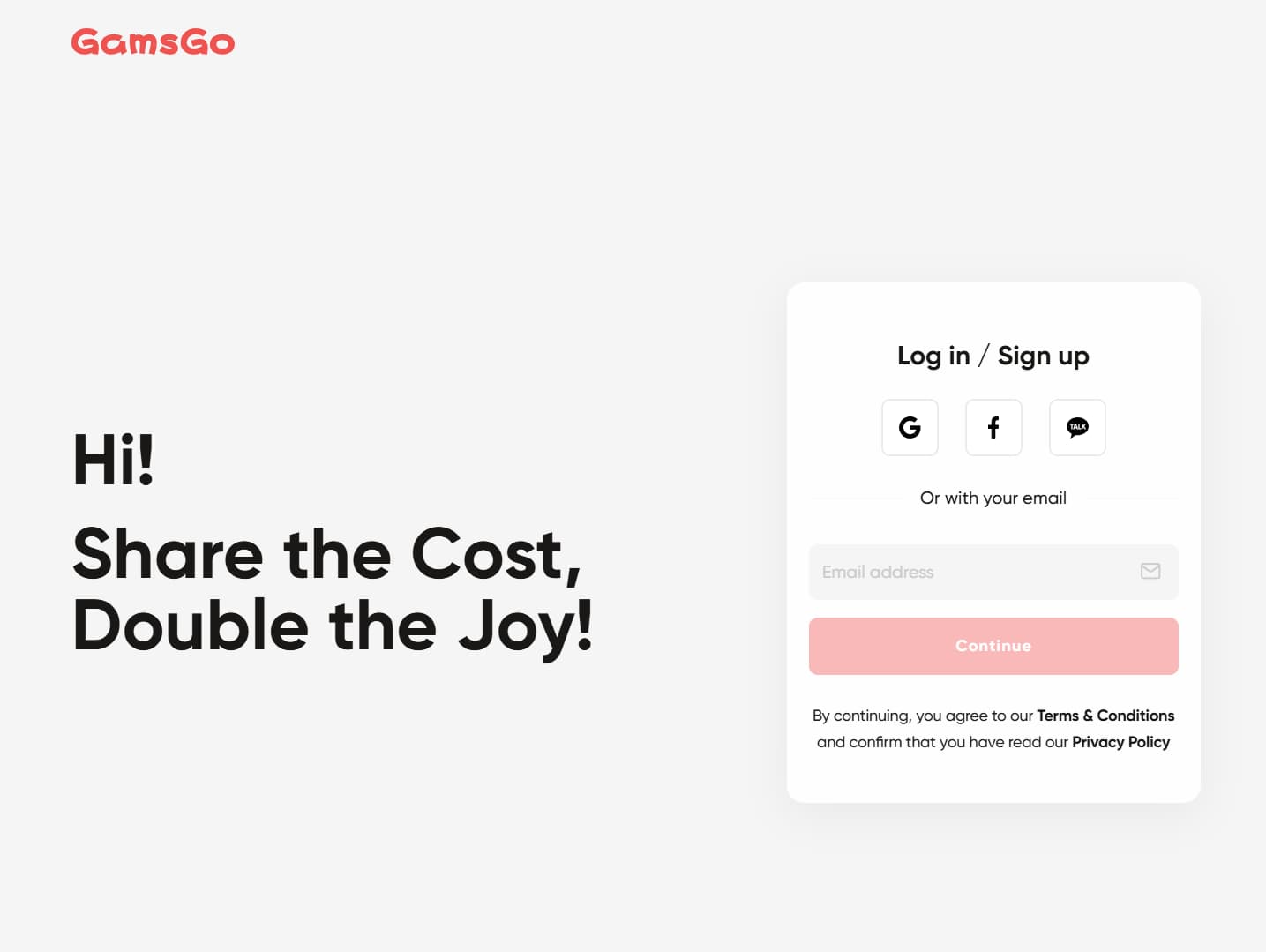
1️⃣ Create a GamsGo Account
Visit the GamsGo website and click “Sign Up” in the top-right corner. You can register with your email or log in quickly with Google. Once your email is verified, your account will be ready to use.
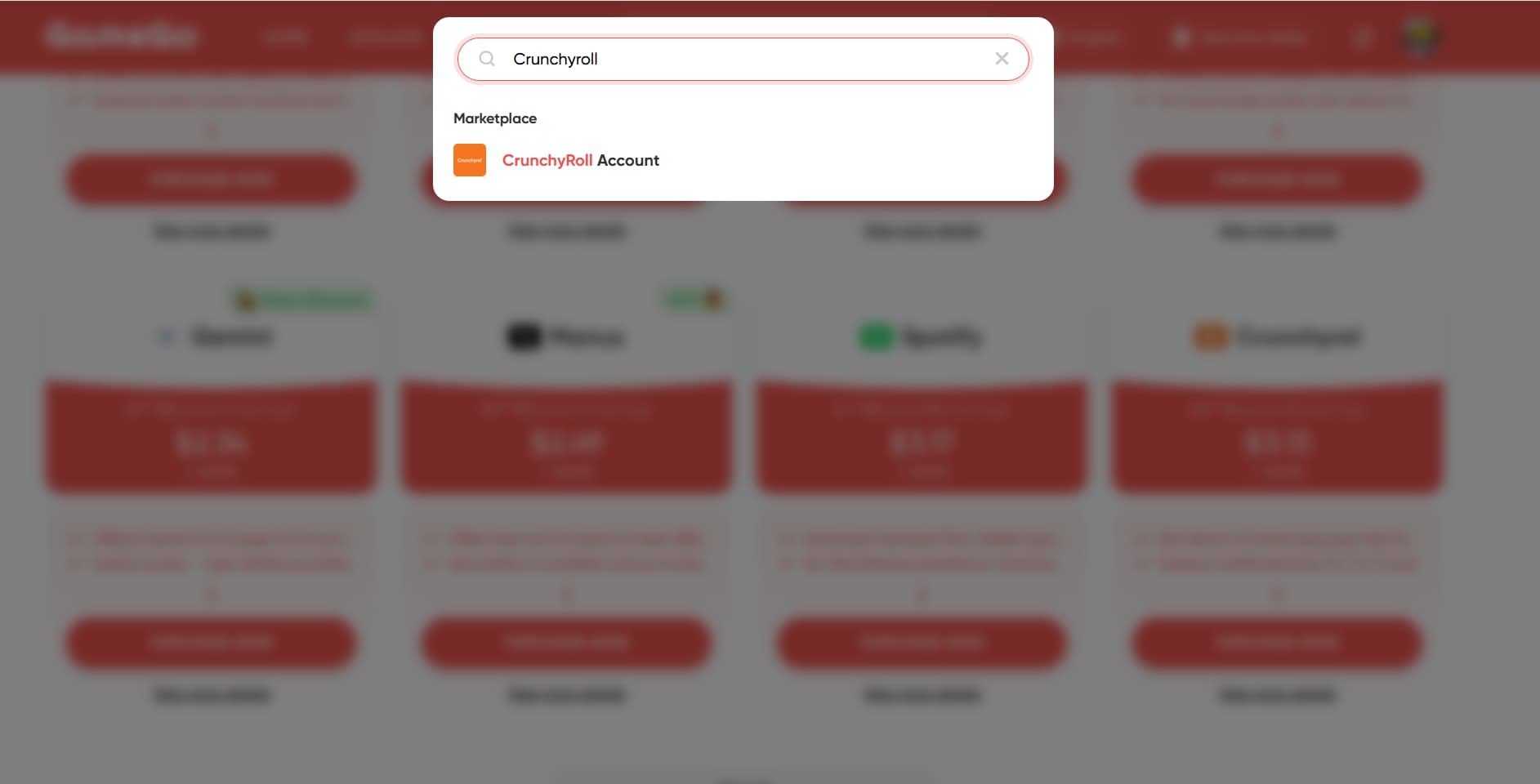
2️⃣ Find Crunchyroll Subscription Deals
On the GamsGo homepage, type “Crunchyroll” into the search bar to access the Crunchyroll subscription page and view the latest available deals.
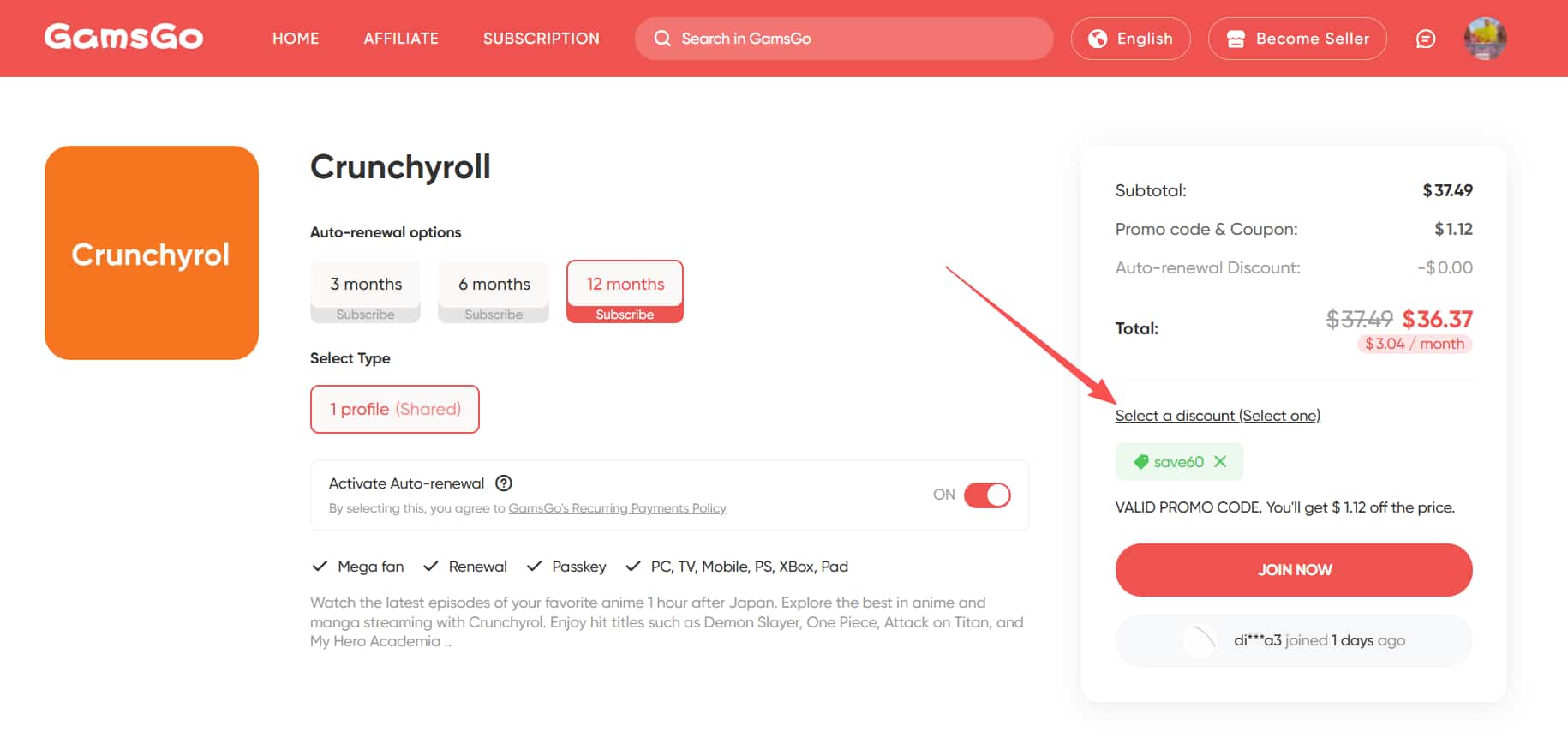
3️⃣ Choose Your Subscription Plan
Select a 3 / 6 / 12-month plan based on your needs. On the checkout page, GamsGo clearly displays the Mega Fan tier, along with detailed benefits and included services, so everything is transparent and easy to understand.
👉 Extra savings: We’ve secured an exclusive blog discount for you. Enter the promo code save60 at checkout to get an additional 3% off on top of existing discounts.
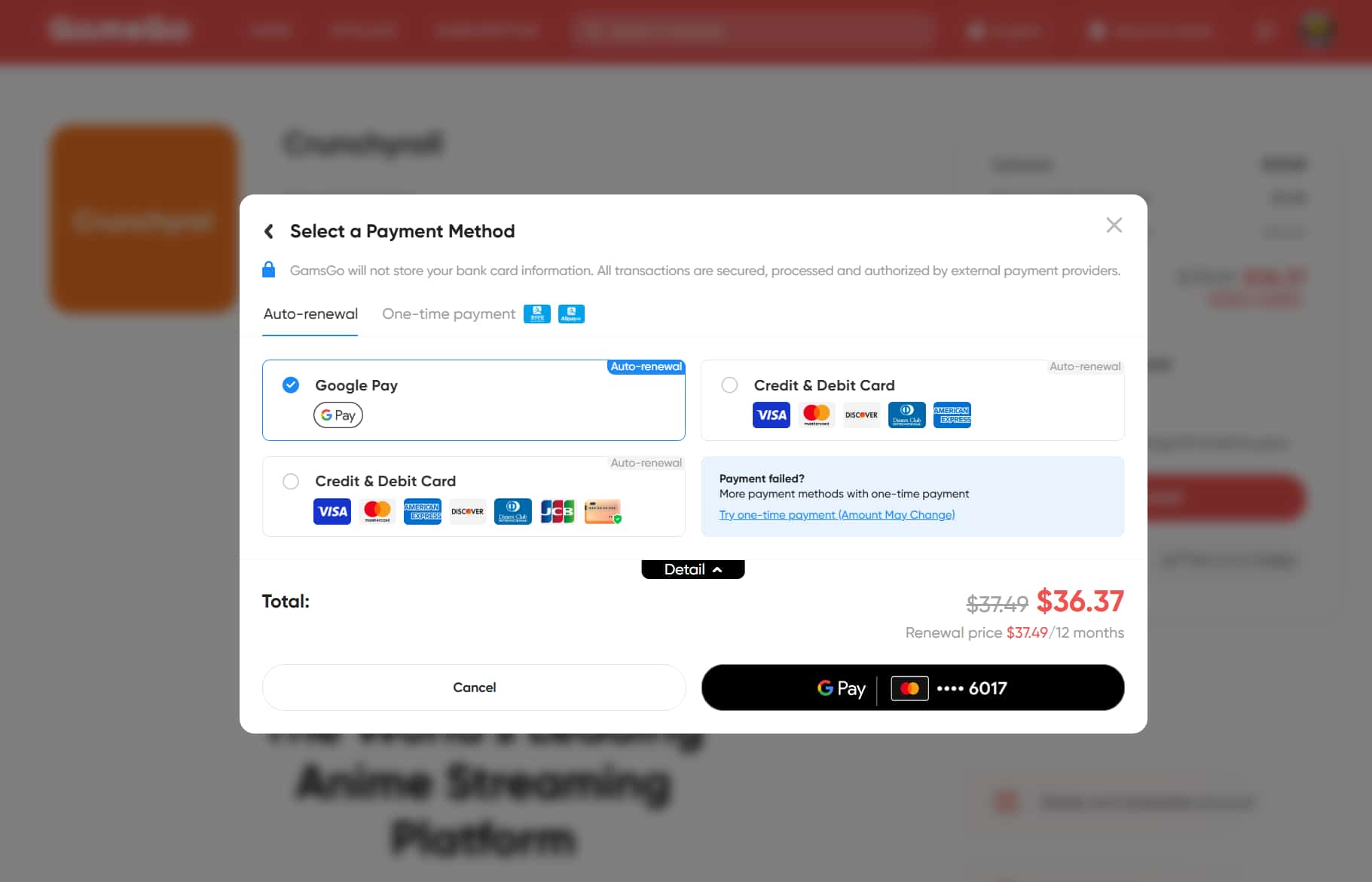
4️⃣ Pay and Confirm
Click “Buy Now”, choose your preferred payment method, enter your payment details, and complete the order.
5️⃣ Receive Your Login Details
After payment, GamsGo processes and delivers your order immediately. Your Crunchyroll login details are usually sent within minutes, with no extra waiting time.
✨ Good to know: After subscribing, you’ll have your own individual profile. Your watch history, recommendations, and favorites are completely separate from those of other users.
If you encounter any issues during purchase or use, GamsGo offers 24/7 customer support, ready to help you at any time.
Buy Crunchyroll for Less with a VPN
Since Crunchyroll’s pricing varies by region, another way to reduce the subscription cost is by using a VPN. However, with so many VPN options available, choosing a reliable and trustworthy VPN is essential.
What Is a VPN
A VPN (Virtual Private Network) is an encrypted connection technology that creates a secure “virtual tunnel” between your device (computer, smartphone, tablet, etc.) and the internet. It encrypts your data and hides your real IP address, protecting your online activity from unnecessary tracking or monitoring.
Simply put, once you use a VPN, your real IP address is hidden. The VPN replaces it with a different IP address, so websites can only see the VPN’s IP, not your actual location.
Crunchyroll VPN Comparison
Among the hundreds of VPN services available worldwide, the GamsGo testing team spent several months running real-world tests and comparisons on dozens of mainstream VPN products.
Our test scenarios included accessing region-restricted streaming content like Crunchyroll, Netflix, and YouTube, securely connecting to public Wi-Fi, downloading less common resources, and supporting remote work needs.
Below is the comparison table based on our evaluation results:
VPN | Long-term Avg. Monthly Price | Overall Rating | Key Strength (One Sentence) | Main Drawback |
NordVPN | Official: $15.29/mo; GamsGo: $8.99 / 3 months | ⭐⭐⭐⭐⭐ | The best all-around choice: great speed, strong security, and solid value. | Almost no obvious weaknesses. |
ExpressVPN | Pro: $19.99/mo | ⭐⭐⭐⭐ | Top-tier speed and stability. | Expensive. |
Surfshark | Surfshark One+: $20.85/mo | ⭐⭐⭐ | Unlimited devices and strong value for money. | Based in a Nine Eyes country. |
ProtonVPN | Unlimited: $12.99/mo | ⭐⭐⭐ | Privacy-first philosophy and strong security focus. | Average speeds. |
PureVPN | Max: $19.95/mo | ⭐⭐⭐ | Affordable with a full feature set. | Slower speeds in Asia. |
CyberGhost VPN | $12.99/mo | ⭐⭐⭐ | Huge server network, but performance varies. | Unstable in Asia. |
FastestVPN | $40 lifetime | ⭐⭐ | Very cheap upfront with a lifetime plan. | Slow speeds / not great overall usability. |
Based on long-term usage experience and stability testing, we recommend NordVPN as a truly reliable VPN service that’s well-suited for long-term use.
Click to see our full, detailed VPN review: Best VPNs to Trust in 2026: Our Top 10 Picks
Crunchyroll Prices by Country (2026)
Crunchyroll sets different prices by region. Here's how Mega Fan compares in some of the cheapest countries:
How to Buy Crunchyroll for Less with NordVPN
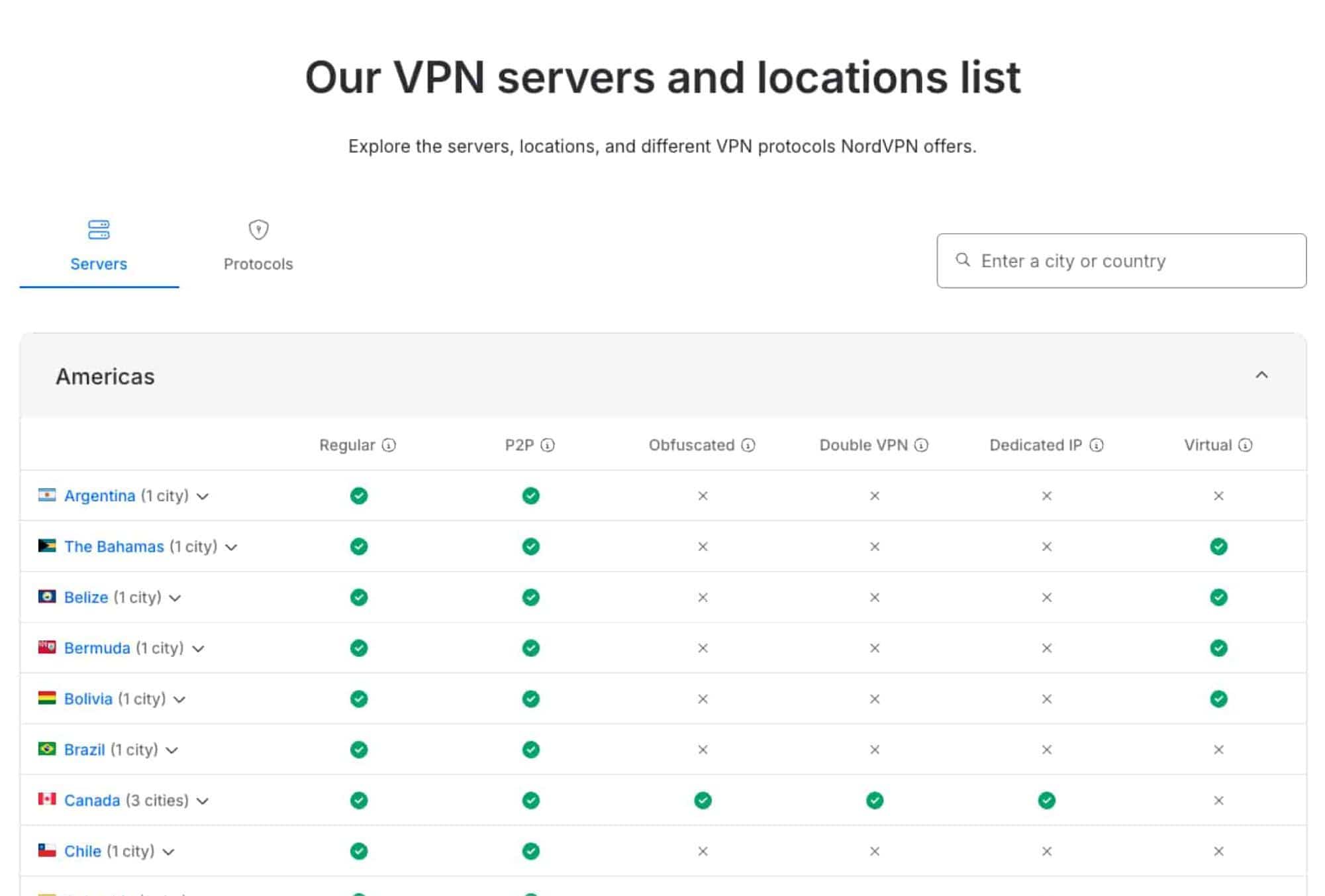
NordVPN is widely regarded as one of the most secure VPNs available. As of July 2025, NordVPN operates a massive network of 7,155+ servers across 164 countries and regions.
By switching to lower-priced regions such as Turkey or Argentina, you can reduce the Crunchyroll Mega Fan price to around $2–3 per month. Follow the steps below:
1️⃣ Prepare NordVPN
Before you start, you’ll need an active NordVPN account. You can buy it from the official website, but on GamsGo, you can often get it for about one-fifth of the regular price.
After purchasing a NordVPN Premium account on GamsGo, download and install the NordVPN app on your computer or phone. Open the app, click “Log in” (top right), and sign in with your account credentials.
2️⃣ Connect to a Low-Price Country
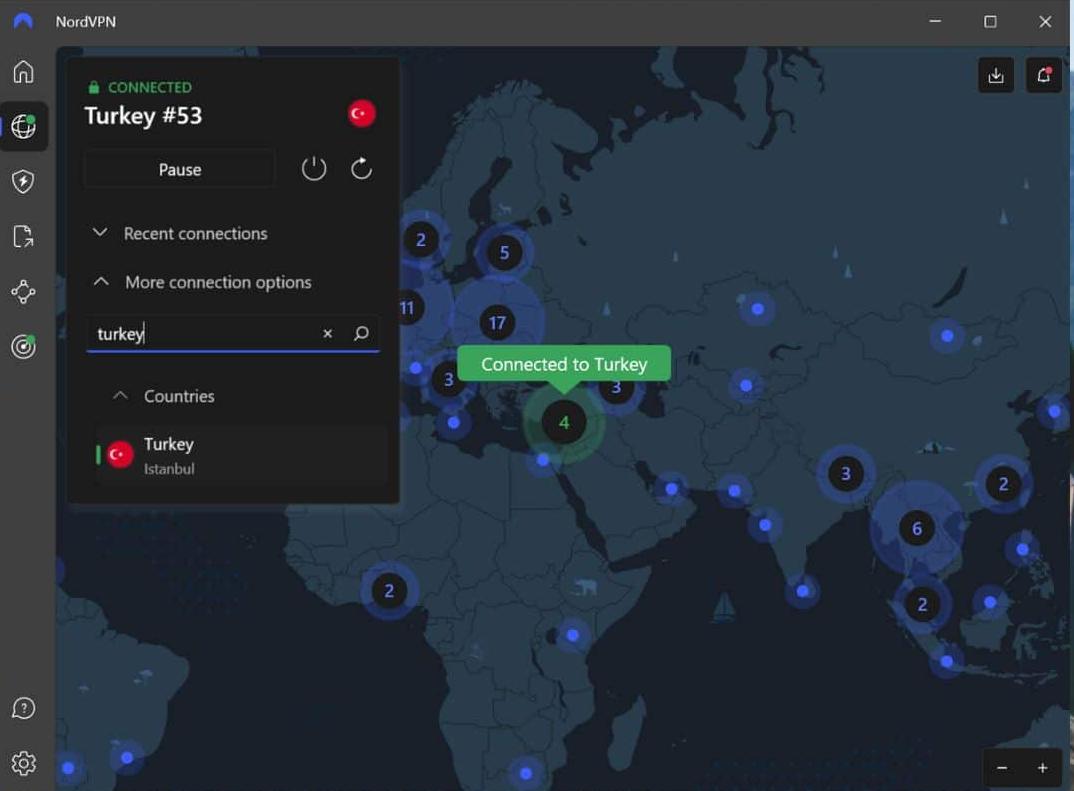
Once logged in, go to the NordVPN main screen. In the country list on the left or the search bar at the top, enter a target country such as Turkey or Argentina. Click to connect—NordVPN will automatically assign a server.
When the status shows “Connected / Protected”, your IP has successfully switched to that region.
3️⃣ Visit Crunchyroll to Check the Lower Price
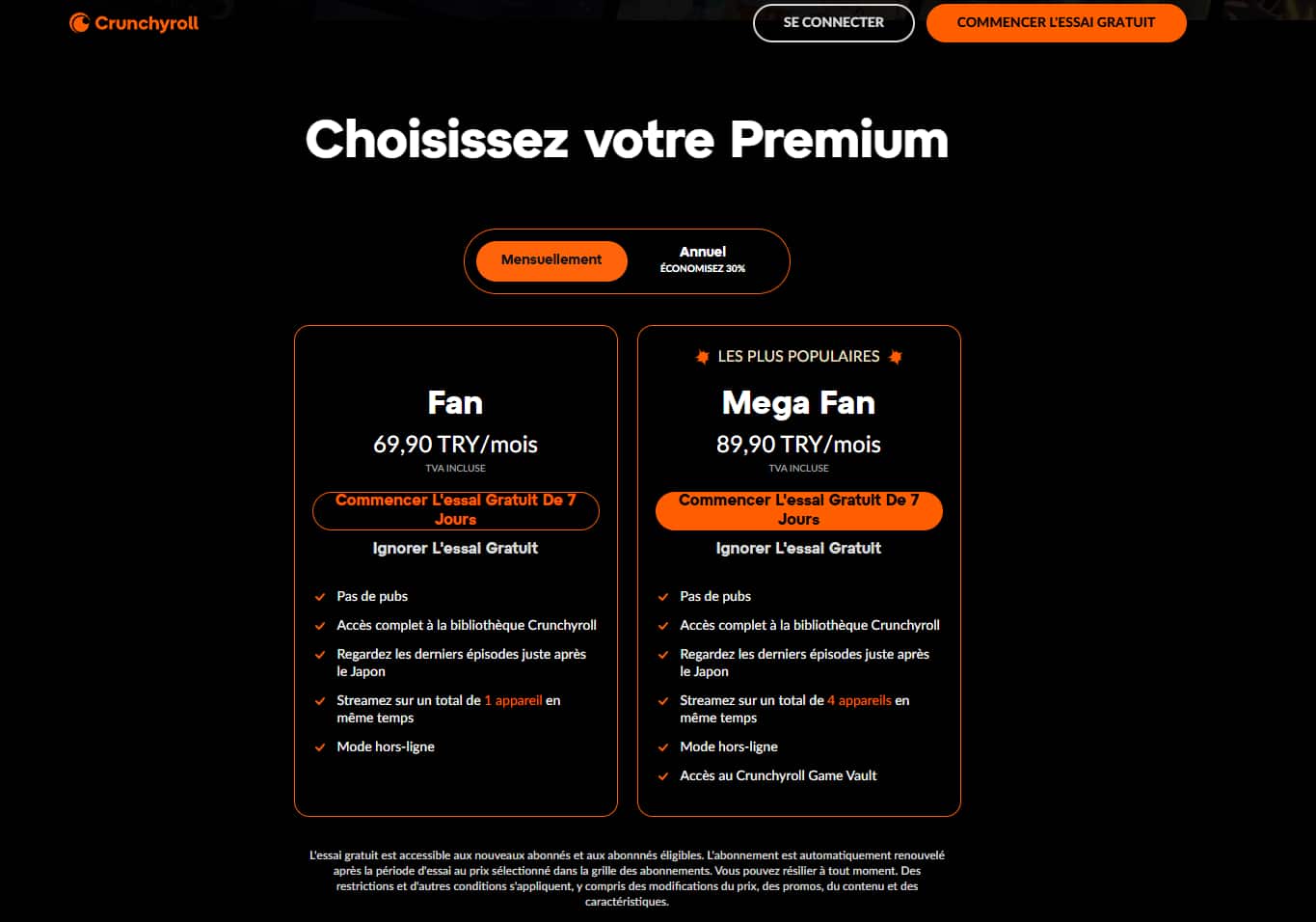
Open crunchyroll.com and click “Subscribe” or “Try Premium” in the top-right corner to view plans.
If everything worked correctly, you’ll see prices similar to those shown in the example (starting from the second image), which are significantly lower than standard Euro or USD pricing.
4️⃣ Complete Payment and Start Watching
Confirm the price, choose your plan, and proceed to checkout. After completing payment, you’ll see a success message. Your account will be upgraded to Premium, and in most cases you can continue using the benefits even after disconnecting the VPN.
Tip: If the price doesn’t change after connecting to the VPN, your browser may still be using cached location data. Go to Privacy & Security, clear your cache and cookies, restart the browser, then revisit the site with the VPN enabled.
⚠️ Important Notice: GamsGo always provides guidance from a legal and compliance-oriented perspective. Using a VPN to switch regions for purchasing Crunchyroll may involve bypassing regional restrictions and could violate Crunchyroll’s terms of service. Therefore, this method is shared as a supplementary reference only and is not our primary recommended option.
Crunchyroll Account Sharing: A Cost-Saving Option
In 2026, Crunchyroll still allows account sharing with family members or close friends. With the Mega Fan plan, one account typically supports up to 4 simultaneous streams (you plus 3 family members or close contacts).
By splitting the subscription cost with family, the monthly cost per person can drop to about 1/3–1/4 of the official price, making it much cheaper than subscribing alone.
However, it’s important to note that Crunchyroll does not encourage sharing outside the household. If an account is frequently logged in from different locations, it may trigger security checks, leading to forced verification, login restrictions, or temporary loss of access.
👉 Learn more about Crunchyroll subscription sharing: Share Crunchyroll Account: Everything You Need to Know
Best Ways to Save Money on Your Crunchyroll Subscription
As mentioned earlier, we’ve introduced three ways to save on your Crunchyroll subscription. The table below summarizes and compares them side by side:
Method | Recommendation | Security | Price | Extra Tools Required | Stability |
GamsGo | ⭐⭐⭐⭐⭐ | ✅ 100% safe | Mega Fan plan from $3.30/month | ❌ No | ✅ Very stable |
VPN | ⭐⭐ | ⚠️ Violates the terms of service, potential risk | Mega Fan plan from $1–2/month | ✅ Yes (VPN required) | ❌ Unstable |
Account Sharing | ⭐⭐ | ⚠️ Usually fine with family or close friends; risky with strangers | Mega Fan plan $4–5/month per person | ❌ No | ⚠️ Partially stable |
From the comparison, it’s clear that VPN-based methods are the cheapest on paper, but they usually require spending $10 or more on a VPN service. More importantly, switching regions to subscribe may violate platform rules, resulting in lower account stability and a higher chance of restrictions over time.
Family sharing works best when limited to close family members or trusted friends. In small, controlled use cases, it’s relatively convenient. However, sharing with people outside your household often involves logins from different locations, which can trigger Crunchyroll’s risk-control systems, leading to instability or access limitations.
Overall, GamsGo delivers the best balance of security and price. It’s currently the most hassle-free and cost-effective option, allowing users to enjoy Crunchyroll Premium benefits stably without extra tools, VPNs, or technical setup.
Conclusion
Crunchyroll is a streaming platform loved by anime fans worldwide, offering Premium benefits like ad-free viewing, simulcast releases, and multi-device streaming. However, the official subscription price is still relatively high for some users. While Crunchyroll does not offer a global family-sharing plan, GamsGo provides a more cost-effective alternative.
With GamsGo, you can subscribe to the Crunchyroll Mega Fan plan for around $3.30 per month, significantly reducing your subscription cost without adding extra steps or technical barriers.
🎁 If you choose to subscribe to Crunchyroll through GamsGo, we’ll also prepare an exclusive bonus to help you enjoy a better, more affordable streaming experience.
We’ve prepared an exclusive promo code for all blog readers:
Enjoy an additional 3% off on your next purchase!
Valid across all categories — streaming accounts, AI tools, game top-ups, software subscriptions, and more.
FAQ
What is the Cheapest Plan for Crunchyroll?
The Crunchyroll Fan plan is the most affordable option at $9.99 per month. With this plan, you can enjoy ad-free streaming and watch on 2 devices simultaneously. It’s a great option for those looking to experience Crunchyroll’s content without breaking the bank.
Is Crunchyroll Through Prime Cheaper?
There are two practical ways to save money right now. The official annual plan offers about 16% savings compared to monthly billing. Another option is using GamsGo, where the Mega Fan plan costs around $ 3.30 per month, over 76% cheaper than standard prices.
Is there a Way to Get a Discount on Crunchyroll?
There are two practical ways to save money right now. The official annual plan offers about 16% savings compared to monthly billing. Another option is using GamsGo, where the Mega Fan plan costs around €3.30 per month, over 70% cheaper than standard prices. Students in the US and UK may get extra discounts.
Related Articles:
How to Block Ads on Crunchyroll in 2026
How to Stream Crunchyroll on Discord with Friends (No Black Screen)
Crunchyroll Black Friday 2025: Best Anime Streaming Discounts