
Gemini is Google’s AI assistant and is now available in more than 160 countries. With deep integration across Gmail, Docs, and other Google services.
After Google I/O 2026, Gemini reorganized its product structure into four subscription tiers, each with clear differences in available models and features.
This article breaks down each plan tier by tier to help you decide which Gemini subscription level is right for you.
Gemini Pricing Plans Compared (2026)
At Google I/O 2026, Google adjusted its subscription structure again: the top Ultra tier dropped from $250 to $200, a new $100 entry-level Ultra tier was added, and a compute-based usage model was introduced. For individual users, Gemini now offers four tiers, with available models and usage limits increasing as the price goes up.
| Plan | Price | Available Models | Key Highlights |
|---|---|---|---|
| Free | $0 | Gemini 3.5 Flash, limited 3.1 Pro | Basic usage, 32K context, 15GB storage |
| Plus | $7.99 | 3.1 Pro, with higher usage limits | 2x usage, 400GB storage, 128K context |
| Pro | $19.99 | 3.1 Pro, full access | 4x usage, 1M context, 5TB storage, includes YouTube Premium Lite |
| Ultra | From $99.99 | 3.1 Pro + Deep Think | 5–20x usage, from 20TB storage, includes YouTube Premium; the $200 tier unlocks Project Genie |
Among the four tiers, the biggest jump is from Free to Pro. For an extra $19.99 per month, you get full 3.1 Pro access, a 1M context window, and a major increase in usage limits, which is why Pro is the main focus of this article.
The price gap between the two Ultra sub-tiers, $100 and $200, mainly comes down to usage multiples, storage, and a few exclusive features. These plans are aimed at heavy creators and developers.
Google AI Free vs. Pro: Is Pro Worth It?
For most users, the real question is not whether to use Gemini, but whether it is worth paying $19.99 per month for Pro when the free version already seems good enough.
To answer that, you should look beyond price and focus on the factors that directly affect daily use: available models, how much content you can process at once, usage limits, and how deeply Gemini fits into your everyday workflow.
The free version is enough for basic tasks, but its limits are obvious. It mainly relies on Gemini 3.5 Flash and only offers limited access to the stronger 3.1 Pro model. The context window is smaller, long-document processing is more restricted, Deep Research is limited to 5 reports per month, and storage is only 15GB. It works for everyday questions and short writing tasks, but once your tasks become more complex, these limits appear quickly.
For $19.99 per month, Pro mainly removes these bottlenecks:
| Category | Free | Pro |
|---|---|---|
| 3.1 Pro access | Limited | Full access, 4x higher usage |
| Context window | 32K | 1M, about 1,500 pages |
| Deep Research | 5 reports/month | Significantly higher limits |
| Storage | 15GB | 5TB |
| Gmail/Docs integration | Not included | Full integration |
| Extra benefits | — | YouTube Premium Lite |
The biggest experience upgrades are full 3.1 Pro access and the 1M context window. The former is much stronger for complex reasoning and coding, while the latter lets you analyze hundreds of pages of documents in a single task. These are exactly the areas where the free version is most likely to feel limited.
So, who should actually upgrade? You can decide based on your usage habits:
Pro is worth upgrading to if you:
- Use Gemini heavily every day
- Rely on Gmail and Docs for work and need deeper AI integration
- Often work with long documents, large files, or in-depth research tasks
The free version is enough if you:
- Only ask occasional questions or write short content
- Have light usage and rarely hit the free plan’s limits
If you fall somewhere in between — your usage is higher than casual, but Pro still feels expensive — you do not have to choose only between Free and Pro. The Plus plan below may be a better fit.
What About the Plus Plan?
Plus costs $7.99 per month and sits neatly between Free and Pro. It is designed for users who have outgrown the free plan but do not want to jump straight to $19.99 per month.
Compared with the free version, Plus doubles everyday usage, provides a higher 3.1 Pro access limit, and increases storage from 15GB to 400GB, easing several of the most common free-plan restrictions.
However, it does not include Pro’s core benefits. The 1M context window, full high-usage access, and Gmail and Docs integration remain exclusive to Pro. So if your needs clearly involve deep work or long-document analysis, Pro is the better value.
Is AI Ultra Worth the Extra Cost?
Ultra is the top tier among the four plans and comes in two sub-tiers: $99.99 and $199.99. The former is aimed at heavy users and developers who often hit Pro’s limits, while the latter is mainly for creators with professional video-generation needs and very large storage requirements.
Compared with Pro, Ultra offers 5 to 20 times more usage, starting from 20TB of storage, full YouTube Premium, and Deep Think reasoning mode. The $199.99 tier also includes exclusive access to experimental features such as Project Genie. The difference is more about quantity and a few specialized capabilities than the core model itself.
For most users, Ultra is unnecessary. It only makes real financial sense if Gemini is deeply embedded in your daily workflow, you frequently hit the ceiling of Pro, or you work professionally with video creation.
How to Subscribe to Gemini Pro for Less
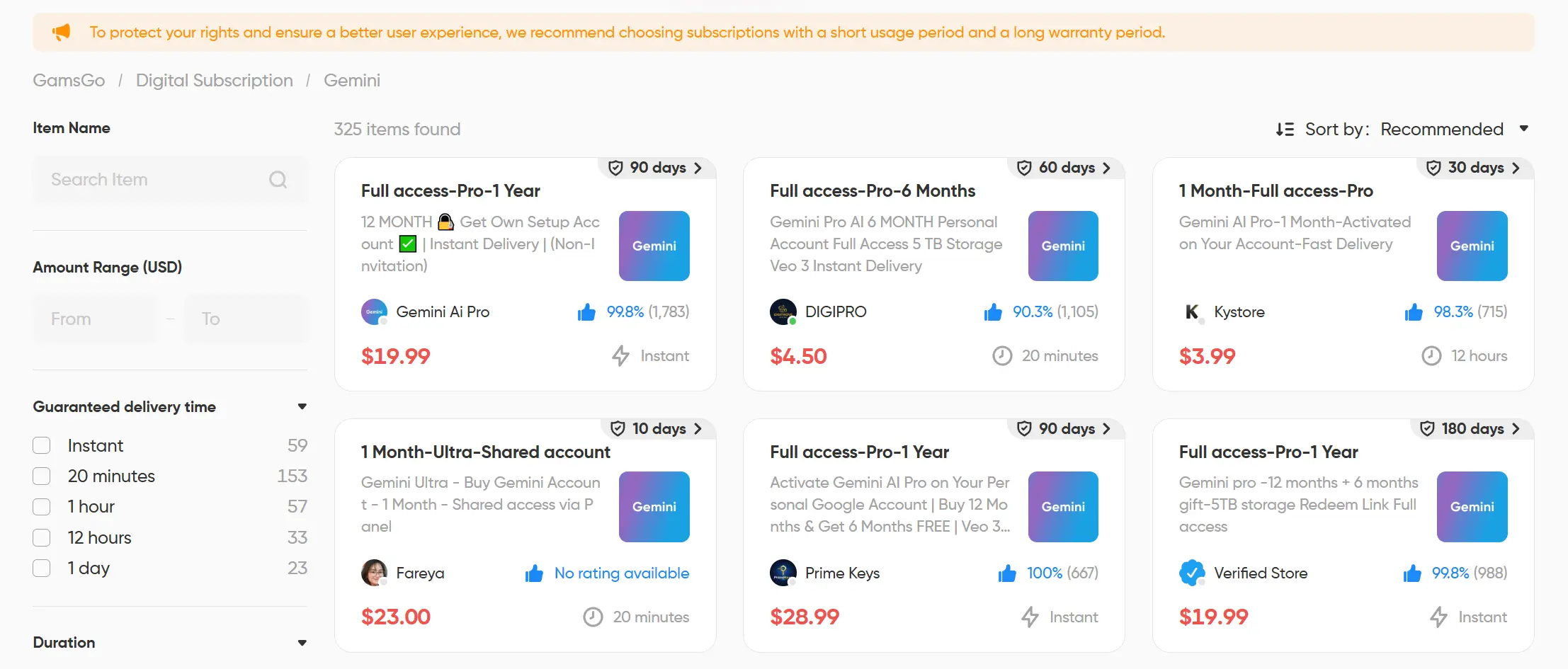
If a long-term Gemini subscription at the official price feels too expensive, you can consider buying related products through the GamsGo digital marketplace.
GamsGo has been operating for seven years and has served more than one million users. On the marketplace, many real sellers offer unused Gemini accounts, including Pro and Ultra subscription tiers, with flexible durations ranging from 1 month, 3 months, and 6 months to 1 year.
The exact price may vary depending on the seller and purchase time, but compared with the official price, it is usually 60% to 75% cheaper, and sometimes even more.
Conclusion
In terms of features, Gemini Pro is absolutely worth the price. Its reasoning depth, long-text processing ability, multimodal understanding, and deep Workspace integration make it far more capable than the free version.
If you are concerned about subscription costs, GamsGo Marketplace is one of the best ways to save money. You can usually unlock the full feature set for only 25% to 40% of the official price, reducing your AI spending while improving productivity.
FAQ
Is Gemini Pro worth it for everyday use?
Gemini Pro is worth it if you use AI regularly for research, writing, coding, file analysis, or Google Workspace tasks. If you only ask simple questions occasionally, the free version is usually enough.
What is the main difference between Gemini Free and Pro?
The biggest difference is capacity. Gemini Pro usually offers stronger model access, higher usage limits, a larger context window, more storage, and better integration with Google apps such as Gmail and Docs.
Should I choose Gemini Plus or Gemini Pro?
Choose Plus if you only need more usage than the free plan. Choose Pro if you work with long documents, need deeper research, or want full productivity features across Google Workspace.
Who needs Gemini Ultra?
Gemini Ultra is mainly for heavy users, developers, and professional creators who frequently reach Pro limits or need advanced experimental features. Most regular users do not need Ultra.
Can I use Gemini Pro for work and study?
Yes. Gemini Pro is useful for summarizing documents, drafting emails, researching topics, analyzing files, coding, and improving productivity. Always review important outputs before using them professionally.
Related Articles
Is MidJourney Free?Plans, Price & How to Save Money
Seedance 2.5 Prices: Is the Subscription Worth It?



%20vs%20ChatGPT%401x-5d2bedb1-6884-4049-b3c3-7ce664d834f4.webp)