If your Netflix Premium subscription from GamsGo shows "Reactivate your account", "Welcome back", or the account is no longer Premium after login, do not worry. This guide explains how to report the issue, what happens after you submit the request, and what alternatives you can choose if you do not want to wait.
The guide will help you restore access to your Netflix Premium subscription, understand the Netflix Premium renewal process. And you
can decide whether to wait for a fix, switch to another subscription, or receive credit in your GamsGo Wallet.
Why Your Netflix Premium Subscription May Show "Reactivate Your Account"
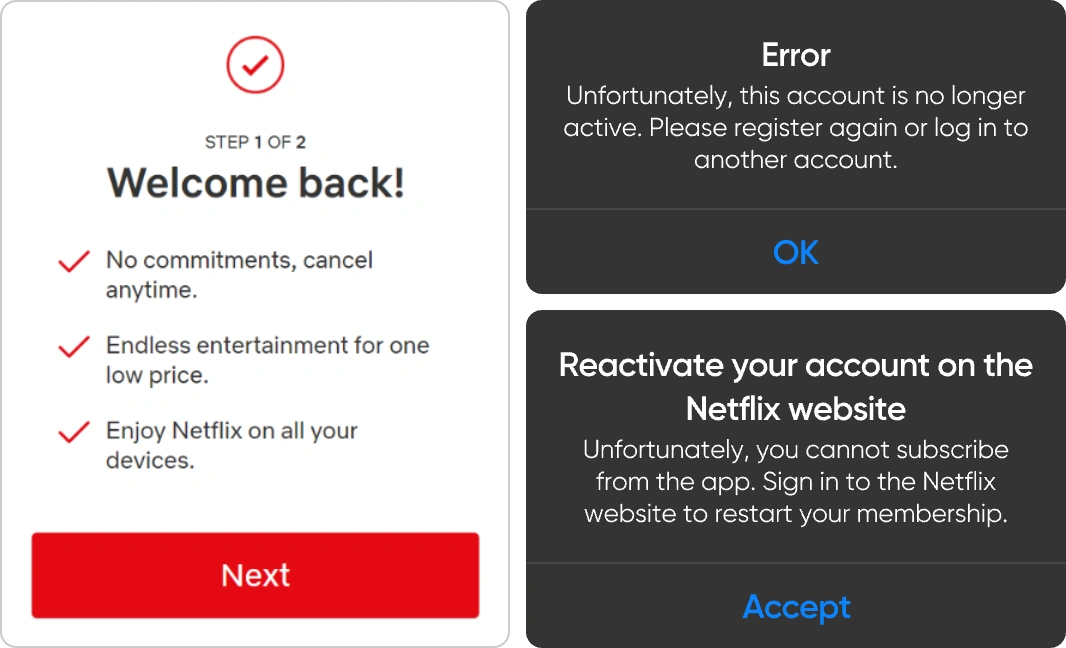
A Netflix account may show messages such as "Reactivate your account" or "Welcome back" when the membership is inactive, billing has changed, or Netflix renews the subscription status differently from what the user expected. If you purchased access through GamsGo and your account does not show Premium benefits, you should report the issue through your GamsGo order page instead of trying to change the Netflix billing settings yourself.
Common signs that you need to submit a report include:
- You can log in to Netflix, but the account is not Premium.
- Netflix asks you to reactivate the account.
- The account shows a "Welcome back" screen instead of active streaming access.
- Premium features, such as 4K playback or multiple simultaneous screens, are unavailable.
- Your GamsGo order is active, but the Netflix account status does not match the subscription you purchased
Quick Checklist Before Reporting the Issue
Before clicking the report button, confirm that the problem is related to the Netflix Premium status and not a temporary login or device issue.
- Check that you are logging in with the Netflix credentials provided by GamsGo.
- Try opening Netflix in a browser instead of only using the mobile app or smart TV app.
- Refresh the Netflix page and confirm whether the account still shows "Reactivate your account" or "Welcome back".
- Take a screenshot of the Netflix message in case support needs proof of the issue.
How to Report Netflix Not Premium on GamsGo
If your Netflix account is not Premium, follow the steps below to submit a report from your GamsGo account. Keeping the process inside GamsGo helps the support team connect the issue with your order and handle the request more efficiently.
Step 1: Log In to GamsGo
Log in to your GamsGo account and open the order or subscription page linked to your Netflix Premium purchase.
Step 2: Start the Netflix Not Premium Report
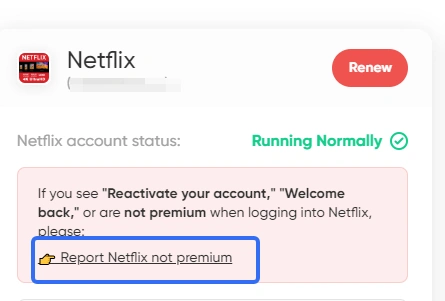
Click Report Netflix not premium. Use this option only when you see "Reactivate your account", "Welcome back", or the Netflix account is active but does not include Premium benefits.
Step 3: Confirm the Report
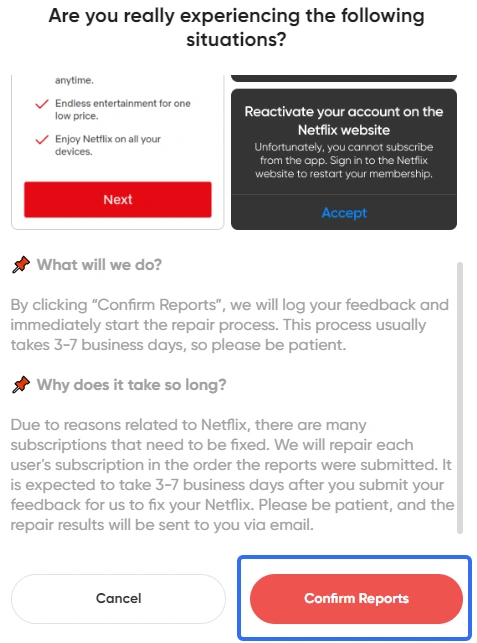
After clicking Report Netflix not premium, a confirmation pop-up will appear. Review the message carefully. If the issue matches your situation, click Confirm.
Step 4: Wait for the Account Status to Change
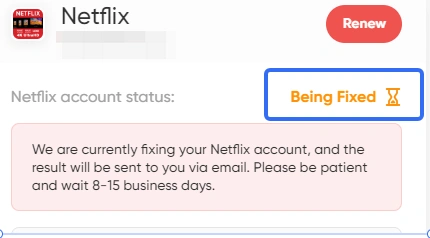
Once the account status changes to Being Fixed, GamsGo has received your report and is working on the issue. Due to a high volume of requests, the modification process may take 8 to 15 business days. The final result will be sent to you by email.
Alternative Solutions If You Do Not Want to Wait
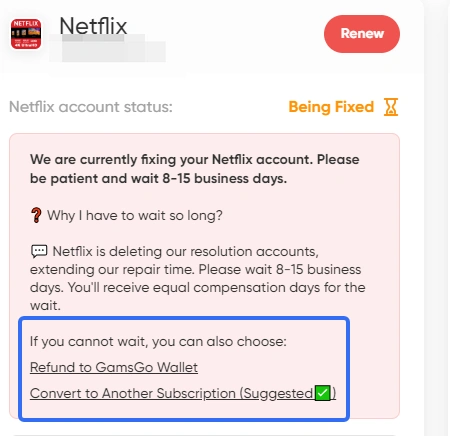
If you do not want to wait for the Netflix Premium renewal or repair process, GamsGo may offer alternative solutions depending on the order status and available products.
- Convert to another subscription: If you want faster access to entertainment, you can switch your remaining Netflix subscription time to another available service that better fits your needs.
- Refund to GamsGo Wallet: If you prefer immediate flexibility, the remaining value of your Netflix subscription may be converted into GamsGo Wallet credit, which you can use to purchase other subscriptions.
Why Use GamsGo for a Netflix Premium Subscription?
The official Netflix Premium price can be expensive for users who mainly want 4K streaming and multiple screens. GamsGo helps users access digital subscriptions through a more flexible and cost-conscious model, while also providing order management and support when something goes wrong.
- Lower price: GamsGo helps users get a Netflix Premium subscription at a more affordable price than paying the full official plan alone.
- Fast delivery: After payment, account details are usually delivered quickly, so you can start watching without a long waiting time.
- Order support: If Netflix shows “Reactivate your account,” “Welcome back,” or the account is not Premium, you can report the issue directly from your GamsGo order page.
- Alternative solutions: If the issue cannot be fixed immediately, GamsGo may offer options such as switching to another subscription or refunding the remaining value to your GamsGo Wallet.
- Multiple digital subscriptions: Besides Netflix Premium, GamsGo also offers other streaming services, AI tools, software, games, and digital products in one place.
- More convenient than private sharing: You do not need to find people to split the subscription, manage payments, or handle account problems by yourself.
Conclusion
This guide has explained why the issue happens, how to report it, what “Being Fixed” means, and what alternatives you can choose if you do not want to wait, including switching to another subscription or receiving the remaining value in your GamsGo Wallet.
If you still want affordable entertainment while your Netflix issue is being handled, you can also explore other streaming subscriptions on GamsGo. GamsGo offers popular digital services such as YouTube Premium, HBO Max subscription and more, helping you enjoy premium content at a lower cost.
We’ve prepared an exclusive promo code for all blog readers:
Enjoy an additional 3% off on your next purchase!
Valid across all categories — streaming accounts, AI tools, game top-ups, software subscriptions, and more.
FAQ
What Does "Reactivate Your Account" Mean on Netflix?
It usually means the Netflix membership is not currently active under that account. If the account came from GamsGo and your order is still valid, submit a Report Netflix not premium request from your GamsGo account.
How Long Does It Take to Fix a Netflix Premium Issue?
After the status changes to Being Fixed, the process may take 8 to 15 business days. GamsGo will send the result by email when the case is completed.
Can I Get a Refund Instead of Waiting?
In some cases, you may be able to convert the remaining subscription time into GamsGo Wallet credit. Availability depends on the order status and the options shown in your GamsGo account.
Related Articles:
Is Netflix Still Worth it After the Price Hike?
How to Stream Crunchyroll on Discord with Friends (No Black Screen)