LinkedIn now has more than 1.2 billion members, and Premium has become a go-to tool for job seekers, recruiters, and sales professionals.
But when you try to find out what it actually costs, the pricing is surprisingly hard to pin down — LinkedIn doesn't show every plan upfront, and most of the figures floating around online are out of date.
This guide lays out exactly what LinkedIn Premium costs in 2026 — every plan, monthly versus annual, what each one includes, and the hidden charges to watch for.
We'll also cover whether it's worth it and, if you'd rather not pay full price, how to get LinkedIn Premium for up to 80% off through a stable, ready-to-use subscription from GamsGo.
LinkedIn Premium Cost in 2026
LinkedIn splits its paid plans into two groups: everyday tools to grow your network and career, and dedicated tools for selling or hiring. Here's what every plan costs, billed monthly versus annually.
| Plan | Monthly | 1 Year (Paid Monthly) | Annual (per month) | 1 Year (Paid Annually) | GamsGo (Annual) |
|---|---|---|---|---|---|
| Basic (Free) | Free | Free | Free | Free | — |
| Career | $39.99 | $479.88 | $19.99 | $239.88 | from $20/year |
| Business | $69.99 | $839.88 | $44.99 | $539.88 | from $39/year |
| All-in-One | $89.99 | $1,079.88 | $59.99 | $719.88 | — |
| Sales Navigator Core | $119.99 | $1,439.88 | $89.99 | $1,079.88 | — |
| Recruiter Lite | $169.99 | $2,039.88 | $139.99 | $1,679.88 | — |
Paying month by month for a full year always costs more than paying annually, so Career runs $479.88 spread monthly against $239.88 paid upfront.
And it gets cheaper still: GamsGo offers a linkedin premium subscription that takes Career and Business down to around $20 and $39 for the whole year, far below LinkedIn's own annual price.
Is LinkedIn Free to Use?
Yes. LinkedIn offers both free and paid subscription options for professional networking.
You can build a full profile, connect with others in your industry, follow and browse companies, apply to jobs, join groups, and message the people you're already connected with. You also get a limited view of who has looked at your profile.
The limits show up when you want to go further. On a free LinkedIn account you can't see the full list of everyone who viewed your profile, and you can't message people outside your network, since InMail credits only come with paid plans. Applicant insights, interview prep, LinkedIn Learning, and company insights are held back too.
If those features would move your job search forward, that's where Premium earns its price. Which tier is actually worth it depends on your goal, so the plan breakdowns below walk through what each one costs and includes.
LinkedIn Premium Plans for Job Seekers
These are the three paid plans built for individuals. Here's how they compare on the features people actually use day to day.
| Feature | Career | Business | All-in-One |
|---|---|---|---|
| Monthly price | $39.99 | $69.99 | $89.99 |
| Annual (per month) | $19.99 | $44.99 | $59.99 |
| InMail credits / month | 5 | 15 | 30 |
| Who viewed your profile | 365 days | 365 days | 365 days |
| Top Applicant & interview tools | Yes | Yes | No |
| LinkedIn Learning access | Yes | Yes | No |
| Unlimited people browsing | No | Yes | Yes |
| AI writing & prospecting tools | No | No | Yes |
| Best for | Job seekers | Networking | Small business |
LinkedIn Premium Career Subscription
Career is the entry paid plan and the one most job seekers reach for. It costs $39.99/month, or $19.99/month billed annually, and everything about it is geared toward getting hired faster.
| Pros | Cons |
|---|---|
|
|
LinkedIn Premium Business Subscription
Business costs $69.99/month, or $44.99/month billed annually. It keeps Career's job-hunting tools but shifts the focus toward networking, visibility, and reaching more people.
| Pros | Cons |
|---|---|
|
|
LinkedIn Premium All-in-One Subscription
All-in-One costs $89.99/month, or $59.99/month billed annually. It's really a small-business plan for selling, marketing, and hiring at once, and it's a separate product from LinkedIn Premium Company Page, which only grows a brand page.
| Pros | Cons |
|---|---|
|
|
LinkedIn Sales Navigator and Recruiter Lite Cost
These two plans are dedicated tools rather than personal upgrades, and they serve very different jobs. Sales Navigator is for sellers finding leads, and Recruiter Lite is for sourcing and hiring candidates.
| Feature | Sales Navigator Core | Recruiter Lite |
|---|---|---|
| Monthly price | $119.99 | $169.99 |
| Annual (per month) | $89.99 | $139.99 |
| InMail credits / month | 50 | 30 |
| Search | 50+ search filters | 20+ advanced search filters |
| Built for | Leads & sales | Finding & hiring talent |
LinkedIn Sales Navigator Core Cost
Sales Navigator Core costs $119.99/month, or $89.99/month billed annually. It's a standalone sales tool focused on lead generation, and LinkedIn reports it helps sellers reach 4.3x more decision makers.
| Pros | Cons |
|---|---|
|
|
LinkedIn Recruiter Lite Cost
Recruiter Lite costs $169.99/month, or $139.99/month billed annually. It's built around a full hiring workflow, and LinkedIn reports it delivers 3.7x more candidate replies.
| Pros | Cons |
|---|---|
|
|
LinkedIn Premium Hidden Costs You Should Know
The headline price isn't always the full story. LinkedIn's own terms include several details that catch people off guard, so read these before you subscribe.
- Monthly billing costs far more than annual. LinkedIn charges a real premium for month-to-month flexibility, so choosing annual billing can save up to 33% over a year on every tier.
- Free trials auto-renew. At the end of your trial, your membership renews automatically and you're charged monthly or annually, depending on the option you picked, unless you cancel first.
- InMail credits expire. Unused InMail credits expire after 90 days. If you cancel your subscription, any remaining credits are only valid until the end of your current billing cycle.
- Refunds are limited. LinkedIn generally doesn't offer refunds, except in certain situations and jurisdictions outlined in its refund policy, so don't assume you can get your money back if you change your mind mid-cycle.
- Company insights aren't guaranteed accurate. Premium Insights are compiled from member profile data and refreshed weekly, but LinkedIn doesn't guarantee the data's comprehensiveness or accuracy.
- Taxes can add to the price. Listed prices may not include local VAT or GST, so the amount at checkout can be higher than the figure LinkedIn advertises.
To avoid an unwanted charge, set a reminder a day or two before any free trial ends. You keep Premium features until the end of the billing cycle after cancelling, so use your remaining InMail credits before they're gone.
There's also a cost-splitting option most people miss. Duo billing lets you share a single Premium plan with another LinkedIn member on one bill, while each account stays completely private and independent.
The paying subscriber can't see the other member's activity or account details, only whether they've accepted the invite. The second member can't already hold a Career, Business, or Sales Navigator Core plan, and if the primary subscriber cancels, Premium ends for both.
Is LinkedIn Premium Worth Buying?
For an active job hunt, LinkedIn Premium Career usually earns its price if it helps you land a role even a little sooner. For casual users, the free account is often enough. The two lists below make the call easier.
It's worth it if you:
- Are actively job hunting and want to message hiring managers directly with InMail
- Want to see everyone who viewed your profile over the past year
- Value applicant insights that show how you stack up against other candidates
- Plan to use LinkedIn Learning to close a specific skills gap before interviews
You can probably skip it if you:
- Rarely message people outside your existing network
- Aren't job hunting and mainly browse or post content
- Already get replies through warm introductions and connection requests
The practical move is to start with the one-month free trial. Test InMail and applicant insights on real applications, and if they help you land interviews quickly, you might only need a month or two before cancelling.
Keep expectations realistic, though. InMail improves your reach, not your reply rate, and a weak profile still won't convert. Premium also can't unmask visitors who chose to stay anonymous, since that's their privacy setting, not something a paid plan overrides.
If cost is the sticking point, check whether your employer will cover it. Many companies pay for staff memberships, and the emailed receipt you get after purchase can go straight onto an expense report.
How to Get Cheap LinkedIn Premium?
Want to buy linkedin accounts or a Premium plan without paying the full sticker price? A few routes help: free trials, annual billing, Duo billing to split the cost, and student, military, or Microsoft offers. Our how to get LinkedIn Premium discount guide walks through each one.
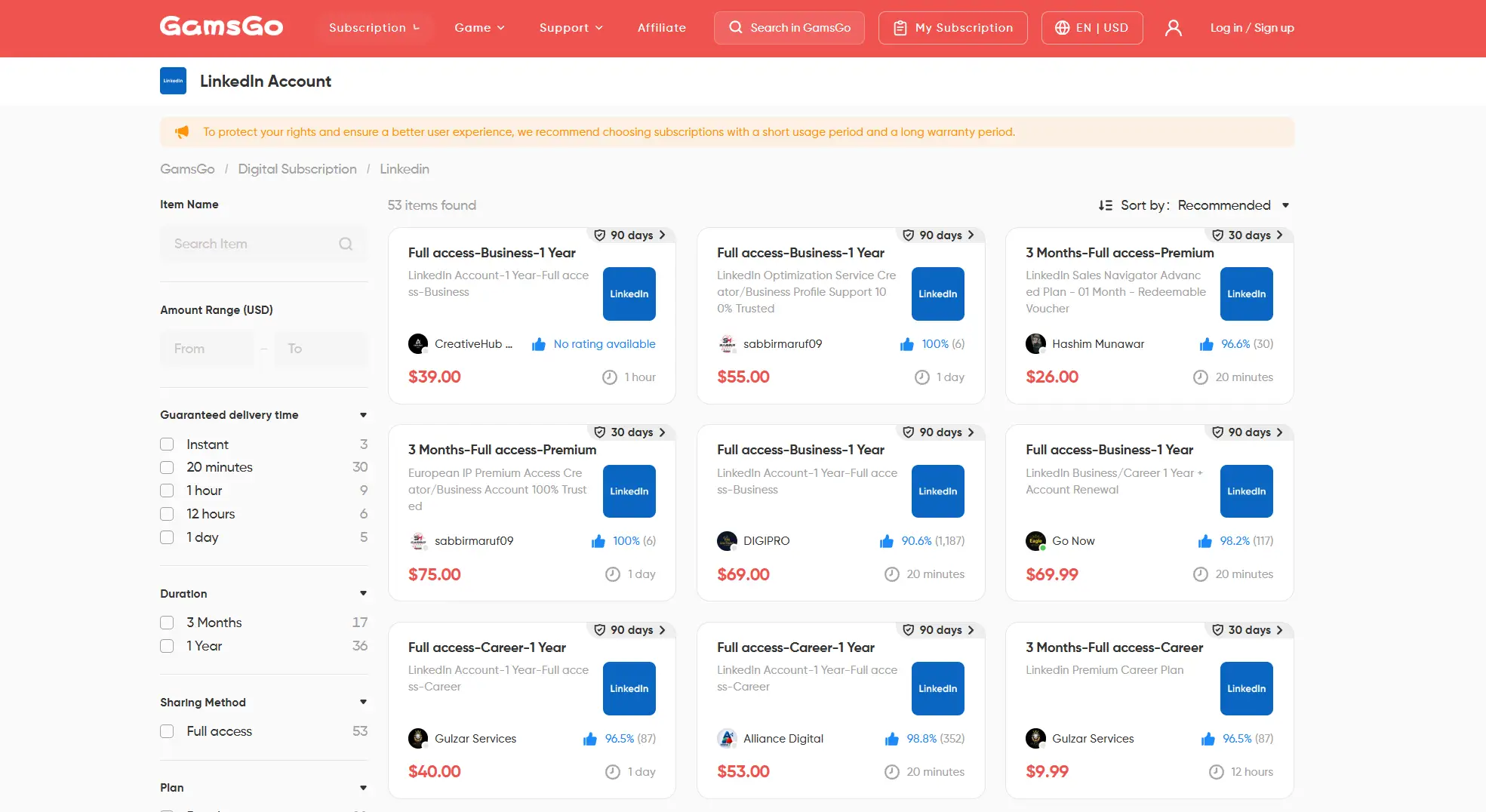
The simplest option, though, is a platform that sells it for less. GamsGo is a digital subscription service offering a cheaper linkedin premium subscription than signing up directly. It can bring Premium down by up to 80% off the official price, taking Career and Business to around $20 and $39 for a full year.
The main advantages:
- Lower prices on real subscriptions. GamsGo focuses on making premium digital services more affordable, so you typically get the core membership benefits at a fraction of the standard rate. Exact benefits are listed on each product page.
- Self-operated and marketplace options. Self-operated items are managed by GamsGo directly, usually with faster, more consistent delivery and support. Marketplace items come from vetted third-party sellers and can offer more price choice.
- Multiple secure payment methods. Checkout supports Visa, Mastercard, American Express, Discover, Apple Pay, Google Pay, and regional options like iDEAL and Bancontact, and the platform follows PCI-DSS security standards. Available methods vary by country.
- Fast delivery. For self-operated products, your account details are usually sent to your GamsGo account automatically right after payment. Marketplace listings show each seller's average delivery time so you can pick a faster one.
- 24/7 support and buyer protection. Reach the help center, live chat, or assistance@gamsgo.com any time. GamsGo vets its sellers and uses safeguards like DealShield to protect buyers, though refunds follow platform rules and your order details.
As with any purchase, read the product page, delivery time, seller rating, and refund terms first so the plan matches what you need.
How to Cancel LinkedIn Premium (and Get a Refund)
You can cancel anytime, and your Premium features stay active until the end of the current billing cycle. There's no penalty for cancelling early in the month.
- On the web, click your photo and open Settings & Privacy, or tap Premium features in the app.
- Open your Premium subscription details.
- Select Cancel subscription and choose a reason if prompted.
- Confirm before your renewal date so you aren't charged again.
Before you cancel, use up any remaining InMail credits. Once you cancel, they stay valid only until the end of your billing cycle, and they don't carry over to a free account.
On refunds, LinkedIn rarely gives them. They apply only in certain situations and jurisdictions set out in its refund policy, so cancelling before the next renewal is the reliable way to avoid another charge.
Two special cases: on a Duo plan, only the primary subscriber can cancel, and that ends Premium for both accounts. On Recruiter Lite, unused job credits move to your personal account at the end of the cycle.
Final Thoughts on LinkedIn Premium Cost
In 2026, the right LinkedIn Premium cost comes down to your goal. Career at $19.99/month annually fits a focused job hunt, while Business, All-in-One, Sales Navigator, and Recruiter Lite serve networking, small business, sales, and hiring.
Whatever you pick, start with the free trial and pay annually if you'll keep it. And if you'd rather not pay LinkedIn's full price at all, GamsGo gets you Premium for up to 80% less. Land the right role faster and it pays for itself.
LinkedIn Premium Cost FAQ
Is There a Free Version of LinkedIn Premium?
LinkedIn's basic account is free, and most Premium plans include a one-month free trial before you're charged. Trials renew automatically at the end unless you cancel first.
Can LinkedIn Premium See Who Viewed You Anonymously?
No. Premium shows your profile viewers from the last 365 days, but anyone who sets their privacy to semi- or fully anonymous still appears without a name. A paid plan doesn't override another member's privacy setting.
Is LinkedIn Premium Cheaper if I Pay Annually?
Yes. Paying yearly can save up to 33% versus monthly billing. Career drops to an effective $19.99/month, Business to $44.99, All-in-One to $59.99, Sales Navigator Core to $89.99, and Recruiter Lite to $139.99.
Can I Split LinkedIn Premium With Someone Else?
Yes, through Duo billing. One member pays a single bill for both accounts, while each Premium account remains fully private. Secondary members can't already hold an active Career, Business, or Sales Navigator Core plan.
Related Articles
HBO Max Subscription 2026: Prices, Deals, and How to Get 60% Off
10 Best Spotify Alternatives in 2026
6 Ways to Get Cheap Spotify Premium in 2026