Discord Server Boosting lets members contribute upgrades to their community. Boosts unlock more emoji slots, animated server icons, and better audio and streaming quality. As a server receives more Boosts, it unlocks higher levels of perks.
Server Boosts usually require ongoing payments, and higher levels cost more to maintain. For server owners on a budget, finding free or cheaper ways to boost can help keep community costs under control.
This guide covers eight free and low-cost methods to help you choose the right option. GamsGo offers Discord Nitro subscriptions and Discord Server Boosts. A package of 14 Boosts costs around $7 per month, saving about 80%.
What Does Boosting a Discord Server Do?
Server Boosting improves the experience for the whole community, including members without Nitro. Members who contribute Boosts also earn a badge that evolves with the length of their boosting streak. Each higher level includes the perks of the levels below it. Here are the main differences.
| Perk | Level 1 | Level 2 | Level 3 |
|---|---|---|---|
| Total Boosts required | 2 | 7 | 14 |
| Total emoji slots | 100 | 150 | 250 |
| Voice quality | 128 kbps | 256 kbps | 384 kbps |
| Streaming quality | 720p / 60 fps | 1080p / 60 fps | 1080p / 60 fps |
| Upload limit for free accounts in this server | 10 MB | 50 MB | 100 MB |
| Animated server icon | Available | Available | Available |
| Custom server invite background | Available | Available | Available |
| Server banner | Not unlocked | Static banner | Animated banner |
| Custom role icons | Not unlocked | Available | Available |
| Custom invite link | Not unlocked | Not unlocked | Available |
Server Tags and Enhanced Role Styles are separate perks. Each requires three dedicated Boosts, which do not count toward your server level. For example, maintaining Level 1 and enabling both perks requires eight Boosts in total.
How to Boost a Discord Server for Free
Use the 2 Boosts Included With Your Nitro Plan
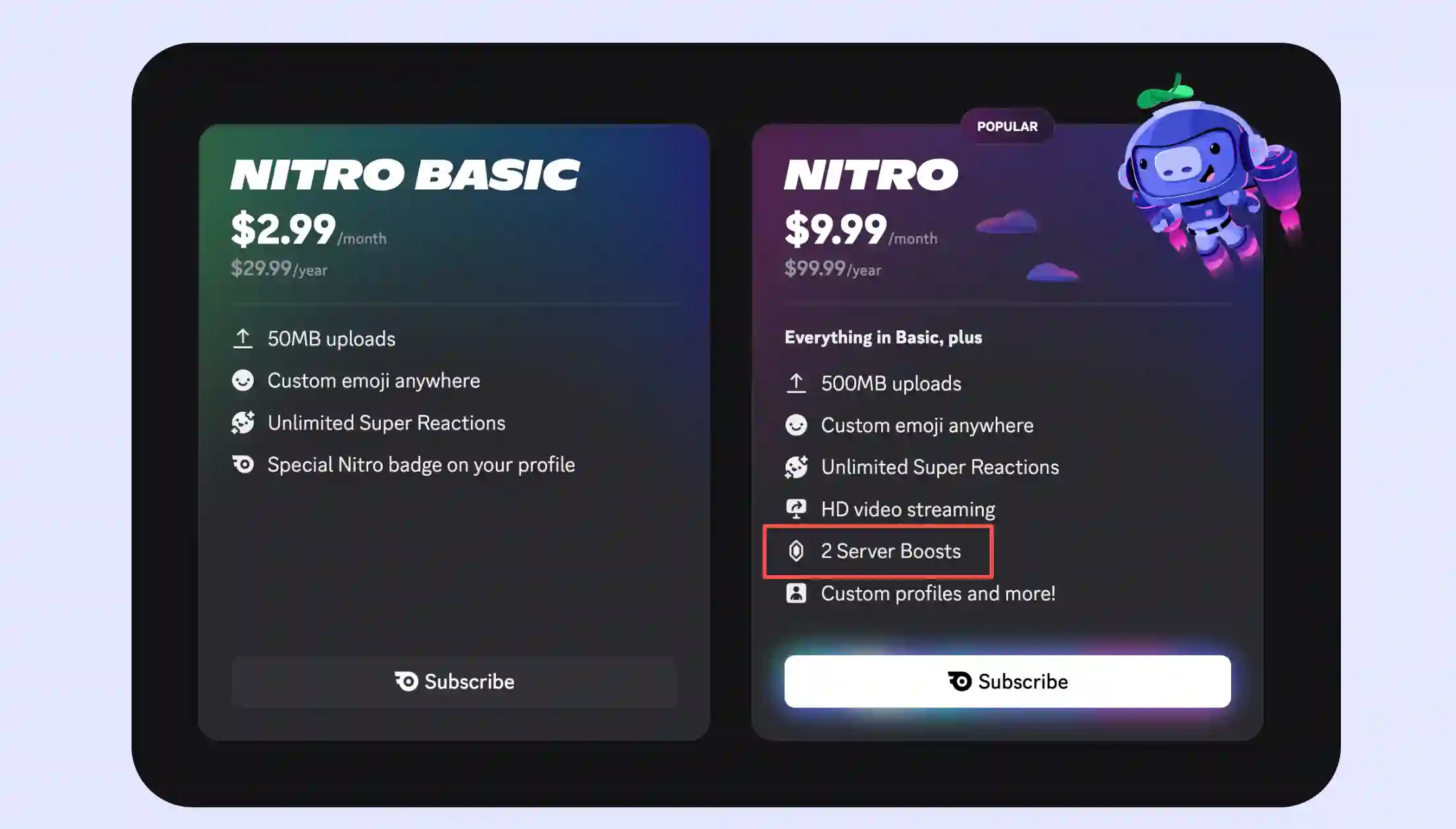
Both monthly and annual Nitro plans include two Boosts. If you already subscribe, you can apply any unused Boosts to your server without buying them separately. Nitro Basic does not include this benefit.
You can apply both Boosts to one server to unlock Level 1, or use one on each of two servers. They remain active while your Nitro subscription is valid and expire when it ends.
This is a straightforward option for small communities that already have Nitro and only need basic upgrades. There is no extra charge: two Boosts unlock Level 1, including an animated icon, more emoji slots, and 720p streaming at 60 fps.
Ask Nitro Members to Boost Your Server
Server members can pool their Boosts. If your community already has Nitro subscribers, ask them to apply any unused Boosts to your server. This puts their existing subscription benefits to use without requiring the server owner to buy Boosts directly.
- Set a clear boosting goal: Share your current Boost count, target level, and the number still needed so members can see which features their contributions will unlock.
- Offer special perks: Give boosters a custom role, a dedicated channel, or priority access to community events to encourage participation.
- Thank supporters publicly: Turn on server Boost notifications, thank members who contribute, and keep the community updated on progress toward the next level.
This works best for communities with active Nitro members. It can reduce the owner's expenses and help cover the Boosts needed for an upgrade. However, the number and duration of Boosts depend on members' support. If they transfer their Boosts or let their subscriptions expire, your server may drop a level.
Claim a Nitro Promotion That Includes Server Boosts
Some official partner promotions offer Nitro trials that include two Boosts. Eligible users can apply them during the free period. Check both the deadline to claim the offer and the deadline to redeem it. The table below shows the status as of October 13, 2026.
| Promotion | Where to claim or redeem | Main eligibility requirements | Nitro duration | Current status and deadlines |
|---|---|---|---|---|
| UNiDAYS | UNiDAYS website or app; search for Discord | Verified students or recent graduates; subscription history restrictions apply | 1 month | Still available to claim; claim by July 9, 2027, and redeem by August 8, 2027. |
| T-Mobile / Metro | Use the promotional link previously claimed in T-Life | Eligible members in specified US regions; first-time Nitro subscribers | 3 months | No longer available to claim; previously claimed offers can be redeemed until November 5, 2026. |
| Meta Quest | Use the promotional email or notification received earlier | Eligible Meta Quest users who previously claimed the offer | 1 month | No longer available to claim; the official page lists conflicting redemption deadlines of September 30 and October 30. If you already claimed the offer, check when your link expires. |
For eligibility requirements and instructions for student offers, official partner promotions, and subscription discounts, see our Discord Nitro discounts guide.
These promotions are useful if you qualify and want Level 1 perks for a limited period. Redemption requires a valid payment method, and Nitro automatically renews unless you cancel before the trial ends. If you only want the free period, cancel in advance. The included Boosts expire when the trial ends.
Get a Full Nitro Gift From a Friend or Giveaway
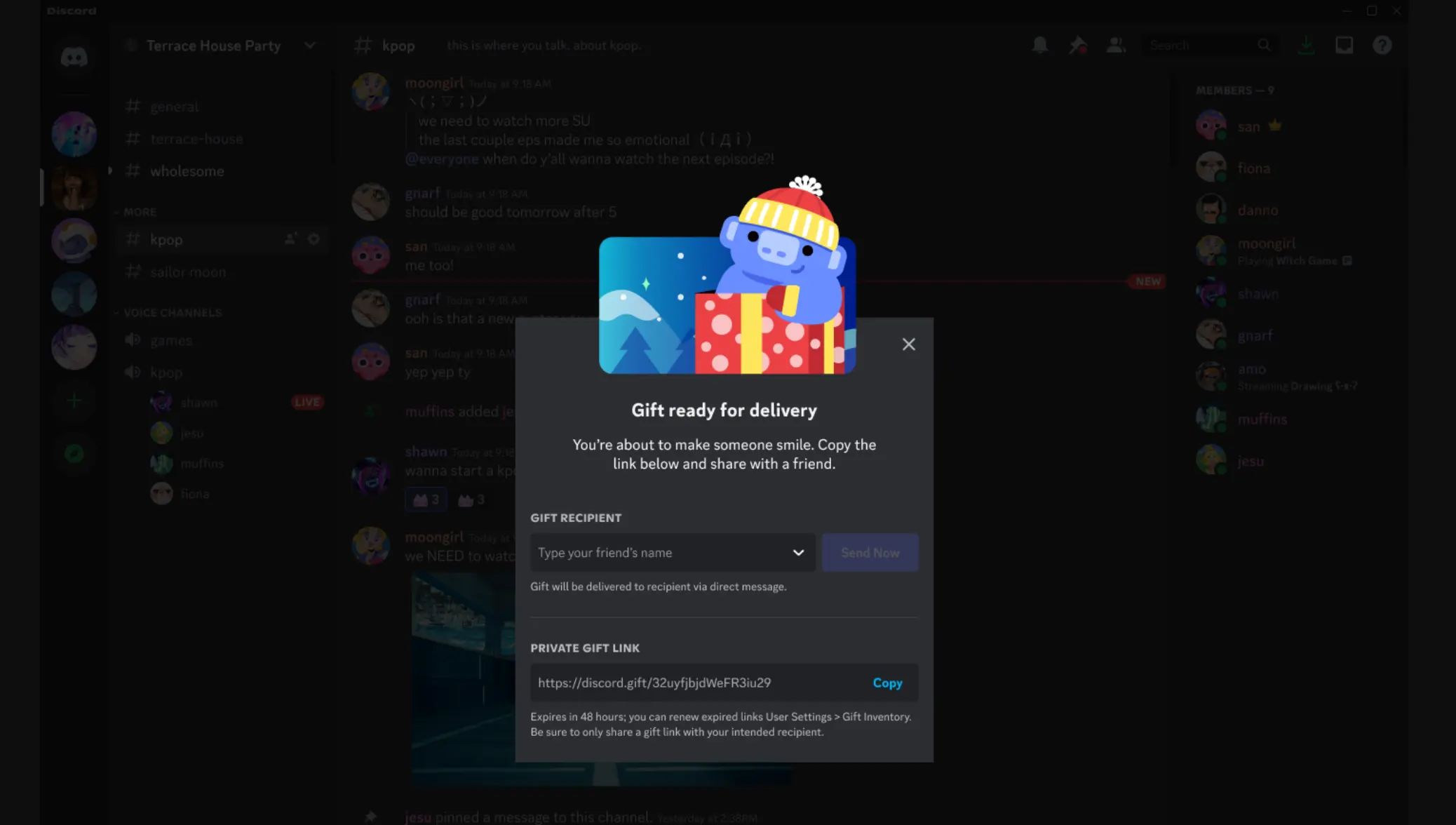
A friend can pay for a full Nitro subscription and send you a gift link. Once you redeem the gift and activate Nitro on your own Discord account, you can use the two included Boosts. The person sending the gift covers the cost.
Community giveaways work similarly: the organizer sends a Nitro gift to the winner. Check the plan and duration before entering to make sure Boosts are included. Nitro Basic gifts do not include Server Boosts, and trial prizes may have different benefits.
A gift or giveaway can provide two Boosts to help your server reach Level 1 at no cost to you. However, receiving a gift depends on someone else's generosity or winning a draw, and the benefits last only for the gifted period. This makes it more useful as a short-term supplement.
Put Your Savings Toward More Games
Spend less on Server Boosts and put the savings toward new games. GamsGo offers Xbox Game Pass subscriptions for players who want to try different titles and find a new game to play with their Discord friends.
If you already have a specific game in mind, explore GamsGo's range of Steam accounts. Find an affordable account that suits you, start playing, and give your community a new game to discuss.
Why Some Free Nitro Offers Don’t Include Server Boosts
Free Nitro describes how you get access, not which benefits are included. Some trials and rewards offer custom emoji, profile customization, or HD streaming without Server Boosts.
| Source of free Nitro | Includes two Boosts? | What to check |
|---|---|---|
| A full Nitro gift purchased by someone else | Yes | Make sure the gift is for Nitro, not Nitro Basic, which does not include Boosts. |
| Official trials or partner promotions | Depends on the offer | Some trials specifically exclude Boosts. Check the offer's benefits and restrictions. |
| Nitro Credits redeemed with Orbs earned from Quests | No | Temporary Nitro access that specifically excludes the two Boosts and the 30% discount on additional Boost purchases. |
Before redeeming an offer, check the plan and its benefits to confirm that it includes two Server Boosts. If a page simply promises free Nitro without mentioning Boosts, read the official FAQ first. Otherwise, you may claim the offer only to find that you cannot boost your server.
How to Boost a Discord Server for Less
Free Boosts often have limits on quantity or duration, so maintaining a higher server level long term may still require paying for more. Finding a lower-cost option can therefore help. The following methods cover where you buy and how you subscribe, helping you reach your target level for less.
Get Discord Server Boosts for Less With GamsGo
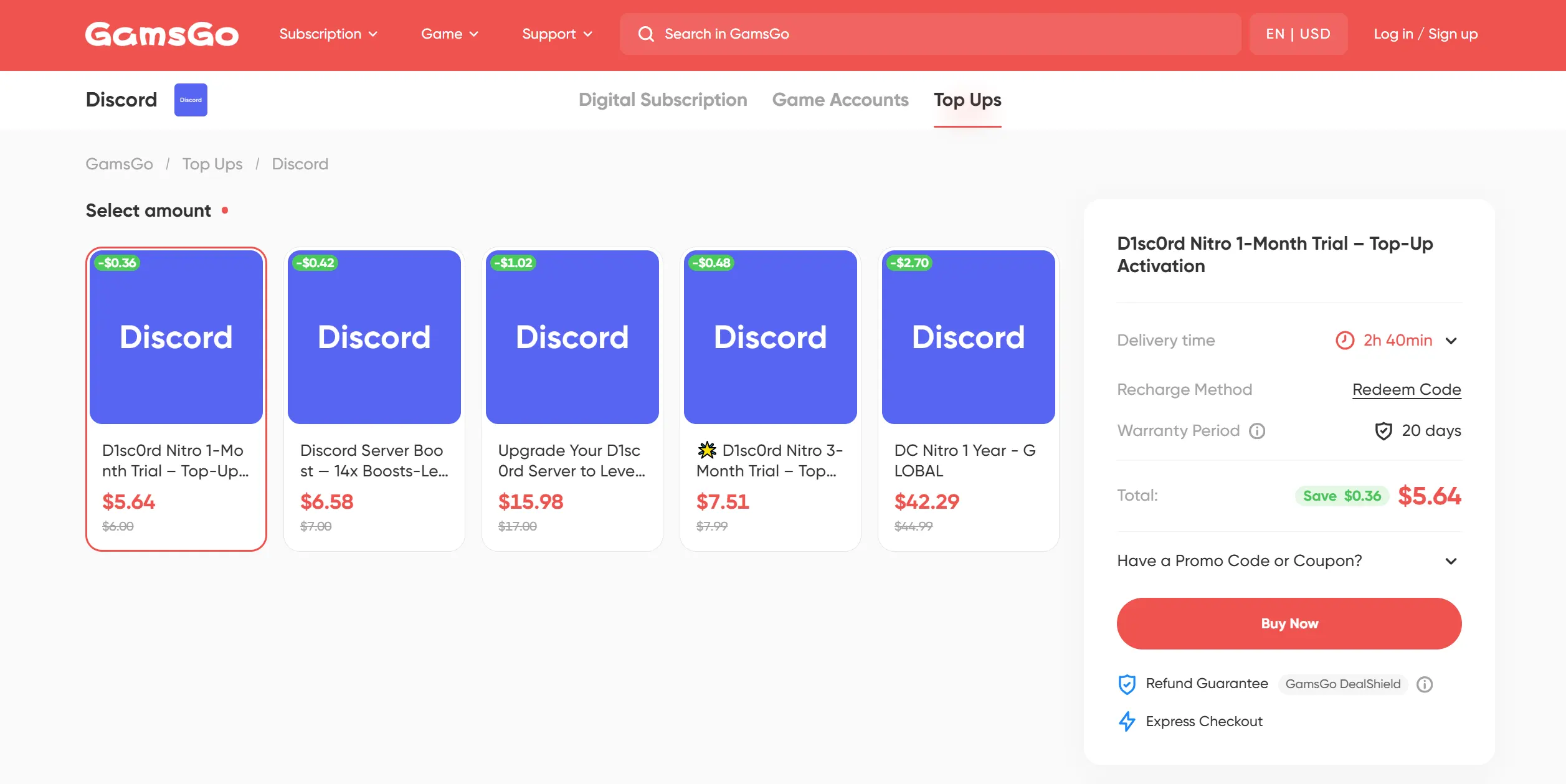
GamsGo is a digital platform for shared subscriptions, offering streaming and AI subscriptions, game accounts and game top-ups. It also offers Discord Nitro subscriptions and Server Boosts, helping users access the services they need for less.
A one-month package of 14 Boosts costs just $6.58. Using Discord's previously published US price of $4.99 per Boost per month as a reference, buying 14 Boosts without Nitro would cost $69.86. That makes the GamsGo package $63.28 cheaper, a saving of about 90.6%.
GamsGo also provides 24/7 customer support and refund protection. If an order is not delivered as promised or does not match its description, you can request help under the platform's policies. For most server owners who want to stay within budget and buy the Boosts they need, GamsGo is an option worth considering first.
Get 30% Off Additional Boosts With Nitro
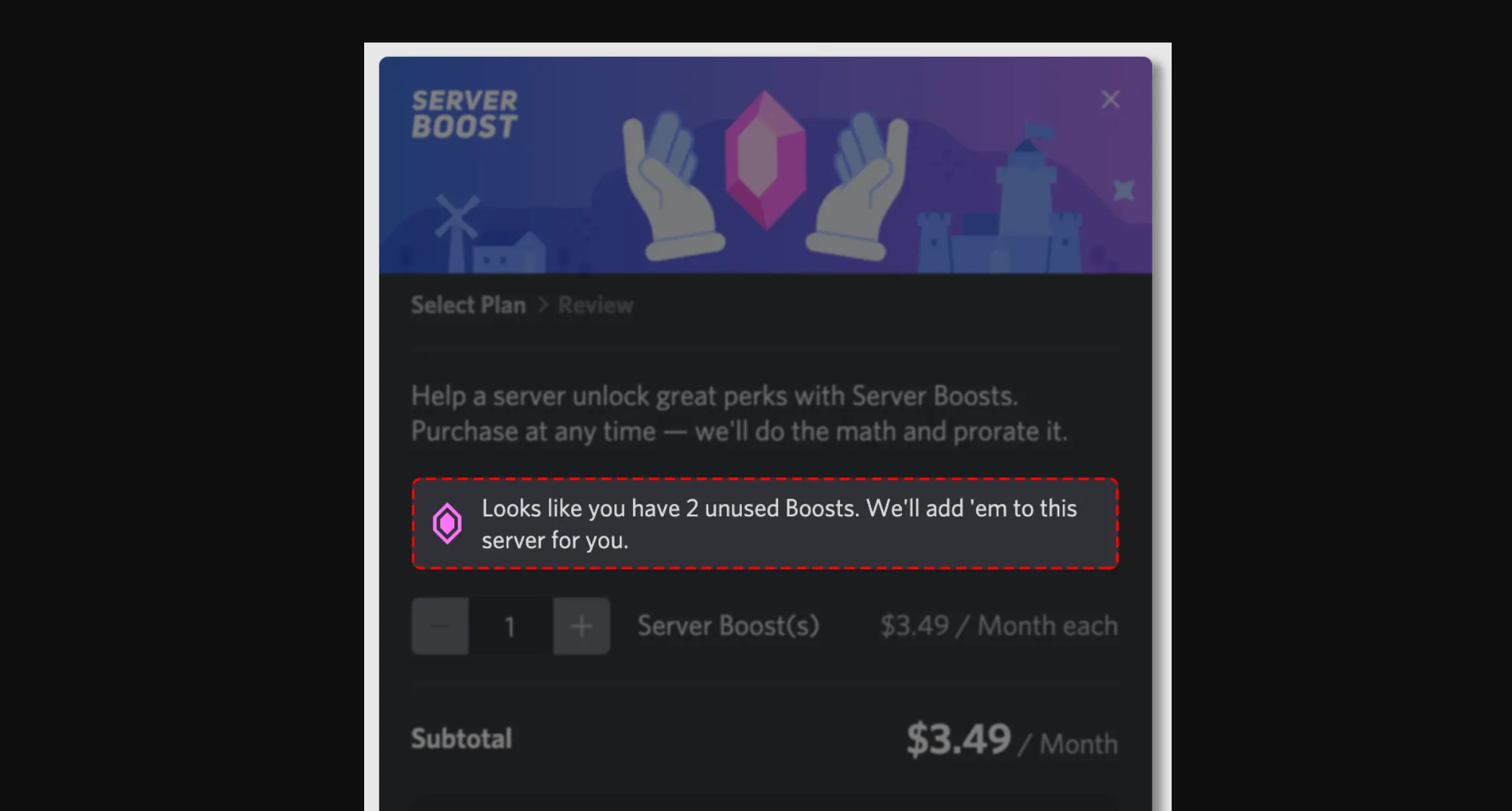
A Nitro subscription includes two Boosts and gives you 30% off additional Boost purchases. Apply the two included Boosts to your server first, then buy only the extra Boosts needed to reach your goal.
For example, Level 2 requires seven Boosts. After using the two included with Nitro, you would need five more. Based on Discord's historical US reference price of $4.99 per Boost per month, the discounted price is about $3.49 each, or $17.45 for five.
This is useful if you already have Nitro and need more Boosts: you can use your existing subscription benefits to reduce the extra cost. The example above covers only the additional Boosts. If you subscribe to Nitro specifically for the discount, include the membership fee in your total.
Related Guides
Explore more ways to save on Discord Nitro and the games you enjoy with your community.
Choose an Annual Nitro Plan
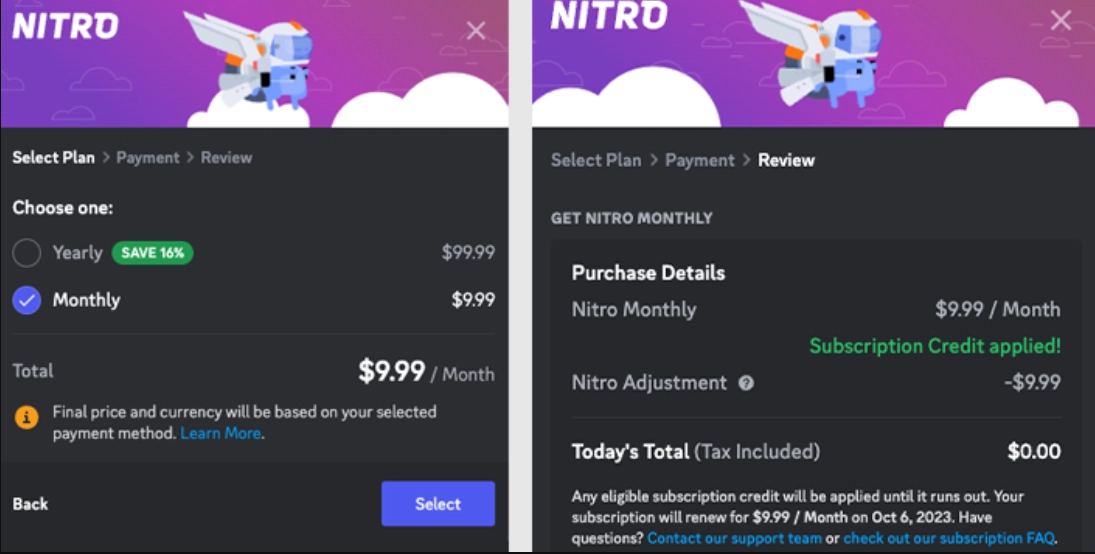
Nitro offers both monthly and annual billing. An annual plan generally has a lower average monthly cost, helping you spend less over time while keeping the same core benefits as the monthly plan.
You pay for the full year upfront. Once your subscription is active, the two included Boosts remain available throughout the year and can support your server's Boost level.
The two Boosts do not accumulate each month. Paying annually does not give you 24 Boosts over the year. To reach Level 2 or Level 3, you will still need member contributions or additional purchased Boosts to meet the required total.
Use Share Nitro Referral Rewards, If Available
Share Nitro is Discord's official trial invitation feature. Eligible Nitro subscribers can send two-week trials to up to three friends. If a friend redeems a trial and becomes a paying subscriber, the sender may earn a reward if their account is eligible for the referral promotion.
If your reward is a subscription discount, each friend who starts a paid subscription after the trial earns you one month of Nitro at 30% off, up to three consecutive months. The discount reduces your membership fee without increasing the number of included Boosts.
This reward is only available to selected accounts. Check the Share Nitro banner on the Nitro home page for your eligibility and reward type. If it shows Orbs, you will receive Orbs rather than the subscription discount.
Free and Low-Cost Discord Server Boosts Compared
The table below compares the eight methods by what you pay. Using Boosts included in an existing Nitro plan costs nothing extra. Annual billing and referral discounts reduce membership fees rather than adding more Boosts. Compare the quantity, duration, and eligibility requirements to find the option that fits.
| Method | Cost | Boosts available | Duration or discount period | Main requirements |
|---|---|---|---|---|
| Use the Boosts included with Nitro | No extra cost if you already have Nitro | 2 | As long as Nitro is active | An active Nitro subscription with unused Boosts |
| Ask Nitro members to contribute | No cost to the server owner | Depends on members' contributions | As long as members keep their Boosts active | Members willing to boost your server |
| Claim an official promotion that includes Boosts | Free during the promotional period | Usually two; check the offer | Promotional Nitro period | Meet the eligibility requirements and check Boost benefits and renewal terms |
| Receive a full Nitro gift or giveaway prize | No gift cost for the recipient | 2 | Gifted Nitro period | Redeem and activate Nitro; extending the gift period does not add more Boosts |
| Buy Boosts through GamsGo | $6.58 per month | 14 | 1 month | Follow the product's delivery instructions |
| Use Nitro's discount on extra Boosts | 30% off extra Boosts; Nitro fee separate | Purchased Boosts, plus the two included with Nitro | Boost subscription period | A Nitro subscription and an additional Boost purchase |
| Choose annual Nitro billing | $99.99 per year at the standard US price | Two included Boosts | 1 year | Pay for the year upfront; Boosts do not accumulate monthly |
| Use Share Nitro referral discounts | 30% off Nitro if eligible | The same two included Boosts | One discounted month per qualifying friend, up to three consecutive months | An eligible discount offer and a friend who starts a paid subscription after your shared trial |
With few eligibility requirements, GamsGo's Boost service is a convenient way for server owners and members to upgrade for less. You do not need an existing Nitro subscription, a promotion, or a successful referral. A one-month package of 14 Boosts costs just $6.58, making it one of the most straightforward options.
How to Apply Your Available Boosts to a Discord Server
Once you have available Boosts, you still need to choose a server and apply them. The steps below show how to do this in the Discord desktop app or browser version.
- Open the server: Go to the server you want to support and have already joined. Check the server name.
- Open the Boost page: Click the server name in the upper-left corner, then select Server Boost from the drop-down menu.
- Apply your available Boosts: Click Boost This Server, check the selected server and number of Boosts, then follow the prompts to apply the Boosts available on your account.
- Check that the Boosts are active: Look for the success confirmation, then return to the Boost page to check that the server's Boost count has increased. The server unlocks the relevant level perks once it reaches the required total.
If you see a purchase prompt, check your membership benefits and available Boosts first. If you bought a Server Boost package from GamsGo, follow the seller's delivery instructions and then verify the server's Boost count.
Final Thoughts
Free or no-extra-cost Discord Boosts mainly come from an existing Nitro plan, member contributions, eligible promotions, and full Nitro gifts. Not every free Nitro offer includes Boosts, so check the number available and how long they last before choosing.
For more Boosts on a smaller budget, consider GamsGo's Server Boost service. A one-month package of 14 Boosts costs just $6.58, with stated delivery terms and after-sales support. It gives server owners and community members a lower-cost way to unlock Level 3 perks.
Boost Your Discord Server for Less
Get affordable Server Boosts on GamsGo and use the promo code below for an extra discount on eligible purchases.
Your promo code
SAVE60
FAQs
Is It Free to Boost a Server on Discord?
Server Boosts are generally paid upgrades. However, if you already have full Nitro, you can use its two included Boosts without paying extra. A free Discord account does not automatically include Server Boosts.
Can I Get Discord Boosts for Free?
Yes. A full Nitro gift or an eligible promotion that includes Server Boosts can let you boost without paying yourself. Availability depends on the gift or offer, and promotional trials may automatically renew as paid subscriptions unless canceled.
Does Nitro Give a Free Server Boost?
Full Nitro includes two Server Boosts with both monthly and annual plans. You can apply both to one server or split them between two servers. These are included benefits, rather than two new Boosts that accumulate every month. Nitro Basic does not include Boosts.
Can You Boost a Server Without Paying?
Yes, if you already have available Boosts through Nitro, a full Nitro gift, or a qualifying promotion. As a server owner, you can also ask Nitro members to contribute their unused Boosts, allowing your community to unlock perks without you covering the cost.
Will I Lose My Nitro if I Boost a Server?
No. Boosting a server uses one of your available Boosts; it does not give away or cancel your Nitro subscription. You keep your personal Nitro benefits, and using the two Boosts included with your plan adds no extra charge.
Related Articles