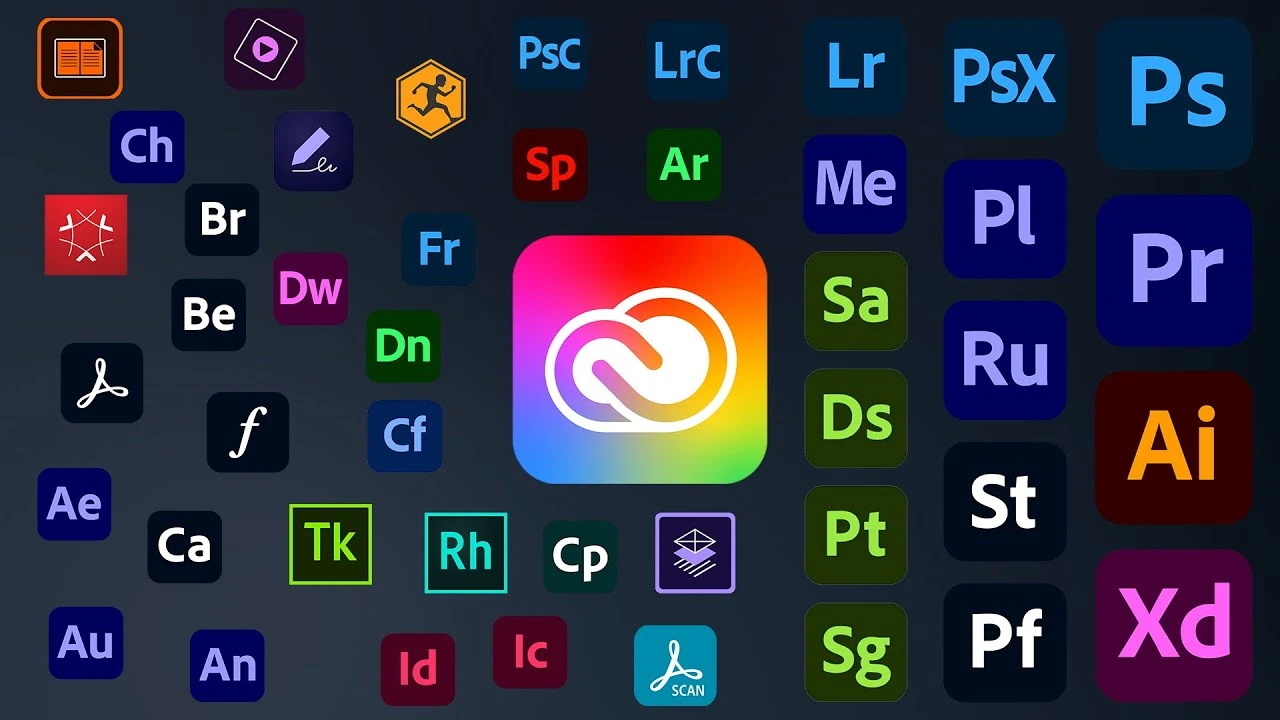
Adobe Creative Cloud includes more than 20 creative apps, such as Photoshop, Illustrator, Premiere Pro, and Acrobat Pro. In the U.S., the standard Creative Cloud Pro Individual plan currently costs US$69.99 per month, while eligible students can pay just US$19.99 per month during the first year, saving around 71%.
However, the Adobe Student Discount comes with eligibility, age, and student verification requirements. The discounted price also increases after the first year. For users who cannot pass student verification or who have already graduated, the long-term cost of an Adobe subscription can still be relatively high.
This guide explains the 2026 Adobe Student Discount, including pricing, eligibility requirements, and how student verification works. If you do not qualify for the student offer, you can also compare Adobe subscription options on GamsGo to see whether there is a plan that better fits your budget.
What Is the Adobe Student Discount?
The Adobe Student Discount is a special education offer for eligible students and teachers who want to subscribe to Creative Cloud Pro at a lower price. It is not a temporary promotion that requires a coupon code. Instead, it is a separate Students and Teachers plan that requires education status verification before purchase.
Eligible users can access Creative Cloud apps such as Photoshop, Illustrator, Premiere Pro, and Acrobat Pro for less than the standard Individual plan. If you want to compare available options, you can also check Adobe Creative Cloud subscriptions before choosing a plan.
Pricing may vary by region and subscription stage, so it is important to check the first-year promotional price, renewal cost, and eligibility requirements separately.

How Much Can You Save With the Adobe Student Discount?
Adobe currently states that eligible students and teachers can save 71% during the first year. In the U.S., the regular price of Creative Cloud Pro is US$69.99 per month, while eligible students pay US$19.99 per month for the first year. That is a saving of about US$50 per month.
However, the US$19.99 monthly price is only an introductory offer for the first year. After the first year, users who still qualify as students or teachers currently renew at US$39.99 per month. When deciding whether the Adobe Student Discount is worth it, it is important to consider both the first-year savings and the higher renewal cost.
If you are comparing long-term costs, you can also review other Adobe subscription options before choosing a plan.
What Is Included in the Adobe Student Plan?
The Adobe Student Plan is not a reduced or limited version of Creative Cloud.
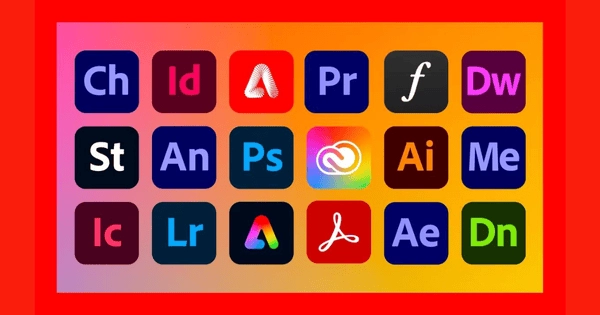
Eligible students get access to Creative Cloud Pro, including more than 20 Adobe apps such as Photoshop, Illustrator, Premiere Pro, and Acrobat Pro.
The plan also includes Adobe Firefly generative AI features, Adobe Fonts, templates, tutorials, cloud storage, and other Creative Cloud services. For students who regularly work with images, videos, PDFs, or design projects, this means they can access multiple creative tools under one subscription instead of paying for several Adobe apps separately.
Can Students Try Adobe for Free?
Yes. Adobe currently offers students and teachers a 7-day free trial of Creative Cloud Pro, allowing eligible users to test the included apps before starting a paid subscription.
However, the free trial is not a permanently free student plan. If you do not cancel before the trial ends, the subscription will begin charging the applicable student plan price. It is a good idea to check the renewal price and subscription terms before starting the trial.
Who Is Eligible for the Adobe Student Discount?
Under Adobe’s current rules, students generally need to be at least 13 years old and enrolled at an eligible school, university, college, or homeschool program. Access to the Adobe Student Discount ultimately depends on whether your education status can be successfully verified.
For U.S. students, Adobe’s current eligibility requirements typically include being at least 13 years old and enrolled at a qualifying educational institution.
Adobe Student Discount Eligibility Requirements
Eligible students may include:
- University or college students
- Community college students
- Junior college students
- Vocational school students
- Primary and secondary school students
- Eligible homeschool students
For colleges and universities, Adobe generally requires enrollment at a qualifying accredited educational institution. Homeschool students may need to meet applicable local education requirements.
Adobe mainly looks at whether you can prove your current student status rather than the specific type of course you are taking.
If your school already has an institutional Creative Cloud license, it is worth checking with your school’s IT department first. Some universities provide Creative Cloud Pro directly to students, which means you may not need to purchase a separate individual student subscription.
Can International Students Get the Adobe Student Discount?
Yes. Adobe Student Discount pricing and eligibility vary by country or region.
In Japan, the current limited-time Creative Cloud Pro student offer costs ¥980 per month for the first 3 months, ¥2,180 per month from the fourth month, and ¥4,180 per month from the second year.
In Australia, the student plan starts at A$23.99 per month including GST for the first year, then increases to A$63.99 per month. In India, the current student price is ₹398.99 per month including GST, rising to ₹699.01 per month after the first year. The UK also uses local pricing and may offer limited-time student promotions.
Taxes, eligibility rules, and purchase conditions can also differ by region. Some offers are limited to new customers, first-time education subscribers, or annual plans.
International students should check the Adobe education page for their own country or region instead of relying on U.S. pricing. You may be able to verify with a school email, but some regions may require additional proof such as a student ID or enrollment document.
Before subscribing, check the current promotional price, discount period, renewal price, taxes, and verification requirements. If the local student price does not fit your budget, you can also compare Adobe subscription options and other Student Discount Guides.
MORE WAYS TO SAVE
More Student Discount Guides
How to Get the Adobe Student Discount in 2026
Applying for the Adobe Student Discount is fairly straightforward.
You can follow these steps:
1.Go to the Adobe Students and Teachers page.
2.Select the Creative Cloud Pro for Students and Teachers plan.
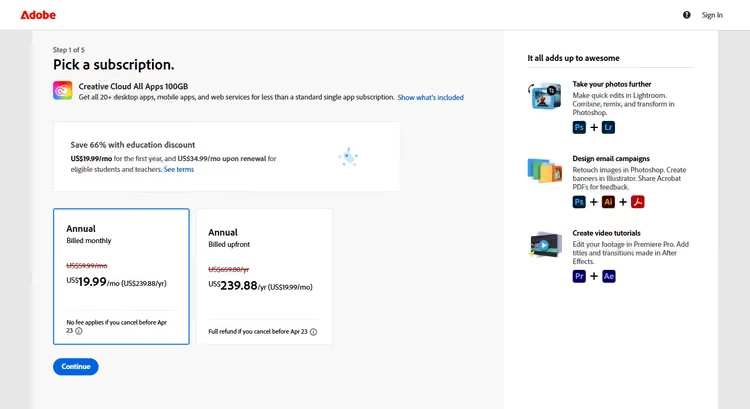
3.Sign in to your Adobe account or create a new one.
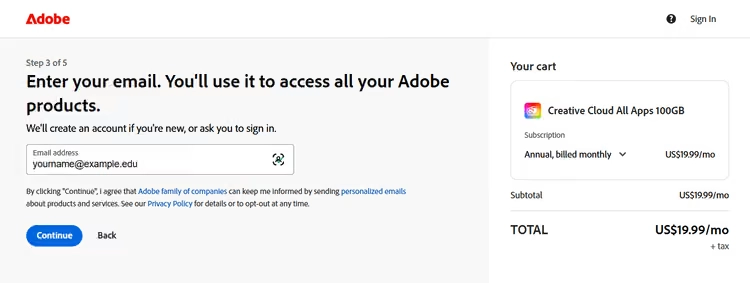
4.Enter your school information and school email address.
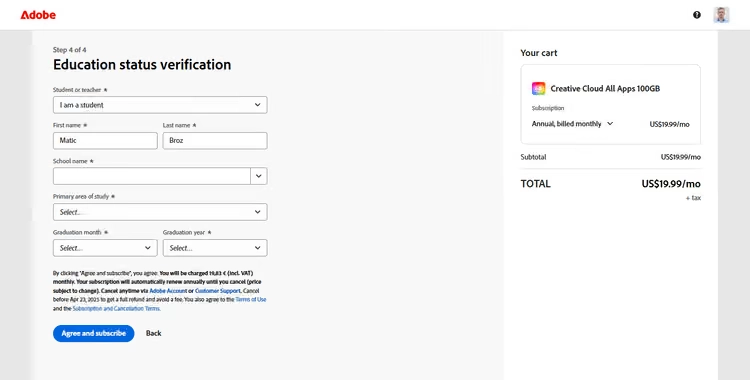
5.Follow the prompts to complete student status verification.
6.Review the price, billing cycle, and payment method, then complete your purchase.
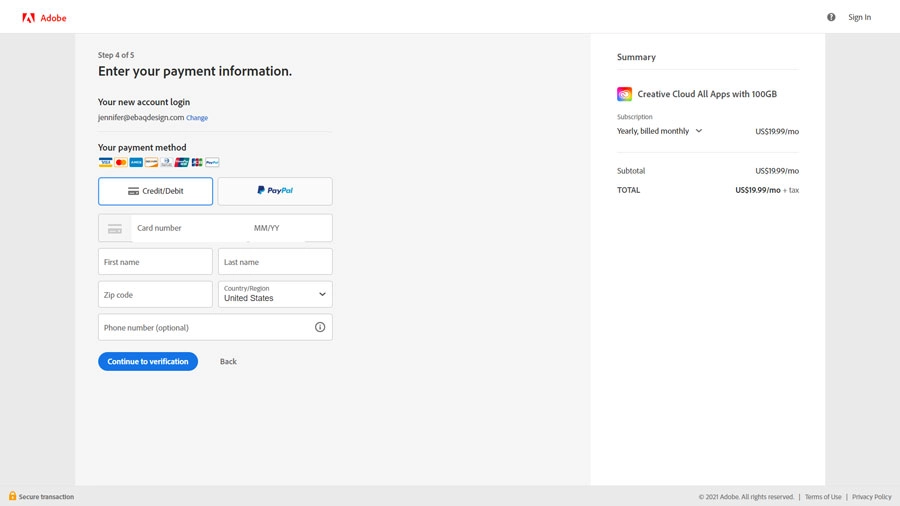
Before purchasing, make sure you select the Students and Teachers plan rather than the standard Creative Cloud Pro Individual plan.
Also check the subscription type carefully. Although the US$19.99 per month price is billed monthly, it is part of an annual plan, not a standard month-to-month subscription that you can purchase one month at a time.
Can You Verify with a School Email?
Yes. Using a school email address is one of the easiest ways to apply for the Adobe Student Discount.
Adobe accepts email domains provided by educational institutions, such as .edu, .k12, and other school-specific academic domains. If Adobe can confirm that the email belongs to an eligible institution, your student status may be verified automatically.
However, not having a .edu email does not necessarily mean you are ineligible.
Many universities outside the U.S. use different email domains. As long as Adobe can verify your school and current student status, you may still qualify for the student discount.
What Documents Can You Use for Adobe Student Verification?
If your school email cannot be used to complete verification, Adobe may ask you to provide additional proof of your student status.
Valid documents generally need to show:
- Your name
- The name of your school or institution
- Current enrollment information or a valid date
Adobe’s verification guidance lists documents such as a student ID, transcript, tuition bill, or other current proof of enrollment.
Try to submit the most recent documents available.
If your student ID does not show a valid date, you can use a transcript, enrollment letter, tuition bill, or another document that confirms your current academic status.
How Long Does Adobe Student Verification Take?
If Adobe can automatically recognize your school email, verification may be completed immediately.
If you need to submit additional documents, the process may take longer because Adobe may need to review them manually. Adobe does not publish a single processing time that applies to every user.
If your verification remains pending for an extended period, check the email address linked to your Adobe account for any request to submit additional documents or complete another verification step.
Why Is My Adobe Student Discount Not Working?
If your Adobe Student Discount is not working, avoid creating multiple new Adobe accounts right away.
The most common problems are usually related to eligibility or verification details.
For example, Adobe may not recognize your school email, your institution may not appear in the verification system, or the documents you submitted may not clearly prove that you are currently enrolled.
You should also check the following:
- Whether the name on your Adobe account matches your student documents
- Whether your school email address was entered correctly
- Whether your school meets Adobe’s eligibility requirements
- Whether your verification documents are still valid
- Whether the same student plan is available in your country or region
- Whether your account has already used the relevant first-year promotional offer
Adobe’s first-year introductory pricing is mainly intended for eligible first-time members, and education offers may also be subject to purchase limits.
If school email verification fails, follow the instructions on the verification page and submit another form of student proof instead of repeatedly creating new accounts.
Does the Adobe Student Discount Expire?
The Adobe Student Discount does not keep the first-year price forever.
In the U.S., the current US$19.99 per month rate is a first-year introductory price.
After the first year, eligible students and teachers currently renew at US$39.99 per month.
Adobe may also ask you to verify your education status again. According to Adobe’s current renewal guidance, users may receive a re-verification request before renewal and need to confirm that they still qualify for the Students and Teachers discount. Documents such as a student ID, transcript, or tuition bill may be required.
Because of this, do not assume that your subscription will remain at US$19.99 per month after the first year. Before renewal, check your billing date, next renewal price, current eligibility status, and whether Adobe has sent you a re-verification email.
If you have graduated or no longer qualify for student pricing, your subscription price may change again.
Can You Get Adobe for Less Without a Student Discount?
Yes. The Adobe Student Discount is one of the most straightforward ways to save on Creative Cloud, but it is not the only option. If you are not eligible for student pricing, or if US$19.99 per month is still above your budget, there are several other ways to reduce the cost.
Use Adobe's Official Promotions
Adobe occasionally offers official Creative Cloud Pro discounts for new customers.
For example, Adobe’s current U.S. Creative Cloud page lists a 50% discount for the first three months for eligible new subscribers, bringing the price down to US$34.99 per month before it returns to US$69.99 per month.
These offers are usually temporary, so check Adobe’s current Special Offers or Pricing page before subscribing.
Choose Only the Adobe Apps You Actually Need
Not everyone needs access to more than 20 Adobe apps.
If you only use Photoshop, Illustrator, or Premiere Pro, it may be worth comparing Adobe’s Single App plans. Some U.S. Single App plans currently start at around US$22.99 per month.
For users who only need one app, this can be more practical than paying for the full Creative Cloud Pro plan. However, if you regularly use several tools such as Photoshop, Premiere Pro, Illustrator, and Acrobat Pro, separate subscriptions may become less cost-effective. In that case, a full Creative Cloud Pro subscription may be more convenient.
You can also compare Adobe Creative Cloud subscription if you want to look at alternatives outside the standard student discount route.
Use GamsGo for a Lower-Cost Adobe Option
If you do not qualify for the Adobe Student Discount, you can also compare Adobe Creative Cloud options on GamsGo.
GamsGo currently offers Adobe plans that include access to more than 20 apps, such as Photoshop, Illustrator, Premiere Pro, and After Effects, with support for both Windows and Mac.
GamsGo is a digital marketplace serving users in more than 150 countries and regions, with products that include streaming subscriptions, productivity software, AI tools, game items, game accounts, and game top-ups.
Unlike the official Adobe Student Plan, these options do not require student verification, a school email address, or proof of enrollment. For users who have already graduated, cannot complete Adobe’s student verification process, or simply want to compare different ways to access Adobe at a lower cost, GamsGo can be an alternative worth considering.
Adobe Student Discount vs Other Ways to Save
If you are still not sure which option is the best fit, the table below gives you a quick comparison:
| Option | Student Verification Required? | Apps Included | Current Starting Price | Best For |
|---|---|---|---|---|
| Adobe Student Discount | Yes | 20+ Adobe apps | US$19.99/month for the first year | Eligible students |
| Adobe Creative Cloud Pro Individual | No | 20+ Adobe apps | US$69.99/month | Users who want Adobe’s standard individual plan |
| Adobe Single App Plan | No | 1 Adobe app | From US$22.99/month | Users who only need one Adobe app |
| Adobe Provided by Your School | Depends on the school | Depends on the school license | May be free | Students whose school already provides Adobe access |
| GamsGo Adobe | No student verification | May include 20+ Adobe apps depending on the plan | From US$16.99/month, check the live page for current pricing | Users who do not qualify for student pricing or want to compare lower-cost options |
The biggest advantage of the official Adobe Student Discount is that it offers a much lower price directly from Adobe.
However, you need to meet the student eligibility requirements, and the US$19.99 per month first-year price does not last forever. If you cannot verify your student status, you can also compare Adobe Single App plans, official promotions, and other Adobe Creative Cloud to find a plan that better matches your budget.
Is the Adobe Student Discount Worth It?
If you are eligible and regularly use several Adobe apps such as Photoshop, Illustrator, and Premiere Pro, the first-year student price offers significant savings compared with the standard Creative Cloud Pro plan.
However, if you only need one Adobe app or your school already provides Creative Cloud at no extra cost, paying for the full student plan may not make sense just because it is advertised as 71% off.
You should also consider the renewal price. In the U.S., the plan currently costs US$19.99 per month for the first year and US$39.99 per month after that for users who remain eligible. It is better to judge the value of the Adobe Student Discount based on the long-term cost rather than the introductory price alone.
Conclusion
In 2026, the Adobe Student Discount remains one of the main official ways for eligible students to reduce the cost of Creative Cloud. In the U.S., eligible new members currently pay US$19.99 per month for the first year, with the price increasing to US$39.99 per month afterward if they still qualify.
Before subscribing, confirm that your school is eligible and prepare a school email address or other proof of enrollment. It is also worth checking whether your school already provides Adobe access.
If you cannot qualify for student pricing, compare Adobe’s official promotions, Single App plans, and other Adobe Creative Cloud options to find a plan that better fits your budget.
EXCLUSIVE BLOG READER OFFER
Save More on Adobe with GamsGo
Get Adobe for less through GamsGo, then enter the exclusive promo code below at checkout for an additional discount.
Promo code
SAVE60
Extra 3% off your purchase
SAVE60 can also be used on eligible streaming, AI, software, and game products on GamsGo.
FAQ
Does Adobe Have a Student Discount in 2026?
Yes. Adobe currently offers a Creative Cloud Pro discount for students and teachers. In the U.S., eligible new subscribers currently pay US$19.99 per month for the first year.
How Much Is Adobe Creative Cloud for Students?
In the U.S., the current student price is US$19.99 per month for the first year on an annual plan, billed monthly. After the first year, eligible students currently renew at US$39.99 per month.
Do You Need a .edu Email for the Adobe Student Discount?
Not necessarily. A school email address is one of the easiest ways to verify your student status, but Adobe also accepts other education-related email domains. If your email cannot be verified automatically, you may be asked to provide other proof of current enrollment.
What Proof Do You Need for the Adobe Student Discount?
If school email verification does not work, Adobe may ask for documents that show your name, school or institution, and current enrollment status. Examples may include a student ID, transcript, or tuition bill.
Does Adobe Verify Student Status Every Year?
Adobe may ask you to verify your education status again when your subscription renews. According to Adobe’s current support information, some users may receive a verification notice around 30 days before renewal and be asked to confirm their eligibility again through SheerID.