Like a lot of people, I started looking at YouTube ReVanced because of the ads. It is a free, open-source patcher that adds ad blocking, background play and other tweaks to the official YouTube app on Android, and one of the most popular ways to block YouTube ads on a phone.
Setting it up in 2026 takes a little more care than it used to. The patches moved to GitLab after a DMCA notice in March 2026, look-alike download sites copy the official one, and Google's developer verification is changing how Android installs APK files.
So I put everything I have learned into one guide: the install steps that work today, the patches I turn on, and the fixes for errors like videos not loading and quality unavailable. I also cover what to use on iPhone, TV and PC.
Along the way, a friend recommended an option that turned out to be easier and safer: buying cheap YouTube Premium on GamsGo. It starts at $2.99 a month, works on every screen with the official app and needs zero patching, so I share how I get it too.
What Is YouTube ReVanced?
YouTube ReVanced is a toolkit for customizing the official YouTube app. It has two parts: a set of patches, and a free app called ReVanced Manager that applies them. Manager patches the official YouTube APK right on your phone, and you install your own customized YouTube.
Everything happens on your device, and you choose each change. These are the features I use most:
- Ad blocking: removes video ads, feed ads and most popups
- Background play: keeps audio playing with the screen off or in another app
- SponsorBlock: skips sponsor reads inside videos automatically
- Return YouTube Dislike: brings back dislike counts
- Hide Shorts: cleans Shorts and other clutter out of your feed
- Force original audio language: plays every video in its original voice
- Default video quality: starts videos at the quality you pick
ReVanced also patches YouTube Music, which gives you ad-free music and background play with the same setup.
ReVanced vs Vanced, RVX and Morphe
You will see four similar names when you look for a YouTube patcher. Here is how they compare in 2026:
| Project | Status | Made By | Best For |
|---|---|---|---|
| YouTube Vanced | ❌ Ended in 2022 | Vanced team | History only. Today's "Vanced APK" files are reuploads, and old builds fail to play videos. |
| ReVanced | ✅ Active | ReVanced team | Most people. Patches YouTube and YouTube Music. This guide uses it. |
| ReVanced Extended (RVX) | ✅ Fork | Separate fork developers | Extra layout options, with its own manager app |
| Morphe | ✅ Active | Former ReVanced developers, independent project | A one-tap simple mode. Patches YouTube, YouTube Music and Reddit. |
Before You Install: Requirements and Official Sources
Here is my checklist before I patch anything. It covers the device, the sign-in tool and where each file comes from.
| What You Need | Details |
|---|---|
| An Android phone or tablet | ReVanced patches the Android app. For iPhone, PC and smart TVs, see the device table further down. |
| GmsCore (non-root phones) | A small helper app that handles Google sign-in for the patched app. Most people use this non-root method. |
| Root (optional) | Rooted phones can mount the patches over the stock YouTube app instead. |
| Manager and GmsCore files | From revanced.app and github.com/ReVanced |
| Patches | Manager loads them for you. They are hosted on gitlab.com/ReVanced since March 2026. |
| A few minutes and a charged battery | Patching runs on your phone, so keep the screen on until it finishes. |
How I spot fake sites: the real ReVanced gives you Manager, and you patch YouTube yourself. Any site offering a ready-made "YouTube ReVanced APK", an iOS IPA or a PC .exe is a copycat, as are look-alike domains such as revanced.net and revanced.to.
How to Install YouTube ReVanced Step by Step
These are the exact steps I follow with ReVanced Manager 2.6.0, the current stable release from April 2026.
Step 1: Download ReVanced Manager From the Official Site
- Open the official ReVanced download page in your phone browser.
- Download the Manager APK.
- Open the file. When Android asks, allow your browser or file manager to install unknown apps.
- Tap Install, then open ReVanced Manager.
If your phone shows a developer verification message, follow the developer verification steps further down.
Step 2: Install GmsCore for Google Sign-In
- Download the latest stable GmsCore APK from ReVanced's GmsCore releases. Pick the release marked "Latest".
- Install it like any other APK.
- When GmsCore asks to ignore battery optimization, tap Allow. This keeps your sign-in and notifications working in the background.
Step 3: Get the Supported YouTube Version
Why the YouTube Version Matters Tap to show or hide
Each patch release is built for specific YouTube versions. Matching the version Manager recommends is the single biggest factor in a clean, first-try patch, so I always check it before downloading anything.
- In ReVanced Manager, open the Apps tab at the top and select YouTube.
- Let Manager fetch the APK through a downloader. Downloaders are add-on apps, so mark one as trusted first under Settings > Downloads.
- Prefer to get the APK yourself? Use select from storage and pick a YouTube APK with the exact version number Manager supports.
Step 4: Choose Your YouTube ReVanced Patches
Tap Reset in the bottom right to load the recommended set. It already includes ad blocking, background play and the patches YouTube needs to keep playing videos.
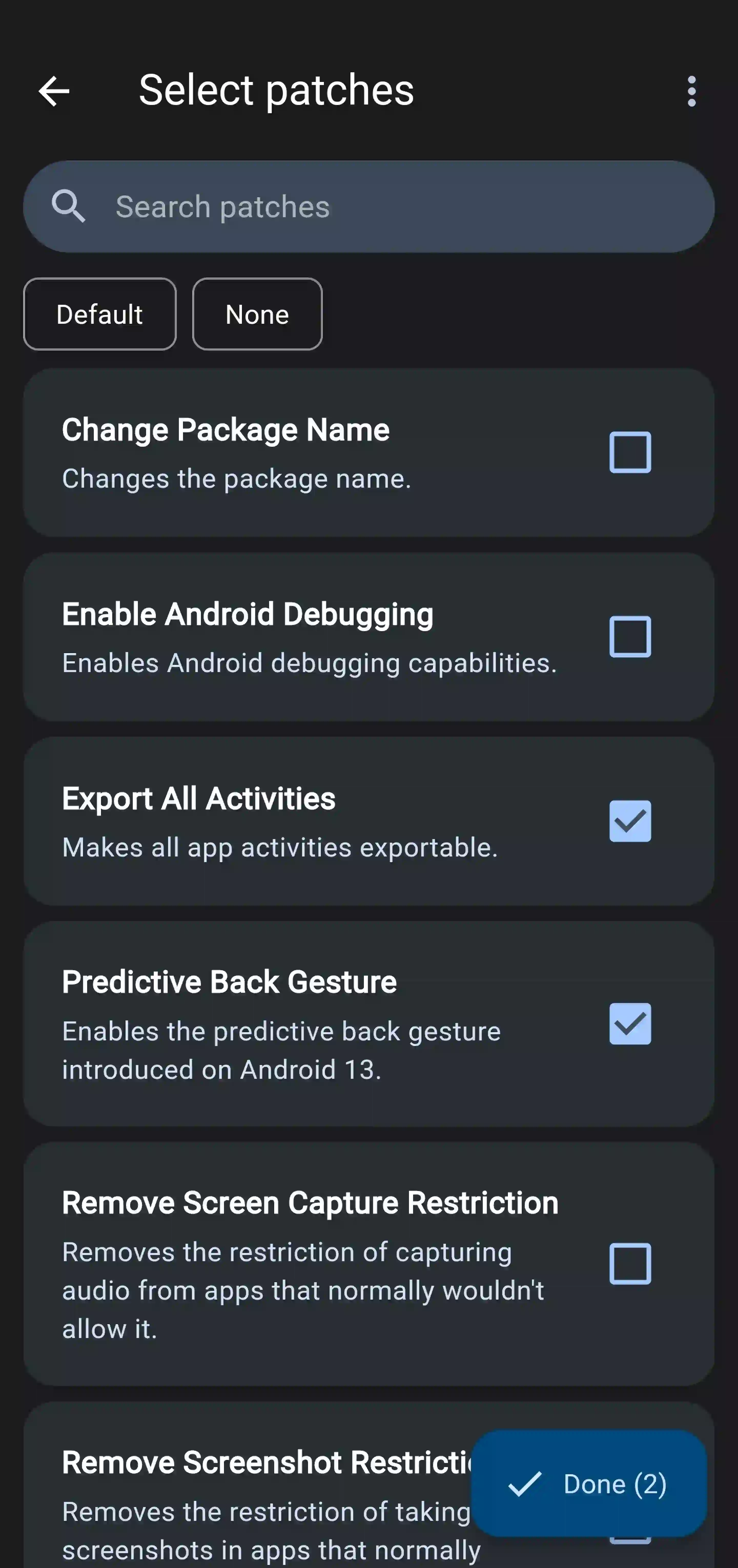
From there, I check this list. The first four are essentials, and the rest are worth adding:
| Patch | What It Does | My Pick |
|---|---|---|
| GmsCore support | Lets the patched app sign in through GmsCore | Essential for non-root |
| Spoof video streams | Keeps videos playing after YouTube's server changes | Essential |
| Hide ads / Video ads | Removes video ads, feed ads and promo shelves | Essential |
| Background playback | Audio keeps playing when you leave the app or lock the screen | Essential |
| SponsorBlock | Skips sponsor reads and intros marked by the community | Worth adding |
| Return YouTube Dislike | Shows estimated dislike counts | Worth adding |
| Video quality | Sets a default quality on Wi-Fi and mobile data | Worth adding for sharp video by default |
| Custom branding | Changes the app name and icon | Handy to tell the two YouTube apps apart |
If background play is the main thing you want, there are also simpler ways to play YouTube in the background without patching.
Step 5: Patch, Install and Sign In
- Tap Patch and keep Manager open until it finishes.
- Follow any prompts on screen, then tap Install. The save button in the bottom left exports the patched APK as a backup.
- Open the new app. It sits next to the stock YouTube app, so you can keep both.
- Tap your profile and sign in. GmsCore handles the Google login.
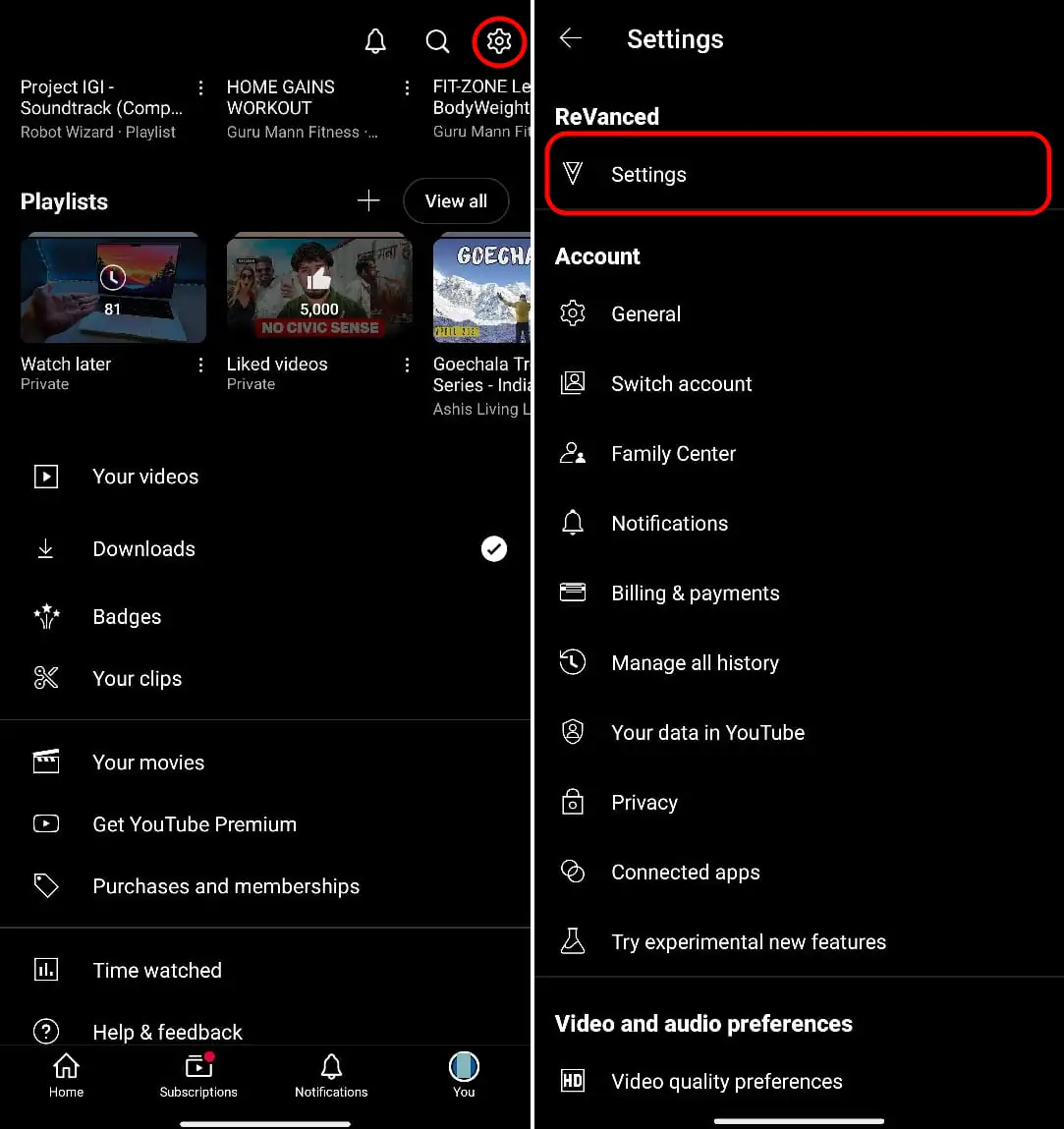
- Tap your profile picture, then the gear icon, and open ReVanced Settings to fine-tune ads, quality, Shorts and SponsorBlock.
How to Install YouTube Music ReVanced
YouTube Music uses the same steps. In the Apps tab, pick YouTube Music, get the version Manager supports, tap Reset, then Patch and Install. One GmsCore install covers both apps.
After patching, you get ad-free music and background play. If you are still deciding on a music app, my YouTube Music vs Spotify comparison breaks down what each one does best.
How to Make ReVanced Open YouTube Links by Default
Links from chats and browsers open the stock app until you change this once:
- Go to Settings > Apps > YouTube (the stock app) > Open by default and turn off Open supported links.
- Open the patched app's App info > Open by default, turn on Open supported links and add all the listed links.
- If a link still opens the stock app, disable stock YouTube. This is safe with the non-root method.
How to Disable Auto-Dubbed Audio in YouTube ReVanced
If videos suddenly play in a dubbed voice, YouTube's auto-dubbing is on. Here is how I switch every video back to its original language:
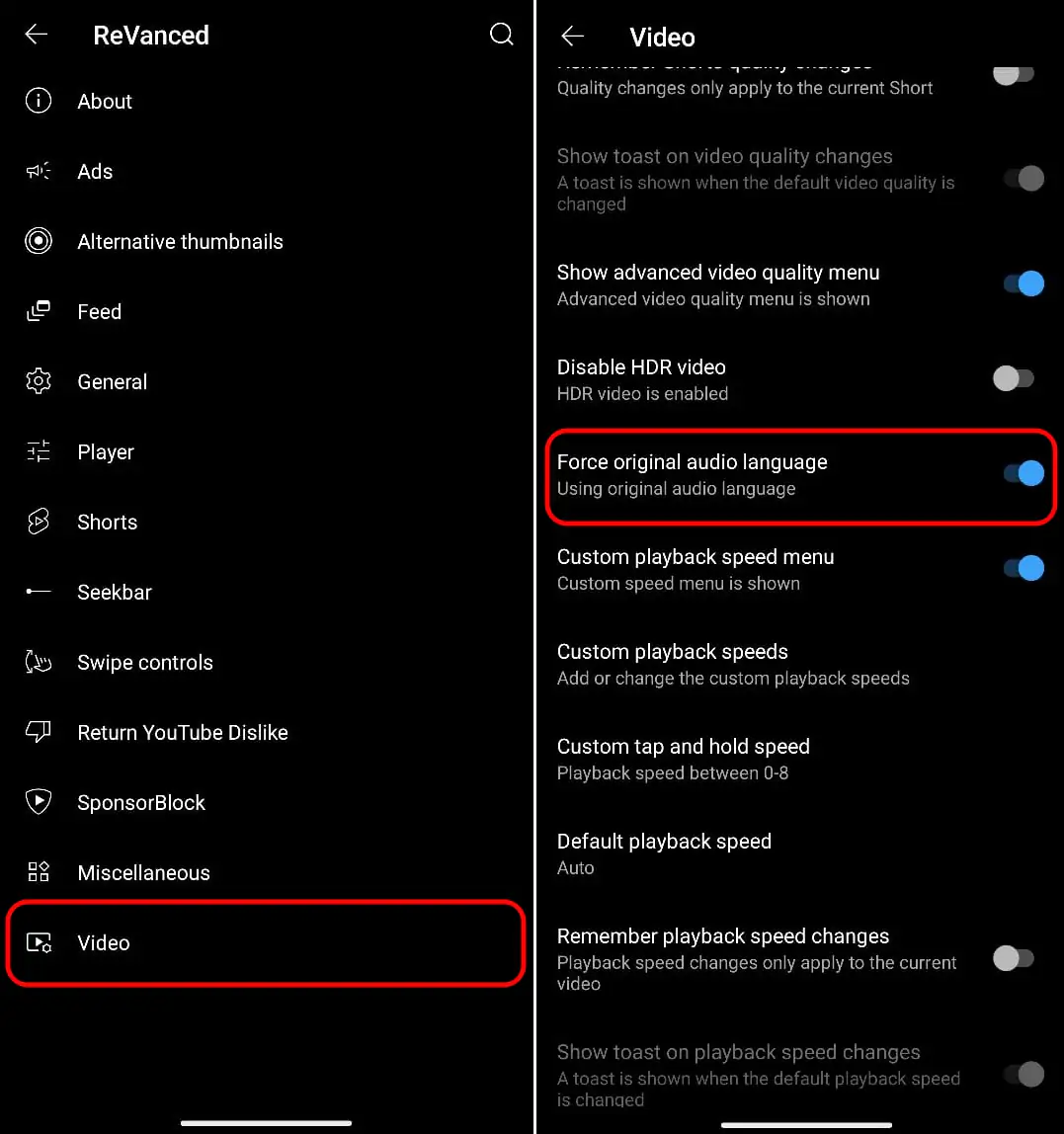
- Tap your profile picture, then the gear icon in the top right.
- Open ReVanced Settings > Video.
- Turn on Force original audio language.
Installing ReVanced With Android Developer Verification
Google's developer verification is the biggest change to Android sideloading in years. Here is where it stands today:
- Since September 30, 2026: certified Android devices in Brazil, Indonesia, Singapore and Thailand check that apps come from registered developers.
- First phase: the check covers Google Play and six partner app stores. APKs downloaded from a website, like ReVanced Manager, install the usual way for now.
- 2027: the rules expand to every country.
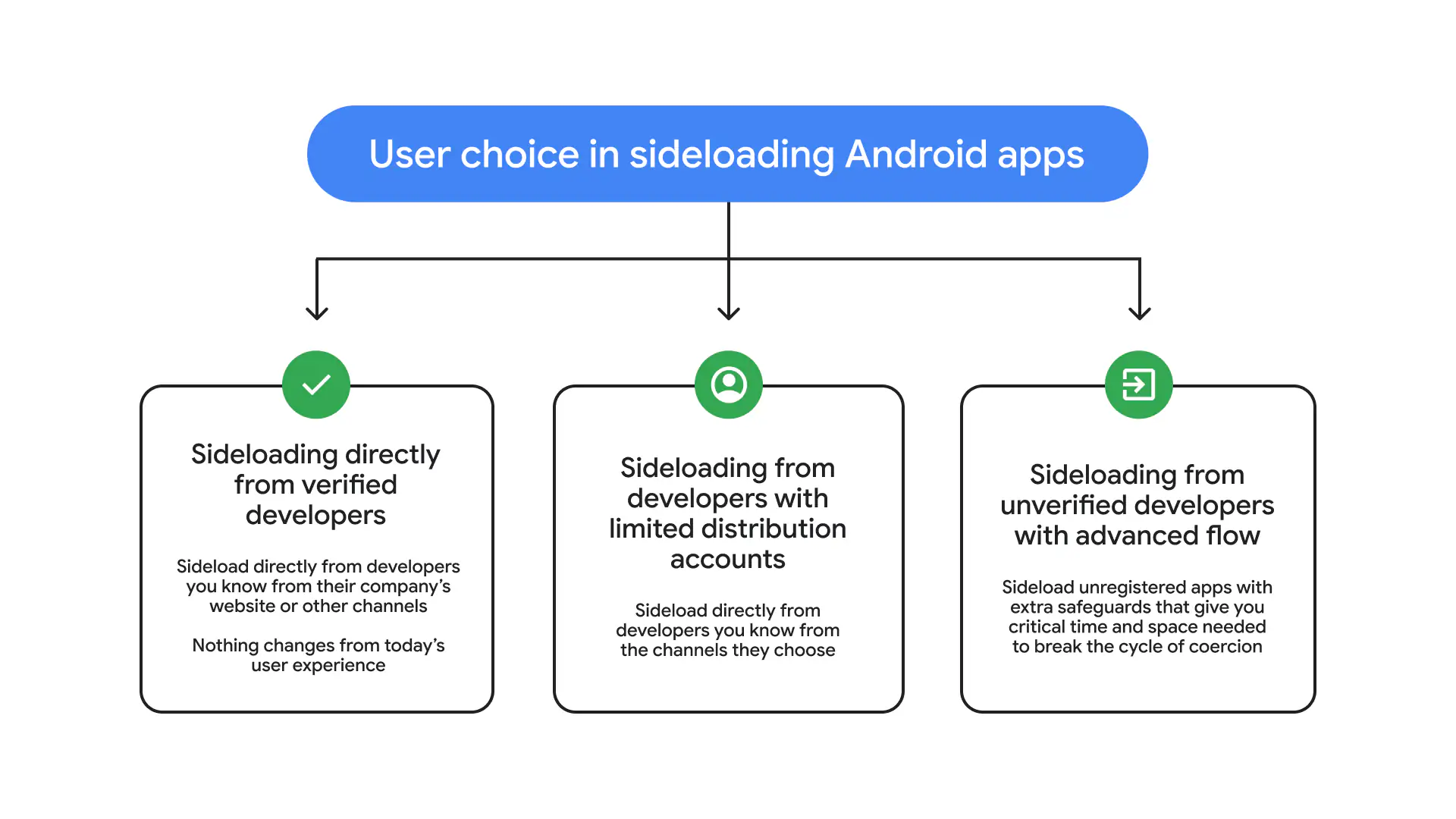
When your phone asks for it, Google's advanced flow unlocks apps from unregistered developers. You do it once:
- Open Settings > About phone and tap Build number seven times to enable Developer options.
- In Developer options, turn on Allow apps from unverified developers and confirm with your screen lock.
- Confirm that you are making this choice yourself, then restart the phone.
- Wait 24 hours. This waiting period happens only once.
- Return to the same setting, confirm again, and allow unverified apps for 7 days or indefinitely.
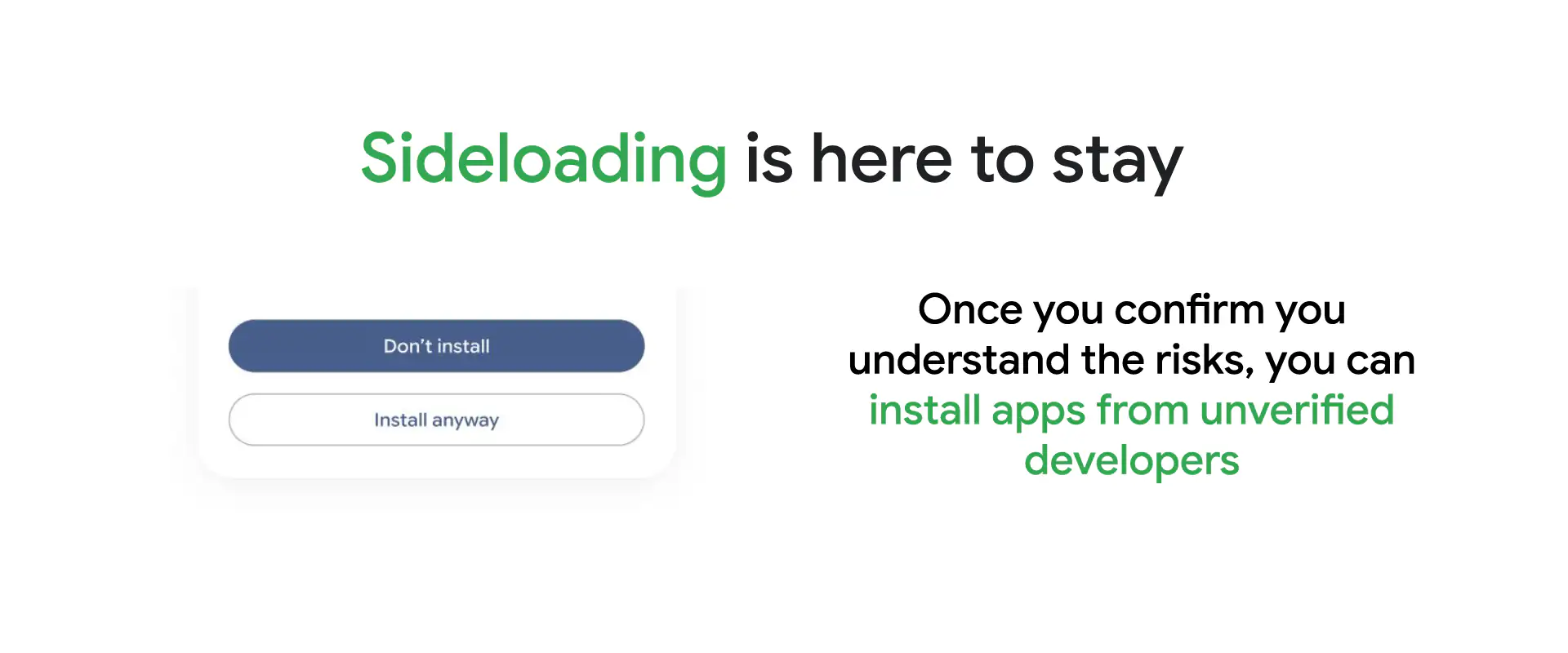
Install With ADB Instead (No 24-Hour Wait) Tap to show or hide
ADB installs from a computer skip the advanced flow. Turn on USB debugging in Developer options, connect your phone, and run adb install followed by the APK file name. It is faster, and you need a computer with the Android platform tools.
Google has yet to say how self-patched APKs will be treated in 2027, so I keep an eye on the Android developer verification update for new details.
If a day of waiting and Developer options sounds like too much, the official YouTube app with Premium skips all of it. I compare the options in the alternatives section.
YouTube ReVanced Not Working?
When ReVanced acts up, the cause is almost always a change on YouTube's side, and the fix is usually a quick re-patch or a settings switch. I start by checking the device, then match the symptom.
Can You Use YouTube ReVanced on iPhone, TV or PC?
ReVanced is built for Android phones and tablets. Here is what works on each of your other screens:
| Device | ReVanced | What Works Instead |
|---|---|---|
| iPhone and iPad | ❌ | YouTube Premium in the official app. Tweaked iOS apps need sideloading from a computer and re-signing every 7 days with a free Apple ID. |
| Android TV and Google TV | ⚠️ Phone app only | YouTube Premium in the TV app, built for a remote. Third-party TV clients carry risks: SmartTube's official APK shipped with a hidden library in late 2025. |
| Samsung and LG smart TVs | ❌ | YouTube Premium. These TVs run Tizen and webOS, which install apps from their own stores only. |
| Windows and Mac | ❌ | YouTube Premium in any browser. A "YouTube ReVanced .exe" is fake, and desktop patchers only prepare Android APKs. |
If you watch on an iPhone, a TV or a laptop as well as your phone, one YouTube Premium deal covers every screen with the official apps.
Common YouTube ReVanced Errors and Fixes
My first move for any error is to update the patches in ReVanced Manager and patch again. ReVanced usually ships a fix within days of a YouTube change. If the problem stays, find it here:
| Symptom | Likely Cause | How I Fix It |
|---|---|---|
| Videos not loading, endless buffering, "There was a problem while playing", "Content not available" or "Could not fetch client streams" | YouTube changed how it serves video, and the current spoof client stopped working | Re-patch with the latest patches. Then open ReVanced Settings > Miscellaneous > Spoof video streams > Default client, pick Android VR or visionOS, and restart the app. |
| Quality unavailable, quality greyed out or stuck at 360p | The spoof client in use offers fewer video formats | Switch to visionOS, or to Android VR with Allow Android VR AV1 on. Update GmsCore, then set a default quality in ReVanced Settings > Video. |
| "App is outdated" or "Update your app" | Spoof app version points to an old YouTube version that YouTube now rejects | Turn off ReVanced Settings > General > Spoof app version, or re-patch the YouTube version Manager supports. |
| YouTube Music stops after 1 minute | Some spoof clients get cut off at the one-minute mark | Switch the client to visionOS or Android VR instead of Android Reel (no auth). Update GmsCore and re-patch. |
| YouTube Music error 400 | Usually outdated patches or an expired session | Update patches and GmsCore, clear the app's data, then sign in again. |
| "App not installed" or installation conflict | An older patched copy with a different signature is still on the phone | Uninstall every old patched copy, including ones in Secure Folder, a Work Profile or hidden apps, then install again. |
| Can't sign in or "No internet connection" | GmsCore is missing, or a battery saver is closing it | Reinstall GmsCore and exempt it from battery optimization. Use a personal Google account, since work and family-managed accounts often fail to sign in. |
| Watch history not saving | A system ad blocker or private DNS blocks YouTube's history server | Allow s.youtube.com in your ad blocker or DNS, and turn on watch history in your Google account. |
| Ads showing again | YouTube added a new ad type that the next patch release will cover | Update patches and re-patch as soon as a new release is out. |
| YouTube Music missing in Android Auto | Android Auto shows Play Store apps by default | In Android Auto settings, tap Version 10 times, open Developer settings from the menu and turn on Unknown sources. |
Most of these fixes start in the same place. Here is the path to the Spoof video streams menu: profile picture > gear icon > ReVanced Settings > Miscellaneous.
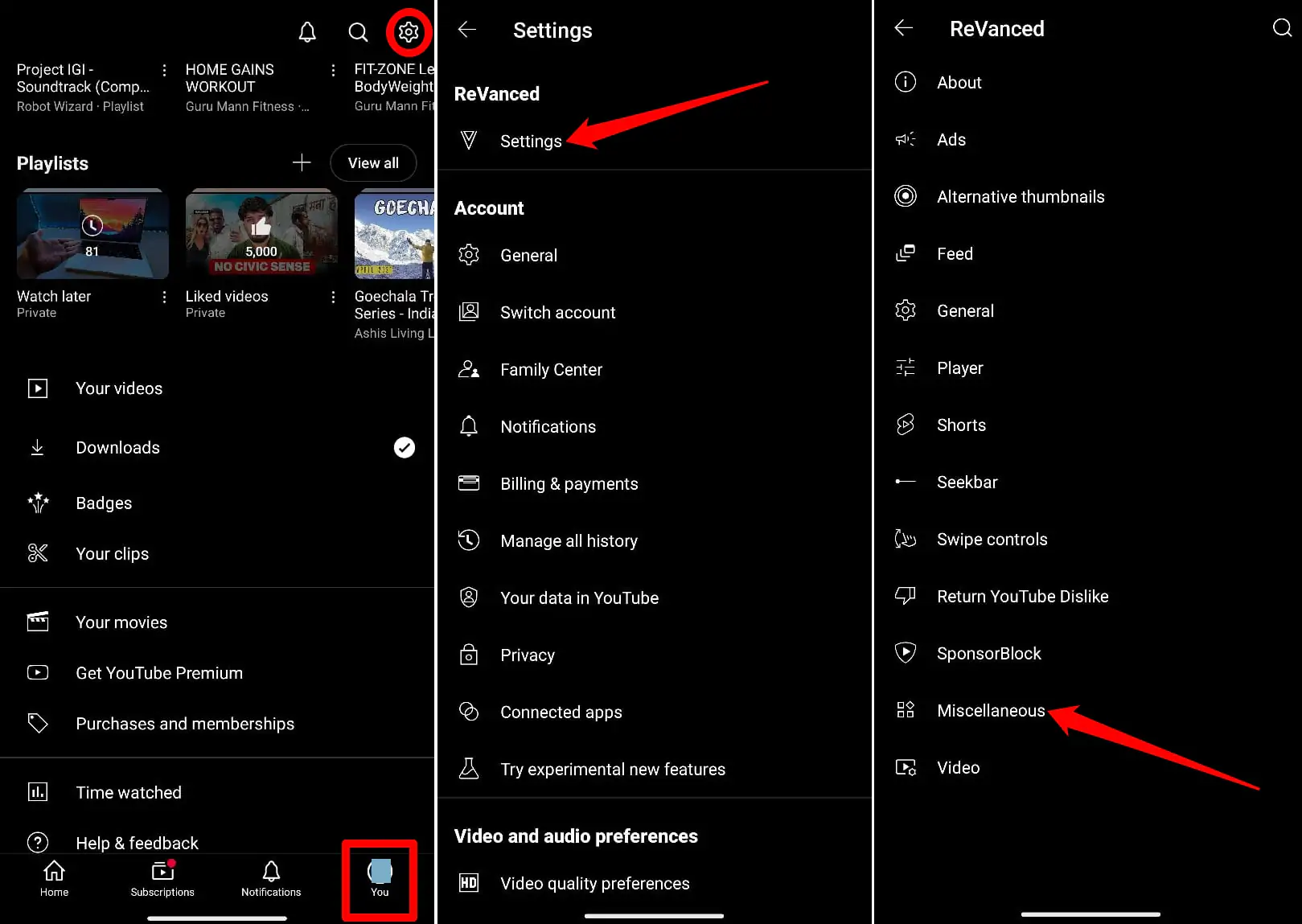
My tip: the client that works best changes over time. When videos stop loading again, I cycle through the other clients first, then check for a new patch release.
How to Update YouTube ReVanced
The patched app updates through Manager rather than the Play Store. Here is my routine:
- Open ReVanced Manager. It checks for a new Manager version on launch and shows a badge on the settings icon when one is ready.
- Go to the Apps tab and select YouTube. Manager loads the newest patches automatically.
- Get the YouTube version Manager supports, tap Patch, then Install. It installs over your current copy and keeps your login.
Plan to do this every few weeks, and sooner when YouTube pushes a big change. If that sounds like more upkeep than you want, the alternatives below need none.
Is YouTube ReVanced Safe?
The official ReVanced project is open source, and patching happens on your own phone, so anyone can check what it changes. The real risks come from where you download it and what it means for your Google account. Here is how I handle each one:
| Risk | What Can Happen | How I Stay Safe |
|---|---|---|
| Fake download sites | Researchers have found fake "YouTube Vanced" apps carrying the Nexus banking trojan, and look-alike ReVanced domains keep appearing. | I download Manager and GmsCore only from revanced.app and ReVanced's GitHub, and patch YouTube myself. |
| Your Google account | Modifying the app breaks YouTube's Terms of Service. Large-scale bans have yet to be reported, and YouTube can change its enforcement at any time. | If an account holds paid apps, years of photos or a monetized channel, I weigh that risk before signing in with it. |
| Signing in through GmsCore | GmsCore handles your Google login. It is an open-source fork of microG, so it is as trustworthy as the copy you install. | I install GmsCore from ReVanced's GitHub releases page only. |
| Third-party clients | Even trusted projects get hit. In late 2025, SmartTube's official APK shipped with a hidden library its developer never added. | I keep apps updated and follow each project's official channels for security notices. |
If the account risk and the hunt for real download links feel like too much, the official app with YouTube Premium gives you the same ad-free experience. Here is how the options stack up.
Best YouTube ReVanced Alternatives
I compared the main options on the three things that matter after you live with ReVanced for a while: whether it works on every screen, how much upkeep it needs, and whether YouTube Music comes with it.
| Option and Rating | All Devices | Upkeep-Free | YT Music |
|---|---|---|---|
| YouTube Premium on GamsGo From $2.99/month My top pick ⭐ 5/5 | ✅ | ✅ | ✅ |
| YouTube Premium (official) $15.99/month ⭐ 4/5 | ✅ | ✅ | ✅ |
| YouTube Premium Lite $7.99/month ⭐ 3/5 | ✅ | ✅ | ❌ |
| YouTube ReVanced Free ⭐ 3/5 | ❌ | ❌ | ✅ |
| Morphe Free ⭐ 3/5 | ❌ | ❌ | ✅ |
| NewPipe Free ⭐ 2/5 | ❌ | ❌ | ❌ |
A quick note on each: Premium Lite still shows ads on music and Shorts and leaves out YouTube Music Premium. ReVanced, Morphe and NewPipe are Android-only apps that need a fresh patch or update whenever YouTube changes.
NewPipe vs YouTube ReVanced: NewPipe is a separate app that runs without a Google account, which privacy fans like. ReVanced keeps the real YouTube app with your account, comments and recommendations.
My recommendation for most people is YouTube Premium. It is the only option with a check in every column: it works on all your screens, needs zero patching and keeps your account in good standing.
Want to try it first? My guide to YouTube Premium free trial options covers every way to test it. For a full look at the perks, read is YouTube Premium worth it.
How to Get YouTube Premium for Less
Price is the main reason most people try ReVanced instead of Premium. YouTube's official US price is now $15.99 a month for an individual plan and $26.99 for a family plan. I buy YouTube Premium on GamsGo, which gets me the official app and my own account for much less.
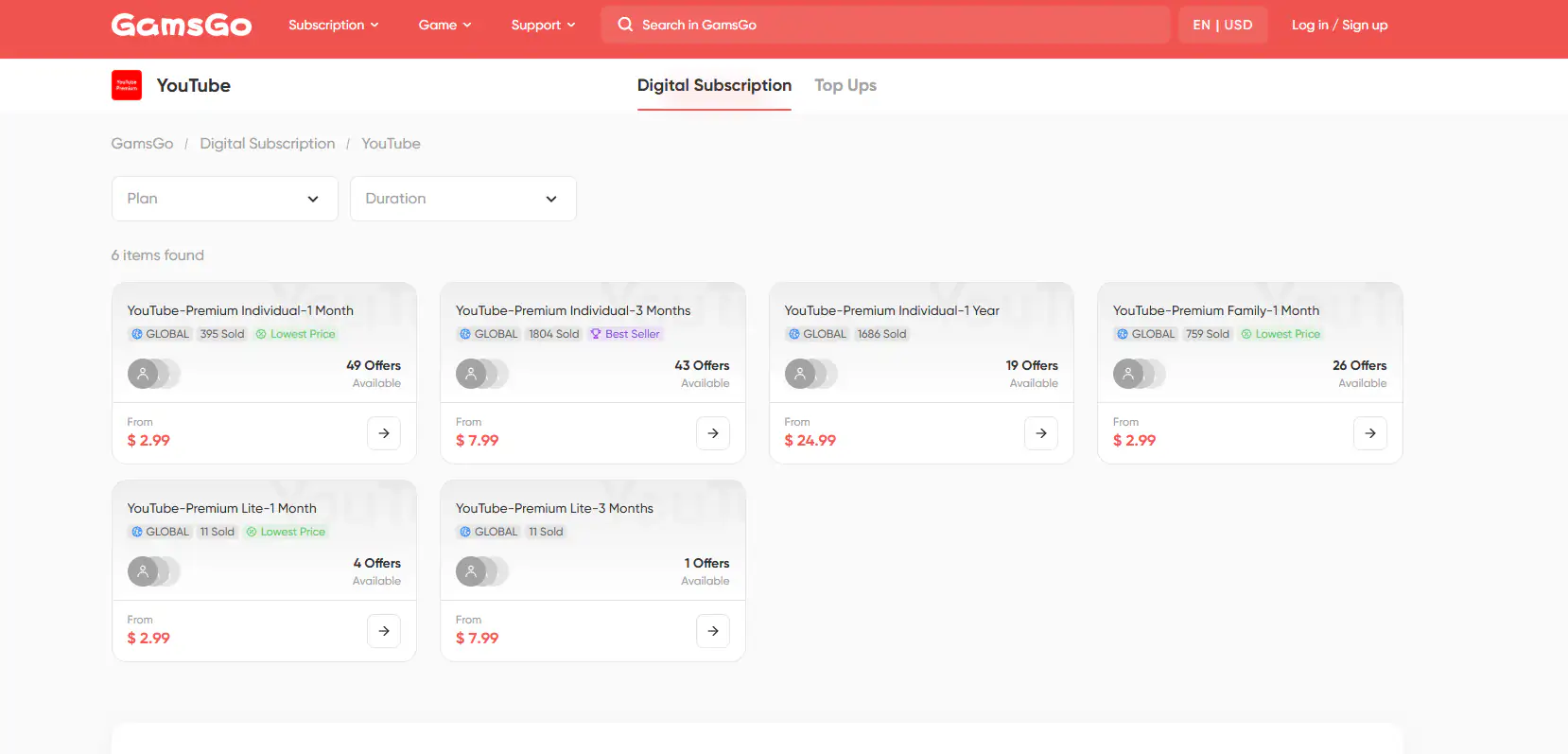
Here is how the GamsGo price compares with the official individual plan:
| Plan Length | Official Price (Individual) | GamsGo Price | You Save |
|---|---|---|---|
| 1 month | $15.99 | From $2.99 | About 81% |
| 3 months | $47.97 | From $7.99 | About 83% |
| 12 months | $191.88 | From $24.99 | About 87% |
Official prices above are the US monthly price multiplied by the number of months.
Why I Buy YouTube Premium on GamsGo
A low price is only half of it. Here is what makes it worth it for me:
- Your own Google account: you join with your own email, so your subscriptions, playlists and history stay yours, and your login stays private.
- Every Premium perk: ad-free videos, background play, offline downloads and YouTube Music Premium, the same as an official plan.
- Every device: phone, tablet, PC, smart TV, PlayStation and Xbox, all with the official apps.
- Instant delivery: your order arrives right after payment, so you can start watching in minutes.
- 24/7 live support: a real person helps with activation or renewal whenever you need it.
- Refund guarantee: buyer protection with refunds available within 24 hours.
How to Buy YouTube Premium on GamsGo
- Open the discounted YouTube Premium page on GamsGo.
- Choose your plan and length: 1 month to try it, or 3 or 12 months to save more.
- Pay with a card, Apple Pay, Google Pay or another listed method.
- Enter the email of the Google account you want to use, then open the invite link and accept it.
- Open the official YouTube app on any device and enjoy ad-free videos.
While you are there, you can also save on your other subscriptions, such as cheap Netflix Premium, Spotify Premium deals and cheap Disney+, and keep them all in one place.
Want more ways to cut the cost? These guides cover every option I have tested:
| Deals YouTube Premium discount | Students YouTube student discount |
| Family Share YouTube Premium | Gift Codes YouTube Premium code |
Conclusion: Which Option Should You Choose?
For most people, the easiest way to get ad-free YouTube in 2026 is to buy YouTube Premium on GamsGo. You use the official app with your own account, it works on every screen you own, and setup takes a few minutes.
It also costs a fraction of the official price. ReVanced is a fun project if you watch on one Android phone and enjoy tinkering; just plan to re-patch every few weeks.
Ad-Free YouTube on Every Screen
Skip the patches, sideloading and 24-hour wait. Get YouTube Premium with YouTube Music on GamsGo from $2.99 a month.
FAQ
Is YouTube ReVanced Legal?
ReVanced shares patches, and you apply them to your own copy of YouTube. Using a patched app breaks YouTube's Terms of Service, which is a contract matter between you and YouTube. Laws vary by country, so treat this as general information rather than legal advice.
Can You Download Videos With YouTube ReVanced?
Yes, through a separate downloader app. ReVanced's download button sends the video to the downloader you install, and the file is saved there. For other methods, see my guide on how to download YouTube videos.
Does YouTube ReVanced Work Without a Google Account?
Yes. You can watch signed out with ads blocked. Signing in adds your subscriptions, playlists and watch history, and it unlocks age-restricted and members-only videos.
How Do I Turn Off Shorts in YouTube ReVanced?
Open ReVanced Settings > Shorts and turn on the options to hide Shorts in the home feed, search results and subscriptions. The same settings also hide the Shorts button in the bottom bar.
Is YouTube ReVanced Down?
ReVanced runs entirely on your phone. When many users report it "down" at once, YouTube has changed something on its servers. Check r/revancedapp for news and patch again once a fix is released.
Related Articles
More YouTube guides from the GamsGo team: