CapCut is easy to pick up, whether you are making TikTok videos, Instagram Reels, YouTube Shorts, or quick product posts.
The question of price usually comes later—when you keep running into a locked template, start relying on an AI caption tool, or need a draft to move smoothly from desktop to phone.
The free version still handles the essentials: trimming, captions, effects, and exports for social platforms. But once you are editing every week, a lower-cost CapCut Pro subscription stops feeling like an optional extra and starts becoming a real budget decision.
This guide answers the practical questions: whether CapCut offers a genuine discount, how the available options compare with official pricing, and which route fits the way you actually edit.
Quick answer: CapCut does not offer one public promo code that works for everyone. The most reliable ways to save are checking for official campus access, choosing the right billing cycle, or considering a lower-cost GamsGo CapCut option if Pro features are already part of your regular workflow.
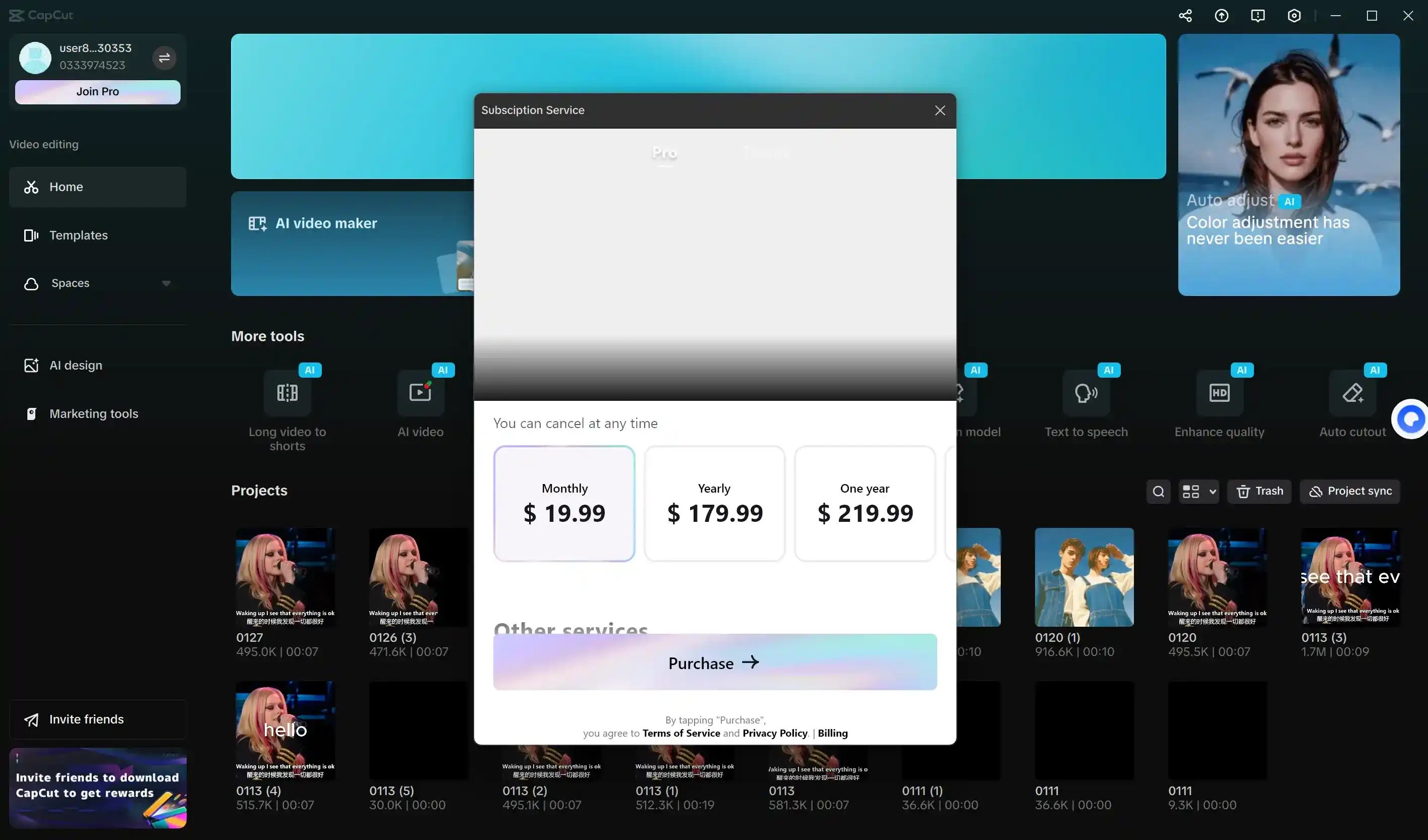
CapCut Pro Subscription Pricing in the United States
In the United States, CapCut Standard is the free option for everyday editing, while Pro is the paid plan for creators who need more advanced tools.
The table below uses those official figures as a U.S. baseline. It lets you compare Standard, Pro, and Teams before you consider lower-cost alternatives.
For a broader plan-by-plan breakdown, you can also read our CapCut pricing guide.
| What to Compare | CapCut Standard | CapCut Pro | CapCut Teams |
|---|---|---|---|
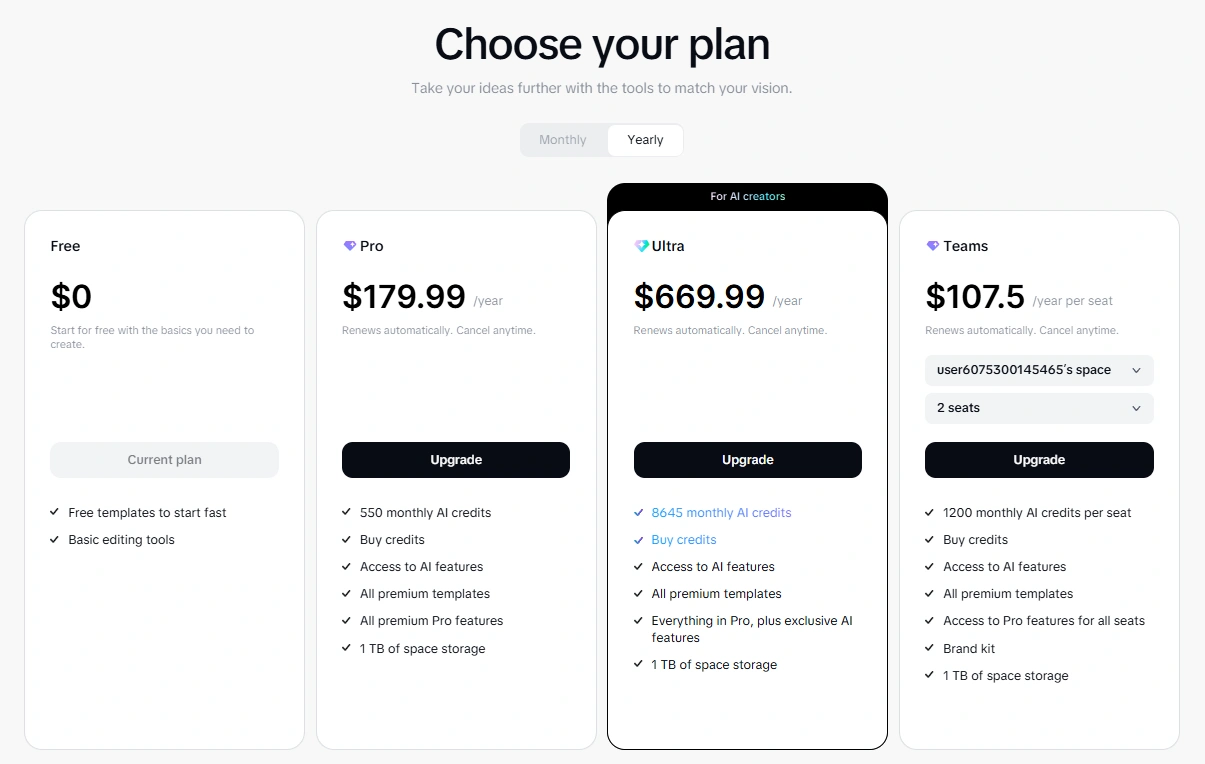
| U.S. price baseline | $0 / free basic version | $19.99/mo or $179.99/yr | $24.99/mo |
| Best for | Beginners and casual creators | Solo creators and freelancers | Small teams and review workflows |
| Devices | Basic mobile, desktop, and web editing | Mobile, desktop, and web | Mobile, desktop, and web |
| Creative tools | Basic editing tools, templates, and exports | Pro templates, effects, AI tools | Pro tools plus team access |
| Cloud / teamwork | Not built for shared team workflows | Better for personal projects | Better for shared projects |
| Main decision | Stay free for simple edits | Pay for your own editing workflow | Pay for collaboration |
Price note: your final total can change with app-store billing, taxes, region, and plan length. Treat the figures above as a guide, then confirm the current price at checkout.
CapCut Standard vs CapCut Pro: What Actually Changes?
The main difference is simple: CapCut Standard covers straightforward editing, while Pro is worth considering when its paid tools save you time across repeated projects.
Your decision should come down to the tools you need regularly, the quality you want to export, and the time those tools save you.
| Decision Point | CapCut Standard (Free) | CapCut Pro / Teams |
|---|---|---|
| U.S. cost baseline | $0 | $19.99/mo or $179.99/yr; Teams starts at $24.99/mo |
| Annual math | No subscription cost | Pro annual is $179.99 vs $239.88 if paid monthly; annual saves $59.89 |
| Best editing volume | A few simple clips, casual posts, or quick edits each month | Weekly posts, client edits, product videos, or repeat content batches |
| AI and speed tools | Basic editing plus selected AI tools | Better fit for repeat use of CapCut's AI tools for creation, text/audio, image, and video work |
| Assets and output | Free templates, standard effects, and regular social exports | Premium assets, more effects, 4K export, and stronger support for polished social exports |
| Device workflow | Best when one phone, desktop, or browser workspace is enough | Better for CapCut's 3 main editing surfaces: mobile, desktop, and web |
| Best decision | Stay free until a paid feature blocks real work | Upgrade when Pro tools save time on multiple videos, not just one edit |
Pro is most valuable as a time-saver, not as a status upgrade. If its tools help you finish videos faster, maintain a consistent style, and avoid recreating the same captions or effects, the subscription has a clear purpose in your workflow.
Once you know that Pro fits the way you work, the next question is how to get it at a price that makes sense.
Best Low-Cost CapCut Route: GamsGo
GamsGo CapCut Discount Options From $5.91
After trying it for myself and comparing the available ways to lower the cost, I found GamsGo to be one of the more practical CapCut discount routes.
The appeal is easy to understand: plans start at $5.91, so the entry price can be about 70% lower than CapCut Pro's official $19.99/month U.S. baseline. It gives you more flexibility than simply paying the official monthly rate.
Two GamsGo Purchase Formats: CapCut Account or UID Top-Up
GamsGo gives you a clear choice between two formats: CapCut account access or UID Top-Up. Both can lower the cost of CapCut, but each solves a different need.
CapCut account access gives you a separate username and password after purchase, so you can sign in and start editing without using your personal CapCut login.
UID Top-Up adds Standard or Pro to the CapCut account you already use, so your existing drafts, settings, and workflow stay in one place.
| GamsGo Route | How It Works | Best For |
|---|---|---|
| CapCut account | You receive a CapCut account username and password after purchase | Lowest monthly Pro price and quick access on web, desktop, or mobile |
| Top-up subscription | You choose Standard or Pro, then provide your CapCut UID for the top-up | Existing users who want the subscription added to their own account |
How to Buy CapCut Standard or Pro on GamsGo
Both options follow a similar checkout flow, but the information you provide is different depending on the access format you choose.
- Go to GamsGo and search for CapCut. From there, choose the CapCut option that matches how you want to buy.
- Choose UID Top-Up if you want the subscription added to your own CapCut account, or choose CapCut account access if you want GamsGo to provide a ready-to-use account login after purchase.
- Select the plan, region, and duration you need. Review these details before checkout, because the available plan and final price can change based on the option you select.
- For UID Top-Up, enter your CapCut UID exactly as it appears in your CapCut account. For CapCut account access, do not enter your personal CapCut login details.
- Complete the payment and follow the order instructions. If you chose UID Top-Up, check your own CapCut account after the top-up is completed. If you chose CapCut account access, use the username and password you receive to sign in and start editing.
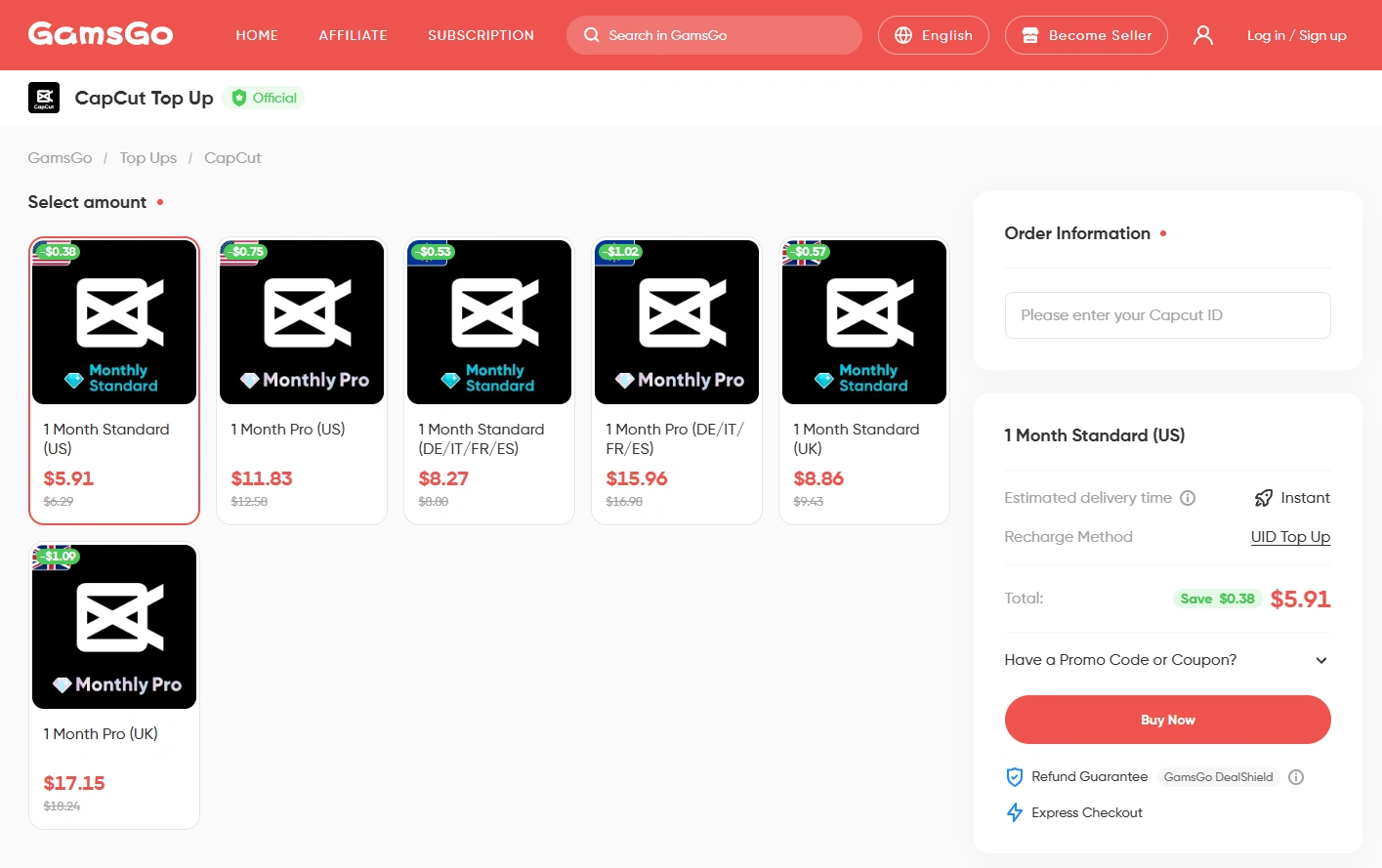
Best fit: CapCut account access is the lowest-cost Pro route. UID Top-Up is the better choice when you want to keep using your own CapCut account. Teams is only worth considering when review, sharing, and handoffs are part of the job.
Other Ways to Lower Your CapCut Cost
If neither GamsGo format feels like the right fit, you still have a few practical ways to lower your CapCut cost. The three options below depend on how often you edit, how long you need Pro, and whether you qualify for school access:
- You can stay on Free if your work only requires basic trimming, text, captions, templates, and social exports.
- You should choose annual billing only if you expect to use Pro for most of the year.
- Students should check CapCut Creative Campus or school access before they pay.
1. Stay Free Until Locked Pro Tools Slow Down Real Projects
The best way to save is to stay on Free until a locked Pro feature repeatedly slows down your real projects. CapCut's free editor already covers the core short-form workflow: cutting clips, adding text and captions, applying standard effects, resizing for social platforms, and exporting everyday TikTok, Reels, or Shorts content.
Try this simple test: look back at your last five projects and note what actually held you up. If most only needed cut, split, text, basic captions, and free templates, Free is probably still enough.
If you repeatedly ran into locked templates, premium effects, advanced AI cleanup, or a need for 4K/no-watermark exports, Pro may be solving a genuine production problem.
You do not need to upgrade just because Pro features look appealing. If the free tools still cover the work you do most often, staying on Free remains the most cost-effective choice.
2. Choose Annual Pro When You Need 10+ Months of Access
Annual Pro is the better official value if you expect to use CapCut for about ten months or more. At $179.99 per year, it is roughly 25% cheaper than paying for the monthly plan over a full year.
This option works well for weekly YouTube Shorts, ongoing brand accounts, client social posts, or ecommerce video batches. It is less suitable for a one-off campaign, a course project, or a short launch period.
A practical rule of thumb: choose monthly for short projects and annual for long-term publishing. In either case, confirm the price and renewal timing at checkout before you commit.
3. Students Should Check Creative Campus or School Access First
Students should check Creative Campus or school access before paying for a personal plan.
CapCut only names a limited group of partner schools publicly. Its Creative Campus page currently lists Mediadesign Hochschule (mdh) Berlin, The University of Manchester, Sup Luxury, and Shibuya Women's International School among its partners.
Eligible students at partner programs can receive free CapCut Pro memberships.
This route is especially relevant for students making videos for coursework, clubs, campus marketing, film classes, portfolios, or social channels. If your school is not a partner, compare the direct monthly and annual plans as you would for any other subscription.
Student tip: treat a student offer as real only when it comes through CapCut, your school, or your own account. A screenshot from a coupon site is not the same thing as verified eligibility.
Which CapCut Saving Route Is Right for You?
There is no single best way to save on CapCut. The right option depends on how often you edit, whether you need paid tools now, and whether your school offers eligible access.
| User Scenario | Best Route | Best When |
|---|---|---|
| Light editing | CapCut Standard (Free) | Edits are simple, occasional, and mostly social-ready |
| Light paid editing | GamsGo Standard | You want a paid option but do not need the full Pro setup |
| Weekly creator work | Annual CapCut Pro | CapCut stays in your weekly content calendar |
| Student creator | CapCut Creative Campus | Your school or account gives you official access |
| Budget-focused Pro user | GamsGo CapCut Pro | Pro features matter, but direct monthly billing feels high |
| Short-term project | Monthly plan | You only need Pro for a launch, assignment, or short batch |
Final Thoughts
In the end, the right CapCut plan is less about choosing the biggest package and more about being honest about how often you edit. If you only make a few simple clips now and then, Free can still be enough.
If you need Pro for one campaign or a short batch of videos, monthly access is usually the cleaner choice.
If CapCut has become part of your weekly workflow, then it makes sense to compare the longer-term options more carefully. Students should check Creative Campus first, while regular creators can compare GamsGo's CapCut formats with the official plans and choose the route that feels easiest to manage.
The best choice is the one that supports the way you actually create, without making you pay for features, access, or time you will not use.
FAQ
Does CapCut Have a Student Discount?
No, CapCut does not offer a universal student coupon. However, CapCut runs CapCut Creative Campus, an official initiative, so students should first check their school, CapCut account, or CapCut's official campus channel for eligible access.
How Much Does CapCut Pro Cost in the U.S.?
Using this U.S. baseline, CapCut Pro costs $19.99/month or $179.99/year, while Teams starts at $24.99/month. Prices can vary by region, device, app store, and promotion, so you should always check the current total at checkout before comparing ways to save.
How Much Is CapCut on GamsGo?
GamsGo offers CapCut plans from $5.91. Your final price depends on the plan, region, and access format you choose.
Is CapCut Free?
Yes. CapCut is free to download and use, and it covers basic trimming, text, captions, and casual social videos.
Is CapCut Pro Worth Buying?
CapCut Pro can be worth buying if its paid tools save you time or help keep repeated projects consistent. For the occasional personal clip, the free version is usually the better place to start.
Is It Safe to Use Cracked Capcut Pro APKs?
No. Avoid cracked APKs, unofficial installers, and "free Pro unlock" downloads. They can create privacy, malware, account, and payment risks, so they are not worth it just to save money.
Can I Use CapCut on Mobile, Desktop, And Web?
Yes. CapCut is available on mobile, desktop, and the web. You should choose the paid package that matches the devices and workflow you use.