GitHub Copilot has become one of the most popular AI coding tools among student developers. According to GitHub, nearly 2 million students worldwide were using Copilot through GitHub Education as of March 2026. GitHub has also moved student benefits to a dedicated GitHub Copilot Student Plan.
So, can students still use Copilot for free? What documents are needed for verification? Why does Copilot still show the Free plan after GitHub Education approval? With the new AI Credits system, the old claim that students get full access to Copilot Pro for free is no longer completely accurate.
In this guide, we’ll explain the GitHub Copilot Student Discount 2026, including eligibility, verification, plan features, and common issues. We’ll also cover other ways to use a GitHub Copilot account after graduation or when you need more AI Credits.
Does GitHub Copilot Still Have a Student Discount in 2026?
Yes. In 2026, students who are eligible for GitHub Education and successfully complete the verification process can still use GitHub Copilot Student for free, without paying the monthly Copilot Pro subscription fee.
Key GitHub Copilot Student benefits in 2026:
- The official plan is called GitHub Copilot Student and is no longer simply equivalent to “free Copilot Pro.”
- It is completely free for eligible students, but you must first verify your student status through GitHub Education.
- Code Completions are unlimited, allowing students to use AI-powered code suggestions without a monthly limit.
- The plan includes 200 AI Credits per month for AI features such as Chat and Agent.
- GitHub reassesses student eligibility regularly, so your student benefits may end after you graduate or are no longer eligible.
In other words, students should apply for GitHub Copilot Student rather than follow older 2024 or 2025 guides that focus on getting “free Copilot Pro.”
How Can You Get GitHub Copilot Free or Cheaper in 2026?
Method | Who It's For | Cost | Recommendation |
|---|---|---|---|
Apply for Copilot Student | Current students who can verify their student status | Free | ⭐⭐⭐⭐⭐ |
Use Copilot Free | Users who code occasionally or are learning basic programming | Free with usage limits | ⭐⭐⭐⭐ |
Free Copilot Pro for eligible teachers or open-source maintainers | Verified teachers and qualifying maintainers of popular open-source projects | Free if eligible | ⭐⭐⭐⭐⭐ |
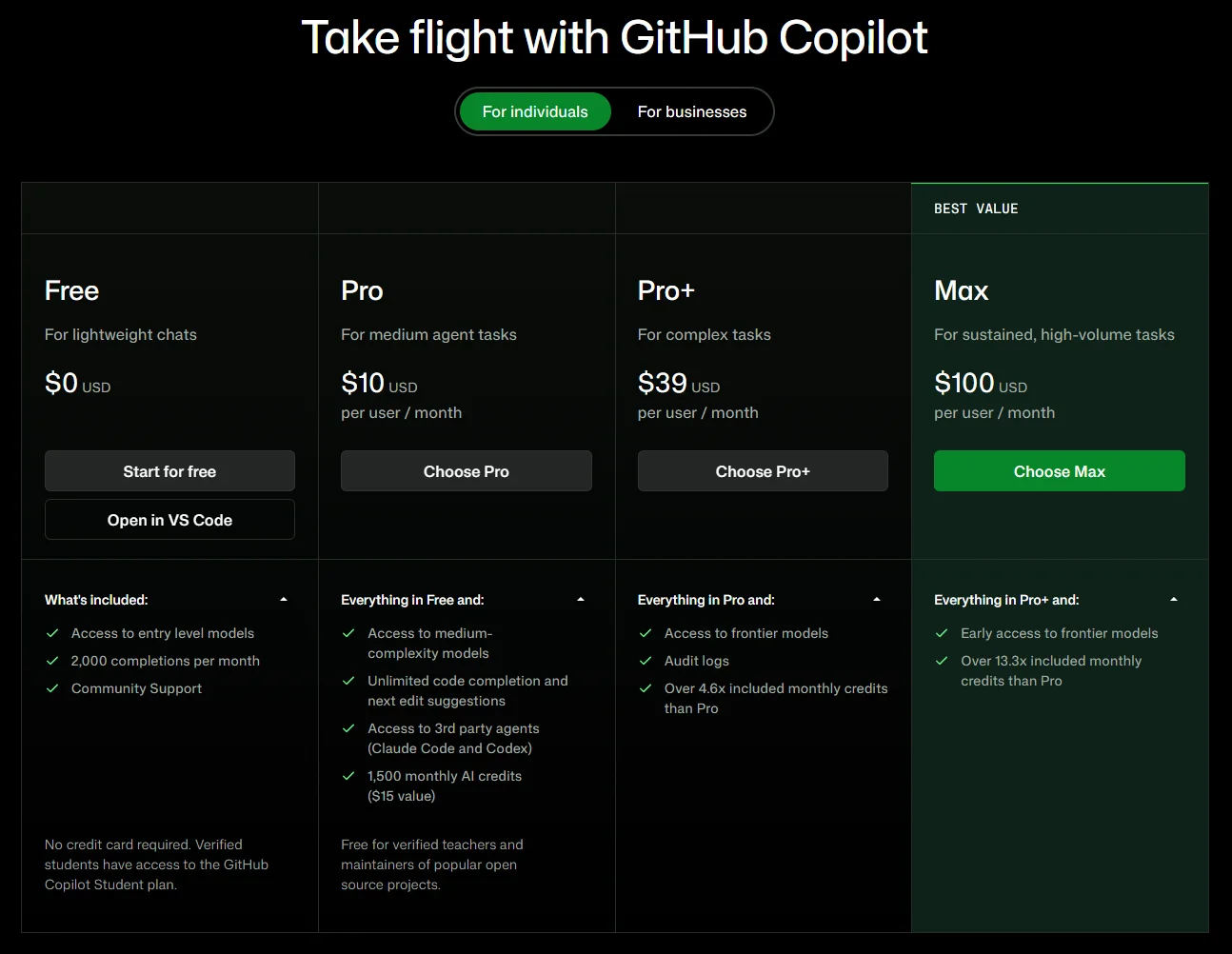
Upgrade to Copilot Pro | Graduates, heavy users, or users who need more AI Credits | $10/month | ⭐⭐⭐ |
Method 1: Apply for GitHub Copilot Student (Best for Current Students)
If you are currently enrolled in high school, college, university, or another eligible degree- or diploma-granting program, GitHub Copilot Student is the main free option to consider. You first need to verify your student status through GitHub Education and then activate Copilot Student. GitHub confirms that verified students can access Copilot's premium features for free.
The specific eligibility requirements and application process are explained in the Am I Eligible and How Do I Apply sections below.
Method 2: Use GitHub Copilot Free (No Student Verification Required)
Copilot Free does not require student verification or a paid subscription. You can sign up with a GitHub account and use a limited version of Copilot at no cost. It can be useful if you only code occasionally, are learning programming basics, or don't need frequent access to advanced AI features.
The main limitation is usage. Copilot Free currently includes up to 2,000 code completions per month, along with limited access to other Copilot features.
If you are waiting for your GitHub Education verification to be processed, Copilot Free can also be used as a temporary option.
Method 3: Get Free Copilot Pro as a Teacher or Open-Source Maintainer
Students aren't the only users who may qualify for free Copilot access. GitHub states that verified teachers and maintainers of popular open-source projects may be eligible for free access to Copilot Pro. However, eligibility is subject to GitHub's requirements, so check the official criteria before signing up for a paid plan.
Method 4: Upgrade to Copilot Pro (For Graduates and Heavy Users)
If you have already graduated, are no longer eligible for Copilot Student, or regularly reach the limits of Copilot Free, a paid plan may be more suitable.
As of 2026, Copilot Pro costs $10 per month, while Copilot Pro+ costs $39 per month and Copilot Max costs $100 per month. The higher-tier plans provide larger monthly AI Credit allowances and access to additional models and features.
For users who only need basic AI coding assistance, Copilot Free may be enough. For frequent coding, Chat, or agent-based workflows, a paid plan provides a larger usage allowance.
If you only need Copilot Pro for a specific project or want a more flexible way to access a GitHub Copilot Pro subscription, you can also compare available offers on GamsGo and purchase a GitHub Copilot Pro account based on your needs. The listing page shows details such as the usage period, price, Seller Rating, delivery time, and warranty period. At the moment, most available offers are for 1-month Pro plans with full access.
Prices and availability may change, so check the listing page for the latest details before purchasing.
This option may be useful if you:
- Have already graduated and are no longer eligible for Copilot Student;
- Need more AI Credits than the Student Plan provides;
- Only need Copilot Pro temporarily for a specific project;
- Don't want to maintain a long-term subscription for a short-term development task.
Before purchasing, check the plan type, duration, account access method, promised delivery time, and warranty rather than choosing an offer based solely on the lowest price.
What Changed for Copilot Students in 2026?
Many older guides still claim that “students get GitHub Copilot Pro for free,” but this wording is no longer accurate in 2026. GitHub has made two key changes to the student benefits this year, affecting how students access Copilot and how its AI usage is allocated.
2026: Students Moved to a Separate Copilot Student Plan
Many older guides still describe the student benefit as “free GitHub Copilot Pro,” but this is no longer the best way to describe the current program.
In 2026, GitHub lists Copilot Student as a separate free plan for verified students. It provides unlimited code completions and access to Copilot features, but it is not simply the same as a paid Copilot Pro subscription. GitHub also limits model access on the Free and Student plans to automatic model selection, while paid Pro plans provide more flexible model selection.
This distinction is important when following older student discount guides. If your GitHub Education account has been verified, you should look for Copilot Student rather than expect your account to show a paid Copilot Pro subscription.
AI Credits Are Now Part of Copilot Student
GitHub's current Copilot system also uses AI Credits to measure usage of certain AI-powered features. Both Copilot Free and Copilot Student include a monthly AI Credits allowance, while paid plans provide larger allowances depending on the subscription tier.
At the same time, Copilot Student still includes unlimited code completions, so students who mainly use Copilot for inline coding suggestions can continue to use it extensively without a completion limit. However, AI-powered features such as Chat and agent-based workflows can consume the plan's included AI Credits.
For students who frequently use Chat, Agent Mode, or other credit-consuming features, it is therefore important to monitor their AI Credit usage rather than assume that every Copilot feature is unlimited.
GitHub Copilot Student vs Free vs Pro: Which Plan Fits You?
The main differences between Copilot Free, Student, and Pro are not simply whether they support basic code completion. The plans differ in code completion limits, AI Credits, model selection, and access to advanced Copilot features.
Method | Who It's For | Cost |
|---|---|---|
Apply for Copilot Student | Current students who can verify their student status | Free |
Use Copilot Free | Users who code occasionally or are learning basic programming | Free with usage limits |
Free Copilot Pro for eligible teachers or open-source maintainers | Verified teachers and qualifying maintainers of popular open-source projects | Free if eligible |
Upgrade to Copilot Pro | Graduates, heavy users, or users who need more AI Credits | $10/month |
GitHub currently lists 1,500 total monthly AI Credits for Copilot Pro, consisting of 1,000 base credits and a 500-credit flex allowance. By comparison, GitHub does not currently publish a fixed Student credit amount in its main public plan table.
If you mainly use Copilot for class assignments, coding practice, understanding existing code, or small personal projects, Copilot Student may be sufficient for everyday development.
If you frequently rely on AI Chat, agent-based workflows, multiple model options, or more intensive development tasks, the limitations of the Student plan may become more noticeable. In that case, you can consider upgrading to Copilot Pro or exploring a more flexible GitHub Copilot subscription.
For users who have already graduated or no longer qualify for student verification, GamsGo also offers GitHub Copilot account options. GamsGo is a digital product platform offering access to a range of subscription-based services, including AI tools, streaming services, productivity software, and other digital products. Availability, pricing, and account terms may vary by listing.
Am I Eligible for GitHub Copilot Student?
To use GitHub Copilot Student for free, you first need to become a verified student through GitHub Education. Your eligibility is determined by the verification process, not simply by whether you have a school email address.
Basic Requirements
You generally need to meet the following requirements:
- Be currently enrolled in a degree- or diploma-granting program, such as high school, college, university, or an eligible homeschool program;
- Own a personal GitHub account;
- Be at least 13 years old;
- Provide documentation that proves your current student status.
Do I Need a .edu Email?
Not necessarily. GitHub does not require every student to have a .edu email address. Its verification process is tailored to each school.
If GitHub detects that recent students from your school successfully verified their status using an academic email, future applicants from the same school may also be required to use one. If your school does not provide academic email addresses, GitHub allows you to provide official documentation explaining the school's policy and then reapply.
So, not having a .edu email does not automatically make you ineligible.
If your school's email domain is not recognized, GitHub recommends contacting GitHub Education Support and providing your school's full name, website, and email domain.
What Documents Can I Use for Verification?
If GitHub cannot verify your student status through your academic email, you may need to upload documentation showing that you are currently enrolled. GitHub lists several examples, including:
- A photo of your school ID showing a current enrollment date;
- Your current class schedule;
- A transcript;
- An affiliation or enrollment verification letter.
When submitting your documents, make sure that:
- Your name matches the information on your GitHub Education application;
- Your school or institution is clearly identifiable;
- The document shows a current date or other information confirming your current enrollment;
- The image or document is clear and easy to read.
One of the most common reasons for additional verification is insufficient proof of current student status. GitHub specifically notes that unclear images, missing dates, or documents that do not clearly establish your current academic status may result in a request for additional proof.
For example, a student ID that only proves you were enrolled in the past may not be enough. A document showing your current enrollment, current semester, class schedule, or recent academic status is more useful for verification.
How Do I Apply for GitHub Copilot Student?
Applying for GitHub Copilot Student involves two separate steps: first, you need to verify your student status through GitHub Education; then, you need to activate the Copilot Student benefit.
Completing the GitHub Education verification does not always mean Copilot Student is immediately active. This is one of the most common points of confusion for students in 2026. GitHub also notes that it may take several days for the student benefit to be applied after your Education verification is approved.
Step 1: Prepare Your GitHub Account
Sign in to your personal GitHub account and make sure you can access it normally and that your primary email address is verified. If your school provides an academic email address, consider adding and verifying it on your GitHub account before starting the application.
Step 2: Start a GitHub Education Application
Go to the GitHub Education Benefits page. Under the GitHub Education section, click Start an application and follow the instructions to provide information about your school, educational program, and student status.
Step 3: Submit Your Student Proof
If GitHub can verify your eligibility through your academic email, this step may be relatively straightforward. Otherwise, you may need to upload proof of your current student status, such as a student ID, class schedule, transcript, or enrollment verification letter. See the previous section for more information about acceptable documents.
Step 4: Wait for GitHub Education Approval
After submitting your application, wait for GitHub Education to review it. Keep in mind that being approved for GitHub Education does not necessarily mean that Copilot Student is immediately active. You may need to complete the next step separately.
Step 5: Activate Copilot Student
After your Education application is approved, go to Settings → Education → Benefits. Under “Free GitHub developer resources for students and teachers,” click Learn more and follow the instructions to activate Copilot Student.
Once the process is complete, your account should have access to the Copilot Student plan.
Step 6: Start Using GitHub Copilot
Once Copilot Student is active, you can use Copilot in supported development environments such as VS Code, as well as on GitHub.com and through Copilot CLI.
Depending on the features available to your account, you can use Copilot for code completion, code explanations, debugging, test generation, code refactoring, Chat, and agent-based workflows.
For new users, it can be helpful to start with code completion and code explanations before moving on to Agent Mode. More intensive AI features, including agent-based tasks and longer Chat interactions, can consume your available AI Credits more quickly.
Why Isn't My Copilot Student Plan Showing?
Education Approved, but Copilot Still Shows Free
This does not necessarily mean that your application has failed. GitHub explains that GitHub Education verification and Copilot activation are separate processes, and it may take several days for the student benefit to be fully applied to your account.
First, go to Settings → Education → Benefits and check whether the Copilot Student benefit is available. You can also check your Copilot settings and try to activate the Student plan again.
Copilot Only Shows a Paid Checkout Page
If you have just been approved for GitHub Education but Copilot only shows options such as Start Free Trial, Copilot Pro, or a payment page, don't purchase a plan immediately.
GitHub recommends waiting a few days and checking again while your student benefits are being applied. If Copilot Student still does not appear after the waiting period, contact GitHub Support for help.
This can help you avoid paying for Copilot Pro when you may already be eligible for the free Student benefit.
My Student Verification Was Rejected
If your GitHub Education student verification is rejected, common issues can include:
- Your documentation does not show a current date or otherwise does not clearly prove that you are currently enrolled;
- Your academic email has not been verified;
- The school name on your application does not match the information in your supporting documents;
- The uploaded image or document is unclear or difficult to read;
- GitHub cannot currently verify your school's domain or institution information.
Check the reason provided by GitHub and submit updated documentation that addresses the issue. If additional verification is required, use your existing GitHub account rather than creating multiple new accounts.
If you continue to have problems, review GitHub's student verification guidance or contact GitHub Education Support for further assistance. (docs.github.com)
How Long Can I Use Copilot Student for Free?
GitHub Copilot Student does not have a fixed “one-year free” period. Instead, access is tied to your verified student status. GitHub currently reevaluates student eligibility regularly, so you can continue using the Student benefit as long as you remain eligible for GitHub Education. (docs.github.com)
If your Copilot Student plan suddenly disappears, check your GitHub Education Benefits page first to confirm that your student status is still active. The issue may be related to your Education eligibility rather than the Copilot extension in VS Code.
What Happens After I Graduate?
After you graduate or are no longer eligible for GitHub Education, your Copilot Student benefit can end. At that point, your account may no longer have access to the Student plan, and you can check which Copilot options are available to your account.
If Copilot Free meets your needs, you can continue using the free plan with its usage limits. If you need more extensive access to code completion, Chat, or other Copilot features, you can consider a paid GitHub Copilot Pro account.
For graduates working on internship applications, portfolios, or personal projects, choosing a plan with enough usage capacity can help avoid interruptions caused by monthly limits.
Is GitHub Copilot Student Worth It?
If you meet the eligibility requirements, Copilot Student is worth considering before paying for a subscription. There is no cost for eligible students, and the plan includes unlimited code completions along with access to other Copilot features.
For students in computer science, software engineering, data science, and other technical fields, Copilot can be useful for practicing programming, understanding unfamiliar code, debugging errors, generating tests, and working on personal or academic projects.

How Students Can Get the Most Out of Copilot
- Learn a new programming language: Ask Copilot to explain what a piece of code does, how to use a specific API, or how two approaches differ. This can be more useful for learning than simply copying AI-generated code.
- Debug more effectively: Give Copilot an error message along with the relevant code and ask it to identify possible causes and fixes. However, always review and test AI-generated suggestions before applying them.
- Fill in project details: Use Copilot to generate unit tests, comments, README files, and edge-case handling. These details are often important in real-world software development.
- Build your portfolio: Copilot can help you develop personal projects more efficiently, but you should still be able to understand and explain your own code during interviews.
The long-term value of using Copilot goes beyond writing code faster. Students can use it to develop practical AI-assisted development skills, such as writing effective prompts, reviewing AI-generated code, guiding an agent through a project, and managing context efficiently to make better use of available AI Credits.
If your course or school has restrictions on using AI tools, make sure to follow the applicable academic integrity policies. Avoid submitting complete Copilot-generated answers as your own coursework.
For students who frequently run agent-based tasks, work with large codebases, or use advanced AI features extensively, the Student plan's AI Credit allowance may become a limiting factor. In that situation, you can consider a discounted GitHub Copilot Pro subscription or another paid Copilot option that better matches your usage needs.
Conclusion
In 2026, GitHub continues to offer free Copilot benefits to verified students, but the official plan is now called GitHub Copilot Student. It should not simply be described as “free Copilot Pro,” as the Student and Pro plans have different features, model access, and usage allowances.
If you are currently enrolled, start by applying for GitHub Education and completing the student verification process. Once approved, activate Copilot Student through your Education Benefits page. If the benefit does not appear immediately, don't rush to pay for a subscription—GitHub notes that it may take several days for the student benefit to become available.
If you have already graduated or find that the Student plan's AI Credit allowance does not meet your development needs, you can start with Copilot Free and then choose a paid option based on your actual usage. You can also explore GitHub Copilot Pro options on GamsGo.
Ultimately, the key question is not simply whether you can use Copilot for free, but whether the plan you choose provides enough access for how often and how intensively you develop.
Already graduated or need more AI Credits than the GitHub Copilot Student plan provides?
Explore GitHub Copilot Pro options on GamsGo. Use this exclusive promo code for blog readers:
Extra 3% off.
A convenient option when Copilot Student is no longer available or your AI usage needs are higher.
FAQ
Do students still get GitHub Copilot Pro for free?
Not exactly. In 2026, GitHub Copilot Student is a separate free plan for verified students. It is not simply the same as a free Copilot Pro subscription. For example, Copilot Student uses automatic model selection and includes an AI Credits allowance, while paid Copilot Pro provides access to a selection of models and a larger monthly AI Credits allowance.
Can high school students get GitHub Copilot Student?
Potentially, yes. GitHub Education is available to students who meet its eligibility requirements, including students enrolled in qualifying educational programs. You must be at least 13 years old and provide valid proof of your current student status during the verification process. Eligibility is determined by GitHub's verification requirements, so simply being a high school student does not guarantee approval.
Why does Copilot still show Free after my student verification?
GitHub Education approval and Copilot Student activation are separate steps. After your student verification is approved, it can take several days for the Copilot benefit to be applied to your account.First, go to Settings → Education → Benefits and look for the Copilot Student benefit. If only paid options are shown, don't complete a purchase immediately. Wait a few days and try again.
What happens when I run out of AI Credits on Copilot Student?
Copilot Student includes unlimited code completions, but AI-powered features that use AI Credits may be affected when your included allowance is exhausted. GitHub's current documentation states that Copilot Student has an AI Credits allowance, but it does not publish a fixed Student credit amount in the main plan table.The exact rules for additional usage and billing depend on your account settings and GitHub's current policies.
What should I do with GitHub Copilot after I graduate?
Once you are no longer eligible for Copilot Student, your student benefit can end. You can then use another Copilot plan that is available to your account, such as Copilot Free, or subscribe to a paid plan if you need higher usage limits and additional features.
Related Articles