Grammarly has become one of the most widely used writing tools on the planet, with over 40 million daily users and 50,000 organizations. It works inside Google Docs, Gmail, Microsoft Word, Outlook, Slack, Canvas, Blackboard, and most places where students and professionals actually write.
But unlocking its full potential requires a Pro subscription — $30/month, or $12/month billed annually ($144/year). Grammarly does offer ways to experience Pro for free through trials, referral rewards, university partnerships, and seasonal promotions. Still, this information is scattered and often mixed with outdated or exaggerated claims.
We've verified each method and narrowed it down to 8 that actually work in 2026. If you'd rather skip the legwork, GamsGo offers Grammarly Pro accounts starting at $4.99/month, and we've included it as an option below. Let's dive in👇.
Can You Get Grammarly Pro for Free in 2026?
Yes. The real free routes are usually tied to a trial, school license, workplace seat, or limited promotion.
Most of them require eligibility. If a website promises "free Grammarly Pro lifetime" with no login, no school, no trial, and no payment method, treat it as a scam.
Here are the methods that actually make sense in 2026.
Quick Guide: 7 Methods Covered
- Official 7-day Grammarly Pro free trial - best for testing full Pro features right away.
- Grammarly for Education through your school - best for eligible students, teachers, researchers, and staff.
- Student access with a free Grammarly account - best for students who mainly need basic writing support.
- Referral program - best if you can invite friends or classmates to try Grammarly.
- Official Grammarly promo codes - best for users waiting for a verified discount.
- Low-cost Grammarly Pro access through GamsGo - best if free methods do not work and you want a cheaper long-term option.
- Seasonal promo codes and sales - best if you can wait for Back-to-School, Black Friday, or Cyber Monday deals.
What's the Difference Between Grammarly Free and Pro?
Before you look for a free way to get Grammarly Pro, it helps to know what you actually get with the Pro plan. Below, we compare Grammarly Free vs Pro, explain the real feature differences, and show when upgrading makes sense.
What is Grammarly Free?
Grammarly Free covers the basics: spelling, grammar, punctuation, tone detection, and a limited number of AI prompts. For short emails, quick messages, and basic school assignments, the free plan can be enough.
The free version can catch some surface-level errors, such as spelling mistakes, basic grammar issues, and punctuation problems. However, it falls short when it comes to factors that affect the overall quality and performance of your writing.
What is Grammarly Pro?
Grammarly Pro is for heavier writing work. The Pro version, on the other hand, offers tone analysis and adjustment, full-sentence rewrites, vocabulary and conciseness suggestions, plagiarism detection, feedback tailored to different writing styles, such as the difference between writing a sales email and an academic paper, and more detailed clarity and readability assessments.
Grammarly Free vs Pro
Below is a categorized comparison of all features available in the Free and Pro versions:
| Feature | Free | Pro |
| Grammar & spelling | Basic corrections | Advanced grammar, punctuation, and spelling |
| AI prompts | 100/month | 2,000/month |
| Full-sentence rewrites | ❌ Not available | ✅ Style and clarity rewrites |
| Tone detection | Basic | Advanced tone & voice adjustment |
| Plagiarism detection | ❌ Not available | ✅ Full plagiarism checker |
| Style suggestions | ❌ Not available | ✅ Formality, clarity, wordiness fixes |
| Team features | ❌ Not available | ✅ Style guides, brand tones, usage analytics |
| Platform support | Browser extension, desktop, mobile | All free platforms + Gmail, Word, Google Docs, iOS, Android |
In short, the free version can only answer the question, “Is there anything wrong here?” But the Pro version tries to answer a deeper question: “Is this piece actually good?” So, more users like me may eventually need to upgrade to the Pro version. Next, we’ll share several practical ways to use Grammarly Pro for free.
How to Get Grammarly Pro for Free?
Official 7-Day Grammarly Pro Free Trial
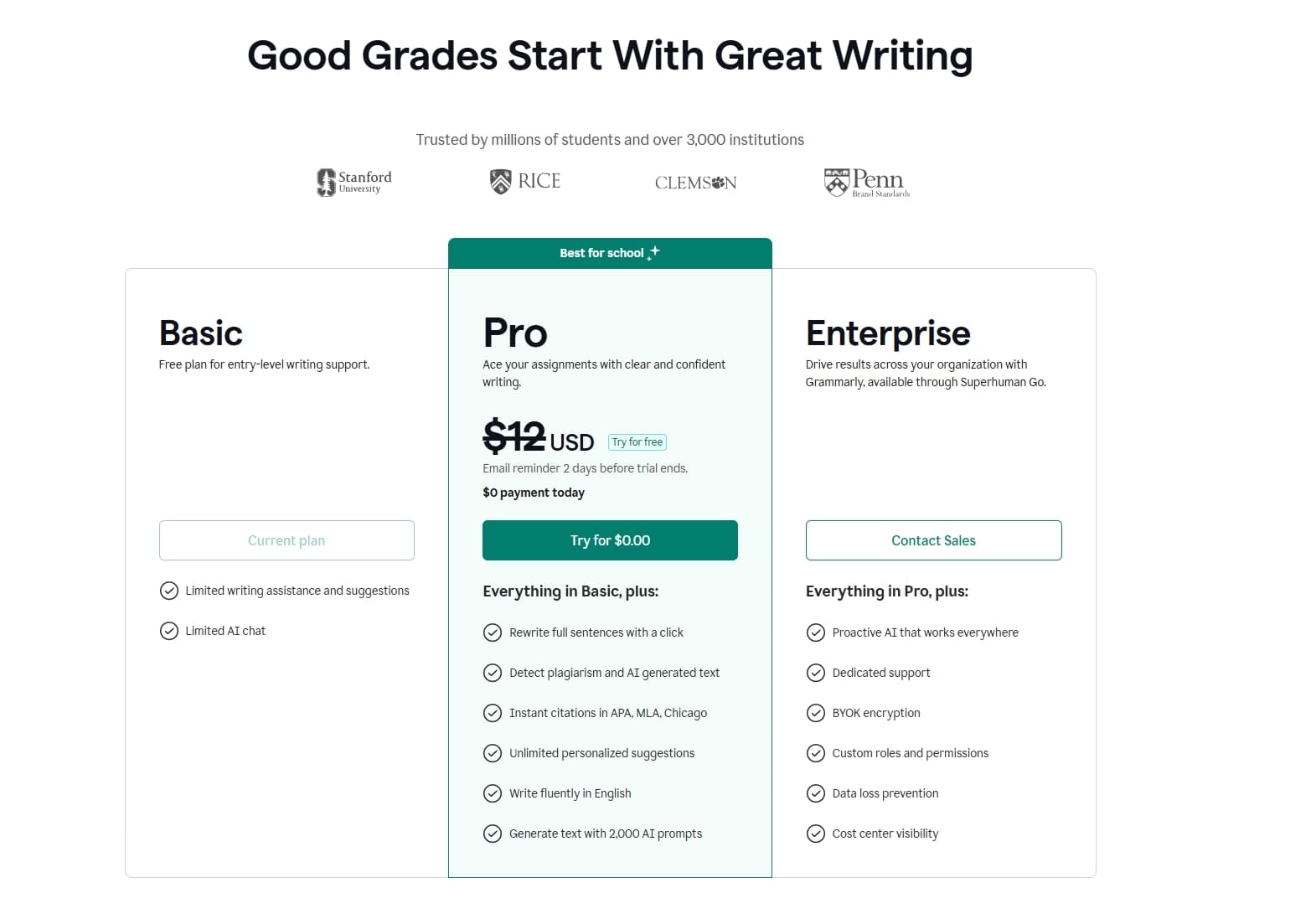
Grammarly's official pricing page currently shows a 7-day Pro free trial. It also states that you get $0 payment today and an email reminder 2 days before the trial ends.
To start the trial, go to Grammarly's Plans page, choose Pro, and click Start 7-day Free Trial. You may need to add a payment method, so set a reminder to cancel before the trial ends if you do not want to continue.
Grammarly for Education Through Your School
If you are a student, teacher, researcher, or university staff member, this is the strongest long-term option.
Grammarly for Education is an institutional plan used by 3,000+ institutions. When your school pays for campus access, eligible students and faculty can use Grammarly through the school's license instead of buying a personal Pro plan.
To check eligibility, search your school's website for "Grammarly," "Grammarly for Education," or "writing support." You can also ask the library, IT help desk, writing center, or student success office. Some schools provide access through a portal rather than through Grammarly's public sign-up page.
Student Access With a Free Grammarly Account
Even if your school does not provide Pro, Grammarly still offers a student-focused free account.
The Grammarly for Students page lets students sign up for free and use Grammarly across tools like Word, Google Docs, Outlook, Gmail, Slack, Blackboard, and Canvas. It will not unlock every Pro feature, but it does cover the basics many students need every week.
The table below shows the differences between the free student version and the Pro version:
Feature / Comparison Item | Free for Students | Feature / Comparison Item | Free for Students |
|---|---|---|---|
Spelling checks | ✅ | Full-sentence rewrites | ❌ |
Basic grammar checks | ✅ | Advanced tone adjustments | ❌ |
Basic writing corrections | ✅ | English fluency suggestions | ❌ |
Tone detection | ✅ | Unlimited personalized suggestions | ❌ |
100 AI prompts per month | ✅ | Plagiarism detection | ❌ |
Works in Word | ✅ | AI-generated text detection | ❌ |
Works in Google Docs | ✅ | Citation consistency checks | ❌ |
Works in Gmail | ✅ | Inclusive language suggestions | ❌ |
Works in Outlook | ✅ | 2,000 AI prompts per month | ❌ |
Works in Blackboard | ✅ | Full Grammarly Pro access | ❌ |
Works in Canvas | ✅ |
|
|
So, this route is useful if you mainly need grammar correction, spelling checks, tone awareness, and light AI help.
Referral Program (Earn 1 Free Month Per Friend)
Grammarly's referral program is one of the most underutilized free-access methods available.
The mechanics are simple: log into your Grammarly account, navigate to the referral section in your profile, and share your unique referral link. For each friend who signs up and qualifies (they must be a new user who has never used Grammarly Premium or Pro), both you and your friend receive one free month of Pro.
There's no cap on the number of referrals you can make, so if you have a large network, this method can stack into several months of free access.
The easiest places to share your link: university group chats, workplace Slack channels, LinkedIn, or any community where people regularly ask for writing tool recommendations. If you're already using Grammarly free and want Pro access without spending anything, this is the most straightforward path.

Grammarly Official Promo Codes
For U.S. users, Grammarly official promo codes can be real, but they are not always publicly listed. The safest places to check are Grammarly’s official pricing page, your logged-in upgrade page, official Grammarly emails, education pages, and approved affiliate partners.
If a third-party coupon site claims to offer an “official Grammarly promo code,” the code should only be trusted after it works on Grammarly’s own checkout page.
Low-Cost Grammarly Pro Access Through GamsGo
If none of the free options above work for you, such as if you are not a student, do not want to wait for referral rewards to add up, or simply prefer a more stable long-term solution, GamsGo offers a more direct and affordable alternative.
GamsGo is a subscription-sharing platform that provides discounted access to popular services. On GamsGo, Grammarly Pro costs around $4.99 per month. Compared with Grammarly’s official $30 monthly plan, this can save you about 70% to 80%. Even compared with Grammarly’s annual plan, which usually costs around $12 per month when billed yearly, GamsGo is still about 50% cheaper.
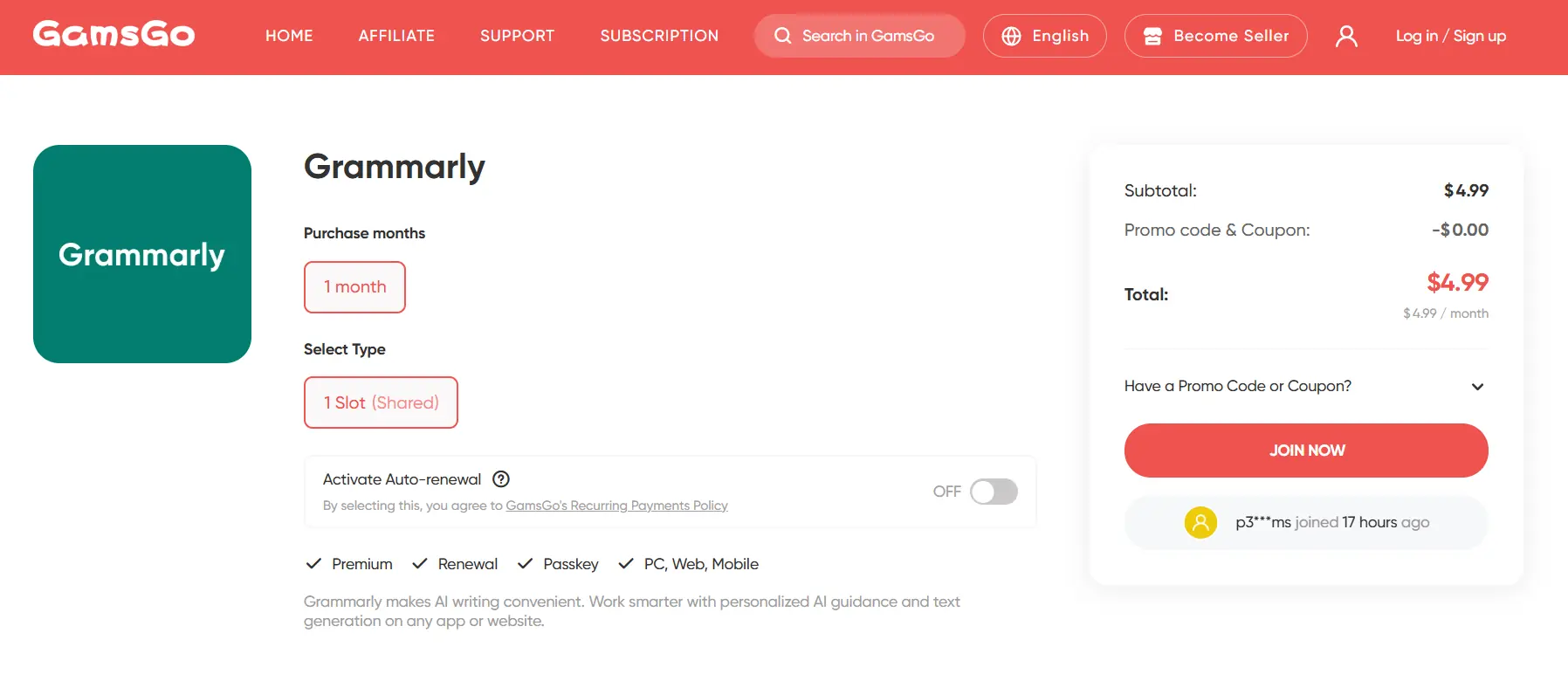
To test the stability of the Grammarly Pro account, we personally used it for three months. During our testing period, the account remained accessible, and Grammarly’s grammar checks, rewrite suggestions, tone adjustments, and clarity recommendations all loaded smoothly and worked reliably across our writing tasks.
Seasonal Promo Codes & Sales (Up to 55% Off)
Grammarly runs some of the deepest discounts in the writing tools category during major shopping events. Recurring sale windows to watch for:
- Back-to-School (August–September): Grammarly's biggest student-facing sale, typically offering up to 50% off annual Pro plans. Usually timed around the US and UK academic calendar — late July through early September.
- Black Friday / Cyber Monday (late November): Historically Grammarly's deepest discount window, with up to 55% off annual plans. The 2025 sale ran from late November through December 6, covering both events in a single extended window. Expect something similar in November 2026.
- Cyber Monday (4 days after Black Friday): Often mirrors or extends the Black Friday offer, with up to 50% off annual subscriptions.
- New-user email promos: Create a free Grammarly account and monitor your inbox. Grammarly regularly sends upgrade offers of 10–60% off to free users. These links are typically valid for just 2–3 days, so act quickly when they arrive.
To maximize your chances of catching a deal: follow Grammarly on LinkedIn and X/Twitter, subscribe to their newsletter, and keep notifications on in the Grammarly app.
Which Grammarly Free Method Should You Pick?
The best Grammarly free method depends on whether you need full Pro access, basic student support, a verified discount, or a lower-cost long-term option.
| Method | Best For | Cost | Duration | Choose This If... |
| 7-day free trial | Anyone testing Pro quickly | Free during trial | 7 days | You need full Pro features for a short deadline. |
| Grammarly for Education | Students, faculty, researchers, and staff | Free if your institution pays | While your eligibility lasts | Your school already offers Grammarly access. |
| Student free account | Students with basic writing needs | Free | Ongoing | You mainly need grammar, spelling, tone detection, and 100 AI prompts. |
| Referral program | Users with classmates, coworkers, or communities to invite | Free when referrals qualify | 1 free month per qualified friend | You can share a referral link with people who are new to Pro. |
| Official promo codes | Deal hunters who still want to buy direct | Discounted | Varies by offer | You find a code that works on Grammarly's own checkout page. |
| GamsGo | Users who want stable low-cost Pro access | Around $4.99/month | Subscription-based | Free trials, school access, and referrals are not practical for you. |
| Seasonal sales | Users who can wait for major sale windows | Discounted | Limited-time | You can wait for Back-to-School, Black Friday, or Cyber Monday. |
Which one should you pick?
- Need full Pro features today? Start with the official 7-day free trial and set a cancellation reminder before the trial ends.
- Are you connected to a school? Check Grammarly for Education first, then use the student free account if your school does not provide Pro access.
- Have friends, classmates, or coworkers who may want Grammarly? Try the referral program because qualified referrals can add free Pro months.
- Want to pay less without chasing eligibility? Compare official promo codes, seasonal sales, and GamsGo.
- Only need light editing help? Stay on the free plan and use the 100 AI prompts strategically.
How to Maximize the Free Plan's 100 AI Prompts
Grammarly Free includes 100 AI prompts per month, so the best strategy is to spend each prompt on high-impact rewrites instead of tiny one-line fixes. Treat the limit like a monthly editing budget: use it for emails, essays, resumes, proposals, and messages where tone or clarity actually matters.
A simple rule works well: use Grammarly's regular free grammar checks first, then spend AI prompts only when you need a stronger rewrite, a tone adjustment, or a clearer structure.
| Use Case | Smart Prompt | Why It Saves Prompts |
| Make this email sound confident, polite, and concise. | One prompt improves tone, length, and clarity at once. | |
| Resume | Rewrite these bullets to sound more results-focused. | You can improve several bullet points in one request. |
| Essay or report | Improve this paragraph for clarity without changing the meaning. | It keeps your argument intact while improving readability. |
| Client message | Check whether this message sounds too direct and soften it if needed. | It targets tone instead of wasting prompts on surface edits. |
To stretch the 100-prompt limit further, batch similar edits together. For example, paste three short email drafts and ask Grammarly to make all of them clearer in one response, or paste several resume bullets and ask for one consistent style across the set.
Avoid spending prompts on spelling, punctuation, or basic grammar corrections because the free checker already handles many of those issues. Save prompts for tasks that require judgment, such as improving tone, shortening a paragraph, making a sentence more persuasive, or turning rough notes into polished copy.
If you hit the 100-prompt limit early every month, that is a strong sign you should test the 7-day Pro trial, look for school access, or consider a lower-cost option like GamsGo.
Conclusion
There are plenty of legitimate ways to access Grammarly Pro for free or at a steep discount in 2026 — whether through the referral program, university EDU licenses, campus ambassador programs, or seasonal sales. The key is matching the right method to your situation.
That said, Grammarly Pro is genuinely worth the investment if writing is a regular part of your work or studies. The jump from 100 to 2,000 AI prompts is immediately noticeable, and features like full-sentence rewrites, plagiarism detection, and advanced tone adjustment can meaningfully reduce the time you spend editing and revising.
If you've tested Pro and want to keep it long-term without paying full price, GamsGo is the most straightforward option. At roughly $4.99/month with no complicated eligibility requirements, it's the easiest way to maintain Pro access for as long as you need it.
If you choose to buy Grammarly Pro through GamsGo, our blog will also give you an extra discount to help you save even more.
We've prepared an exclusive promo code for all blog readers:
Enjoy an additional 3% off on your next purchase!
Valid across all eligible categories on GamsGo.
FAQ
How Long Is the Grammarly Pro Free Trial?
Grammarly currently offers a 7-day Pro free trial through its official pricing page. The page also states that Grammarly sends an email reminder 2 days before the trial ends.
Can I Get Grammarly Pro Without a Credit Card?
Sometimes, yes, through school or employer access. The official free trial may require a payment method, so education or workplace access is usually better if you want to avoid adding a card.
Is Grammarly Premium the Same as Grammarly Pro?
Yes. Grammarly rebranded "Premium" to "Pro" in late 2024. If you were a Premium subscriber, you were automatically migrated to Pro at the same price. The core features remain the same, with the addition of team features (style guides, brand tones, usage analytics) that were previously only in the Business plan, which no longer exists as a separate tier.
You Might Also Like: