Seedance is one of the most powerful AI video generation models available today. When Seedance 2.0 launched, it ranked #1 globally in blind testing by independent benchmark Artificial Analysis Video Arena, with an ELO score of approximately 1,195 — outperforming Google Veo 3.1 and Kling 3.0.
Now Seedance 2.5, released on June 23, 2026, takes things even further — doubling the maximum generation length from 15 to 30 seconds, raising the reference input limit from 12 to 50, and adding native 4K output.
Want to try this AI video tool that's taking the world by storm? This guide will show you how to use Seedance 2.5 at the lowest possible cost.

What Is Seedance 2.5?
Seedance 2.5 is the next-generation AI video model from Volcano Engine, ByteDance's cloud platform, officially announced at the Volcano Engine FORCE conference on June 23, 2026. As the parent company of TikTok, ByteDance has a deeper understanding of video content than almost any other tech company — and that DNA is baked into every Seedance release.
Here's what's new in Seedance 2.5:
- Native 30-second continuous generation: A single generation produces a full 30-second video with consistent characters and smooth camera movement — no manual clip stitching required.
- Up to 50 multimodal reference inputs: Supports images, video clips, audio files, and even 3D white models simultaneously — the highest reference cap of any commercial video model available.
- Controllable local editing: Swap specific elements within a generated video while keeping the original camera movement, lighting, and background intact.
- Native 4K + 10-bit color depth: Renders at 4K from the ground up — not upscaled from lower resolution. 10-bit color gives more headroom for post-production color grading.
- 3D white-box pre-visualization: Feed in an untextured 3D model to generate a low-fidelity preview animation — useful for validating composition and camera blocking before the final render.
- ~20% improvement in prompt adherence: More precise response to instructions around camera movement, subject action, and lighting direction — meaning fewer wasted generations.
- Native audio-visual generation: Sound effects, dialogue, and lip sync are all generated within the same latent space as the video — no manual alignment needed in post.
For a full breakdown of Seedance 2.5's features and launch timeline, check out: Seedance 2.5 Release: How to Access & What's New. For context, Google Veo 3.1 supports a maximum of 3 reference inputs, and Kling 3.0 still trails on generation length and local editing — which is exactly why Seedance 2.5 generated so much buzz the moment it was announced.
Seedance 2.5 vs. 2.0: What Are the Upgrades?
So what exactly changed from 2.0 to 2.5? Here's a quick side-by-side:
| Feature | Seedance 2.0 | Seedance 2.5 |
|---|---|---|
| Max generation length | 15 seconds | 30 seconds |
| Reference input limit | 12 | 50 |
| Resolution | 4K (upscaled) | Native 4K |
| Color depth | 8-bit | 10-bit |
| Video editing | Basic editing | Controllable local editing |
| 3D preview | Not available | 3D white-box pre-visualization |
| Prompt adherence | Baseline | ~20% improvement |
| Availability | Live globally | Expected early July 2026 |
How to Use Seedance 2.5? (Dreamina & CapCut)
Seedance 2.5 is currently accessible through two official ByteDance products, each with a distinct focus and target audience.
Dreamina is ByteDance's official AI content creation platform and the most fully-featured way to access Seedance 2.5. It supports text-to-video, image-to-video, and up to 50 multimodal reference inputs — all accessible directly in the browser, no download required. Best suited for content creators, advertisers, and video production teams who need to generate high-quality footage from scratch.
CapCut is ByteDance's video editing app, with Seedance integrated as a built-in AI generation feature alongside its core editing tools. Better suited for short-form video creators who already have footage to work with and occasionally need AI-generated clips to fill gaps in their workflow.
Both run on the same underlying model. The choice comes down to your primary need: use Dreamina if you want to create video, use CapCut if you want to edit it.
How Much Does Seedance 2.5 Cost? (Platforms & Pricing)
To use Seedance 2.5, you'll need a subscription to one of the official apps. Both Dreamina and CapCut have their own pricing structures. Since Dreamina is the more fully-featured platform and the go-to choice for most creators, we'll focus on its pricing first.
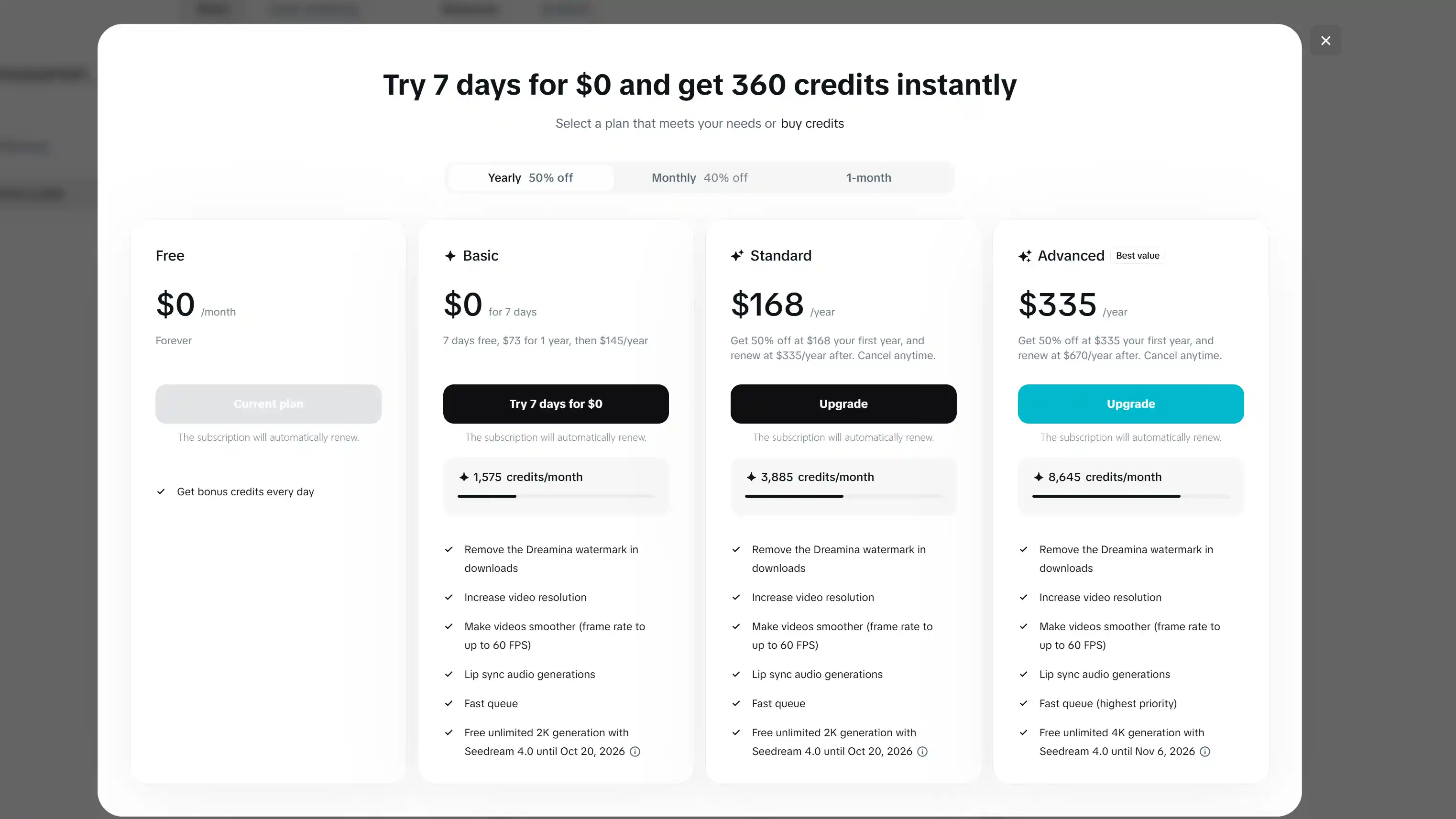
Here's what Dreamina currently charges:
| Plan | Monthly Price | Monthly Credits | Est. Videos (5s clips) |
|---|---|---|---|
| Basic | $15 | 1,575 | ~63 clips |
| Standard | $35 | 3,885 | ~155 clips |
| Advanced | $70 | 8,645 | ~345 clips |
Keep in mind these estimates are based on standard-quality 5-second clips. Seedance 2.5 is built for 30-second native 4K generation, which consumes significantly more credits per clip — so your actual output per plan will be lower.
CapCut offers Seedance access through its Pro subscription at $19.99/month, with no credit management required. It's a better fit for short-form creators whose main workflow is editing, with occasional AI generation on the side.
How to Use Seedance 2.5 for Less?
Official pricing isn't cheap — but you don't have to pay full price. Here are several ways to use Seedance 2.5 for free or at a significant discount.
Start for Free — Seedance 2.5 Free Trial Options
Dreamina offers new users a 7-day free trial with approximately 535 credits, covering text-to-video, image-to-video, and multimodal reference generation. That's enough to test a handful of short clips, and no credit card is required to get started.
CapCut offers a 3-day Pro free trial, which includes full access to all AI generation features including Seedance. You can cancel anytime during the trial at zero cost.
Both options let you get hands-on with Seedance 2.5 — 30-second generation, multimodal references, and all — before committing to a paid plan.
Use Seedance 2.5 through GamsGo and Save Up to 70%
For long-term access to Seedance 2.5, GamsGo's subscription sharing platform offers the best value available.
GamsGo provides discounted Dreamina subscriptions at up to 70% off the official price — with independent accounts and no feature cuts. Payment is supported via Visa, Mastercard, PayPal, and Apple Pay, with a 12-hour after-sales response guarantee.
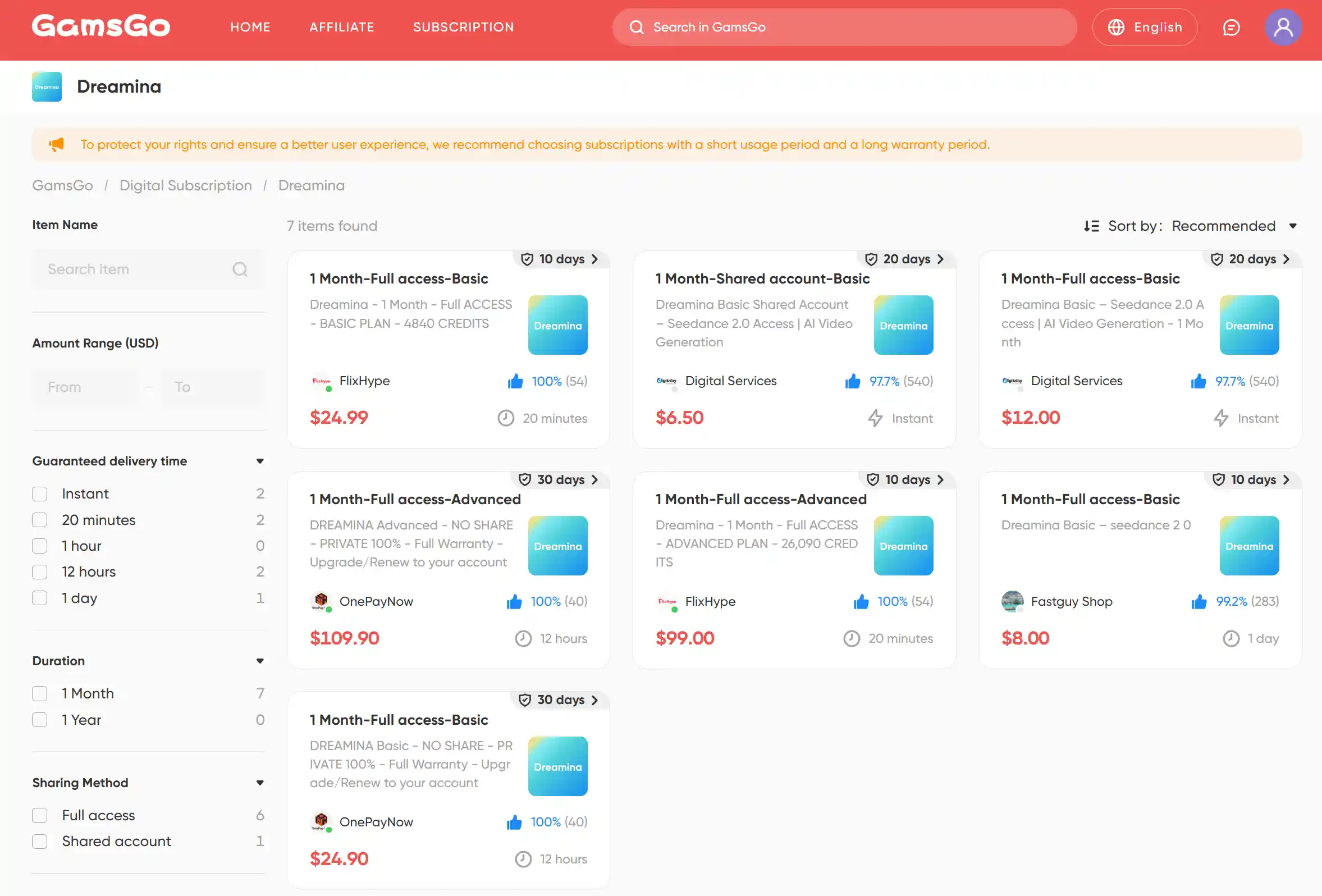
If your primary need is video editing with occasional Seedance generations, GamsGo also offers discounted CapCut Pro accounts at below-official pricing.
Save with Dreamina Annual Plan
Dreamina's annual plan runs 15–20% cheaper than paying month to month. On the Standard plan, for example, monthly billing adds up to $420/year — switching to annual saves you $60–80 over the same period.
This works best if you're already using Seedance 2.5 consistently every month. If your usage is more irregular, a flexible GamsGo subscription is likely the smarter call.
Use Seedance 2.5 via Volcano Engine API
Volcano Engine API is ByteDance's direct developer interface, accessible through the Ark platform. Pricing is per second of generated video — Seedance 2.0 runs at approximately ¥1/second, and 2.5 is expected to be similar, putting a 30-second generation at roughly ¥30 per clip.
Compared to subscription plans, the pay-as-you-go model becomes more cost-effective at scale. This route is best suited for developers and enterprise teams who need to integrate Seedance into existing products or content pipelines — individual creators are better off with a subscription.
Take Advantage of Regional Pricing
Dreamina's pricing varies significantly by region. In Canada, for example, the same credits cost roughly one-third of what US users pay — a real pricing gap built into ByteDance's official pricing strategy, not a loophole.
That said, Dreamina collects IP address and region data. If the region used at signup doesn't match your actual location, there's a risk of account issues. This approach isn't for everyone — assess the risk carefully before proceeding.
Stretch Your Credits Further (Cost-Saving Tips)
Smart usage habits can stretch your subscription further and get more output for the same monthly spend:
- Test prompts at lower resolution first: Run your concept through at standard quality before committing to a 4K render. High-resolution generation consumes far more credits — keep your trial-and-error cheap.
- Only generate as long as you need: Not every video needs to be 30 seconds. Credit consumption scales directly with length — short-form content doesn't need to max out the duration.
- Edit locally instead of regenerating: Seedance 2.5's controllable local editing lets you fix specific areas without redoing the whole clip. Regenerating an entire video over a single detail is the most common — and most avoidable — credit drain.
- Write better prompts to reduce reruns: With prompt adherence up 20% in 2.5, a well-structured prompt covering camera movement, subject action, and lighting direction is more likely to nail it on the first try.
Which Option Is Right for You? (Quick Comparison)
Each approach has its own sweet spot. Here's the full picture at a glance:
| Method | Discount | Barrier | Rating |
|---|---|---|---|
| Free Trial | 100% free | New users only, limited credits | ⭐⭐⭐ |
| GamsGo Dreamina Subscription | Up to 70% off | None — ready to use immediately | ⭐⭐⭐⭐⭐ |
| Dreamina Annual Plan | 15–20% off | Requires upfront annual commitment | ⭐⭐⭐⭐ |
| CapCut Pro | No discount | Editing-first, generation is secondary | ⭐⭐⭐ |
| Volcano Engine API | Pay-as-you-go, cheaper at scale | Requires technical skills, developers only | ⭐⭐⭐ |
| Regional Pricing | Up to 66% off | Account risk, setup complexity | ⭐⭐ |
Based on your situation:
- Just getting started: Begin with the free trial to explore what Seedance 2.5 can do before spending anything.
- Editing-first, occasional AI generation: CapCut Pro covers both in one subscription — and through GamsGo, it's only $9/month.
- Individual creator looking for the best value: GamsGo's discounted Dreamina subscription is the clear winner — full features, lowest price.
- Heavy, consistent usage: Combine GamsGo with an annual plan to push costs down even further.
- Developer or enterprise, high-volume production: Volcano Engine API's pay-as-you-go model gets more cost-efficient the more you scale.
FAQ
How many credits does a 30-second 4K video consume on Dreamina?
Seedance 2.5 hasn't publicly launched yet, so exact credit costs aren't confirmed. Based on Seedance 2.0 data, a 10-second clip at 720p costs approximately 1,880 credits on Dreamina. Resolution and duration both multiply that number significantly, which can push the cost several times higher.
Can I use Seedance 2.5 for commercial projects?
Yes, but with conditions. On Dreamina, commercial use is tied to your subscription tier — the free plan covers personal use only, while paid plans (Basic and above) include a commercial license for generated content.
Is GamsGo safe and legitimate?
Yes. GamsGo is an established subscription-sharing platform offering discounted access to premium tools including Dreamina and CapCut. All listings come from real subscribers selling their spare seats or unused credits — GamsGo oversees and regulates every transaction to ensure security.
Related Articles