The rise of AI comic dramas has quickly brought AI video generation tools like Seedance 2.0 into creators’ view. In April 2026, after ByteDance opened the international version of Seedance 2.0, users in the United States could already experience related features through apps such as Dreamina and CapCut.
But for many users, “Can I use Seedance 2.0 for free?” is still the most important question. After our research, we found that many free tutorials online are not reliable. Some methods have limited features, some access points are unstable, and some may even bring account security and privacy leakage risks.
Therefore, we actually tested and screened the free access methods that are currently available. This article will exclude high-risk or unusable options. It will only keep the Seedance 2.0 free-use methods that are more stable, more practical, and more suitable for ordinary users to try.
📑 Quick Guide: 7 Methods Covered
- Rita AI — Easiest for US and international users.
- Dreamina — ByteDance’s official international platform. Best for users who want stable access and a beginner-friendly free trial.
- CapCut — Best for existing CapCut users. Seedance is built into the editing workflow, but free usage and advanced features are limited.
- Runway — Good for Runway users who want to test Seedance with 125 one-time free credits before upgrading.
- BytePlus ModelArk API — Best for developers. New accounts get 2M free tokens, but setup is technical and API-based.
- Xiaoyunque App — Official ByteDance app with free generations, but mainly suits users who have a mainland China phone number.
- Doubao App — Offers a relatively generous daily free quota, but also requires a mainland China phone number.
What Is Seedance 2.0?
Seedance 2.0 is an AI video generation model developed by ByteDance. In simple terms, you just upload a photo of yourself, write a short prompt, and within minutes, you can generate a video where you are the main character—often with visuals that feel close to cinematic quality.
Similar capabilities have already appeared in tools like Sora. So what makes Seedance 2.0 stand out?
Coherent multi-shot video generation
Most AI video tools can only produce a single isolated shot, making it hard to build a smooth sequence. Seedance 2.0 can generate a complete multi-shot video from one prompt, with consistent characters, lighting, and style across all scenes—so the result feels like a continuous story, not stitched clips.Accurate lip sync and audio alignment
The character’s voice and lip movements are automatically synchronized during generation. No extra dubbing or manual editing is needed, and the final video is much closer to being ready for direct use.Stable characters without “face switching.”
Early AI videos often struggled to keep characters consistent across shots. Seedance 2.0 maintains stable faces, outfits, and overall appearance, even with camera changes, making storytelling more natural and believable.
Below are some example videos generated by Seedance 2.0. As you can see, the character’s voice and lip movements are fully synchronized, making the results feel much more natural and realistic.
Is Seedance 2.0 Free to Use?
To be accurate, Seedance 2.0 is not completely free. However, there are currently some ways to try it for free.
Many platforms offer a small number of free generations for new users, allowing you to test the video creation features before paying. That said, these free credits are usually limited, and you’ll need to upgrade once they run out.
It’s also important to be cautious. Some online methods claim to provide “permanent free access,” but they often come with issues such as poor stability or potential security risks. To stay safe, it’s recommended to stick with the official or trusted free access options mentioned in this guide.
Access Seedance via Rita (Easiest for US Users)
Seedance 2.0 was initially made available mainly through Chinese platforms (such as Jimeng and Xiaoyunque), which typically require a mainland China phone number (+86) for registration or login. For users in the US, this can be a significant barrier, and using a VPN does not bypass this requirement.
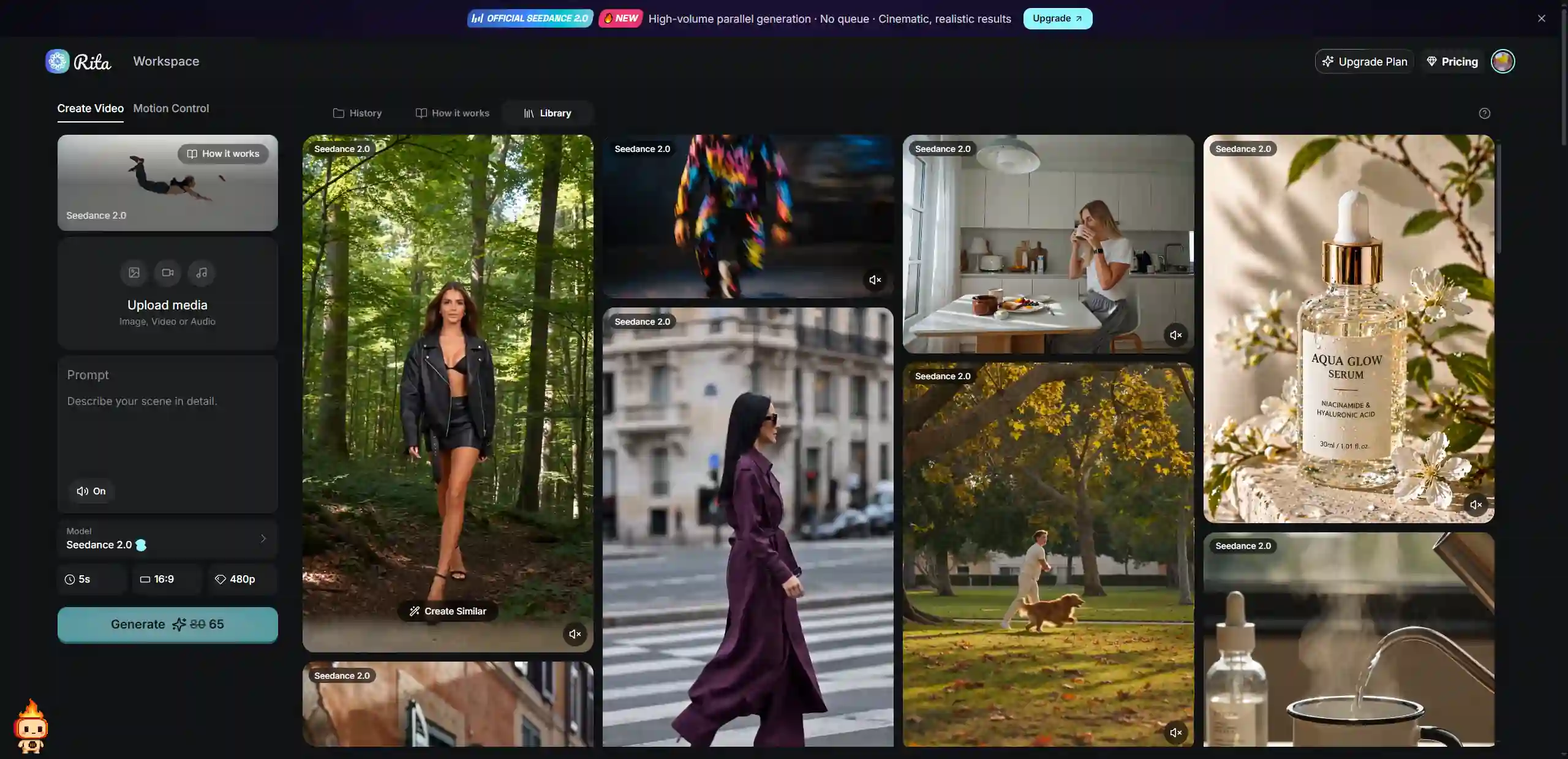
Because of this, using third-party platforms like Rita can be a more convenient option. Rita integrates several popular AI models, including Seedance 2.0 and Seedance 1.5 Pro, so you can start generating videos right after signing up—no complex setup or technical steps required.
✅️ In practice, Rita AI usually provides around 100 free credits per month, which you can use to test Seedance. For users who want to experiment, compare different models, or try AI video creation, this approach is more flexible and easier to get started with.
Overall, for most overseas users, Rita is currently the easiest and most reliable way to access Seedance 2.0 with minimal setup. It doesn't require a Chinese phone number, there's no need to use a VPN, and the interface is fully in English.
Free Seedance 2.0 Access via Dreamina
Dreamina (International version) is ByteDance's official international AI creation platform and currently one of the more stable ways to access Seedance 2.0. For users who want to try it out first, it's a relatively beginner-friendly option.
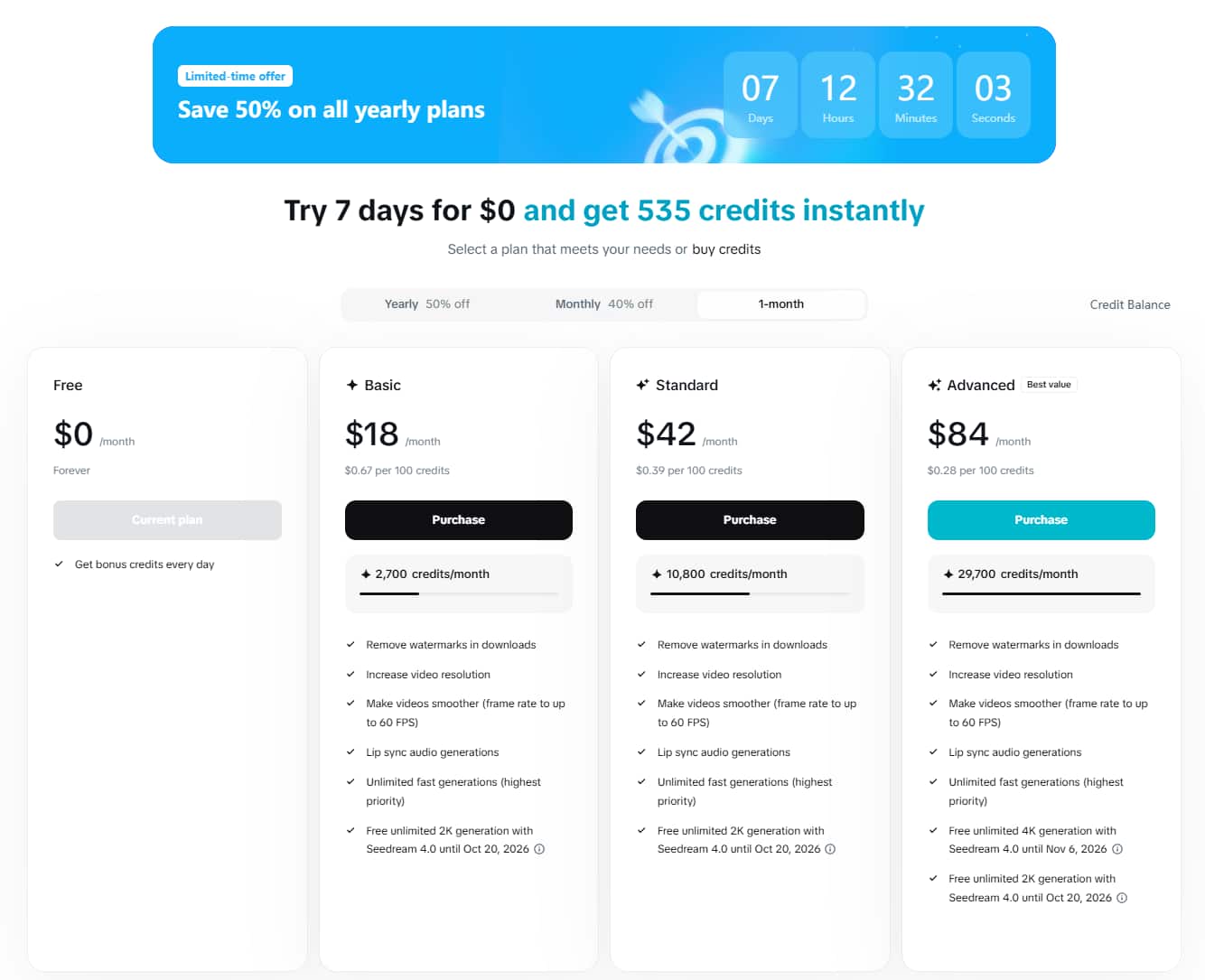
After signing up, Dreamina offers a 7-day free trial, typically including around 535 credits. These credits can be used for image generation, Seedance video creation, avatar generation, and other features. For basic testing or trying out different prompts, this allowance is usually sufficient.
Once the free trial ends, the platform switches to a daily free allowance of around 225 credits—shared across all tools (image generation, video generation, and editing all draw from the same pool). In practice, this is enough for roughly 1–2 short video generations per day. Outputs on the free tier include a watermark and are capped at a lower resolution.
However, once the free trial ends, you'll need to upgrade to a paid subscription to continue using Seedance at full quality. The official pricing starts at around $15–18 per month for the Basic or Standard plan, which may not be ideal for users who only need occasional access.
If you plan to use it long-term, you can also consider getting a Seedance account through GamsGo, where prices can be up to 70% lower. This is a more cost-effective option for users who want to keep using Seedance while managing their budget.
For detailed information on each plan, credit usage, and cost optimization tips, you can refer to our complete Seedance 2.0 pricing guide.
Free Seedance 2.0 Access via CapCut
CapCut is ByteDance's widely used video editing app, and Seedance 2.0 is now integrated into it as a built-in AI generation feature. As of April 2026, Dreamina Seedance 2.0 has rolled out globally through CapCut, covering the US, Japan, Europe, Africa, South America, and the Middle East—marking the end of the invite-only Creative Partner Program restriction.
For creators who are already editing on CapCut, this is the most seamless entry point. New users receive a limited number of free generations on signup. To get started, open CapCut and navigate to "Media" → "AI Media" → "AI Video", then select the Seedance 2.0 model. From there, choose between text-to-video or image-to-video, enter your prompt, and generate. The finished clip drops straight into your CapCut timeline for editing—no platform switching needed.
⛔️ There are a few limitations to keep in mind. CapCut applies stricter content filters than Dreamina—real human faces and copyrighted IP as input materials are blocked, which is exactly what many creators want to use. Many of the advanced generation features are also locked behind a CapCut Pro subscription. Free-tier outputs come with a watermark, and the exact free quota varies by account and region.
Overall, if you're an existing CapCut user, this is the most frictionless way to try Seedance 2.0. But if your goal is to test the model's full capabilities—multi-person scenes, reference material uploads, and character consistency—Dreamina has more relaxed content policies and is a better fit.
Free Seedance 2.0 Access via Runway
Runway is one of the most established AI video platforms globally, and it has added Seedance 2.0 as an integrated third-party model alongside its own Gen-4 and Gen-4.5 engines. For users already in the Runway ecosystem, this means Seedance 2.0 is available without signing up for a separate ByteDance account.
✅️ Runway's free plan includes 125 one-time credits that never expire. This is enough for roughly 2–3 short Seedance 2.0 video generations to evaluate the output quality. Signing up requires only an email address—no Chinese phone number, no VPN required. After generating, you can use Runway's built-in editing and upscaling tools to refine your clips without leaving the platform.
⛔️ There are some important limitations to be aware of. The 125 free credits are a one-time allocation that does not refresh monthly—once they're gone, you'll need to upgrade. Free-tier outputs are capped at 720p and include a Runway watermark. Seedance 2.0 is a computationally intensive model and consumes credits faster than lighter models, so 125 credits go quickly. Additionally, the flagship text-to-video Gen-4.5 model is not available on the free tier.
If you're already a Runway subscriber, Seedance 2.0 is accessible within your existing plan—no extra setup needed. For users just starting out, treat the 125 free credits as a quality evaluation, not an ongoing workflow.
Free Seedance 2.0 Access via BytePlus ModelArk API
BytePlus is ByteDance's official enterprise cloud platform, and ModelArk is its AI model inference service—the only official API access point for Seedance 2.0 outside of China. The Seedance 2.0 API entered public beta for enterprise developers on April 14, 2026, and is accessible globally without a VPN or Chinese phone number.
✅️ New BytePlus accounts receive 2 million free tokens upon signup, which is by far the largest free allocation among any platform in this guide. For developers, this is more than enough to prototype a full application or run hundreds of test generations before paying anything.
To get started: register a BytePlus account, complete account verification, then activate the Seedance 2.0 model inside the ModelArk console (model IDs: dreamina-seedance-2-0-260128 for standard, dreamina-seedance-2-0-fast-260128 for the fast tier). Obtain your API key from the dashboard and call the REST API or SDK directly. The API supports text-to-video, image-to-video, and reference-to-video generation modes.
⛔️ This option is not designed for casual users. The entire flow is developer-oriented—you'll need to manage API keys, handle asynchronous polling, and build or use your own UI to preview results. There is no ready-made web interface. The free token mode also pauses service as quota approaches exhaustion, so it should be treated as a testing resource, not a production pipeline. The account verification process can also be more involved for individual users compared to enterprise applicants.
If you're a developer looking to build on top of Seedance 2.0—whether for a product, automation workflow, or bulk generation—BytePlus ModelArk is the right starting point. For everyone else, the web-based options above will get you to a working video much faster.
Free Seedance 2.0 Access via Xiaoyunque App
Xiaoyunque is an AI creation app developed by ByteDance, and it already integrates Seedance 2.0. In practice, new users can receive 3 free generations after signing up, along with around 120 daily credits, which is roughly enough to generate about 15 seconds of video content.
If you want to use Xiaoyunque, you can download the app from the App Store or Google Play. After registering and logging in, simply select Seedance 2.0 from the model list, upload your materials or enter a prompt, and start generating videos. The overall process is fairly straightforward, although it may take a little time to get used to the interface.
⛔️ There are a few things to keep in mind. The app interface is primarily in Chinese, so if you're not familiar with it, you may need to rely on built-in translation tools or apps like Google Lens to navigate. In addition, registration typically requires a mainland China phone number (+86), which can be a significant barrier for international users.
Overall, if you're able to get through the registration process, Xiaoyunque is a solid way to experience the official version of Seedance 2.0, especially for users who want to explore its native capabilities.
Access Seedance 2.0 via the Doubao App
Doubao is another AI app developed by ByteDance, and it also supports Seedance 2.0 while offering a relatively generous free quota. At the moment, users can generate around four videos per day for free, with each video typically lasting 5 or 10 seconds.
⛔️ To use Doubao, you'll need to download the app and sign in with an account. However, it's important to note that registration usually requires a mainland China phone number (+86), which can be a barrier for users outside China.
Overall, Doubao is better suited for users who have access to a Chinese phone number. If you're able to complete the setup, it remains one of the options with a relatively higher free quota for trying out Seedance 2.0.
Comparison of 7 Ways to Use Seedance 2.0 for Free
For users who want to try Seedance 2.0 for free, each method has its own strengths and is best suited for different use cases. To help you choose more easily, we've prepared a detailed comparison table of all seven options.
Platform | Free Credits | Use Limitation | Language | Best For |
👑 Rita | ~100 credits/month | ✔️ No usage restrictions | English-friendly | ⭐⭐⭐⭐⭐ All users |
Dreamina | 7-day trial (~535 credits) | ✔️ No usage restrictions | English | ⭐⭐⭐ Light testing |
CapCut | Limited free quota on signup | ⚠️ Strict content filters | English | ⭐⭐ CapCut existing users |
Runway | 125 credits (one-time, no expiry) | ⚠️ 720p + watermark, no monthly refresh | English | ⭐⭐ Runway existing users |
BytePlus API | 2M free tokens (new accounts) | ⚠️ Developers only, enterprise verification | English | ⭐⭐⭐ Developers |
Xiaoyunque | 3 videos + daily points | ❌ China Phone Required | Chinese | ⭐ Users with CN phone |
Doubao | ~4 videos/day | ❌ China Phone Required | Chinese | ⭐ Users with CN phone |
For overseas users who have access to a mainland China phone number, official platforms like Xiaoyunque and Doubao are definitely worth trying, as they provide a more native Seedance 2.0 experience.
However, for most international users, the lack of a Chinese phone number can be a significant barrier to accessing these platforms directly. In this case, third-party platforms like Rita become a more practical and convenient option.
Compared to other methods, Rita has a much lower entry barrier. It doesn't require a Chinese phone number, there's no need to use a VPN, and the interface is generally more aligned with international users' habits. Once you sign up, you can start using it right away, making the overall process much smoother.
Overall, for most overseas users, Rita is currently the easiest and most reliable way to access Seedance 2.0 with minimal setup.
How to Use Seedance 2.0?
Once you’ve found a suitable free access option, getting started with Seedance 2.0 for the first time is actually pretty straightforward. Below, we’ll walk you through the real step-by-step process—from entering the platform to generating your first video—so you can follow along easily.
Step 1: Access the platform
First, you’ll need to access a platform that supports Seedance 2.0. Common options include Dreamina (international version), Xiaoyunque, and Jimeng.
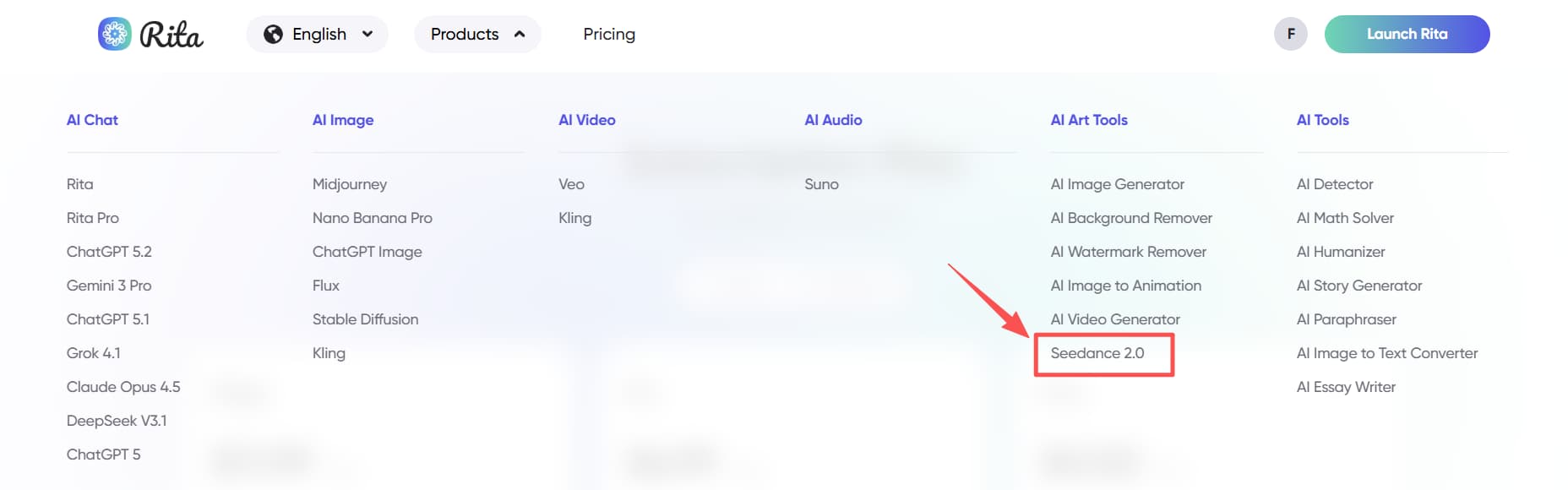
For international users, Rita AI is usually the easiest option to get started. After logging in, go to the “AI Art Tools” section and select Seedance 2.0 to enter the video generation page.
Step 2: Upload reference materials
If you want to generate higher-quality videos, it’s recommended to prepare some reference materials in advance, such as character images, scene images, action clips, or background music and sound effects.
The clearer and more specific your inputs are, the more stable and consistent the final output will usually be.
🔔 It’s important to note that Seedance 2.0 currently does not support uploading real human portraits. If you want to feature yourself as the main character, you can create an AI avatar of yourself and use that instead.
Step 3: Write your prompt
Your prompt is one of the most important factors affecting the final result. A common and effective structure is: 👉 Subject + Action + Scene + Camera movement + Style + Quality details
For example, a simple prompt could be:
“A boy walking down a rainy street at night, streetlights reflecting on the wet ground, neon lights flickering, cinematic lighting, slow tracking shot.”
In addition, Seedance 2.0 supports using @tags to reference uploaded materials. This allows you to control the output more precisely by combining different assets. For example:
Use the girl in @Image1 as the main character and the boy in @Image2 as the supporting character. They are talking in a café. Follow the camera movements from @Video1, including zooming, panning, and shot transitions. The left side of the scene references @Image3, the right side references @Image4, and a woman in white walks through the center.
When writing prompts, try to be as specific as possible—such as describing clothing colors, detailed actions, or scene elements. Clear and detailed instructions usually lead to better and more consistent results.
Step 4: Adjust generation settings
Before generating your video, you can customize several basic settings based on your needs.
Common options include resolution (such as 720p, 1080p, or higher), video length (typically 5 or 10 seconds), and aspect ratio.
You can choose the aspect ratio depending on your use case:
16:9 – best for horizontal videos
9:16 – ideal for short-form platforms
1:1 – suitable for social media posts
Adjusting these settings helps you optimize the output for your intended platform and use case.
Step 5: Generate and refine
Once everything is set, click generate. The process usually takes around 5–10 minutes.
If the result isn’t what you expected, you can improve it by refining your prompt, adjusting your reference materials, or generating multiple versions. Some platforms also offer a “continuation” feature, allowing you to extend your video based on an existing clip.
The steps above cover the basic workflow. If you want to create more realistic and professional-looking videos, you’ll need to learn a few advanced techniques.
👉 The following tutorials can help you further improve your results, such as:
These guides will help you better understand the tool and unlock more advanced creative possibilities.
Conclusion: How to Use Seedance 2.0 for Free in 2026
In 2026, there are several ways to try Seedance 2.0 for free, including platforms like Dreamina, Doubao, and Rita. Each option has its own advantages, so you can choose the one that best fits your needs and setup.
Based on real-world experience, if you’re looking for the easiest way to get started with a stable and smooth experience, Rita is highly recommended. It doesn’t require a Chinese phone number, there’s no complicated setup, and the interface is more user-friendly for international users.
Of course, if you have access to Dreamina or official platforms, you can also use their free credits to explore the model and test its capabilities. This is a good option for short-term use or basic testing.
Once your free credits run out, you can consider upgrading to a paid plan if you need ongoing access. By purchasing Seedance accounts through GamsGo, you may get up to 70% off compared to official pricing, making it a more cost-effective option.
Overall, it’s best to start with the free options and then decide whether to upgrade based on your actual needs. This approach helps you minimize costs while getting the most out of Seedance 2.0.
🎁If you want to continue unlocking more powerful features of Seedance 2.0, feel free to subscribe through GamsGo. Not only will you enjoy up to a 70% discount, but we’ve also prepared an exclusive gift for every user who chooses GamsGo:
We’ve prepared an exclusive promo code for all blog readers:
Enjoy an additional 1% off on your next purchase!
Valid across all categories — streaming accounts, AI tools, game top-ups, software subscriptions, and more.
FAQ
Who owns Seedance?
Seedance 2.0 is ByteDance's most powerful AI video model yet — capable of generating 2K cinematic videos from text, images, and audio. The catch? It officially launched in China first, leaving US creators scrambling to find a way in. The good news: there are working methods right now to access Seedance 2.0 for free — no VPN required for most of them.
Is Seedance 2.0 out?
Yes. Seedance 2.0 was officially released by ByteDance in February 2026 as a next-generation AI video generation model. It is already available through several platforms such as Dreamina and Doubao, although access may be limited depending on the region and account requirements. However, it is not yet fully accessible worldwide, and many international users rely on platforms like Rita to try it out.
Is Seedance 2.0 better than Sora 2?
It depends on your use case. Seedance 2.0 and Sora 2 are both advanced AI video models, but they excel in different areas. Seedance 2.0 stands out for its multi-modal inputs (text, image, video, and audio) and strong control over scenes. In contrast, Sora 2 is often considered stronger in physical realism and longer video generation, making it better suited for narrative storytelling and simulation accuracy.
Does Seedance 2.0 support English prompts?
Yes, Seedance 2.0 supports English prompts. As a multimodal AI video model, it can understand and generate videos based on English text instructions, along with inputs such as images, audio, and video references. On platforms like Dreamina, English prompts are commonly used and work effectively for video generation.
Related Articles:
How to Get ChatGPT Plus for Free in 2026 (10 Proven Ways)
Is Claude AI Free in 2026? Limits, Pro Cost & Is It Worth It
How to Get Capcut Pro for Free in 2026 (7 Proven Ways)
How to Get Seedance 2.5 for Free in 2026
How to Get Cursor Pro for Free