Seedance 2.5 was officially announced by ByteDance at the Volcano Engine FORCE Conference on June 23, 2026, and the AI video community is buzzing.
Since Seedance 2.0 launched in February 2026, AI-generated videos have flooded platforms like Reddit, X, and YouTube — cinematic short clips, lip-synced avatars, and multi-shot stories. Now Seedance 2.5 is here, with native 30-second one-shot clips, up to 50 multimodal reference inputs, and 4K output. It's a major leap from 2.0.
During our research into free access methods, we noticed the same problem as before: many "free" options floating around online are unreliable, limited, or outright sketchy. So we've tested and curated the four most practical ways to try Seedance 2.5 for free, specifically for international users.

📑 Quick Guide: 6 Methods Covered
- Rita AI — Best for international users.
- Dreamina — Best for users who prefer ByteDance’s official international platform.
- CapCut — Best for existing CapCut users who want to use free or included AI video credits.
- Runway — Best for existing Runway users who want to test Seedance with one-time free credits.
- BytePlus ModelArk API — Best for developers and teams testing Seedance through official API access.
- Xiaoyunque or Doubao — Best for users with a mainland China phone number.
Seedance 2.5 vs. Seedance 2.0: What's New?
If you've been using Seedance 2.0, here's a clear breakdown of exactly what changes with the upgrade:
Seedance 2.5 is ByteDance's next-generation AI video model. It builds directly on the multimodal architecture of Seedance 2.0 — meaning you can combine text, images, video clips, and audio in a single generation — but pushes every ceiling higher.
The model is currently in enterprise beta, with public availability expected in early July 2026.
Next, let’s compare Seedance 2.5 and Seedance 2.0 in detail across different key metrics.
| Feature | Seedance 2.0 | 👑Seedance 2.5 |
|---|---|---|
| Max video length (native) | ~15 seconds | 30 seconds |
| Max reference inputs | Up to 12 (9 images + 3 videos + 3 audio) | Up to 50 |
| Output resolution | 720p / 1080p (4K via upgrade) | Up to 4K native |
| Video editing | Regenerate the full clip to make changes | Region-level editing (change one area, rest stays) |
| Generation method | Segment stitching for longer videos | Native single-segment generation |
| Character consistency | Strong within a single shot | Stronger across longer, complex sequences |
| 3D previz support | Not available | 3D white-model previz |
| Primary use case | Short cinematic clips, social content | Long-form ads, film scenes, professional workflows |
| Availability | Globally available | Enterprise beta; public launch expected July 2026 |
Simply put, most of Seedance 2.5’s features are further upgrades based on Seedance 2.0.
Among them, local area editing is especially impressive. You can replace a specific product, adjust the background separately, or modify part of a character without regenerating the entire video. After editing, the movements, lighting, and camera motion in other areas can still remain stable and consistent.
This feature is not only powerful but also greatly improves the efficiency of video editing.
Can I Use Seedance 2.5 for Free?
Like its predecessor, Seedance 2.5 is not completely free — but there are legitimate ways to try it at no cost. Because the model is just entering public availability, most platforms are offering introductory free credits to attract early adopters, similar to how Seedance 2.0 launched.
A few things to keep in mind before diving in:
- Free credits are typically limited to a few generations. Enough to test the quality, not enough for ongoing production.
- Some platforms listed as "free" online require a mainland China phone number (+86) for registration, making them inaccessible to most international users.
- Claims of "permanent unlimited free access" are almost always misleading — avoid those, as they often come with hidden queues, watermarks, or security risks.
The four methods below are tested, reliable options for getting genuine Seedance 2.5 access without unnecessary friction.
How Can I Use Seedance 2.5 for Free?
Here's how to get early access without spending a dime.
Rita AI: No Limitation for International Users
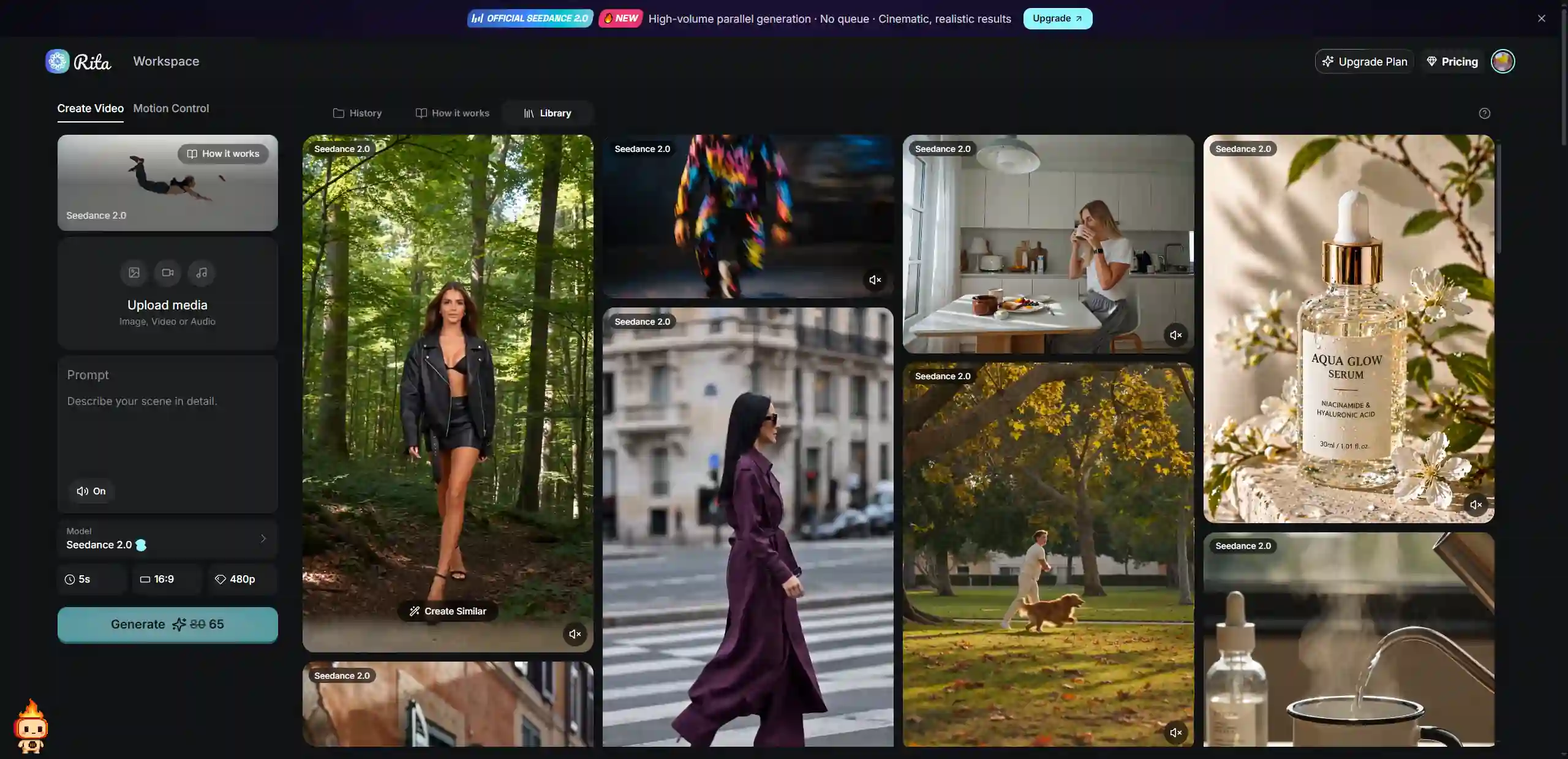
For users outside China, Rita AI remains the easiest on-ramp to ByteDance's Seedance models. Rita is an all-in-one AI platform that integrates multiple top-tier models — including the Seedance family — behind a single English-language dashboard. No Chinese phone number, no VPN, no complicated setup.
New users receive free credits on signup that can be applied to Seedance video generation. As Seedance 2.5 rolls out to third-party platforms (expected shortly after the official July launch), Rita is one of the platforms positioned to integrate it quickly, following the same pattern as Seedance 2.0.
What you get for free: 100 free credits per month for new users, usable across free Seedance and other models. No credit card required.
💡 Tip: While Seedance 2.5 API access rolls out to third-party platforms, Rita currently provides stable Seedance 2.0 access. If you want to start now and upgrade to 2.5 videos the moment it becomes available, Rita is the smoothest path.
Best for: All international users. Especially good if you want access to multiple AI video models (Kling, Veo, etc.) without juggling separate subscriptions.
Dreamina: ByteDance's Official International Platform
Dreamina is ByteDance's own international creative platform and the primary official channel for Seedance models outside China. As of April 2026, Seedance 2.0 is broadly available globally through Dreamina.
When Seedance 2.5 officially launches, Dreamina is expected to receive it first among international platforms — consistent with how the 2.0 rollout worked.
New users receive a 7-day free trial with approximately 535 credits, which can be used for video generation, image creation, and avatars. After the trial ends, you can only use the Free plan for Seedance 2.5. If you run out of credits, you can refer to the Seedance pricing plans below:
Plan | Monthly Price | GamsGo Price | Credits / Month |
|---|---|---|---|
Free | $0 | - | ~225 credits/day (shared) |
Basic | ~$15/month | $6.50 | 1,575 credits |
Standard | ~$18/month | - | More credits |
Advanced | ~$84/month | - | 29,700 credits |
If you want to get ready before Seedance 2.5 officially launches, GamsGo offers up to 50% off, allowing you to purchase a Dreamina subscription at a discounted price.
Free Seedance 2.5 Access via CapCut
CapCut is a widely used video editing app from ByteDance, and Seedance 2.0 is integrated into it as a generation feature. After Seedance 2.5 is released, it is also expected to be integrated into CapCut.
However, CapCut only provides a limited monthly Seedance 2.0 generation quota for paid subscribers. So if you are already a CapCut user, do not miss this free benefit.
If you want to try CapCut Pro for free, GamsGo also offers you 7 ways to do so.
Free Seedance 2.5 Access via Runway
Runway is one of the world’s leading AI video creation platforms. It has integrated Seedance 2.0 as a third-party model, and Seedance 2.5 is expected to be integrated as well after its release.
Users who want to try Seedance 2.5 for free can use Runway’s free plan. It includes 125 one-time credits, and these credits never expire. These 125 credits are enough to generate about 2–3 short Seedance videos. After that, you need to upgrade to a paid plan.
Free Seedance 2.5 Access via BytePlus ModelArk API
BytePlus is ByteDance’s official enterprise cloud platform for the international market. ModelArk is its AI model inference service. It is also the only official API access channel for Seedance 2.0 outside China. On April 14, 2026, it officially opened the Seedance 2.0 API public beta.
BytePlus ModelArk provides 2 million free tokens for new accounts. This is enough for the prototype testing stage, so you do not need to pay right away. This is currently the largest free quota among official channels.
For developers who want to evaluate whether API integration is feasible, it is the most direct path. Registration only requires an email address, and no Chinese phone number is needed.
However, the whole process is designed for developers and enterprises, so it can be difficult for non-developer users.
Xiaoyunque or Doubao App: Users with a Chinese Phone Number
Xiaoyunque is a ByteDance AI creation app that integrates Seedance models natively. New users receive 3 or 4 free video generations after signing up.
❌ Barrier: Registration requires a mainland China phone number (+86). The app interface is primarily in Chinese. International users without a Chinese number cannot register.
✅Best for: Users with a Chinese phone number who want the highest free daily generation quota.
Which Free Seedance 2.5 Method Is Right for You?
With so many options available, the right choice depends on your needs and situation. The table below compares each method by usage limits and best use case, helping you quickly find the option that fits you best.
| Platform | Free Credits | Use Limitation | Language | Best For |
|---|---|---|---|---|
👑 Rita AI | Free sign-up credits, about 100 credits per month | ✅ No limit | English-friendly | All users |
Dreamina | 7-day trial, about 535 credits | ✅ No limit | English | Light testing |
CapCut | Limited free credits after sign-up | ⚠️ Strict content filtering | English | Existing CapCut users |
Runway | 125 credits, one-time, and never expire | ⚠️ 720p with watermark, ends after credits are used | English | Existing Runway users |
BytePlus API | 2M free tokens for new accounts | ⚠️ Developers only, business verification required | English | Developers |
Xiaoyunque & Doubao | 3 or 4 videos | ❌ Requires a +86 phone number | Chinese | Users with a Chinese phone number |
For most international users, the lack of a Chinese phone number blocks direct access to Xiaoyunque and Doubao.
Rita AI has the lowest barrier to entry — no phone verification, no VPN, English interface — and is the most practical starting point for non-Chinese users who want to try Seedance 2.5 as soon as it becomes available on third-party platforms.
How to Use Seedance 2.5: Step-by-Step
Once you've chosen a platform, the core workflow for Seedance 2.5 is similar to 2.0, with a few new possibilities opened up by the upgraded capabilities.
Step 1️⃣: Access the Platform
For international users, start with Rita AI or Dreamina. Log in, navigate to the AI Video section, and select Seedance 2.5 from the model list. (Until 2.5 is live on your chosen platform, you can practice the same workflow with Seedance 2.0.)
Step 2️⃣: Prepare Your Reference Materials
Seedance 2.5 supports up to 50 full-modal reference assets, which is its biggest workflow upgrade. You can now load the model with comprehensive context before generating:
- Character reference images (multiple angles, outfits)
- Scene/environment images
- Motion reference video clips
- Audio tracks (dialogue, background music, sound effects)
- 3D model files for previz (new in 2.5)
💡 Note: Seedance 2.5 currently does not support uploading real human portraits. Use an AI avatar of yourself if you want to appear as a character.
Step 3️⃣: Write Your Prompt
A strong prompt follows this structure: Subject + Action + Scene + Camera movement + Style + Quality details.
"A woman in a red jacket walking through a rainy Tokyo alley at night, neon reflections on wet pavement, slow tracking shot, cinematic lighting, film grain."
With Seedance 2.5's 30-second window, you can also describe a more complex scene arc — for example, a character entering a door, looking around, and approaching a table — all in one prompt rather than generating separate clips and stitching.
Use @tags to reference your uploaded materials precisely:
Use the character from @Image1 as the lead. Follow the camera movement from @Video1. The café environment references @Image2. Background music from @Audio1.
Step 4️⃣: Adjust Generation Settings
Before generating, configure your output settings:
- Resolution: 1080p for drafts, 4K for final outputs (note: 4K costs more credits)
- Duration: Up to 30 seconds natively in 2.5 (vs. 15 seconds in 2.0)
- Aspect ratio: 16:9 for horizontal, 9:16 for short-form/vertical, 1:1 for social posts
💡 Credit-saving tip: Draft and iterate at 1080p first. Only switch to 4K for your best final version. This can save 40–60% of your credit spend.
Step 5️⃣: Generate, Review, and Refine
After clicking Generate, wait about 5–15 minutes for processing.
If the result needs improvement, refine your prompt, adjust the reference materials, use region-level editing in version 2.5 to fix specific details, or extend the clip with the continuation feature.
Conclusion
Seedance 2.5 is the most significant upgrade in the Seedance family to date — native 30-second generation, 50 reference inputs, 4K output, and region-level editing make it a genuinely different tool from 2.0, not just an incremental improvement.
For most international users, the recommended approach is to start with Rita AI for its frictionless signup and English interface, or Dreamina for the most official ByteDance experience.
Since Seedance 2.5 is still in the process of rolling out publicly (expected July 2026), now is a good time to practice with Seedance 2.0 on these same platforms and get your prompt workflow and reference materials ready — so you can hit the ground running when 2.5 becomes fully available.
Once free credits run out, paid Dreamina plans through GamsGo can offer up to 50% off compared to Dreamina's official pricing, making it a cost-effective option for ongoing access.
FAQ
When Is Seedance 2.5 Available?
Seedance 2.5 was officially announced at the Volcano Engine FORCE 2026 conference on June 23, 2026. It is currently in enterprise beta testing. A public launch is expected in early July 2026. Third-party platform access (including Rita, ImagineArt, and others) is expected to follow the official Volcano Engine API release.
What Is the Difference Between Seedance 2.0 and 2.5?
The three main upgrades are: native 30-second single-clip generation (vs. ~15 seconds in 2.0), support for up to 50 multimodal reference inputs (vs. 12 in 2.0), and new region-level controllable editing that lets you change part of a video without regenerating the whole clip. Seedance 2.5 also targets 4K output, though note that ByteDance also upgraded Seedance 2.0 to support 4K at the same event.
Can I Use Seedance 2.5 Without a Chinese Phone Number?
Yes. Platforms like Rita AI and Dreamina do not require a Chinese phone number. Xiaoyunque and Doubao require a +86 number, making them inaccessible to most international users.
Does Seedance 2.5 Support English Prompts?
Yes. Like Seedance 2.0, the 2.5 model supports English prompts. On platforms like Dreamina and Rita AI, English is the primary interface language and works effectively for video generation.
Related Articles:
How to Use Seedance 2.5 for Less